
TimeMachine is market place where visitors can sell/buy their vintage game collections.
1. Dependencies
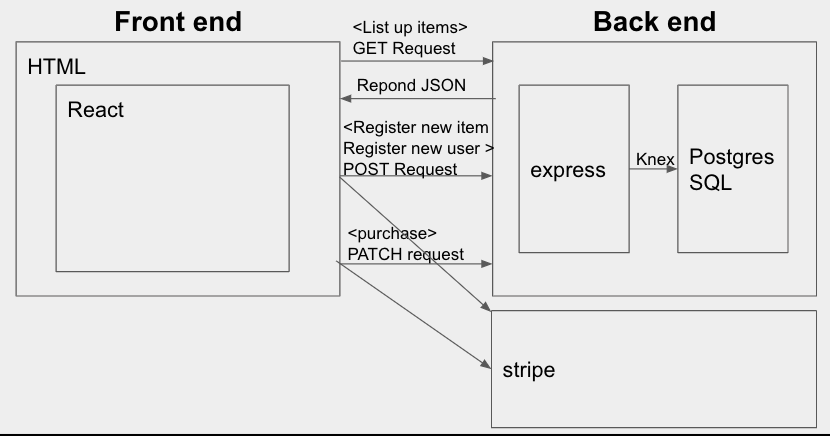
2. System formation
3. How to use
4. Install
5. How it works
	5-1. Sign in/Log in
	5-2. List items
	5-3. Upload items as seller
	5-4. buy items as buyer
  5-5. check out
6. License
Javascript, Knex, express, node, PostgreSQL, axios, Stripe
- Login psql
- $ CREATE DATABASE tron;
- Back to the terminal
- $ yarn add pg
- $ yarn add knex
- $ yarn knex init
- Change client, user name and password in knex.js file
- yarn knex migrate:latest
- yarn run knex seed:run
(knexfile.js setting example)
  development: {
    client: 'postgresql',
    connection: {
      database: 'DATABASE_NAME_HERE',
      user:     'USER_NAME_HERE',
      password: 'PASSWORD_HERE'
    }
  },
- $ yarn add morgan
- $ yarn add path
- $ yarn add body-parser
- $ yarn add cars
- $ yarn add nodemon
- $ yarn add express
- $ yarn add dotenv
- Create “.env” in directory ()
- $ nodemon server
.env file (write following codes in .env file)*adjust DATABASE_URL
NODE_ENV=development
DATABASE_URL=postgresql://YOUR_POSGRESQL_USER_NAME@localhost:5432/YOUR_DB_NAME_HERE
Stripe create api to set up stripe express account.
app.post("/api/createuser", async (req, res) => {
  const account = await stripe.accounts.create({
    country: "JP",
    type: "express",
    capabilities: {
      card_payments: {
        requested: true,
      },
      transfers: {
        requested: true,
      },
    },
  });
When user input their id and password(Pass word will be hashed automatically),
api will post new data on user_table on database.
app.post("/signup", async (req, res) => {
  try {
    let postData = req.body;
    //hash the password
    const hashed_password = bcrypt.hashSync(postData.password, 12);
    postData.password = hashed_password;
    //check if the user already exists
    const email_exists = await db
      .select()
      .table("users")
      .where("email", postData.email)
      .then(res => res);
    if (email_exists.length) {
      return res.status(400).json("A user with this email already exists");
    } else {
      //insert data to the users table
      await db.into("users").insert(postData);
      await db.select().table("users");
      return res.status(200).json("User Registerd Successfuly");
    }
  } catch (err) {
    console.error("Error in Signing up!", err);
    res.sendStatus(500);
  }
});
Front-end will post data object (which includes email and password). Firstly, database will check if user exists in the record. If user email address exists, server sends back password in object. Login api compare the user input password and database side password. If user input password is correct, auth_token will be returned.
app.post("/login", async (req, res) => {
  try {
    let postData = req.body;
    const user = await db
      .select()
      .table("users")
      .where("email", postData.email)
      .then(res => res);
    if (user.length) {
      await bcrypt
        .compare(postData.password, user[0].password)
        .then(isMatch => {
          console.log("Check isMatch", isMatch);
          if (isMatch) {
            //Generate jwt token
            let authToken = jwt.sign(
              {
                id: user[0].id,
                first_name: user[0].first_name,
                last_name: user[0].last_name,
                email: user[0].email,
              },
              process.env.JWTSK
            );

            return res.status(200).json({ authToken: authToken });
          } else {
            return res.status(400).json("Password Incorrect");
          }
        });
    } else {
      throw new Error("No user with that email");
    }
  } catch (err) {
    console.error("Error in Signing up!", err);
    res.sendStatus(500);
  }
});
Sending shopping information object to stripe api.
app.post("/api/checkout", async (req, res) => {
  const session = await stripe.checkout.sessions.create({
    payment_method_types: ["card"],
    line_items: [
      {
        price_data: {
          currency: "jpy",
          product_data: {
            name: req.body.name,
            images: [`${req.body.img}`],
          },
          unit_amount: req.body.price,
        },
        quantity: 1,
      },
    ],
    payment_intent_data: {
      application_fee_amount: 123,
      transfer_data: {
        destination: req.body.seller_id,
      },
    },
    mode: "payment",
    success_url: `http://www.google.com`,
    cancel_url: `http://www.youtube.com`,
  });
  return res.send(session);
});
License for the code**
この 作品 は クリエイティブ・コモンズ 表示 4.0 国際 ライセンスの下に提供されています。
