CTATProtractor
This component shows a user a protractor with movable rays and supports a number of configuration options. A very basic CTATProtractor allows a user to move a single ray between 0 and 180 degrees.
Up to two movable rays can be added to the protractor, as well as two non-movable 'base' rays that are the basis for angle measures.
The protractor supports up to two sets of labels. The values for each label set run in opposite directions - to help learners understand complimentary angles, for example. These labels can also be configured to display as radians.
Image below illustrates label set 1 and label set 2 on a CTATProtractor with data-ctat-complabels="3"
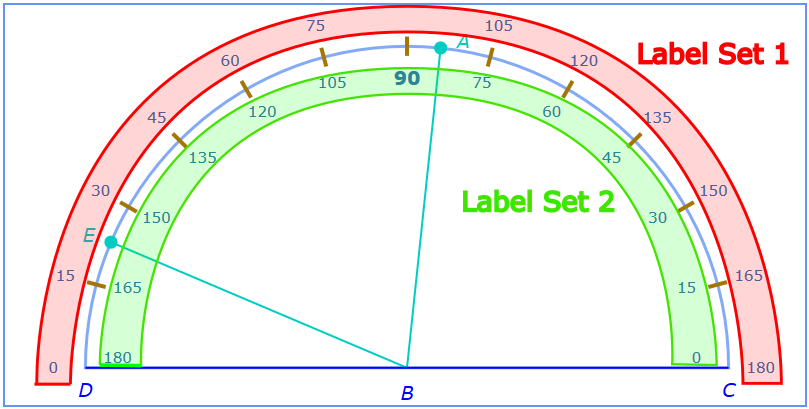
Users click and drag on the handles of the interactive rays (points A and E above) to set their position on the protractor. Users can set custom tick mark intervals on the protractor, and can put it into 'snap' mode so that clicking and dragging is locked to the tick marks.
User can move ray A around the protractor:
<div id="protractor" class="CTATProtractor"></div>CTATProtractor Example (*under development*)
-
id: Required. The name of the component, must be a valid html id name. -
class: Required. The class list, must include"CTATProtractor"and no other CTAT classes. -
data-ctat-protrays: Number of rays present. Default is"1". Maximum is"3"."0"is interactive ray A,"1"adds static ray C,"2"adds static ray D,"3"adds second interactive ray E. -
data-ctat-complabels: Sets which compass labels display. Default is"2". Maximum is"3"."0"is no labels,"1"displays label set 1,"2"displays label set 2,"3"displays both label sets.* -
data-ctat-radians: Sets whether angle labels display in radians. Default is"0". Maximum is"3"."0"is no radians,"1"sets label set 1 to radians,"2"sets label set 2 to radians,"3"sets both label sets to radians. * -
data-ctat-interval: Sets the angle tick mark & snap interval in degrees. Default is"15". Maximum is"90". Value must evenly divide 180, or else interval remains default. -
data-ctat-snap:trueorfalse. Default isfalse. If true, interactive rays will snap to intervals while being moved.
*Under development:*
-
data-ctat-show-feedback:trueorfalse. Default istrueunlessdata-ctat-tutor="false". Determines if grading feedback is shown on the component. -
data-ctat-show-hint-highlight:trueorfalse. Default istrue. Determines if hint highlighting is shown on the component. -
data-ctat-disable-on-correct:trueorfalse. Default istrue. Determines if the component becomes locked when it is graded as correct. -
data-ctat-ctrl-protrays: A list of ; deliminated ids of CTAT controller components that the user interacts with to change the number of protrays. Default is "". -
data-ctat-ctrl-complabels: A list of ; deliminated ids of CTAT controller components that the user interacts with to change the labels that are visible. Default is "". -
data-ctat-ctrl-radians: A list of ; deliminated ids of CTAT controller components that the user interacts with to change the radian labels that are visible. Default is "". -
data-ctat-ctrl-interval: A list of ; deliminated ids of CTAT controller components that the user interacts with to change the value of the tickmark/snapping interval. Default is "".
Valid CTAT controller components include CTATButton, CTATImageButton, CTATTextInput, and CTATNumericStepper. CTATSubmitButton can also be used as a controller component to do grading on demand for the protractor.
In addition to the common Actions listed in Often Used TPAs this component supports the following actions:
| Action | Input | Notes |
|---|---|---|
| SpecifiedAngleSet | a number or JSON string | Moves a specified interactive ray to a specified angle. Number inputs only move ray A, according to angle ABD. JSON string should take the form {"angle_name": angle_value} - for example, {"ABC": 123} will move ray A to a position such that angle ABC is 123 degrees, and angle ABD is 57 degrees. *See section on *Correctness Checking
|
| resetLabels | an int between 0 and 3 | Redraws the label sets according to the value, as per data-ctat-complabels
|
| resetRadians | an int between 0 and 3 | Redraws the label sets according to the value, as per data-ctat-radians
|
Here is a list of the default styles included in CTAT.css that govern various aspects of the look of the number line.
.CTATProtractor {
     border: 2px solid cornflowerblue;
     height: 400px; width: 800px;
}

.CTATProtractor--container {
     display: flex;
     align-items: center;
     justify-content: space-around;
}

.CTATProtractor--compass {
     stroke: rgb(131, 171, 245);
     stroke-width: 3px;
     fill: none;
}

.CTATProtractor--ticks {
     stroke: rgb(163, 118, 5);
     stroke-width: 4px;
}

.CTATProtractor--labels {
     text-anchor: middle;
     fill: rgb(47, 110, 182);
     font-size: 80%;
}

.CTATProtractor--label90 {
     font-weight: bold;
     font-size: 125%;
}

.CTATProtractor--labelB {
     text-anchor: middle;
     font-style: italic;
     stroke: none;
     font-size: 125%;
     fill: blue;
}

.CTATProtractor--protrays {
     stroke: rgb(0, 204, 194);
     fill: rgb(0, 204, 194);
     stroke-width: 2;
}

.CTATProtractor--fgrays {
     stroke: blue;
     fill: blue;
     stroke-width: 2;
}

.CTATProtractor--labelray {
     text-anchor: middle;
     font-style: italic;
     stroke: none;
     font-size: 100%;
}

.CTATProtractor--select {
     cursor: grab;
     user-select: auto;
}

.CTATProtractor--correct {
     filter: drop-shadow(0 -1px 3px limegreen) drop-shadow(1px 0 3px limegreen) drop-shadow(0 1px 3px limegreen);
}

.CTATProtractor--incorrect {
     filter: drop-shadow(0 -1px 3px red) drop-shadow(1px 0 3px red) drop-shadow(0 1px 3px red);
}

.CTATProtractor--hint {
     filter: drop-shadow(0 -1px 3px yellow) drop-shadow(1px 0 3px yellow) drop-shadow(0 1px 3px yellow);
}Special Javascript functions are required to successfully check whether student manipulations of the protractor match the desired input. These functions should be included in a JS file linked to the HTML file that specifies the interface. They will be called in the .BRD file for the problem:
The function below checks whether the student input falls within a certain range, allowing some tolerance for so students do not have to get the ray on the exact degree:
function checkInputRange(angleName, lower, upper, input) {
  inp = JSON.parse(input);
  inpAngle = Math.abs(inp[angleName]);

  return (inpAngle >= lower && inpAngle <= upper);
}
An example of a correctly configured student-input matcher for setting angle EBA to 120 degrees with a tolerance of 2 degrees in either direction is shown below:
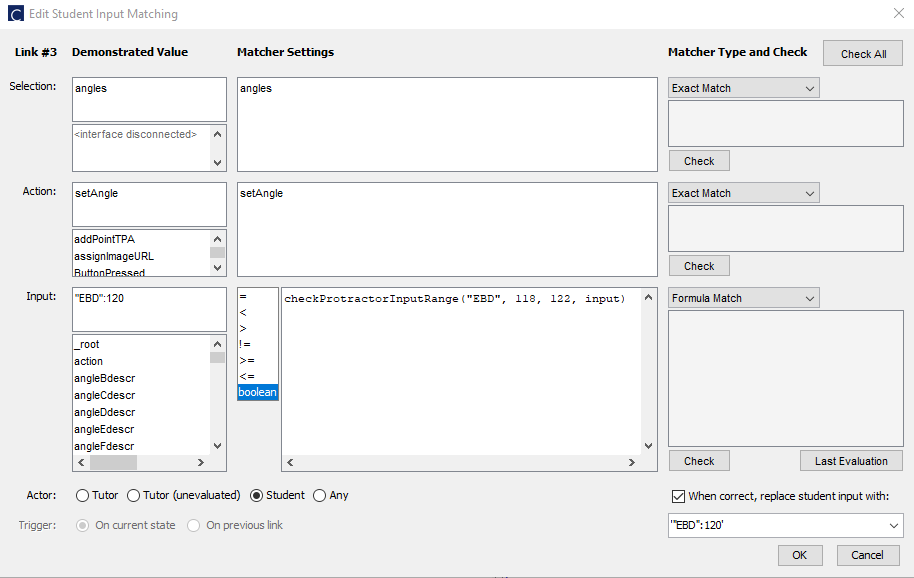
Based on these values, as long as the student moves ray E such that the measure of angle EBA is between 118 and 122 degrees, the tutor will accept it as correct, and it will then move ray E so that the angle EBA measures exactly 120 degrees.
Note that the matcher must be set to "boolean".
Also, please note that the JSON string for "Replace Student Input" MUST be surrounded by single quotes, but the JSON string for "Demonstrated Value - Input" must NOT have any quotes. This is necessary for hint highlighting and correctness highlighting to work.
For angles that are not ABC, if you do not want to replace student input with a precise value and want correctness highlighting to work properly, pass a null value for the angle (e.g. '{"EBA": null}').
If you would like to access the measures of specific angles that have been set for the protractor (e.g. for the purposes of hint/bug messages), you will need special Javascript functions in a problem file, similar to Correctness Checking:
window.onload = function () {
  protractor = this.CTATShellTools.findComponent('your_protractor_id_here')[0];
}

function angleReturner(name) {
  if (name === "ABC") {
    return Math.round(protractor.angleABC);
  } else if (name === "ABD") {
    return Math.round(protractor.angleABD);
  } else if (name === "EBC") {
    return Math.round(protractor.angleEBC);
  } else if (name === "EBD") {
    return Math.round(protractor.angleEBD);
  } else if (name === "ABE" || name === "EBA") {
    return Math.round(protractor.angleABE);
  } else {
    return "INVALID ANGLE NAME PASSED!"
  }
}
Calls to angleReturner() with a specified angle name will give you the current value of that angle on the protractor. (e.g. angleReturner("ABD") will give the current measurement of angle ABD).
*Under development, not yet available*
Example for mass producing the protray count, compass labels, radians, and interval for a CTATProtractor:
<div id="protractor" class="CTATProtractor"
     data-ctat-protrays="%(protrays)%"
     data-ctat-complabels="%(complabels)%"
     data-ctat-radians="%(radians)%"
     data-ctat-interval="%(interval)%">
</div>