



Syntax highlighting and static-analysis diagnostics for expl3 (the LaTeX3 programming layer) in Visual Studio Code.
Files full of expl3 code — xeCJK.dtx, expl3.dtx, your own .sty/.cls —
normally render as a wall of undifferentiated \command text. This extension
adds a semantic highlighting layer so the pieces that carry meaning stand out,
and surfaces explcheck lint results directly
in the editor.
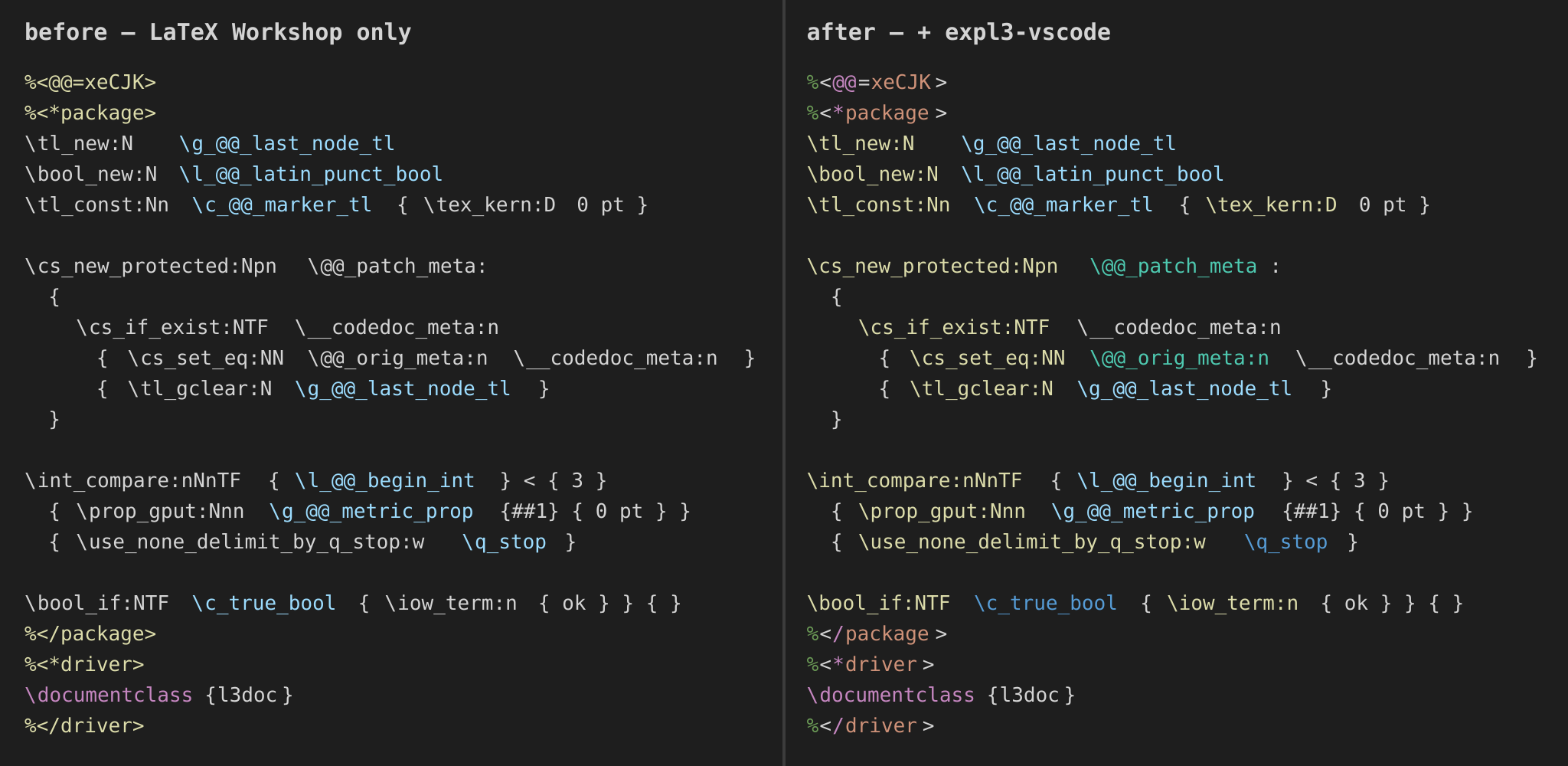
| Layer | Examples | TextMate scope |
|---|---|---|
| API families | \tl_new:N, \prop_gput:Nnn, \cs_new_protected:Npn |
support.function.expl3 |
Variables (l_/g_/c_) |
\l_tmpa_tl, \g_@@_state_bool, \c_novalue_tl |
variable.other.expl3 |
Private commands (@@) |
\@@_do_thing:Nn, \@@_state_bool |
entity.name.function.private.expl3 |
| Quarks / scan marks / constants | \q_stop, \s_stop, \c_true_bool |
constant.language.expl3 |
| docstrip guards | %<*driver>, %</package>, %<@@=xeCJK>, %<+!driver> |
entity.name.tag.docstrip.expl3 |
Colors come from your active color theme — the extension only assigns scopes, so it looks native in Dark+, Light+, Solarized, and everything else.
If explcheck is available, the extension runs it
on your expl3 files and shows the results as squiggles, mapped by severity:
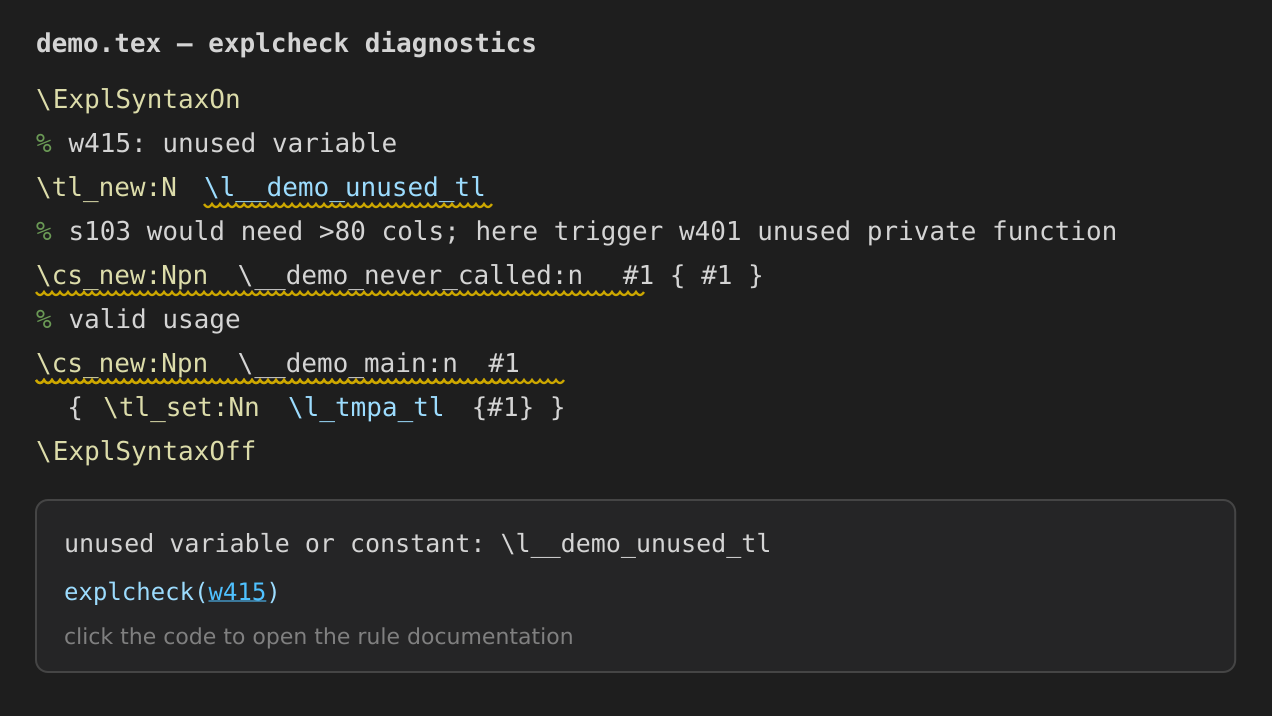
| explcheck prefix | meaning | VS Code severity |
|---|---|---|
e, t |
errors / type errors | Error |
w |
warnings | Warning |
s |
style warnings | Information |
explcheck ships with TeX Live's expltools package (tlmgr install expltools). If
it is not found, the extension prompts once and stays quiet otherwise — highlighting
keeps working regardless.
.dtx/.insare not linted.explcheckcannot process bundled sources directly yet (see explcheck issue #20, planned for v1.1); unpack them to.sty/.texfirst. Highlighting still applies to.dtx.
| Setting | Default | Description |
|---|---|---|
expl3.check.enable |
true |
Enable explcheck diagnostics. |
expl3.check.path |
explcheck |
Path to the executable. |
expl3.check.run |
onSave |
onSave, onType (debounced), or manual. |
expl3.check.debounce |
400 |
Debounce (ms) for onType. |
expl3.check.maxLineLength |
0 |
Max line length before S103 (0 = explcheck default 80). |
expl3.check.ignoredIssues |
[] |
Issue ids/prefixes to suppress, e.g. ["s103"]. |
expl3.check.makeAtLetter |
false |
Tokenize @ as a letter (like .sty files). |
Command expl3: Run explcheck on the active file triggers a check on demand.
Project-level .explcheckrc config is respected:
checks run from the workspace root, so a .explcheckrc at the project root applies
even to files in subdirectories.
By default checks run on save (onSave). To lint as you type, set:
"expl3.check.run": "onType"Checks are debounced (expl3.check.debounce, 400 ms) and a typical file lints
in ~0.1 s, so this stays responsive. The trade-off is transient warnings while a
line is half-written — onSave avoids that by only checking at save points.
This is an injection grammar: it layers on top of an existing LaTeX grammar rather
than replacing it. You need a LaTeX language extension that provides the
text.tex.latex / text.tex.doctex scopes — most commonly:
LaTeX Workshop (
James-Yu.latex-workshop)
Without such a host extension there is no base grammar to inject into, and this extension does nothing on its own. That is by design — injection grammars are additive.
your .dtx / .sty / .tex file
│
├─ Layer 1 — LaTeX Workshop (host grammar)
│    .dtx      → text.tex.doctex   (macrocode blocks, DocTeX structure)
│    .sty/.cls → text.tex.latex
│    colors \begin/\end, % comments, generic \commands, math, environments
│
└─ Layer 2 — expl3-vscode (this extension, injected on top)
     recolors the expl3-specific tokens the host leaves as generic macros:
     :Nn functions · l_/g_/c_ variables · @@ privates · quarks · docstrip tags
TextMate injections are additive, so the two layers never fight — the host paints the general structure and this extension refines the expl3 tokens.
.tex · .sty · .cls · .dtx · .expl — anywhere the host grammar produces a
text.tex.* scope, expl3 tokens light up automatically. No files.associations
configuration needed.
Install LaTeX Workshop and expl3 Syntax Highlighting from the Extensions view (Ctrl/Cmd+Shift+X), then reload the window.
Releases are tag-driven (.github/workflows/release.yml):
vX.Y.Z-rcM→ build + GitHub prerelease (public beta). No marketplace.vX.Y.Z→ build + GitHub release, then a gated publish to the VS Code Marketplace and Open VSX.
The publish step runs under the release GitHub Environment, which has a
Required reviewer: the publish job pauses until that reviewer approves, so
even though anyone in the org can push a tag, only the reviewer can push a
release to the marketplaces. Credentials (VSCE_PAT, OVSX_PAT) are stored as
environment secrets on release, readable only by the approved publish job.
To cut a release: bump version in package.json, commit, then
git tag vX.Y.Z && git push origin vX.Y.Z. The workflow's version gate refuses
to run if the tag's base version does not match package.json.
Grammar lives in syntaxes/expl3.tmLanguage.json;
a representative regression sample is in
tests/fixtures/xeCJK-sample.dtx. Issues and PRs
welcome at https://github.com/CTeX-org/expl3-vscode.