


This is a customized version of developerFolio featuring an IT Manager & Infrastructure Expert profile. 👉 Visit my GitHub: @Carabantech
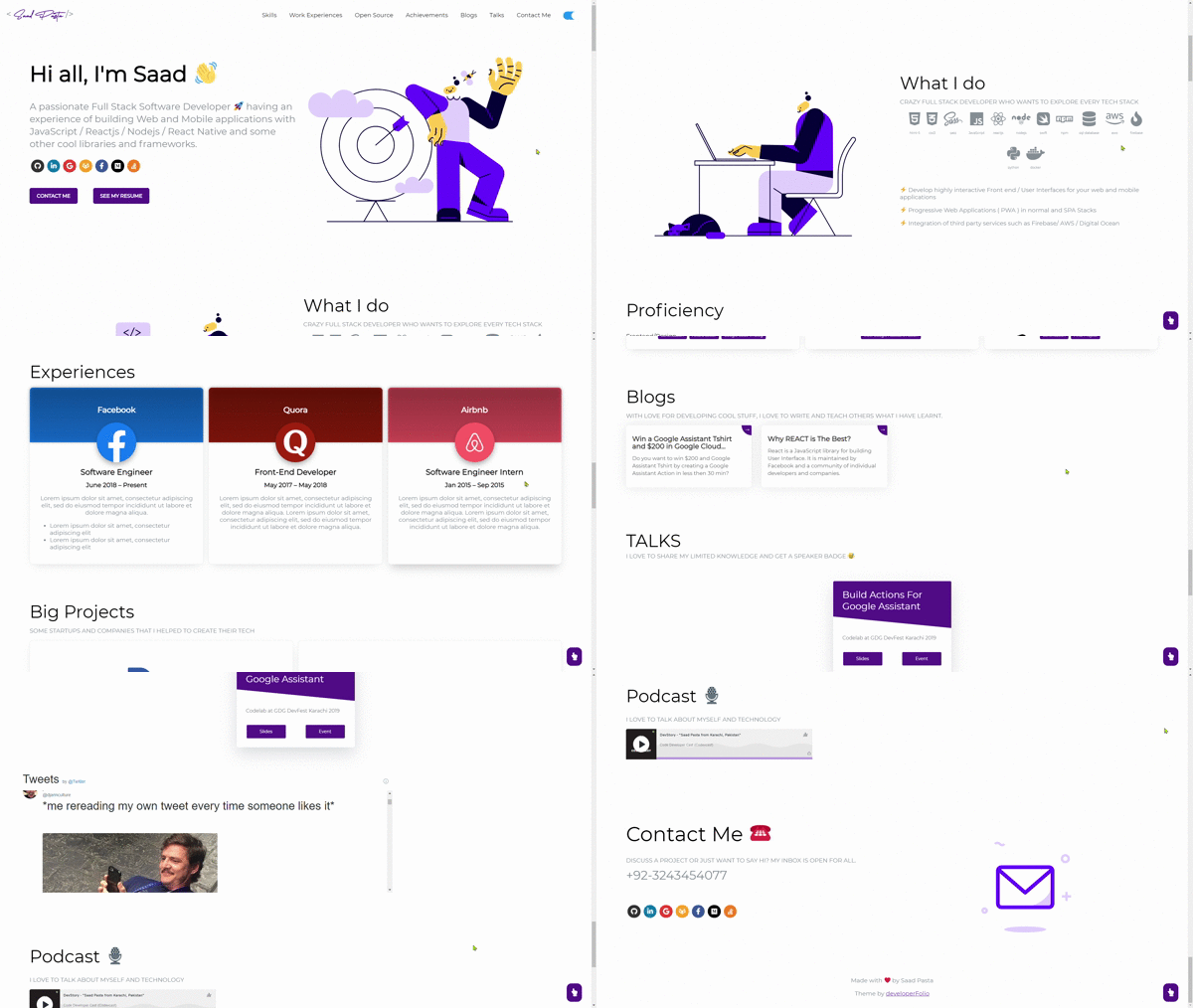
This portfolio template uses the latest Next.js features including:
- App Router for modern routing and layouts
- Server Components for optimal performance
- SCSS Modules for component-scoped styling
- Lottie animations for engaging visuals
- Responsive design for all devices
Just change src/portfolio.js to get your personal portfolio. Customize the theme by using your own color scheme in the src/styles/_globalColor.scss file.
If you'd like to contribute and make this much better for other users, have a look at Issues.
Created something awesome for your fork of the portfolio and want to share it? Feel free to open a pull request.
- Portfolio Sections
- Getting Started
- How to Use
- Environment Variables
- Customization
- Deployment
- Technologies Used
- Project Structure
- Contributors
✔️ Summary and About me
✔️ Skills & Tech Stack
✔️ Education
✔️ Work Experience
✔️ Open Source Projects (GitHub Integration)
✔️ Big Projects
✔️ Achievements And Certifications 🏆
✔️ Blogs (Medium Integration)
✔️ Talks
✔️ Podcast
✔️ Contact Information
✔️ Twitter Timeline
✔️ GitHub Profile
To view a live example, click here.
You'll need Git and Node.js (which comes with npm) installed on your computer.
Minimum versions required:
node >= 18.17.0
npm >= 9.0.0
git >= 2.17.0
Recommended:
- Node.js 18 LTS or Node.js 20 LTS
- npm 9.x or higher
You can also use Docker to run the project:
# Build the Docker image
docker build -t developerfolio:latest .

# Run the container
docker run -p 3000:3000 developerfolio:latestFrom your command line, clone and run the project:
# Clone this repository
git clone https://github.com/Carabantech/developerFolio.git

# Go into the repository
cd developerFolio

# Setup environment variables
# For Linux/Mac
cp .env.example .env

# For Windows
copy .env.example .env

# Install dependencies
npm install

# Run the development server
npm run dev
Open http://localhost:3000 with your browser to see the result.
# Build for production
npm run build

# Start production server
npm run start

# Run linting
npm run lintThis project uses environment variables for configuration. Create a .env file in the root directory based on .env.example.
# Medium username for blog integration
MEDIUM_USERNAME=your_medium_username

# GitHub username (optional, for GitHub integration)
GITHUB_USERNAME=your_github_username

# Display GitHub data (true/false)
USE_GITHUB_DATA=true
Note: In Next.js, environment variables that need to be exposed to the browser must be prefixed with NEXT_PUBLIC_. Currently, this portfolio fetches data server-side, so the prefix is not required for these variables.
To enable GitHub integration:
- Make sure
.envfile exists with yourGITHUB_USERNAME - Set
USE_GITHUB_DATA="true"in the.envfile - In
src/portfolio.js, setshowGithubProfiletotrue
Note: The GitHub integration uses the public GitHub API which has rate limits. For development, a personal access token is not required, but for production deployments with frequent updates, consider using GitHub Actions (see Deployment section).
Open Source Projects Display:
Only pinned items from your GitHub profile will be shown. To pin repositories:
- Go to your GitHub profile
- Click "Customize your pins"
- Select up to 6 repositories to display

For more details, visit the GitHub Setup Wiki.
To display your Medium articles:
-
Add your Medium username to
.env:MEDIUM_USERNAME=your_medium_username
-
In
src/portfolio.js, setdisplayMediumBlogstotrue
Edit /src/portfolio.js to customize your portfolio content:
/* Change this file to get your Personal Portfolio */

const greeting = {
  title: "Hi, I'm Sebastian",
  subTitle: emoji("IT Manager & Infrastructure Expert 🚀"),
  resumeLink: "https://your-resume-link.com"
};

const socialMediaLinks = {
  github: "https://github.com/Carabantech",
  linkedin: "https://www.linkedin.com/in/your-profile/",
  gmail: "your.email@gmail.com",
  // ... more social links
};

const skillsSection = { /* ... */ };
const techStack = { /* ... */ };
const workExperience = { /* ... */ };
const openSource = { /* ... */ };
const bigProjects = { /* ... */ };
const achievementSection = { /* ... */ };
const blogSection = { /* ... */ };
const contactInfo = { /* ... */ };
const twitterDetails = { /* ... */ };Modify the global color scheme in /src/styles/_globalColor.scss:
// Example color customization
$primary-color: #55198b;
$accent-color: #ff6b6b;
// ... more color variablesEdit /src/app/head.jsx to update SEO metadata:
export default function Head() {
  return (
    <>
      <title>Your Name - Portfolio</title>
      <meta name="description" content="Your custom description" />
      {/* ... more meta tags */}
    </>
  )
}For adding emoji 😃 into texts in portfolio.js, use the emoji() function:
const greeting = {
  title: emoji("Hi, I'm John 👋")
};
This keeps emojis compatible across different browsers and platforms.
- Choose a Lottie animation from LottieFiles
- Download it in JSON format
- Replace the desired animation file in
/src/assets/lottie/ - To change animation options, edit
/src/components/displayLottie/DisplayLottie.js
Refer to react-lottie docs for more configuration options.
Insert your Twitter username in portfolio.js:
const twitterDetails = {
  userName: "your_twitter_username" // Don't use @ symbol
};The easiest way to deploy your Next.js app is to use Vercel, the platform from the creators of Next.js.
Steps:
- Push your code to GitHub
- Go to Vercel
- Import your GitHub repository
- Configure environment variables if needed
- Deploy!
Vercel will automatically detect Next.js and configure the build settings.
You can also deploy to Netlify:

Build settings for Netlify:
- Build command:
npm run build - Publish directory:
.next
Important: Add a netlify.toml file in the root:
[build]
  command = "npm run build"
  publish = ".next"

[[plugins]]
package = "@netlify/plugin-nextjs"For GitHub Pages deployment with Next.js:
-
Install the required package:
npm install --save-dev gh-pages
-
Update
next.config.jsfor static export:const nextConfig = { output: 'export', images: { unoptimized: true, }, }
-
Add deployment scripts to
package.json:{ "scripts": { "deploy": "next build && next export && gh-pages -d out" } } -
Run deployment:
npm run deploy
The project includes a GitHub Actions workflow for automated deployment.
Setup:
- Enable GitHub Actions in your repository settings
- Configure environment variables in GitHub Secrets:
MEDIUM_USERNAMEGITHUB_USERNAME
The workflow will automatically:
- Deploy your site when you push to the main branch
- Run weekly to update GitHub profile data
- Can be triggered manually via
workflow_dispatch
See .github/workflows/deploy.yml for configuration details.
Remember to set your environment variables in your deployment platform:
- Vercel: Project Settings → Environment Variables
- Netlify: Site Settings → Build & Deploy → Environment
- GitHub Pages: Repository Settings → Secrets and variables → Actions
- Next.js 13 - React framework with App Router
- React 18 - UI library
- Sass/SCSS - CSS preprocessor with modules
- Lottie React - Animation library
- react-easy-emoji - Emoji rendering
- react-awesome-reveal - Scroll animations
- ESLint - Code linting
- UnDraw - Open-source illustrations
- LottieFiles - Animation files by Oblikweare
developerFolio/
├── public/                 # Static files (favicon, images, etc.)
├── src/
│   ├── app/               # Next.js App Router
│   │   ├── head.jsx       # Page metadata
│   │   ├── layout.jsx     # Root layout
│   │   └── page.jsx       # Home page
│   ├── assets/            # Images, fonts, animations
│   │   ├── fonts/
│   │   ├── images/
│   │   └── lottie/
│   ├── client/            # Client-side data fetching
│   ├── components/        # Reusable components
│   │   ├── button/
│   │   ├── header/
│   │   ├── footer/
│   │   ├── socialMedia/
│   │   └── ...
│   ├── containers/        # Page sections/containers
│   │   ├── greeting/
│   │   ├── skills/
│   │   ├── education/
│   │   ├── workExperience/
│   │   ├── projects/
│   │   └── ...
│   ├── contexts/          # React contexts
│   ├── styles/            # Global styles
│   │   └── _globalColor.scss
│   ├── portfolio.js       # 📝 Main content configuration
│   └── utils.js           # Utility functions
├── .env                   # Environment variables (create this)
├── .env.example           # Environment variables template
├── next.config.js         # Next.js configuration
├── jsconfig.json          # JavaScript configuration
└── package.json           # Project dependencies
src/portfolio.js- Your portfolio content and datasrc/styles/_globalColor.scss- Color theme customizationsrc/app/head.jsx- SEO metadata.env- Environment variables
Contributions are welcome! If you have suggestions for improvements or want to add new features:
- Fork the repository
- Create your feature branch (
git checkout -b feature/AmazingFeature) - Commit your changes (
git commit -m 'Add some AmazingFeature') - Push to the branch (
git push origin feature/AmazingFeature) - Open a Pull Request
Please read CONTRIBUTING.md for details on our code of conduct and the process for submitting pull requests.
Future improvements and features being considered:
- Migration to Next.js 14/15 with latest features
- Integration with LinkedIn API
- Dark/Light theme toggle
- Blog section with MDX support
- Performance optimizations
- Accessibility improvements
- Multi-language support
This project is licensed under the GPL-3.0 License - see the LICENSE file for details.
If you have any questions or need help:
- 📧 Email: Contact
- 💼 LinkedIn: Sebastian Mauricio Carabante
- 🐛 Issues: GitHub Issues
Give a ⭐️ if this project helped you!