Repository navigation
Releases
DecLAB 0.4.2: version in the title bar, more radios

The window title now shows the version, with more radios and a fix for inverted DVB-S2 carriers.
New
- Version in the title bar. The main window reads "DecLAB v0.4.2", so you can see which build you are running.
- More radios. Fobos SDR, SDRplay RSP, USRP (UHD), and a radio behind DecSAT's
decsat-server. Receive only. None of these has been run on its hardware yet. - Airspy Mini rates. The driver takes the board's nearest rate (a Mini: 6 or 3 MS/s), with a rate list in the GUI and
--rateon the command line. Not yet tried on a real Mini. - "L.O. above" for C-band LNBs. A tick on the satellite page (and a 5150 MHz preset) shows frequencies as L.O. minus IF and turns the band view over.
Fixed
- DVB-S2 carriers with an inverted spectrum now lock. Behind an LNB with its L.O. above the band, headers were found but every frame failed. The card shows "Spectrum: inverted".
DecLAB 0.4.1: DAB slideshow
DAB+ slideshow pictures now appear in the window, and more stations' pictures get through.
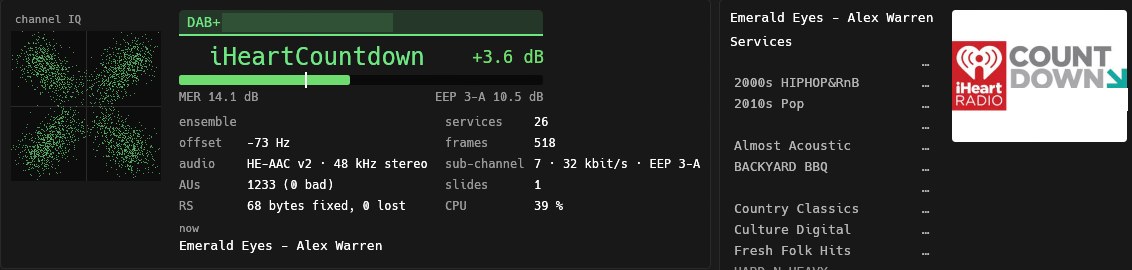
From a real broadcast, with local names blanked out.
New
- DAB slideshow in the GUI. The picture a station sends with its audio (MOT slideshow, in the AAC stream's X-PAD) is shown beside the services list. The card counts the slides received for the service.
Fixed
- Slides sent in short X-PAD. Some stations send MOT in the 4-byte short X-PAD, where the data group length indicator is split across two X-PADs. It was read as incomplete, so those slides never finished. At about 30 bytes a second such a slide can still take minutes to arrive.
For developers
- The
dab_slidesexample surveys every DAB+ service of a block at once: X-PAD applications, MOT groups and errors, and the slides themselves.
Known limits
- Slides sent once with no repeats are lost if a single audio frame is bad, so weak signals show fewer of them.
- Tested on recordings of four real ensembles. Not yet run live on a radio.
Download
DecLAB-0.4.1-windows-x64.zip: declab-gui.exe and declab.exe (command line), for 64-bit Windows 10/11, with nothing to install.
DecLAB 0.4.0: Pluto, HydraSDR, P25 phase 2, trunked calls
Two more radios, P25 phase 2, and trunked calls followed by themselves.
New
- ADALM-PLUTO and Pluto+. Pick ADALM-PLUTO / Pluto+ as the source, or use
--radio plutoon the command line.- Pure Rust: the driver speaks the Pluto's own IIOD protocol, with no libiio and no DLLs.
- Links:
autouses USB if ADI's Pluto USB driver is installed, and otherwise the Pluto's USB network at 192.168.2.1. Useip:ADDRESSfor a Pluto+ on Ethernet. - Settings: rate from 1 to 20 MS/s, gain in dB or AGC.
- Tested on a real Pluto (AD9364, ADI firmware v0.39) over USB and its network.
- Lost samples: a Pluto's USB carries about 7 MS/s of 16-bit IQ. If the rate is higher, the samples the link drops are counted and shown beside the radio's status.
- Tezuka firmware: F5OEO's Tezuka sends 8-bit IQ, which is used automatically and halves the load. This has not yet been tried on hardware.
- Receive only: the transmit LO is powered down.
- HydraSDR RFOne on the Airspy driver (Airspy R2 / HydraSDR, or
--radio hydrasdr). Tested live. - P25 phase 2 (TDMA traffic channels) in Digital voice, as a sixth mode.
- Display: both slots on the card, a heard list, and one slot played at a time.
- Scrambling: the seed is solved from one clean scrambled burst.
- Simulated sensitivity: 83 % of voice frames at 8 dB C/N, 97 % at 10 dB.
- Trunked calls followed. A P25 control channel's grants now open a VFO for each call inside the radio's span.
- Speaker: followers share one speaker, and the first to talk keeps it.
- Closing: a follower closes 4 s after its call ends.
- Phase 2 calls descramble at once, using the system's IDs from the control channel.
- Switch: "follow calls" in the VFO rail turns it on or off.
Download
DecLAB-0.4.0-windows-x64.zip: declab-gui.exe and declab.exe (command line), for 64-bit Windows 10/11, with nothing to install.
DecLAB 0.3.0: LoRa meshes and ISM devices
Two new decoders: LoRa meshes (Meshtastic and MeshCore) and the ISM bands' sensors and remotes, plus talkgroups on MOTOTRBO Capacity Plus.
New
- LoRa mesh: Meshtastic and MeshCore. Put a VFO on a mesh channel (869.525 MHz for Meshtastic's EU LongFast) and DecLAB finds LoRa frames of any preset by itself: every spreading factor from 7 to 12 at 62.5, 125, 250 and 500 kHz at once, with the header, coding rate and CRC checked.
- Meshtastic: every preset's default channel is decrypted, so text messages, positions, node info (names, hardware, role), telemetry (battery, voltage, temperature, humidity, pressure, channel use) and routing, traceroute, neighbour and waypoint packets show. Private direct messages are marked as encrypted.
- MeshCore: packet type, route and path, node adverts (name, type, position), acks, and messages on the Public channel. Add your own
#hashtagchannels in the Keys tab. - On screen: the card shows the preset (LongFast …), the SNR against what its spreading factor needs, the frequency offset and the transmitter's clock drift. The Dechirp scope shows the last frame's symbols. The Nodes, Messages, Packets and Keys tabs list everything heard; click a node or packet for every field and the raw bytes.
- Sensitivity: about Semtech's own figures or better from SF9 up (SF11 decodes to −18.7 dB SNR, SF12 to −22 dB). The decoder takes about 2 % of one core; live from a 10 MS/s Airspy the decoder's thread reads about 15 %, most of that the cut from 10 MS/s.
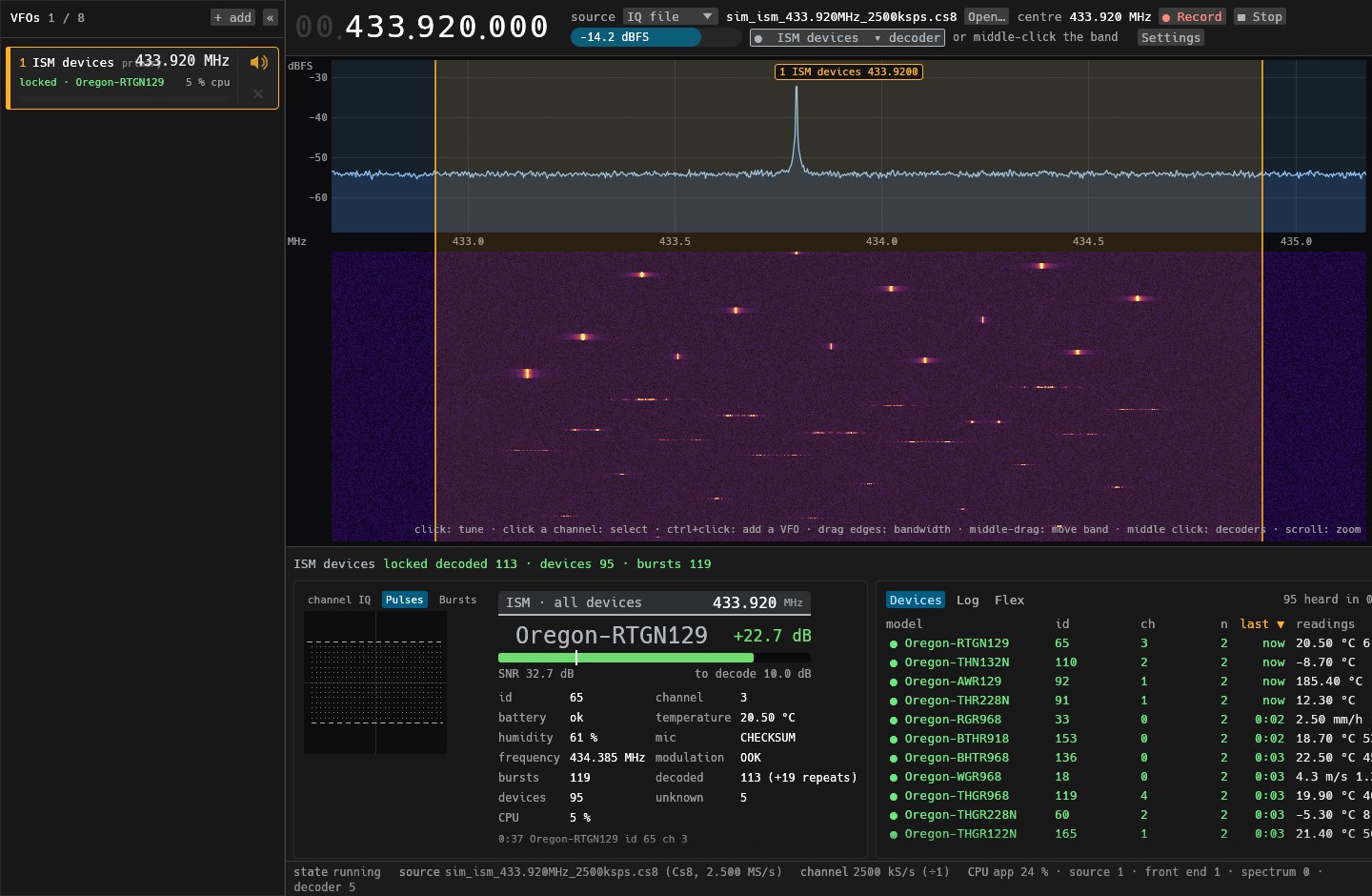
- ISM devices, as rtl_433 decodes them: weather stations and temperature/humidity sensors (Oregon Scientific, Acurite, LaCrosse, Fine Offset/Ecowitt, Bresser, Nexus, ThermoPro and more), remotes and door/window sensors, tyre-pressure sensors and energy meters on 433, 868, 315, 345 and 915 MHz. Bursts are found anywhere in a 2 MHz channel, several at once, each at its own bandwidth. The Devices tab lists every device heard with its latest readings; the Flex tab takes your own rtl_433 flex decoders.
- DMR: MOTOTRBO Capacity Plus calls now show their talkgroup and source, and the channel-status messages show the rest channel and each busy channel's group. Calls are no longer split in pieces mid-call.
Pictures (from simulations)
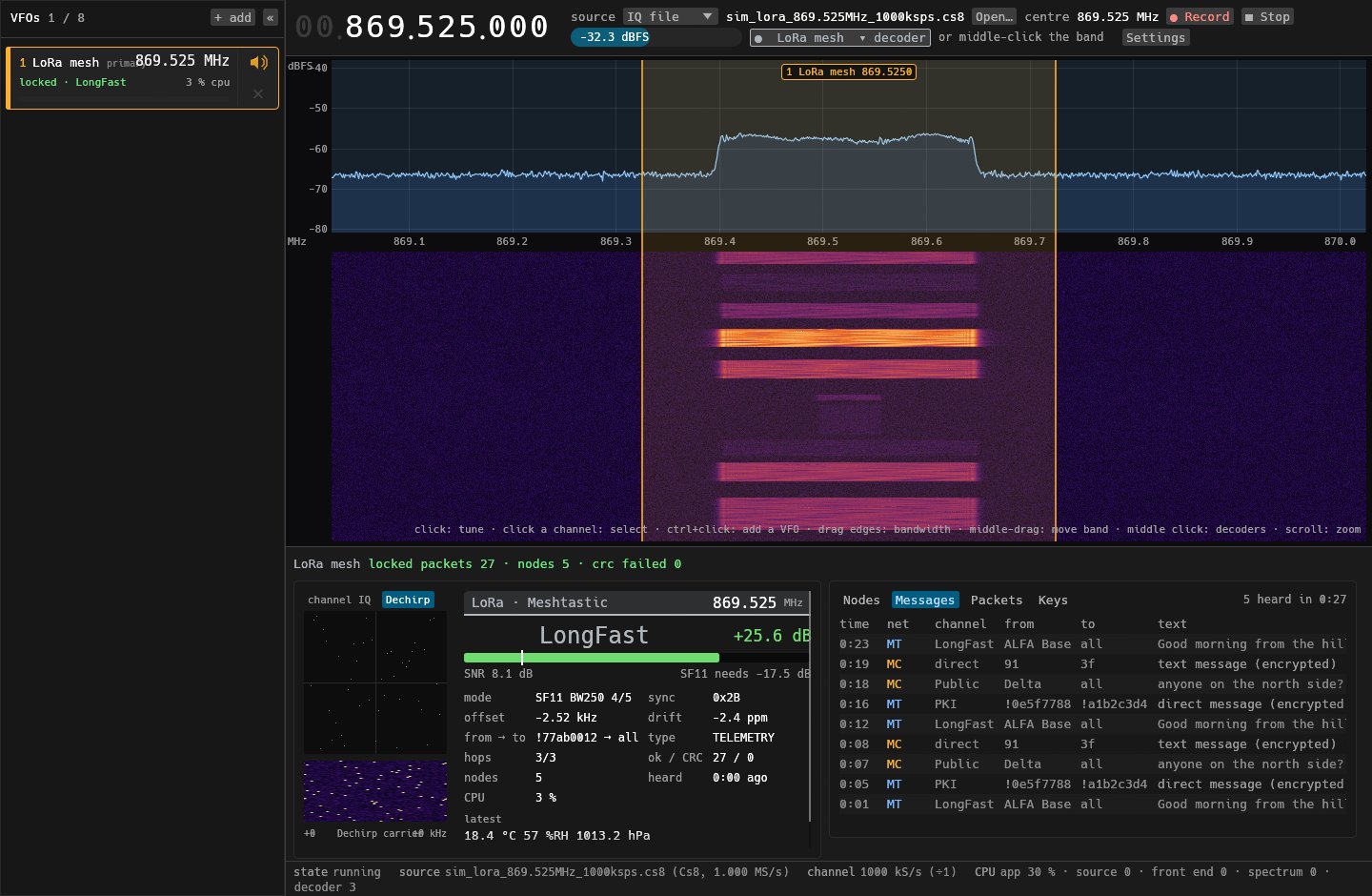
A simulated 869.525 MHz channel with Meshtastic and MeshCore packets: the Packets tab.
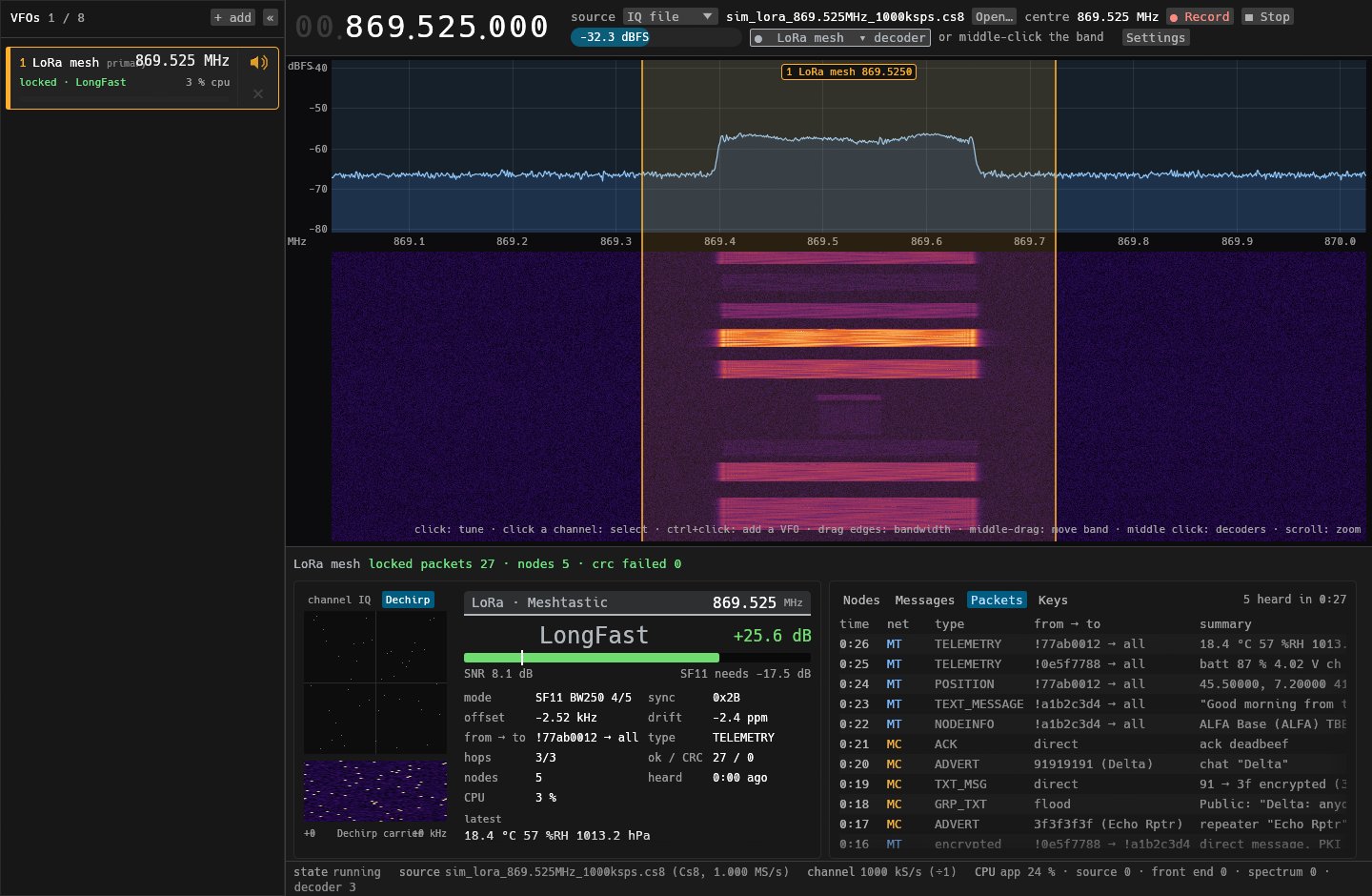
The nodes heard on both meshes, with names, hops and their latest news.
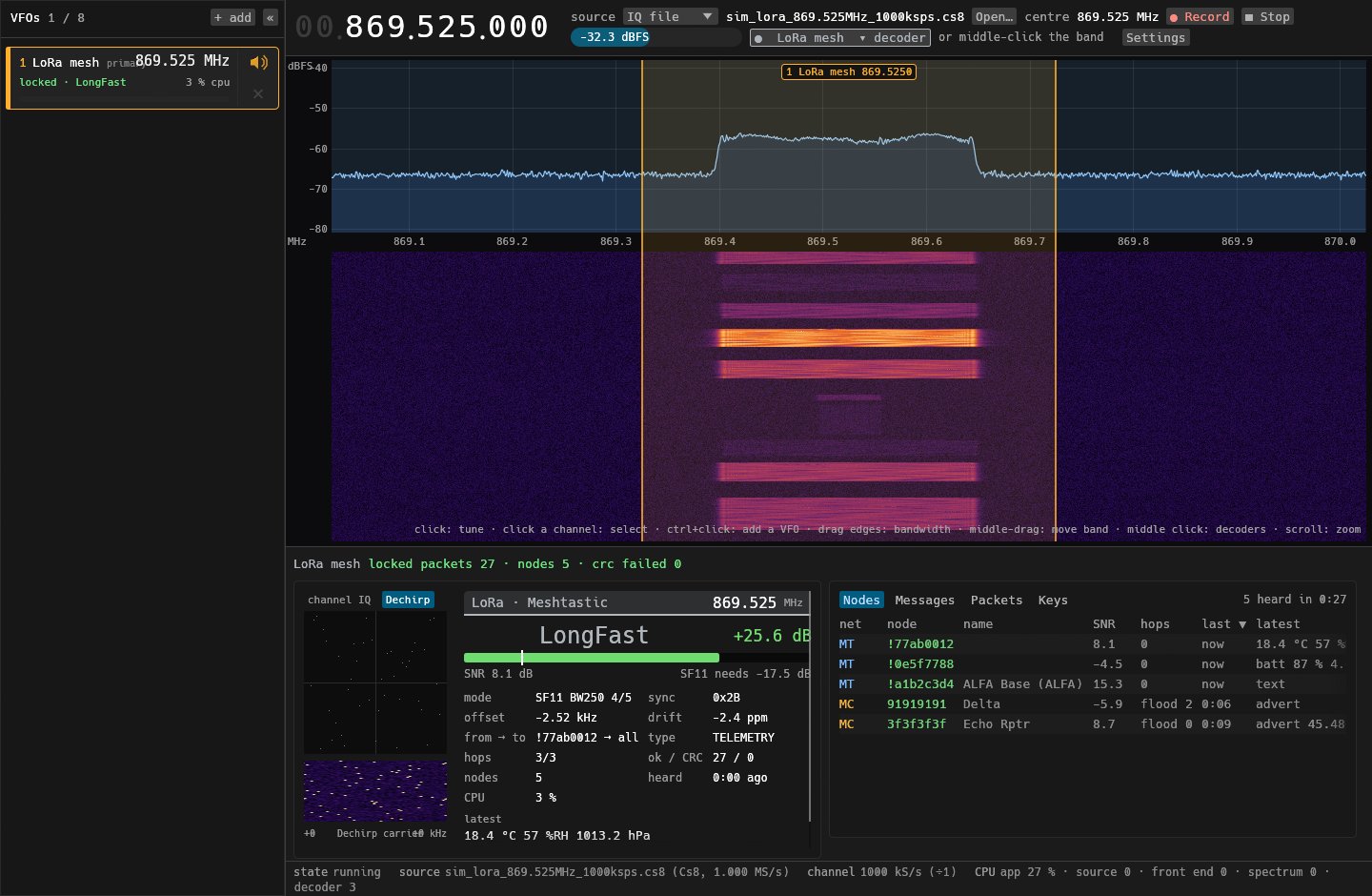
Text messages: Meshtastic's LongFast channel, MeshCore's Public channel, and direct messages that stay private.
A simulated 433 MHz band full of sensors: the ISM devices decoder.
Download: DecLAB-0.3.0-windows-x64.zip has the two exes (no installer). Radios need the WinUSB driver (Zadig). The DVB video player needs an ffmpeg.exe beside the exes. TETRA speech is not included (ETSI code).
DecLAB 0.2.3: on-site pagers, LNB, In app
On-site pagers, satellite downlink frequencies, and the player on the decoder card.
New
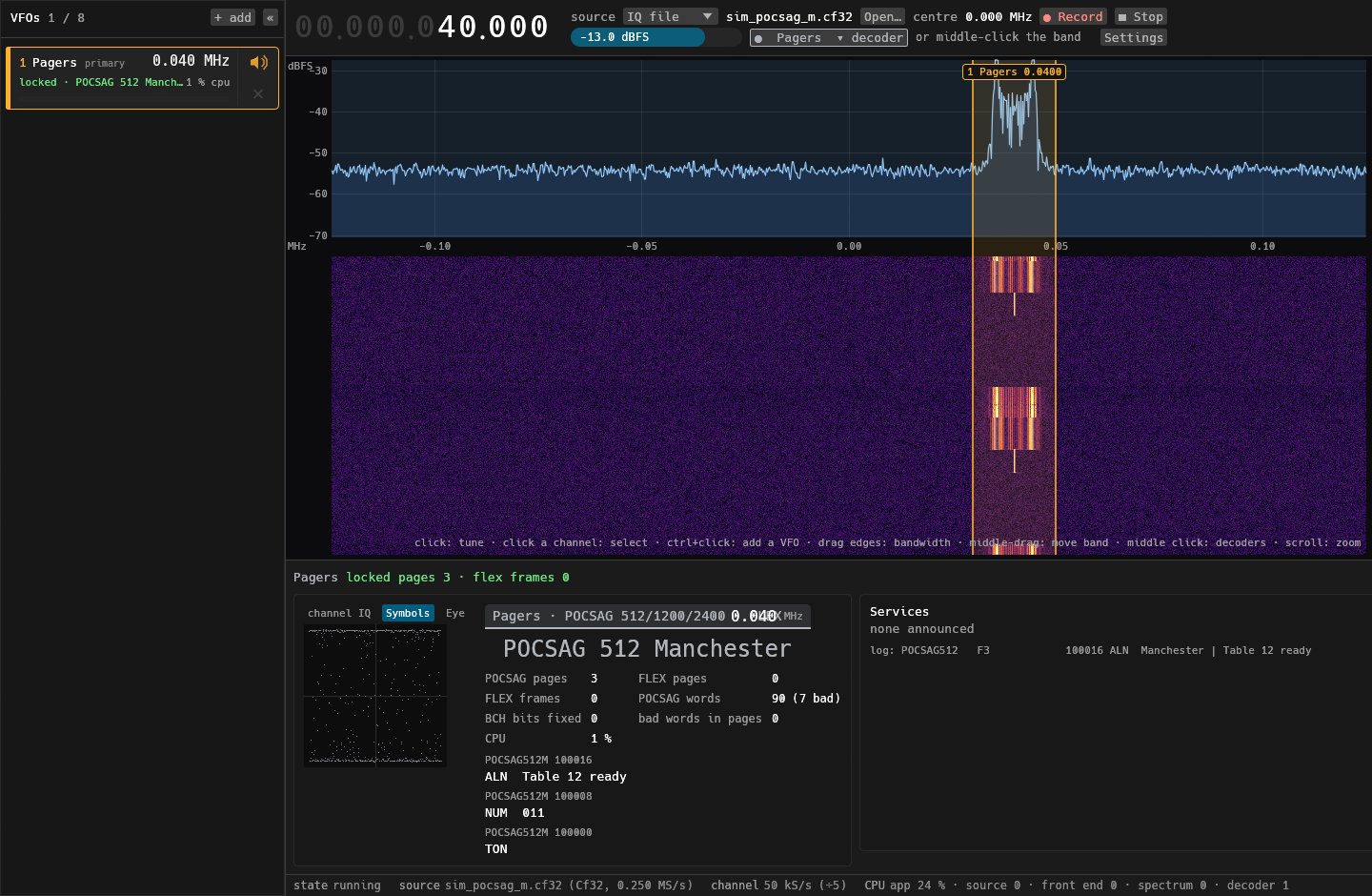
- POCSAG sent Manchester-coded. Some cheap on-site paging transmitters (restaurant and reception pagers) send POCSAG 512 with every bit Manchester-coded: the opposite tone for the first half of the bit, then the bit itself. The preamble looks like ordinary 512, so DecLAB locked onto it and then lost sync at the data, and nothing decoded. The Pagers decoder now runs a Manchester 512 decoder alongside the others and shows it as POCSAG 512 Manchester. Its pages are tagged
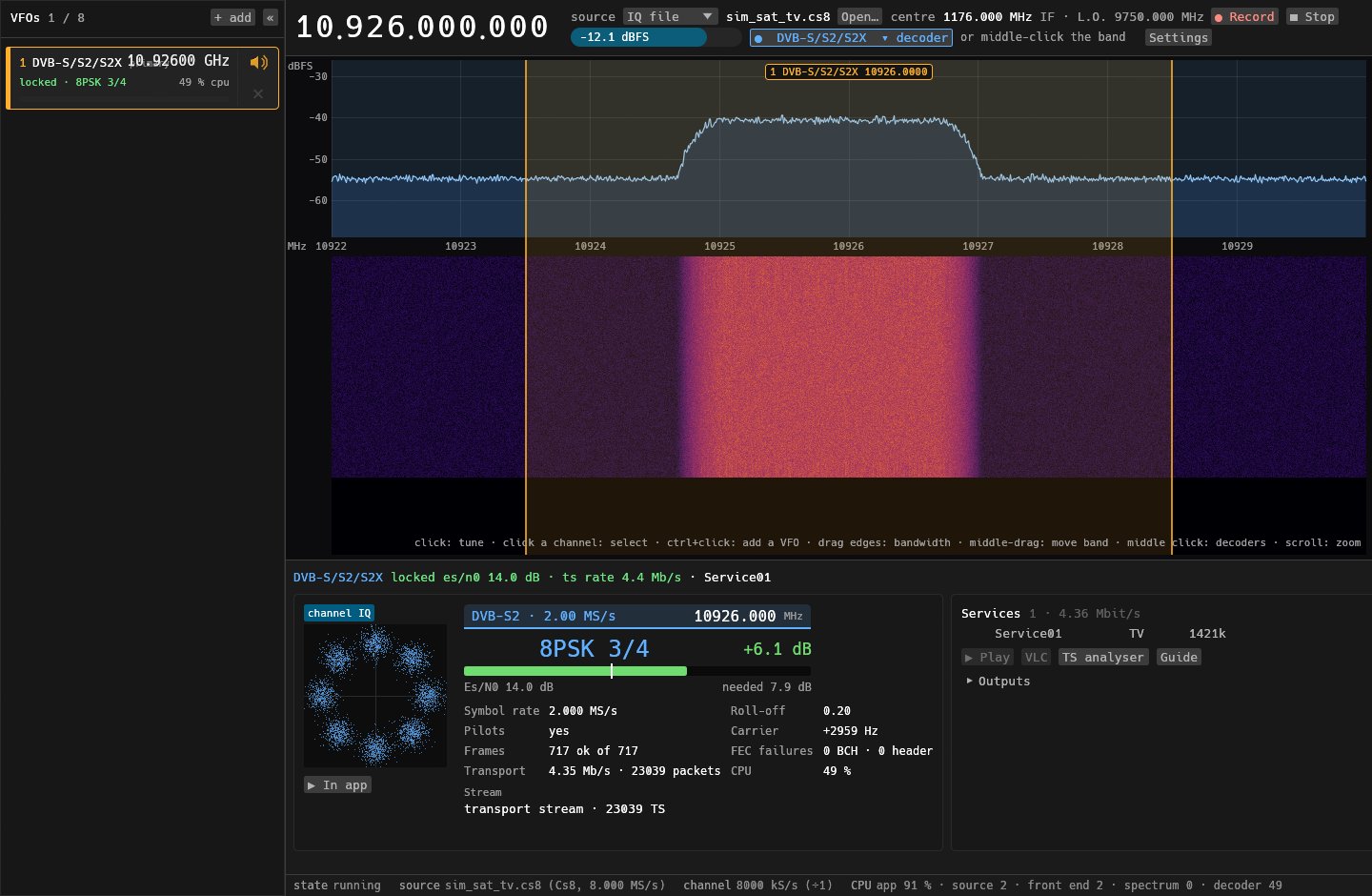
POCSAG512M, andManchesterin the log. It's on by default, with a checkbox in the Pagers settings (--set manchester=offon the command line), and costs about 0.1 % of a core. - LNB local oscillator for DVB-S/S2/S2X. Type your LNB's L.O. into the satellite settings (Universal 9750 / 10600, single-band 10750 / 11300 are in the menu) and the frequency display, the band scale, the card and the VFO list show the downlink, e.g. 10 926 MHz instead of the 1176 MHz IF. Typing a downlink frequency tunes to it. The radio still tunes the IF, and recordings are still named by it. GUI:
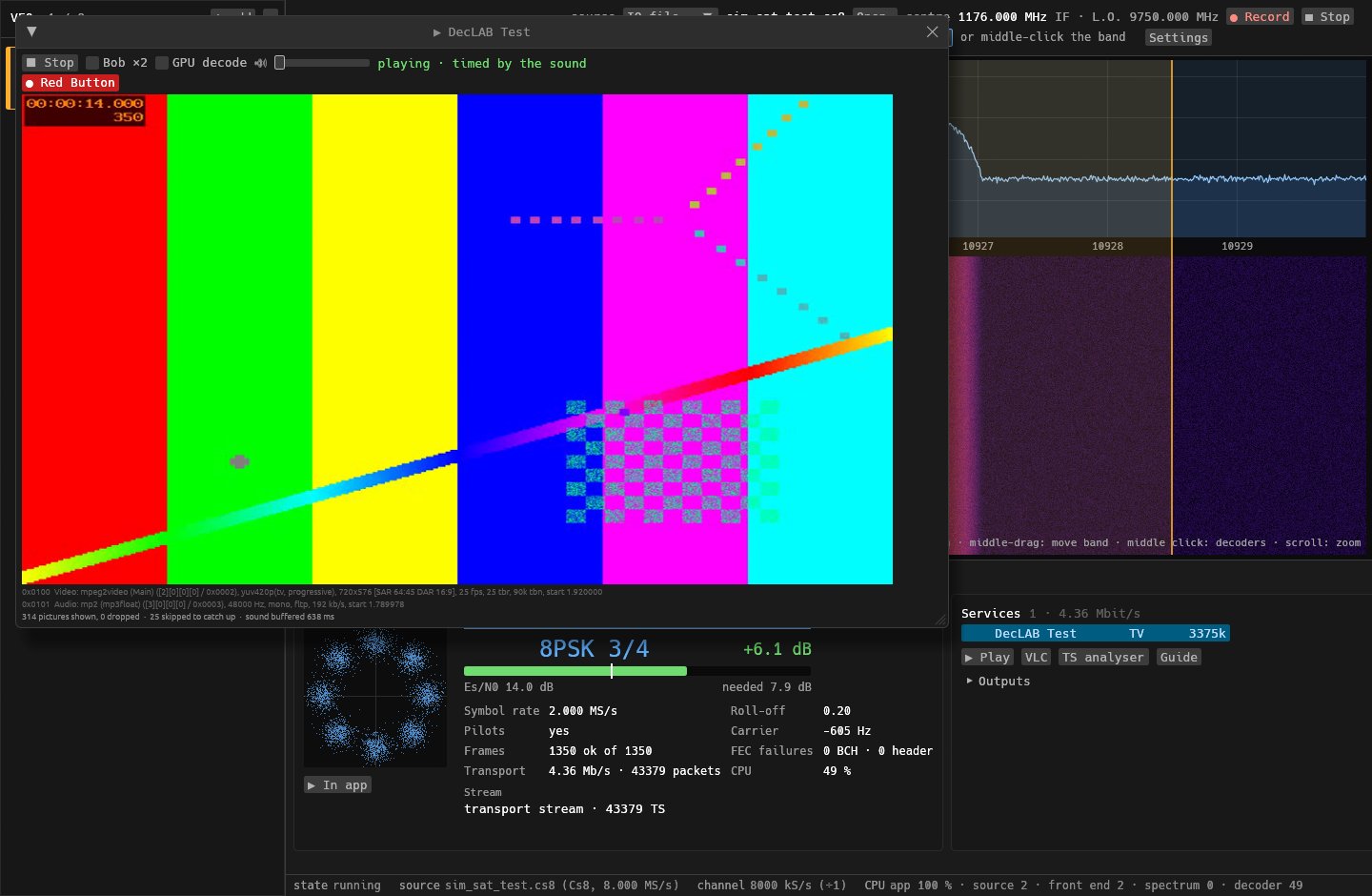
--set lo_hz=9750000000. - "▶ In app" on the decoder card for DVB-T/T2 and satellite: plays the selected service, or the first one with pictures, without going through the services list.
Fixed
- HD (1080i) in the player was squashed to a 32:9 strip. It now shows at 16:9, at the same CPU.
Pictures (from simulations)
A simulated on-site pager transmitter: POCSAG 512 Manchester, with a tone page, a numeric page and a text page.
A simulated DVB-S2 carrier at 1176 MHz IF behind a Universal LNB (L.O. 9750 MHz), shown at its 10 926 MHz downlink.
"▶ In app" on the same carrier, playing a test-pattern programme.
Download: DecLAB-0.2.3-windows-x64.zip has the two exes (no installer). Radios need the WinUSB driver (Zadig). The DVB video player needs an ffmpeg.exe beside the exes. TETRA speech is not included (ETSI code).
DecLAB 0.2.2: network IQ (SDR++, GNU Radio, rtl_tcp)
Any radio, over the network.
New
- Network IQ source. DecLAB takes raw IQ from another program, so radios it has no driver for work through the program that drives them. That includes the SDRplay RSPduo through SDR++'s IQ Exporter. It also takes GNU Radio's TCP and UDP sinks, and rtl_tcp servers, which DecLAB recognises and tunes itself. Pick Network IQ in the source list and give:
- where from:
tcp://127.0.0.1:7777connects to a sender that listens (SDR++: TCP (Server));listen://0.0.0.0:7777waits for one to connect (TCP (Client));udp://0.0.0.0:7777takes UDP. - the sample type: int8, uint8, int16, int32 or float32, scaled as SDR++ scales them.
- the rate and the centre frequency: the stream doesn't carry them. The status line shows the rate actually arriving, so a wrong one is easy to spot.
- where from:
- Command line:
declab run wfm --net tcp://127.0.0.1:7777 --iq int16 --rate 10M --freq 98M.
Fixed
- The RTL-SDR Blog V4 works on Windows (#2).
Pictures (from the simulator, streamed over TCP)
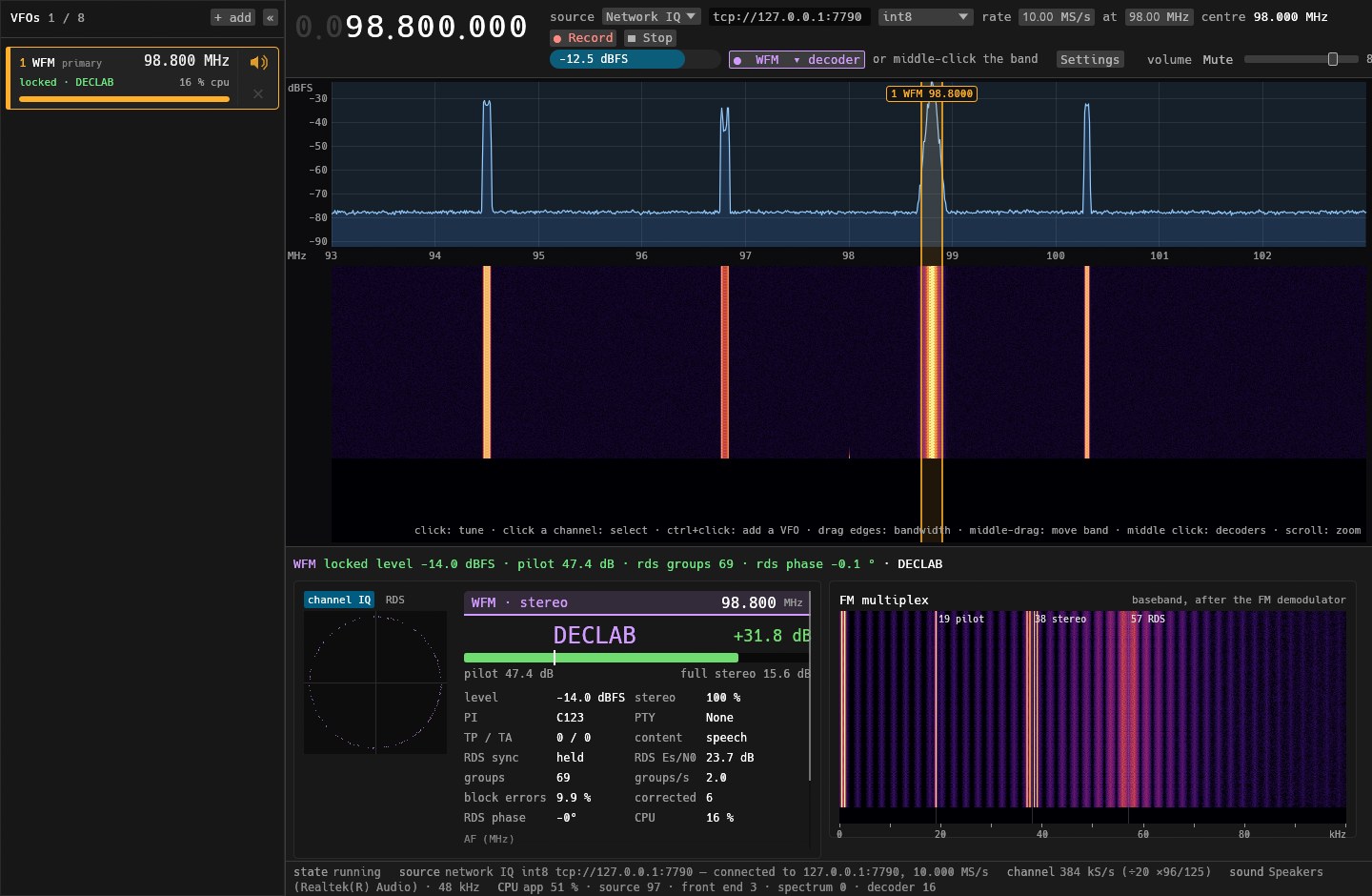
The source row: the URL, the sample type, the rate and the centre.

The simulated FM band arriving over TCP, with WFM and RDS decoding from it.
Download: DecLAB-0.2.2-windows-x64.zip has the two exes (no installer). Radios need the WinUSB driver (Zadig). The DVB video player needs an ffmpeg.exe beside the exes. TETRA speech is not included (ETSI code).
DecLAB 0.2.1: the last call stays on screen
The last call stays on screen.
New
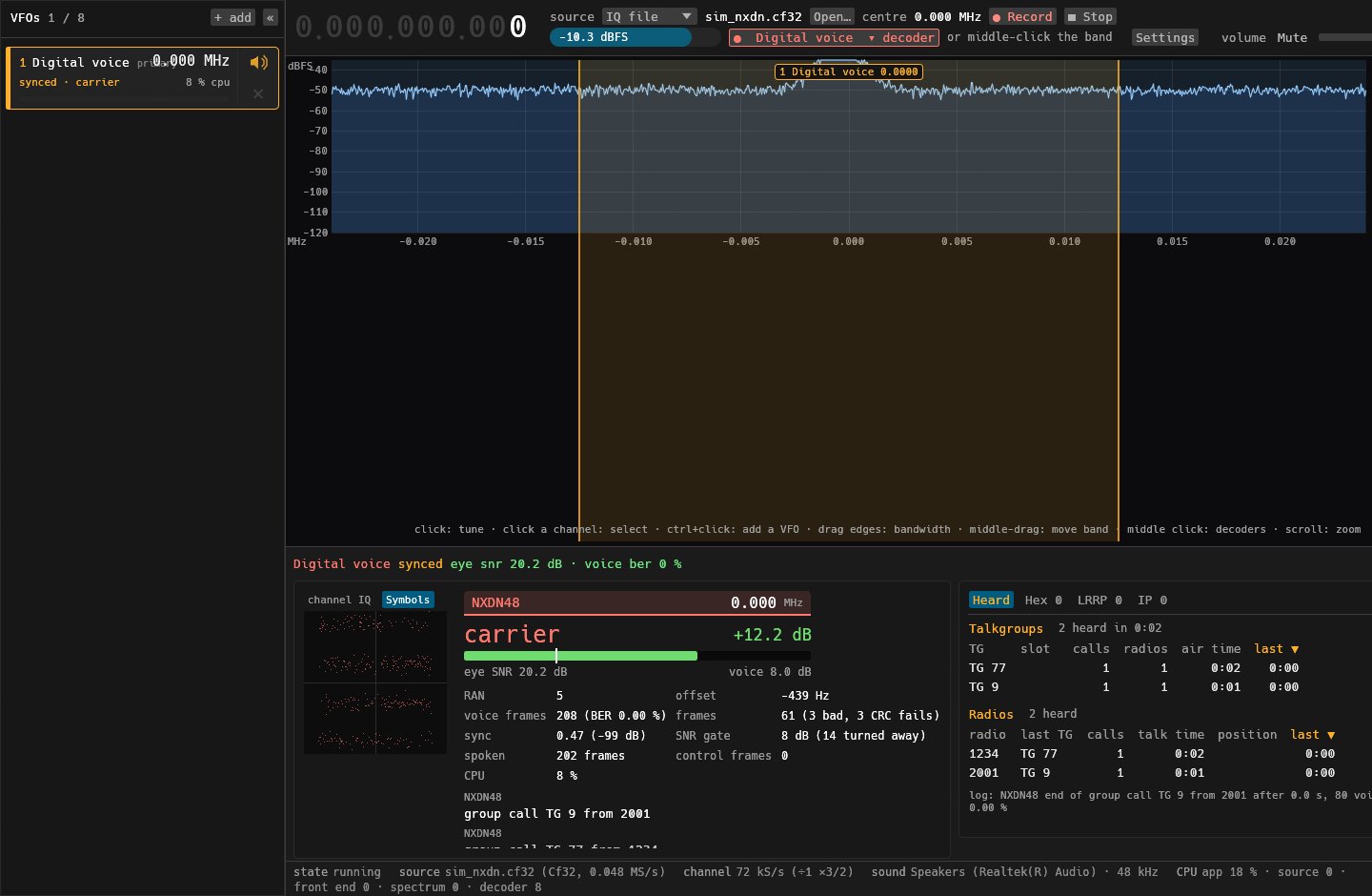
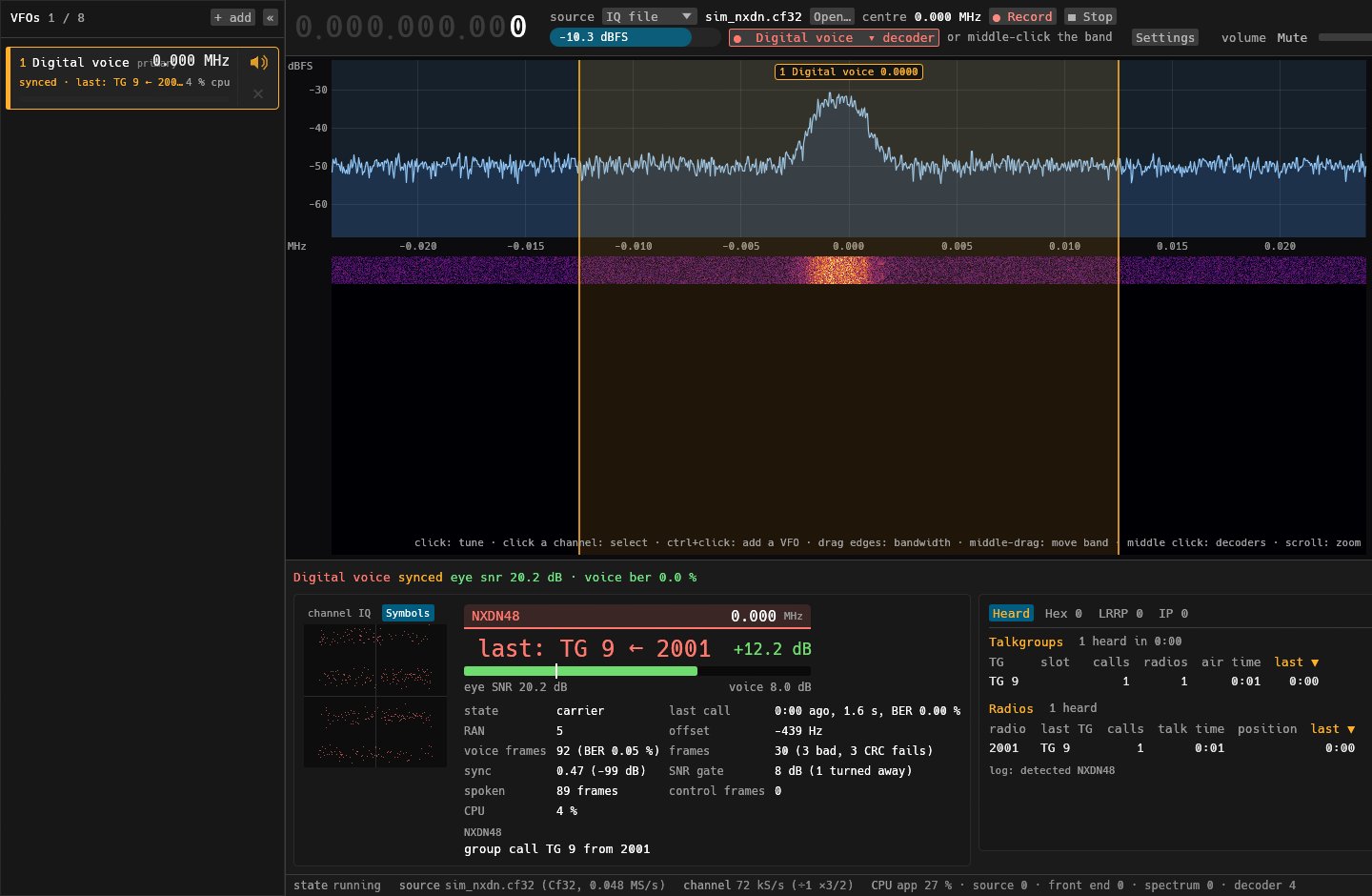
- Digital voice keeps the last call on the card. A repeater that only bursts used to have its call on screen for about half a second. Between calls, DMR and NXDN now show last: TG … ← …, with a last call line giving how long ago it was, its length and its BER. The channel state (carrier, call, control channel) has a line of its own.
- When the signal drops completely, Digital voice keeps the last mode's card, titled last heard m:ss ago, instead of a bare "searching".
- Long headlines (DMR's long IDs, a last call) shrink to fit beside the dB margin instead of running into it.
Fixed
- NXDN no longer says "control channel" forever after one stray control frame. It now means a control frame in the last 2 s.
Pictures (from the simulator)
Before (0.2.0): a second after the call, the card already says "carrier".
After (0.2.1): the call stays up, with its age, length and BER.
Download: DecLAB-0.2.1-windows-x64.zip has the two exes (no installer). Radios need the WinUSB driver (Zadig). The DVB video player needs an ffmpeg.exe beside the exes. TETRA speech is not included (ETSI code).
DecLAB 0.2.0: satellite, data tabs, squelch
Satellite, Digital voice data tabs, AM/FM squelch, NXDN voice from real repeaters.
New
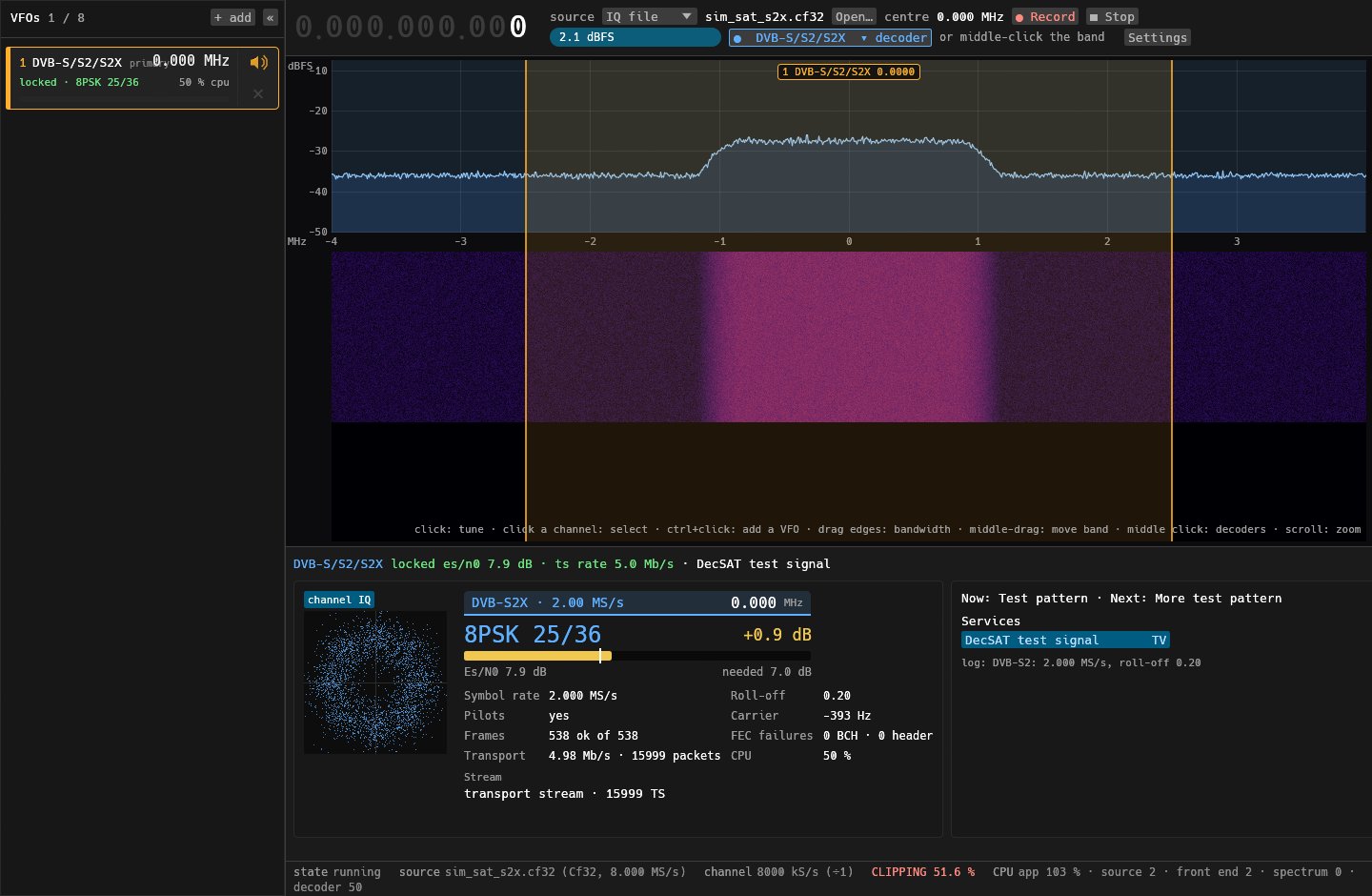
- Satellite (M4): DVB-S, DVB-S2 and DVB-S2X as a plug-in, found blind. Transport streams go to the same services list, player and guide as DVB-T; GSE goes out as IP datagrams to a PCAP file.
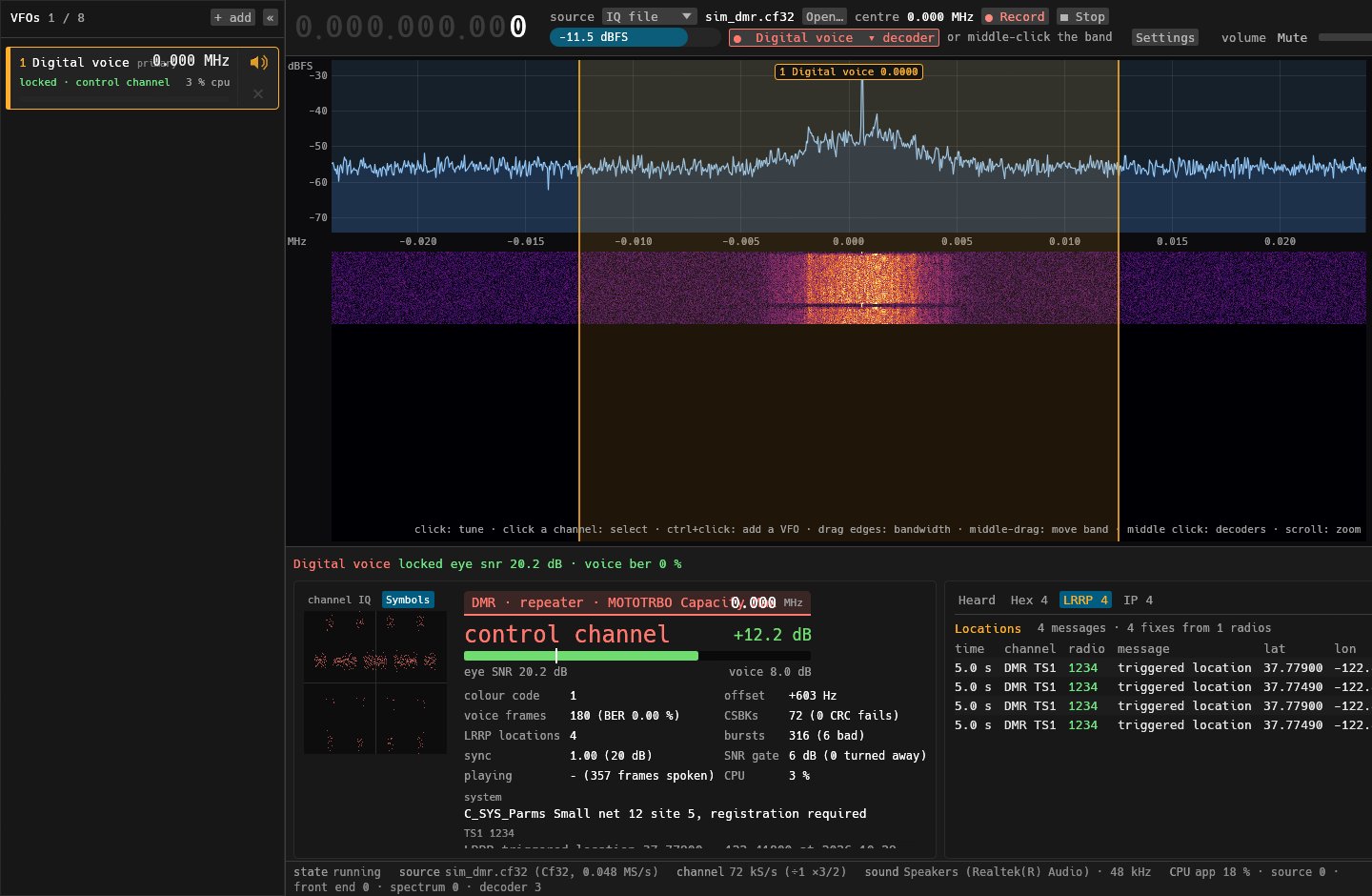
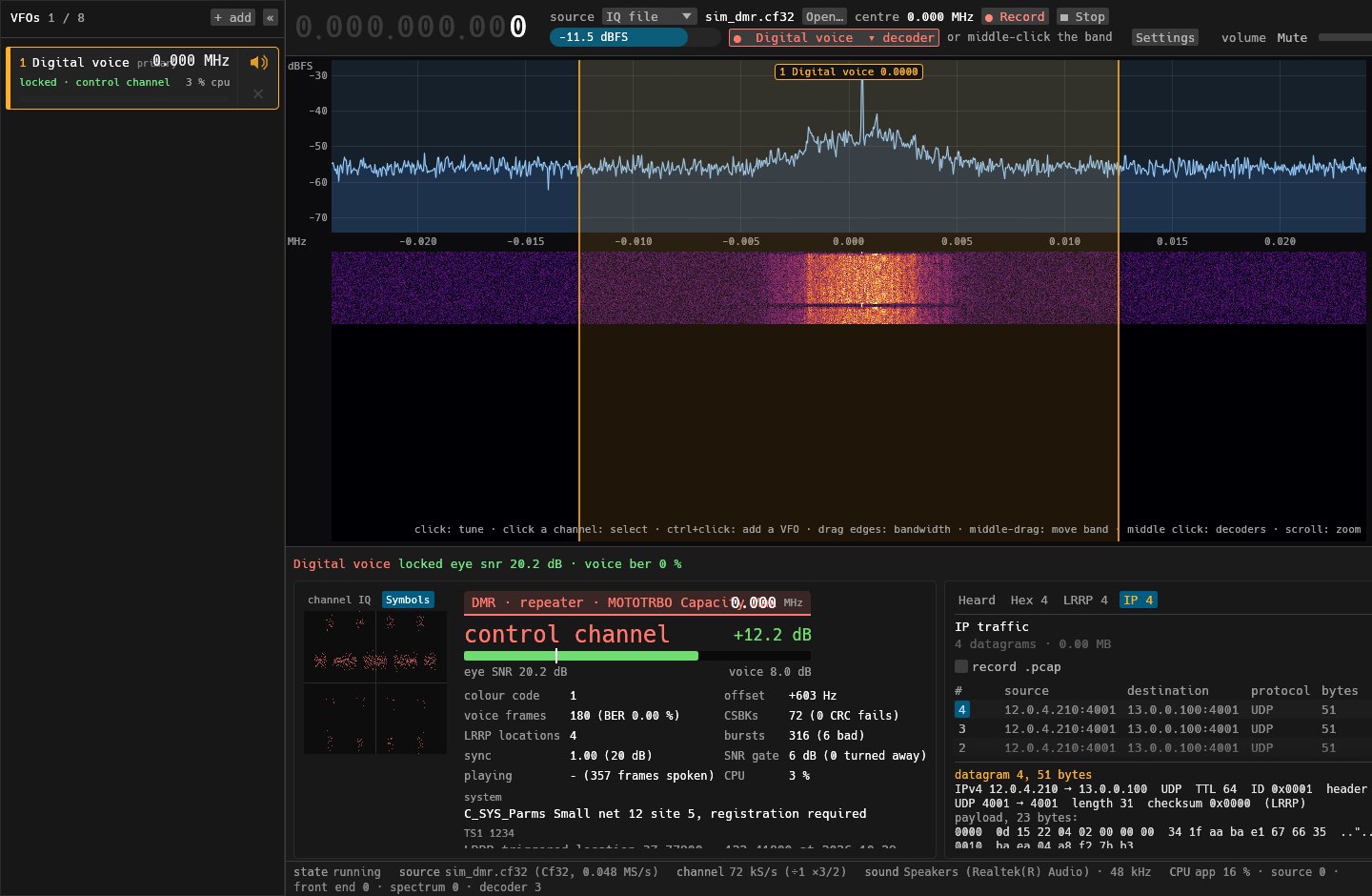
- Digital voice data tabs: the right-hand box has Heard · Hex · LRRP · IP. Hex shows every data message (DMR packet data, TETRA SDS) in hex with ASCII beside it. LRRP is a table of location messages; click a position to copy it. IP lists the datagrams and takes one apart (IPv4/UDP headers with the checksum checked, payload in hex), with a PCAP recorder. DMR's header-compressed packets are rebuilt as whole datagrams.
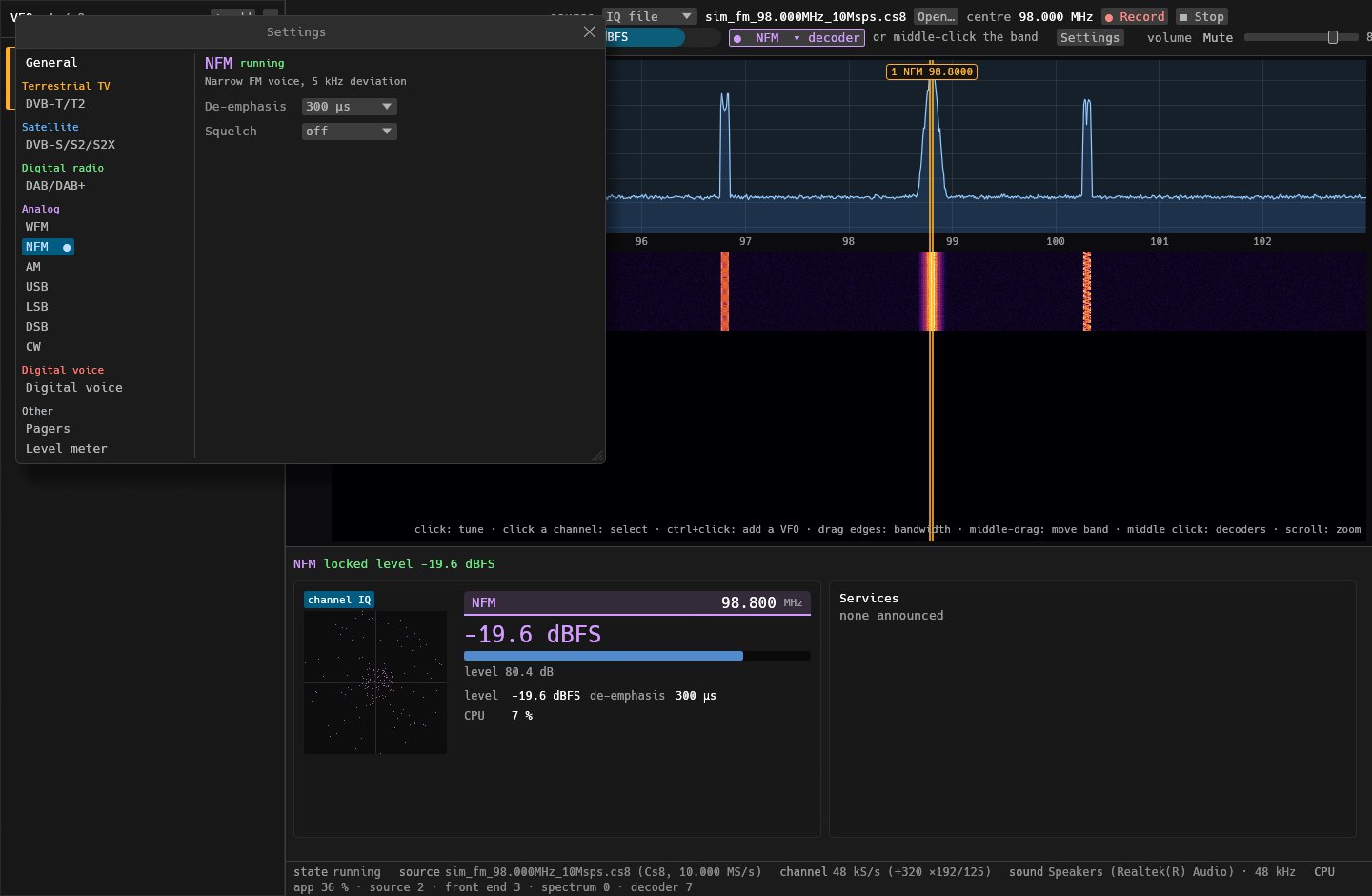
- AM/FM squelch with three methods, each with its own threshold: Level (dBFS), SNR (estimated from the signal, independent of gain) and Noise (the classic FM noise squelch). It fades in and out over 5 ms, with no clicks.
--record-channel OUT.cf32ondeclab runrecords just the decoder's channel at its own rate (about 0.6 MB/s for voice, against 20 MB/s for the radio's stream), for long recordings of one channel.- Finer spectrum as you zoom in. Each VFO keeps its own decoder waterfalls.
Fixed
- NXDN voice was silent on real repeaters. Every voice frame was rejected by a wrong header-parity check (MMDVMHost's shortcut, which only covers the values it sends itself). Checked on 30 minutes of a real NXDN48 repeater: 10 calls, all at 0.00–0.15 % voice BER.
- NXDN no longer reports "control channel" or "unknown" messages decoded from silence after a repeater's beacon.
- DMR locks from any start. TETRA relocks after a drag.
- The command-line tool stopped printing the log after 300 lines.
Known limits
- The NXDN SACCH doesn't decode on that repeater yet (RAN not shown). Voice and call details come through regardless.
- NXDN trunking control channels (CAC) are not decoded.
- Satellite has been tested on simulated carriers only.
Pictures (from simulated signals)
Digital voice: every data message in hex with ASCII beside it.
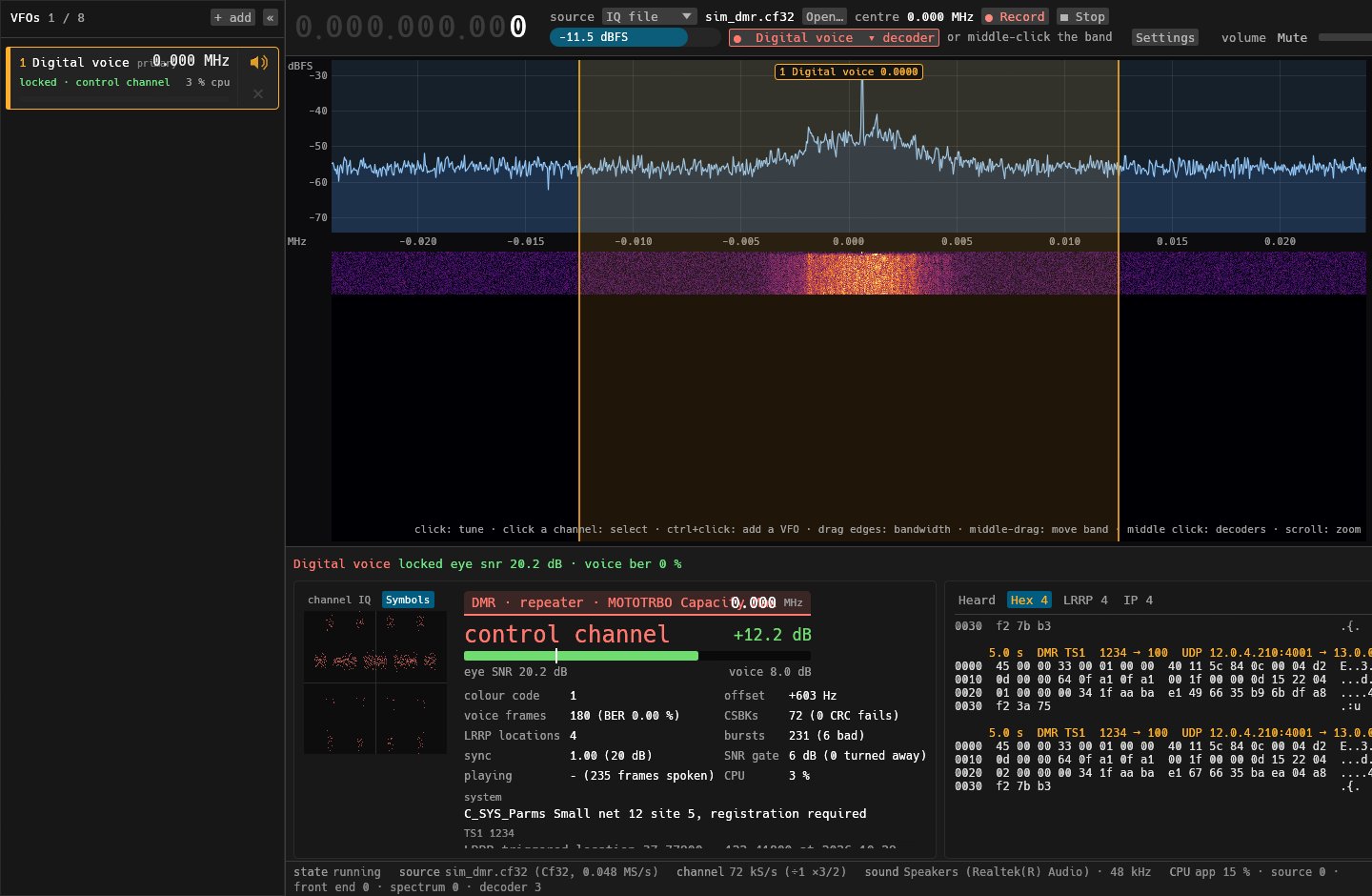
LRRP location messages as a table.
IP datagrams, one taken apart, with the PCAP recorder.
Satellite: a DVB-S2X carrier, 8PSK 25/36, its transport stream and services.
The squelch picker in Settings (Level, SNR or Noise), here for NFM.
Download: DecLAB-0.2.0-windows-x64.zip has the two exes (no installer). Radios need the WinUSB driver (Zadig). The DVB video player needs an ffmpeg.exe beside the exes. TETRA speech is not included (ETSI code).
DecLAB 0.1.1: bias tee
Bias tee on every radio.
New
- Bias tee on the Airspy R2, HackRF One and RTL-SDR Blog (issue 1). A "Bias tee" button next to the gain menu, or
--bias-teeondeclab-guianddeclab. It is off at every start, never saved, and switched off again when the radio closes, so antenna power never stays on by accident. - Version 0.1.1 (the crates were still numbered 0.0.1), and the README now describes multi VFO and bias tee. Multi VFO itself arrived in 0.1.0: up to eight decoders on one radio, a list that collapses to numbered discs, click a channel to select it, ctrl+click to add one.
Not verified on hardware: no radio with a bias tee was attached when this was written. The USB commands and register writes follow libairspy, seify-hackrfone and librtlsdr and are unit-tested. If you try it, please say whether your LNA or active antenna gets power.
Download: DecLAB-0.1.1-windows-x64.zip has the two exes (no installer). Radios need the WinUSB driver (Zadig). The DVB video player needs an ffmpeg.exe beside the exes; TETRA speech is not included (ETSI code).
DecLAB 0.1.0: multi VFO
First tagged release of DecLAB: one receiver for DVB-T/T2, DAB/DAB+, analog (AM, FM, SSB, CW) and digital voice (DMR, NXDN, P25, TETRA), with decoders as plug-in modules.
New in this release: multi VFO. Run several decoders at once on one radio, each on its own channel (up to 8).
- A VFO list down the left shows each VFO's decoder, frequency, lock, CPU and level, with a per-VFO mute and remove.
«collapses it to a strip of numbered discs. - On the band: click a channel to select it, click empty band to retune the selected one, ctrl+click to add a VFO.
- Each VFO has its own decoder, audio, transport stream and files. Only the first VFO retunes the radio.
- CLI/GUI:
--vfo wfm@94.5M(repeatable) and--rail-closedindeclab-gui.
Known limits: the last VFO cannot be removed; settings panels are shared between VFOs of the same decoder; only the selected VFO is remembered between runs; the CLI runs one decoder.
Download: DecLAB-0.1.0-windows-x64.zip has the two exes (no installer, nothing to install). Radios need the WinUSB driver (Zadig). The DVB video player needs an ffmpeg.exe beside the exes; TETRA speech is not included (ETSI code). Airspy R2, HackRF One and RTL-SDR are supported. Most decoders are verified on simulations and recordings, not all live.