In this lesson, we'll run through some practice questions to reinforce your knowledge of SQL queries.
You will be able to:
- Practice interpreting "word problems" and translating them into SQL queries
- Practice deciding and performing whichever type of
JOINis best for retrieving desired data - Practice using
GROUP BYstatements in SQL to apply aggregate functions likeCOUNT,MAX,MIN, andSUM - Practice using the
HAVINGclause to compare different aggregates - Practice writing subqueries to decompose complex queries

Photo by Karen Vardazaryan on Unsplash
Your employer makes miniature models of products such as classic cars, motorcycles, and planes. They want you to pull several reports on different segments of their past customers, in order to better understand past sales as well as determine which customers will receive promotional material.
You may remember this database from a previous lab. As a refresher, here's the ERD diagram for this database:
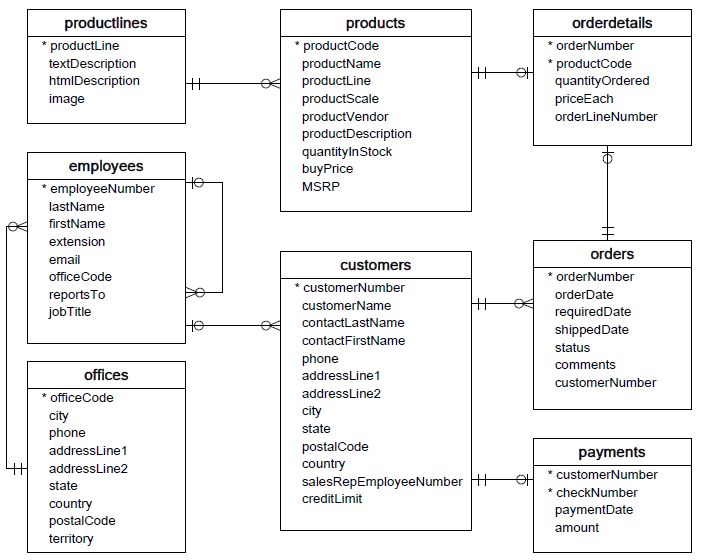
The queries you are asked to write will become more complex over the course of the lab.
As in previous labs, we'll make use of the sqlite3 library as well as pandas. By combining them, we'll be able to write queries as Python strings, then display the results in a conveniently-formatted table.
Note: Throughout this lesson, the only thing you will need to change is the content of the strings containing SQL queries. You do NOT need to modify any of the code relating to pandas; this is just to help make the output more readable.
In the cell below, we:
- Import the necessary libraries,
pandasandsqlite3 - Establish a connection to the database
data.sqlite, calledconn
# Run this cell without changes
import sqlite3
import pandas as pd

conn = sqlite3.Connection("data.sqlite")
The basic structure of a query in this lab is:
- Write the SQL query inside of the Python string
- Use
pd.read_sqlto display the results of the query in a formatted table
For example, if we wanted to select a list of all product lines from the company, that would look like this:
# Run this cell without changes
q0 = """
SELECT productline
FROM productlines
;
"""

pd.read_sql(q0, conn)
From now on, you will replace None within these Python strings with the actual SQL query code.
First, let's review some basic SQL queries, which do not require any joining, aggregation, or subqueries.
Write a query that gets the contact first name, contact last name, phone number, address line 1, and credit limit for all customers in California with a credit limit greater than 25000.00.
(California means that the state value is 'CA'.)

# Replace None with appropriate SQL code
q1 = """
SELECT
    contactFirstName,
    contactLastName,
    phone,
    addressLine1,
    creditLimit
FROM customers
WHERE
    state == 'CA'
    AND creditLimit > 25000
;
"""

q1_result = pd.read_sql(q1, conn)
q1_result
The following code checks that your result is correct:
# Run this cell without changes

# Testing which columns are returned
assert list(q1_result.columns) == ['contactFirstName', 'contactLastName', 'phone', 'addressLine1', 'creditLimit']

# Testing how many rows are returned
assert len(q1_result) == 10

# Testing the values in the first result
assert list(q1_result.iloc[0]) == ['Susan', 'Nelson', '4155551450', '5677 Strong St.', 210500]Write a query that gets the customer name, state, and country, for all customers outside of the USA with "Collect" as part of their customer name.
We are looking for customers with names like "Australian Collectors, Co." or "BG&E Collectables", where country is not "USA".

# Replace None with appropriate SQL code
q2 = """
SELECT
    customerName,
    state,
    country
FROM
    customers
WHERE
    customerName LIKE '%Collect%'
    AND country != 'USA'
;
"""

q2_result = pd.read_sql(q2, conn)
q2_result
The following code checks that your result is correct:
# Run this cell without changes

# Testing which columns are returned
assert list(q2_result.columns) == ['customerName', 'state', 'country']

# Testing how many rows are returned
assert len(q2_result) == 15

# Testing the values in the first result
assert list(q2_result.iloc[0]) == ['Australian Collectors, Co.', 'Victoria', 'Australia']Write a query that gets the full address (line 1, line 2, city, state, postal code, country) for all customers where the state field is not null.
Here we'll only display the first 10 results.

# Replace None with appropriate SQL code
q3 = """
SELECT
    addressLine1,
    addressLine2,
    city,
    state,
    postalCode,
    country
FROM customers
WHERE state IS NOT NULL
;
"""

q3_result = pd.read_sql(q3, conn)
q3_result.head(10)
The following code checks that your result is correct:
# Run this cell without changes

# Testing which columns are returned
assert list(q3_result.columns) == ['addressLine1', 'addressLine2', 'city', 'state', 'postalCode', 'country']

# Testing how many rows are returned
assert len(q3_result) == 49

# Testing the values in the first result
assert list(q3_result.iloc[0]) == ['8489 Strong St.', '', 'Las Vegas', 'NV', '83030', 'USA']
You have now completed all of the basic queries!
Write a query that gets the average credit limit per state in the USA.
The two fields selected should be state and average_credit_limit, which is the average of the creditLimit field for that state.

# Replace None with appropriate SQL code
q4 = """
SELECT
    state,
    AVG(creditLimit) AS average_credit_limit
FROM customers
WHERE country = 'USA'
GROUP BY state
;
"""

q4_result = pd.read_sql(q4, conn)
q4_result
The following code checks that your result is correct:
# Run this cell without changes

# Testing which columns are returned
assert list(q4_result.columns) == ['state', 'average_credit_limit']

# Testing how many rows are returned
assert len(q4_result) == 8

# Testing the values in the first result
first_result_list = list(q4_result.iloc[0])
assert first_result_list[0] == 'CA'
assert round(first_result_list[1], 3) == round(83854.54545454546, 3)Write a query that uses JOIN statements to get the customer name, order number, and status for all orders. For this example, stick to a simple join and avoid using sub-queries.
-
To ensure that your results will pass, make sure your output resembles the image below, including the order of the column names.
-
Refer to the ERD above to understand which tables contain these pieces of information, and the relationship between these tables.

# Replace None with appropriate SQL code
q5 = """
SELECT
    c.customerName,
    o.orderNumber,
    o.status
FROM
    customers c
    JOIN orders o
        ON c.customerNumber = o.customerNumber
;
"""
q5_result = pd.read_sql(q5, conn)
q5_result.head(15)
The following code checks that your result is correct:
# Run this cell without changes

# Testing which columns are returned
assert list(q5_result.columns) == ['customerName', 'orderNumber', 'status']

# Testing how many rows are returned
assert len(q5_result) == 326

# Testing the values in the first result
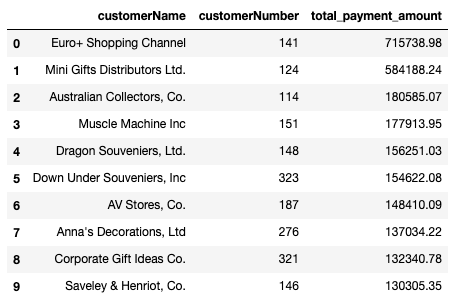
assert list(q5_result.iloc[0]) == ['Atelier graphique', 10123, 'Shipped']Write a query that uses JOIN statements to get top 10 customers in terms of total payment amount. Find the customer name, customer number, and sum of all payments made. The results should be ordered by the sum of payments made, starting from the highest value.
The three columns selected should be customerName, customerNumber and total_payment_amount.
# Replace None with appropriate SQL code
q6 = """
SELECT
    c.customerName,
    c.customerNumber,
    SUM(p.amount) AS total_payment_amount
FROM
    customers c
    JOIN payments p
        ON c.customerNumber = p.customerNumber
GROUP BY c.customerName
ORDER BY total_payment_amount DESC
LIMIT 10
;
"""
q6_result = pd.read_sql(q6, conn)
q6_result
The following code checks that your result is correct:
# Run this cell without changes

# Testing which columns are returned
assert list(q6_result.columns) == ['customerName', 'customerNumber', 'total_payment_amount']

# Testing how many rows are returned
assert len(q6_result) == 10

# Testing the values in the first result
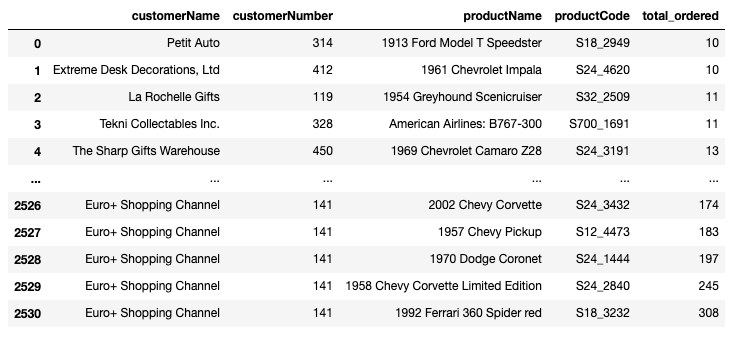
assert list(q6_result.iloc[0]) == ['Euro+ Shopping Channel', 141, 715738.98]Write a query that, for each customer, finds all of the products that they have purchased 10 or more times cumulatively. For each record, return the customer name, customer number, product name, product code, and total number ordered. Sort the rows in ascending order by the quantity ordered.
The five columns selected should be customerName, customerNumber, productName, productCode, and total_ordered, where total_ordered is the sum of all quantities of that product ordered by that customer.
Hint: For this one, you'll need to make use of HAVING, GROUP BY, and ORDER BY — make sure you get the order of them correct!
# Replace None with approprite SQL code
q7 = """
SELECT
    c.customerName,
    c.customerNumber,
    p.productName,
    p.productCode,
    SUM(od.quantityOrdered) AS total_ordered
FROM
    customers c
        JOIN orders o
            ON c.customerNumber = o.customerNumber
        JOIN orderdetails od
            ON od.orderNumber = o.orderNumber
        JOIN products p
            ON p.productCode = od.productCode
GROUP BY c.customerNumber, od.productCode
HAVING SUM(od.quantityOrdered) >= 10
ORDER BY total_ordered
;
"""
q7_result = pd.read_sql(q7, conn)
q7_result
The following code checks that your result is correct:
# Run this cell without changes

# Testing which columns are returned
assert list(q7_result.columns) == ['customerName', 'customerNumber', 'productName', 'productCode', 'total_ordered']

# Testing how many rows are returned
assert len(q7_result) == 2531

# Testing the values in the first result
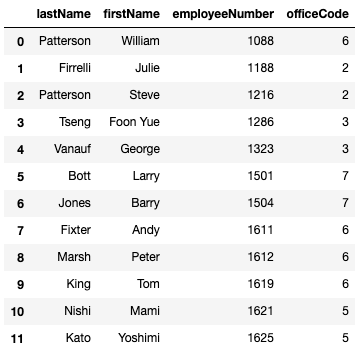
assert list(q7_result.iloc[0]) == ['Petit Auto', 314, '1913 Ford Model T Speedster', 'S18_2949', 10]Finally, get the last name, first name, employee number, and office code for employees from offices with fewer than 5 employees.
Hint: Use a subquery to find the relevant offices.
# Replace None with approprite SQL code
q8 = """
SELECT
    lastName,
    firstName,
    employeeNumber,
    officeCode
FROM employees
WHERE officeCode IN (
    SELECT officeCode
    FROM employees
    GROUP BY officeCode
    HAVING COUNT(employeeNumber) < 5
);
"""
q8_result = pd.read_sql(q8, conn)
q8_result
The following code checks that your result is correct:
# Run this cell without changes

# Testing which columns are returned
assert list(q8_result.columns) == ['lastName', 'firstName', 'employeeNumber', 'officeCode']

# Testing how many rows are returned
assert len(q8_result) == 12

# Testing the values in the first result
assert list(q8_result.iloc[0]) == ['Patterson', 'William', 1088, 6]
Now that we are finished writing queries, close the connection to the database:
# Run this cell without changes
conn.close()In this lesson, we produced several data queries for a model car company, mainly focused around its customer data. Along the way, we reviewed many of the major concepts and keywords associated with SQL SELECT queries: FROM, WHERE, GROUP BY, HAVING, ORDER BY, JOIN, SUM, COUNT, and AVG.