Station System
Contents
This page is not talking about Block#Anchor.
Station system provides player a brand new experience of making a realistic railway system. It is store at world's save file (./[world name]/eki-stations/[station name with postition].json). In current version's json format, it has:
- Name (Yes, it's station's name)
- Pos (Position of the block)
- Operator (Companies or players that maintain this station)
- Level (Station level, Based on TRA station level system. See wiki for more information)
Files can be edited except when your server is running, also, files don't save when the game crashed or the game accidentally close. You can use /saveSta to force saving the station manually.
{
    "name": "Forest Valley Station",
    "x": -280,
    "y": 68,
    "z": 99,
    "operator": "Highland Railway",
    "level": 1
}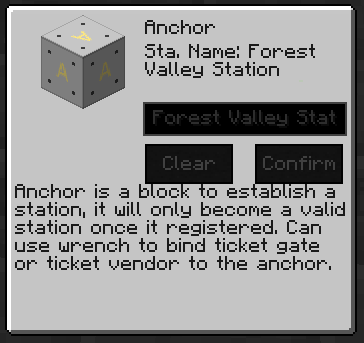 To create a valid station, you'll need to place an anchor block for your station. Once placed, right-click the anchor, it'll open a GUI like the picture on the left. There are two parts in it, the description part and customize part. In customize part, once you done typing your station name in the text field, click "Confirmed" button, and it'll create a station.
Once your station is valid and online to work, your ticket vendor's station list (on the left side of GUI) will add the station you added (See Block#Ticket Vendor), you can click it and it'll automatically calculate the distance from the vendor (or the anchor vendor registered/bound to) you are interacting with to the anchor a.k.a. the station. Simple and useful.
And yes, it is a good option to manage your server by using this system.