Station System
Station system provides player a brand new experience of making a realistic railway system. It is store at world's save file (./[world name]/eki-stations/[station name with postition].json). In current version's json format, it has:
- Name (Yes, it's station's name)
- Pos (Position of the block)
- Lines (Lines that pass through this station) (Optional)
- Operator (Company or people that maintain this station) (Optional)
These elements will use in these gadgets or blocks so you'll get a more clear list of "stations". See Establishment.
{
    "name": "Forest Valley Station",
    "x": -280,
    "y": 68,
    "z": 99,
    "lines": [
        "Purpur Line"
    ],
    "operator": "Highland Railway"
}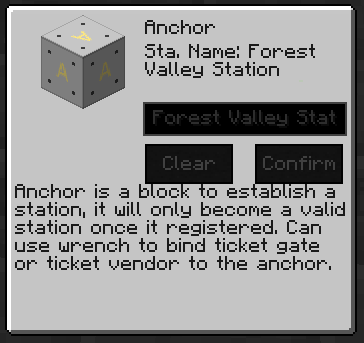 To create a valid station, you'll need to place an anchor block for your station. Once placed, right-click the anchor, it'll open a GUI like the picture on the left. There are two parts in it, the description part and customize part. In customize part, once you done typing your station name in the text field, click "Confirmed" button, and it'll create a station.
## Benefits
Once your station is valid and online to work, your ticket vendor's station list (on the left side of GUI) will add the station you added (See `Block#Ticket Vendor`)
To create a valid station, you'll need to place an anchor block for your station. Once placed, right-click the anchor, it'll open a GUI like the picture on the left. There are two parts in it, the description part and customize part. In customize part, once you done typing your station name in the text field, click "Confirmed" button, and it'll create a station.
## Benefits
Once your station is valid and online to work, your ticket vendor's station list (on the left side of GUI) will add the station you added (See `Block#Ticket Vendor`)