A premium, production-ready multi-step form manager for React & React Native. Built on top of react-hook-form and zod, it handles complex data flows, file persistence, draft recovery, and smooth animations — all with zero configuration.


react-form-steps ships with a powerful interactive CLI that generates complete multi-step wizard forms in seconds. No boilerplate — just answer a few questions and start building.
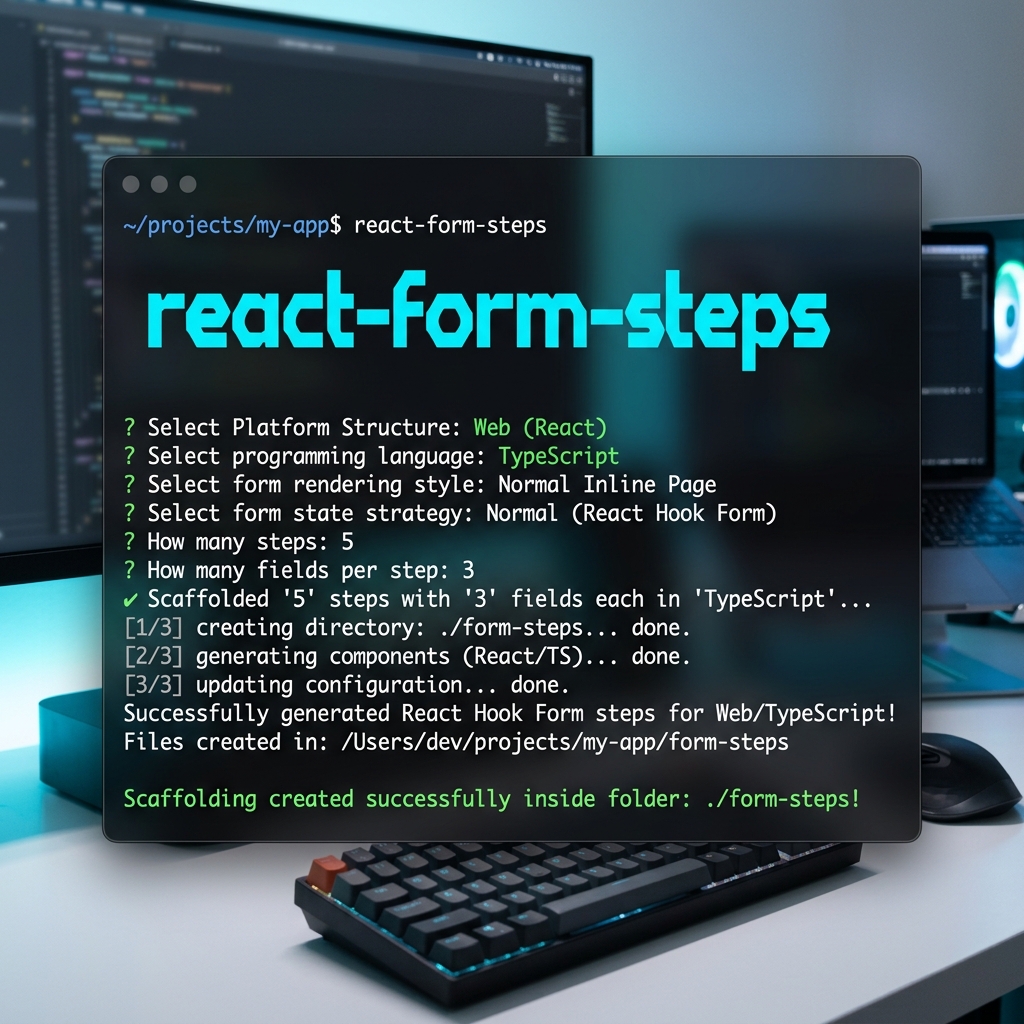
🎬 Click the terminal preview above to watch the interactive CLI setup demo!
npx react-form-stepsThe CLI walks you through:
| Prompt | Options |
|---|---|
| Platform | Web (React) · React Native (Mobile) |
| Language | JavaScript · TypeScript |
| Rendering Style | Normal Inline Page · Popup / Modal Overlay |
| State Strategy | Normal (React Hook Form) · Redux (React Hook Form + Redux Toolkit) |
| Steps | 1–10 steps |
| Fields per Step | 1–10 fields (uniform across all steps) |
./form-steps/
├── FormStepsWizard.tsx    # Main wizard wrapper
├── Step1.tsx              # Step 1 component
├── Step2.tsx              # Step 2 component
├── Step3.tsx              # Step 3 component
├── form-steps.css         # (Web only) Prebuilt styles
├── formSlice.ts           # (Redux only) Redux Toolkit slice
└── index.ts               # Barrel export
- 🏗️ Simple Architecture — Use
<FormSteps>and<Step>components to build forms in minutes. - ✅ First-Class Validation — Optional Zod integration for per-step or global validation.
- 💾 Smart Persistence — Automatically saves drafts to
localStorage,sessionStorage,AsyncStorage, or your custom database. - 📂 Base64 File Helper — Serializes
Fileobjects (images/PDFs) into drafts and restores them as real Files on resume. - ✨ Native Animations — Beautiful built-in
slideandfadetransitions. - 📊 Analytics Built-in — Track user drop-off with
onStepEnterandonStepCompletecallbacks. - 🔄 Edit Mode — Switch between "Create" and "Edit" modes with automatic field diffing.
- 🎨 Fully Customizable — Render props for banners, sidebars, and complete UI control.
- 📱 Cross-Platform — First-class React Native support with platform-specific components.
# Core dependencies
npm install react-form-steps react-hook-form @hookform/resolvers

# Optional: Add Zod for schema validation
npm install zod
For React Native, also install:
npm install @react-native-async-storage/async-storage// steps/PersonalInfo.tsx
import { useFormSteps } from 'react-form-steps';
export function PersonalInfo() {
const { register, formState: { errors }, goBack, goNext } = useFormSteps();
return (
<div>
<h3>Personal Information</h3>
<div>
<label>Full Name</label>
<input
{...register('fullName', { required: 'Name is required' })}
placeholder="John Doe"
/>
{errors.fullName && <span>{errors.fullName.message}</span>}
</div>
<div>
<label>Email Address</label>
<input
type="email"
{...register('email', { required: 'Email is required' })}
placeholder="john@example.com"
/>
{errors.email && <span>{errors.email.message}</span>}
</div>
<div>
<button type="submit">Next Step</button>
</div>
</div>
);
}// steps/AddressInfo.tsx
import { useFormSteps } from 'react-form-steps';
export function AddressInfo() {
const { register, formState: { errors }, goBack } = useFormSteps();
return (
<div>
<h3>Address Details</h3>
<div>
<label>Street Address</label>
<input
{...register('street', { required: 'Street is required' })}
placeholder="123 Main St"
/>
{errors.street && <span>{errors.street.message}</span>}
</div>
<div>
<label>City</label>
<input
{...register('city', { required: 'City is required' })}
placeholder="New York"
/>
{errors.city && <span>{errors.city.message}</span>}
</div>
<div>
<button type="button" onClick={goBack}>Back</button>
<button type="submit">Submit</button>
</div>
</div>
);
}// App.tsx
import { FormSteps, Step } from 'react-form-steps';
import { PersonalInfo } from './steps/PersonalInfo';
import { AddressInfo } from './steps/AddressInfo';
function App() {
const handleSubmit = (payload: any, diff: any) => {
console.log('✅ Form submitted:', payload);
// Send to your API
};
return (
<FormSteps
formKey="user-registration"
storageStrategy="localStorage"
transition="slide"
allowJump={true}
onSubmit={handleSubmit}
onStepEnter={(idx) => console.log('Entered step', idx)}
onStepComplete={(idx) => console.log('Completed step', idx)}
>
<Step label="Personal Info">
<PersonalInfo />
</Step>
<Step label="Address">
<AddressInfo />
</Step>
</FormSteps>
);
}
export default App;// steps/PersonalInfo.tsx
import React from 'react';
import { View, Text, TextInput, TouchableOpacity, StyleSheet } from 'react-native';
import { useFormSteps } from 'react-form-steps';
export function PersonalInfo() {
const { setValue, watch, formState: { errors }, goNext } = useFormSteps();
return (
<View style={styles.container}>
<Text style={styles.title}>Personal Information</Text>
<View style={styles.field}>
<Text style={styles.label}>Full Name</Text>
<TextInput
style={styles.input}
placeholder="John Doe"
value={watch('fullName') || ''}
onChangeText={(val) => setValue('fullName', val, { shouldValidate: true })}
/>
{errors.fullName && (
<Text style={styles.error}>{errors.fullName.message}</Text>
)}
</View>
<View style={styles.field}>
<Text style={styles.label}>Email</Text>
<TextInput
style={styles.input}
placeholder="john@example.com"
keyboardType="email-address"
value={watch('email') || ''}
onChangeText={(val) => setValue('email', val, { shouldValidate: true })}
/>
{errors.email && (
<Text style={styles.error}>{errors.email.message}</Text>
)}
</View>
<TouchableOpacity style={styles.button} onPress={goNext}>
<Text style={styles.buttonText}>Next Step</Text>
</TouchableOpacity>
</View>
);
}
const styles = StyleSheet.create({
container: { padding: 16 },
title: { fontSize: 20, fontWeight: '700', marginBottom: 16, color: '#1e293b' },
field: { marginBottom: 16 },
label: { fontSize: 13, fontWeight: '600', color: '#64748b', marginBottom: 6 },
input: { borderWidth: 1, borderColor: '#cbd5e1', borderRadius: 8, padding: 12, fontSize: 14 },
error: { color: '#ef4444', fontSize: 12, marginTop: 4 },
button: { backgroundColor: '#3b82f6', padding: 14, borderRadius: 8, alignItems: 'center', marginTop: 12 },
buttonText: { color: '#fff', fontSize: 14, fontWeight: '600' },
});// App.tsx
import React from 'react';
import { SafeAreaView, ScrollView } from 'react-native';
import AsyncStorage from '@react-native-async-storage/async-storage';
import { FormSteps, Step } from 'react-form-steps';
import { PersonalInfo } from './steps/PersonalInfo';
import { AddressInfo } from './steps/AddressInfo';
export default function App() {
const handleSubmit = (payload: any) => {
console.log('✅ Form submitted:', payload);
};
return (
<SafeAreaView style={{ flex: 1 }}>
<ScrollView>
<FormSteps
formKey="native-registration"
asyncStorage={AsyncStorage}
transition="slide"
allowJump={true}
onSubmit={handleSubmit}
>
<Step label="Personal Info">
<PersonalInfo />
</Step>
<Step label="Address">
<AddressInfo />
</Step>
</FormSteps>
</ScrollView>
</SafeAreaView>
);
}The library auto-saves user progress as they navigate between steps. If a user leaves and returns later, a customizable banner asks them to resume or start fresh.
<FormSteps
  formKey="checkout-form"
  storageStrategy="localStorage"   // Web: localStorage or sessionStorage
  asyncStorage={AsyncStorage}      // React Native: AsyncStorage
  draftTTL={86400}                 // Draft expires after 24 hours (in seconds)
  Autofilldata={true}              // Skip the banner, auto-resume silently
  onDraftFound={(draft) => console.log('Draft found!', draft)}
  onSubmit={handleSubmit}
>
  {/* steps */}
</FormSteps>Pass a Zod schema to any <Step> for per-step validation. The form will not advance until the schema passes:
import { z } from 'zod';

const contactSchema = z.object({
  phone: z.string().min(10, 'Enter a valid phone number'),
  address: z.string().min(5, 'Address is too short'),
});

<Step label="Contact Details" schema={contactSchema}>
  <ContactForm />
</Step>Most libraries lose file uploads if the page refreshes. react-form-steps automatically converts File and FileList objects into Base64 strings for storage, and restores them as real File objects when the user resumes.
// In your step component — just use a file input normally:
<input type="file" {...register('avatar')} />

// The library automatically serializes & restores files from drafts!Pass defaultValues to switch to edit mode. The library automatically tracks which fields changed:
<FormSteps
  formKey="edit-profile"
  defaultValues={existingUserData}  // Activates edit mode
  onSubmit={(payload, changedFields) => {
    console.log('Full payload:', payload);
    console.log('Only changed fields:', changedFields);
    // Send a PATCH request with only the changed fields
  }}
>
  {/* steps */}
</FormSteps>Sync form state with your Redux store in real-time:
import { useDispatch } from 'react-redux';
import { updateFormData } from './formSlice';

function App() {
  const dispatch = useDispatch();

  return (
    <FormSteps
      formKey="redux-form"
      onDataChange={(data) => dispatch(updateFormData(data))}
      onSubmit={handleSubmit}
    >
      {/* steps */}
    </FormSteps>
  );
}Monitor conversion rates and user drop-off:
<FormSteps
  onStepEnter={(idx) => analytics.track('Step Viewed', { step: idx })}
  onStepComplete={(idx) => analytics.track('Step Completed', { step: idx })}
  onSubmit={handleSubmit}
>
  {/* steps */}
</FormSteps>Add smooth animations between steps:
<FormSteps transition="slide">   {/* Slide from right */}
<FormSteps transition="fade">    {/* Fade in/out */}
<FormSteps transition="none"> {/* Instant (default) */}Control how users can navigate between steps:
<FormSteps
  allowJump={true}         // Allow clicking step indicators to jump
  unrestrictedNav={true}   // Allow jumping even to incomplete steps
  onSubmit={handleSubmit}
>
  {/* steps */}
</FormSteps>| Prop | Type | Default | Description |
|---|---|---|---|
formKey |
string |
— | Unique key for draft storage. |
storageStrategy |
'localStorage' | 'sessionStorage' | 'database' | 'none' |
'none' |
Where to persist drafts (Web). |
asyncStorage |
{ getItem, setItem, removeItem } |
— | Custom async storage adapter (React Native). |
Autofilldata |
boolean |
false |
Auto-resume drafts without prompting the user. |
draftTTL |
number |
— | Draft time-to-live in seconds. |
transition |
'slide' | 'fade' | 'none' |
'none' |
Animation between steps. |
allowJump |
boolean |
false |
Allow non-linear step navigation. |
unrestrictedNav |
boolean |
false |
Allow jumping to incomplete steps. |
defaultValues |
any |
— | Initial data (activates Edit Mode). |
onSubmit |
(payload, diff) => void |
Required | Called on final step submission. |
onAutoSave |
(step, data, merged) => Promise<void> |
— | Custom auto-save callback (database strategy). |
onClearDraft |
() => void |
— | Called when draft is cleared (clean up DB). |
onDataChange |
(data) => void |
— | Sync state with Redux or external stores. |
onDraftFound |
(draft) => void |
— | Notified when a saved draft is detected. |
onStepEnter |
(index) => void |
— | Called when a step becomes active. |
onStepComplete |
(index) => void |
— | Called when a step is completed. |
bannerConfig |
object |
— | Customize default banner text and styles. |
renderDraftBanner |
(props) => ReactNode |
— | Render prop for fully custom draft banners. |
| Prop | Type | Default | Description |
|---|---|---|---|
label |
string |
Required | Display name for the step. |
schema |
ZodSchema |
— | Zod schema for per-step validation. |
Returns the full FormStepsContext merged with react-hook-form's useFormContext():
| Value | Type | Description |
|---|---|---|
values / mergedData |
any |
Current merged values of all steps. |
currentStep |
number |
Index of the active step. |
steps |
StepInfo[] |
Array of { index, label, status }. |
isEditMode |
boolean |
true when defaultValues is provided. |
isSubmitting |
boolean |
true during onSubmit execution. |
changedFields |
Record<string, boolean> |
Map of changed fields (edit mode only). |
goNext() |
() => Promise<void> |
Validate current step and move forward. |
goBack() |
() => void |
Move to previous step. |
goToStep(idx) |
(index: number) => void |
Jump to a specific step. |
getAllErrors() |
() => Record<number, any> |
Get validation errors across all steps. |
resumeDraft(draft) |
(draft) => void |
Programmatically resume a draft. |
clearDraft() |
() => void |
Clear saved draft and reset form. |
register |
function |
Register input fields (from React Hook Form). |
watch |
function |
Watch specific fields (from React Hook Form). |
setValue |
function |
Set field values (from React Hook Form). |
handleSubmit |
function |
Form submit handler (from React Hook Form). |
formState |
object |
Full form state including errors, isDirty, etc. |
Don't like the default banner? Replace it entirely with your own UI:
<FormSteps
  formKey="my-form"
  storageStrategy="localStorage"
  renderDraftBanner={({ draft, resume, startFresh, dismiss }) => (
    <div className="my-custom-banner">
      <p>📝 We found your previous progress!</p>
      <p>Last saved: {new Date(draft.savedAt).toLocaleString()}</p>
      <button onClick={resume}>Continue Where I Left Off</button>
      <button onClick={startFresh}>Start Over</button>
      <button onClick={dismiss}>Dismiss</button>
    </div>
  )}
  onSubmit={handleSubmit}
>
  {/* steps */}
</FormSteps>
Or customize just the text using bannerConfig:
<FormSteps
  bannerConfig={{
    title: 'Welcome Back!',
    description: 'You have unsaved progress from your last visit.',
    resumeLabel: 'Continue',
    freshLabel: 'Start Over',
  }}
  onSubmit={handleSubmit}
>
  {/* steps */}
</FormSteps>Contributions are welcome! Please open an issue or submit a pull request.
MIT © CoderKube Technologies