Skip to content

Conversation

@webdog-rich
Copy link
Contributor

Subsequent calls of GoogleAuth.signIn() now return the user object. This is useful when restoring a previous sign in. I use this to fetch a new token that I can then submit to Amazon Cognito Federated Identity pools.

Also added error handling.

This fixes #69 as let googleUser = await Plugins.GoogleAuth.signIn(null) as any; hangs due to nothing being returned.

My first PR :)

@webdog-rich webdog-rich mentioned this pull request Apr 3, 2022
@reslear
Copy link
Collaborator

reslear commented Apr 3, 2022

Welcome to os, Congratulations on the first contributing 🎉

@reslear reslear merged commit 999a767 into CodetrixStudio:master Apr 3, 2022
@DaveRicho
Copy link

Thanks very much @webdog-rich. Unfortunately, I'm still having the same issue on iOS. Perhaps there is something else I'm doing wrong, but I still can't find it. For now, I've just had to avoid it using in iOS (but I'm still using 3.0.2 successfully in android and web with no issues).

@webdog-rich
Copy link
Contributor Author

Have you definitely upgraded to the latest commit? Can you check if you have any differences to this file in the plugin directory?

https://github.com/CodetrixStudio/CapacitorGoogleAuth/blob/master/ios/Plugin/Plugin.swift

Also, make sure to build the project for ios again - "ionic capacitor build ios" (or similar if you are not using ionic).

I also added error logging for restorePreviousSignIn(), so maybe an error is now logged in the console which will tell us what the issue is?

@collindutter
Copy link

@webdog-rich @reslear should hasPreviousSignIn/restorePreviousSignIn also be used in refresh?

Occasionally, when calling refresh, self.googleSignIn.currentUser is returned as nil. I believe this is the same issue.

Thanks for all the great work on this project :)

@reslear
Copy link
Collaborator

reslear commented Apr 5, 2022

@collindutter thx, and what do you suggest?

@collindutter
Copy link

collindutter commented Apr 5, 2022

Replace:

if self.googleSignIn.currentUser == nil {
    call.reject("User not logged in.");
    return
}
self.googleSignIn.currentUser!.authentication.do { (authentication, error) in
    guard let authentication = authentication else {
        call.reject(error?.localizedDescription ?? "Something went wrong.");
        return;
    }
    let authenticationData: [String: Any] = [
        "accessToken": authentication.accessToken,
        "idToken": authentication.idToken ?? NSNull(),
        "refreshToken": authentication.refreshToken
    ]
    call.resolve(authenticationData);
}

with some variation of:

if !self.googleSignIn.hasPreviousSignIn() {
    call.reject("User not logged in.");
    return
}
self.googleSignIn.restorePreviousSignIn();
self.googleSignIn.currentUser!.authentication.do { (authentication, error) in
    guard let authentication = authentication else {
        call.reject(error?.localizedDescription ?? "Something went wrong.");
        return;
    }
    let authenticationData: [String: Any] = [
        "accessToken": authentication.accessToken,
        "idToken": authentication.idToken ?? NSNull(),
        "refreshToken": authentication.refreshToken
    ]
    call.resolve(authenticationData);
}

Edit: I suppose with this latest PR, I should be able to refresh my token just by calling signIn. If that is the case, not sure refresh has a role.

@reslear
Copy link
Collaborator

reslear commented Apr 5, 2022

@collindutter PR welcome :)

@collindutter
Copy link

@reslear Sure thing, I'm happy to start on this! Though do you think having a refresh method is still necessary with these recent signIn changes?

@reslear
Copy link
Collaborator

reslear commented Apr 5, 2022

@collindutter i'm not iOS developer 😀 maybe @joeflateau will help reply?

@DaveRicho
Copy link

Have you definitely upgraded to the latest commit? Can you check if you have any differences to this file in the plugin directory?

https://github.com/CodetrixStudio/CapacitorGoogleAuth/blob/master/ios/Plugin/Plugin.swift

Also, make sure to build the project for ios again - "ionic capacitor build ios" (or similar if you are not using ionic).

I also added error logging for restorePreviousSignIn(), so maybe an error is now logged in the console which will tell us what the issue is?

Hi @webdog-rich,

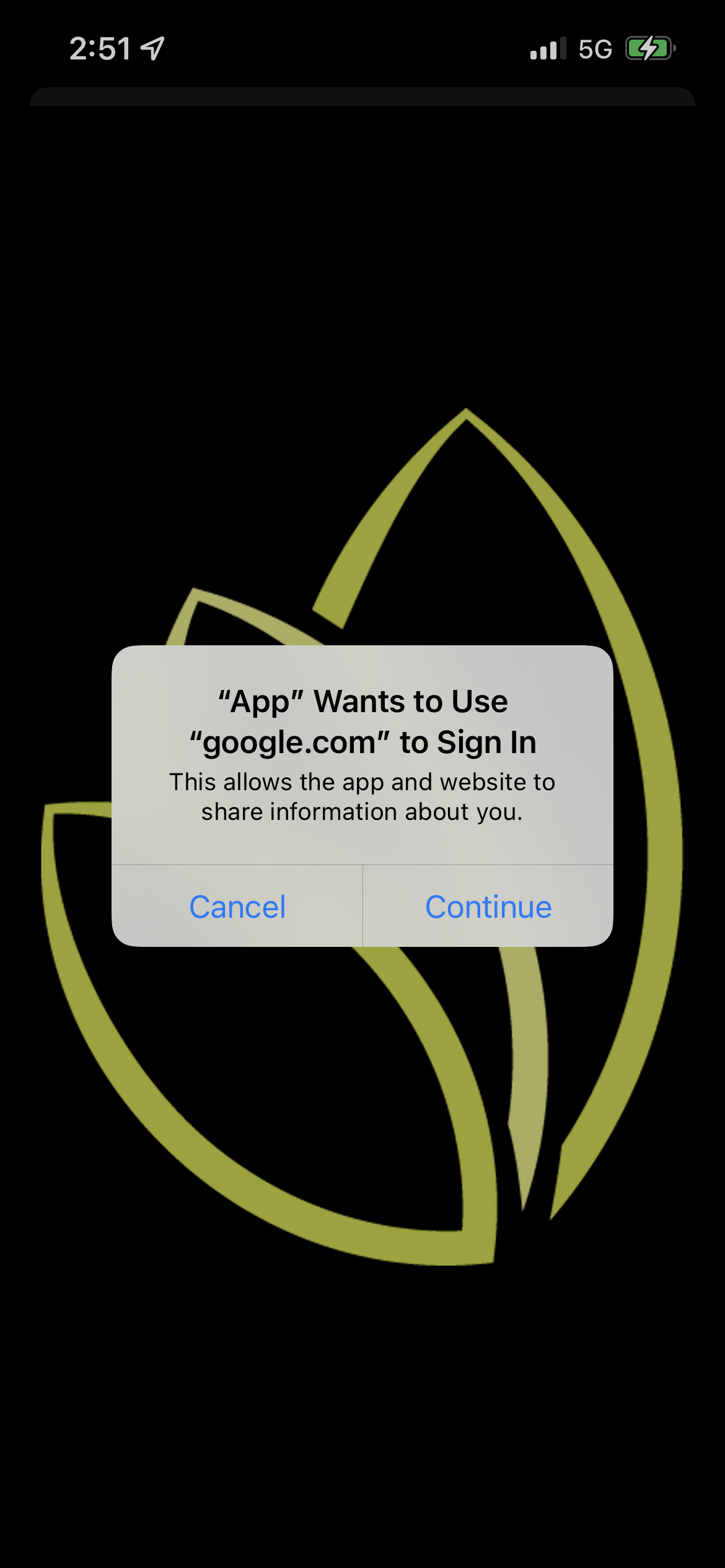
I've done all of those steps. When I try to debug the swift code in XCode when running on my iphone 13 pro (https://github.com/CodetrixStudio/CapacitorGoogleAuth/blob/master/ios/Plugin/Plugin.swift), it seems to give me a chance to choose "continue" in the attached picture after about line 85 (from the swift code).

After that, I see the Google Sign in pop up for a split second before vanishing. I don't seem to be able to debug it from there. It has got me baffled.

Thanks for you efforts!
Dave
9EDFA5DC-411F-4FF2-9902-4321AE765237
.

@collindutter
Copy link

@collindutter i'm not iOS developer 😀 maybe @joeflateau will help reply?

After doing some testing, I can confirm that @webdog-rich's changes to signIn work as a replacement for refresh. Two paths forward:

  1. Remove refresh from the API, update iOS usage instructions
  2. Apply the hasPreviousSignIn/restorePreviousSignIn changes to refresh

@collindutter
Copy link

@DaveRicho would you mind sharing your package.json and capacitor.config.json? It might be helpful to see what versions, and configuration you've got.

@webdog-rich
Copy link
Contributor Author

@DaveRicho are there any errors logged when this happens? Are you able to share your sign in/refresh code? Need some more details on your setup.

@DaveRicho
Copy link

DaveRicho commented Apr 9, 2022

@DaveRicho would you mind sharing your package.json and capacitor.config.json? It might be helpful to see what versions, and configuration you've got.

Hi @collindutter,

Here is an is the capacitor.config.ts


import { CapacitorConfig } from '@capacitor/cli';

const config: CapacitorConfig = {
    appId: 'com.myapp.myapp.app',
    appName: 'MyApp',
    webDir: 'www',
    plugins: {
      SplashScreen: {
        launchAutoHide: true,        
        launchShowDuration: 1000,
        showSpinner: false,
        androidSplashResourceName: 'splash',
        androidScaleType: 'CENTER_CROP',
        iosSpinnerStyle: 'small',
        spinnerColor: '#ffffff',
      },
      GoogleAuth: {
        scopes: [
            'profile',
            'email'
          ],
          serverClientId: '999999999999-xxxxxxxxxxxxxxxxxxxxxxxxxxxxxxxx.apps.googleusercontent.com',
          clientId: '999999999999-xxxxxxxxxxxxxxxxxxxxxxxxxxxxxxxx.apps.googleusercontent.com',
          forceCodeForRefreshToken: true
      },
      LocalNotifications: {
        smallIcon: 'ic_stat_icon_config_sample',
        iconColor: '#CE0B7C',
      },
      PushNotifications: {
        presentationOptions: ['badge', 'alert', 'sound'],
      },
    },
  };
  
  export default config; 

Here is the package.json:

{
  "name": "MyApp",
  "version": "2.0.2",
  "author": "XXXX Team",
  "homepage": "https://myapp.com",
  "scripts": {
    "ng": "ng",
    "start": "ionic serve",
    "build": "ionic build  && npx cap copy",
    "build:prod": "ionic build --configuration production --progress && npx cap copy",
    "open:ios": "npx cap open ios",
    "open:android": "npx cap open android",
    "test": "ng test",
    "lint": "ng lint",
    "e2e": "ng e2e",
    "dev:ios": "ionic capacitor run ios -l --external",
    "cleanPublic": "rm -r public/*",
    "copy": "cp -r www/* public && cp -r src/.well-known public",
    "deployhosting": "firebase deploy --only hosting:myapp-app",
    "deploy:local": "npm run cleanPublic && npm run build:prod && npm run copy",
    "deploy": "npm run cleanPublic && npm run build:prod && npm run copy && npm run deployhosting",
    "xcode:bump": "sh xcode-version-bump.sh",
    "postinstall": "jetifier",
    "serve:local": "http-server ./www -p 8888",
    "lighthouse:local": "lighthouse http://localhost:8888 --view",
    "lighthouse:prod": "lighthouse https://myapp.com --view"
  },
  "private": true,
  "dependencies": {
    "@angular/common": "~12.2.16",
    "@angular/core": "~12.2.16",
    "@angular/fire": "^6.1.5",
    "@angular/forms": "~12.2.16",
    "@angular/platform-browser": "~12.2.16",
    "@angular/platform-browser-dynamic": "~12.2.16",
    "@angular/router": "~12.2.16",
    "@angular/service-worker": "~12.2.16",
    "@capacitor-community/apple-sign-in": "^0.1.2",
    "@capacitor-community/fcm": "^2.0.0",
    "@capacitor/android": "^3.4.0",
    "@capacitor/app": "^1.0.2",
    "@capacitor/browser": "^1.0.2",
    "@capacitor/core": "^3.4.0",
    "@capacitor/device": "^1.0.2",
    "@capacitor/filesystem": "^1.0.2",
    "@capacitor/haptics": "^1.0.2",
    "@capacitor/ios": "^3.4.0",
    "@capacitor/keyboard": "^1.0.2",
    "@capacitor/push-notifications": "^1.0.3",
    "@capacitor/splash-screen": "^1.1.0",
    "@capacitor/status-bar": "^1.0.2",
    "@capacitor/storage": "^1.0.3",
    "@codetrix-studio/capacitor-google-auth": "^3.1.3",
    "@ionic-native/app-version": "^5.31.1",
    "@ionic-native/call-number": "^5.30.0",
    "@ionic-native/core": "^5.30.0",
    "@ionic-native/email-composer": "^5.30.0",
    "@ionic-native/market": "^5.34.0",
    "@ionic-native/splash-screen": "^5.30.0",
    "@ionic-native/status-bar": "^5.30.0",
    "@ionic/angular": "^6.0.4",
    "call-number": "^1.0.1",
    "chart.js": "^3.4.1",
    "cordova-plugin-app-version": "^0.1.12",
    "cordova-plugin-email-composer": "^0.9.2",
    "cordova-plugin-market": "^1.2.0",
    "core-js": "^3.6.5",
    "d3": "^6.3.1",
    "d3-selection": "^2.0.0",
    "d3-zoom": "^2.0.0",
    "firebase": "^8.10.1",
    "jetifier": "^1.6.5",
    "rxjs": "^6.6.7",
    "swiper": "^8.0.5",
    "tslib": "^2.0.0",
    "zone.js": "~0.11.4"
  },
  "devDependencies": {
    "@angular-devkit/architect": "~0.1202.15",
    "@angular-devkit/build-angular": "~12.2.15",
    "@angular-devkit/core": "~12.2.15",
    "@angular-devkit/schematics": "~12.2.15",
    "@angular/cli": "~12.2.15",
    "@angular/compiler": "~12.2.16",
    "@angular/compiler-cli": "~12.2.16",
    "@angular/language-service": "~12.2.16",
    "@capacitor/cli": "^3.4.0",
    "@ionic/angular-toolkit": "^4.0.0",
    "@types/d3": "^6.2.0",
    "@types/d3-selection": "^2.0.0",
    "@types/d3-zoom": "^2.0.0",
    "@types/jasmine": "~3.6.0",
    "@types/jasminewd2": "~2.0.3",
    "@types/node": "^12.11.1",
    "codelyzer": "^6.0.0",
    "firebase-admin": "^8.10.0",
    "firebase-functions": "^3.6.0",
    "jasmine-core": "~3.6.0",
    "jasmine-spec-reporter": "~5.0.0",
    "karma": "~6.3.4",
    "karma-chrome-launcher": "~3.1.0",
    "karma-coverage-istanbul-reporter": "~2.0.1",
    "karma-jasmine": "~4.0.0",
    "karma-jasmine-html-reporter": "^1.5.0",
    "protractor": "^7.0.0",
    "ts-node": "~7.0.0",
    "tslint": "^6.1.3",
    "typescript": "^4.3.5"
  },
  "description": "A XXXX Ionic Capacitor Angular project"
}

@DaveRicho
Copy link

@DaveRicho are there any errors logged when this happens? Are you able to share your sign in/refresh code? Need some more details on your setup.

Hi @webdog-rich ,

I still don’t see any additional Xcode logging that is helpful (I might just be dumb though).

Here is some of the sign in code:

async googleSignIn() {
  console.log('in googleSignIn()');
  let googleUser = await GoogleAuth.signIn() as any;
  console.log(googleUser);
  const credential = firebase.default.auth.GoogleAuthProvider.credential(
    googleUser.authentication.idToken
  );
  console.log(credential);
  return this.afAuth.signInWithCredential(credential);
  // return this.afAuth.signInAndRetrieveDataWithCredential(credential);
}
signInWithGoogle() {
  console.log("Sign in with google");
  const seq = from(
    this.googleSignIn()
  ).pipe(
    tap(x => console.log(x)),
    catchError((err) => {
      console.log(err);
      return of({
        errorMessage: "Sign In With Google was interrupted. Try again.",
      });
    }),
    share(),
    takeUntil(this.ngUnsubscribe)
  );

  seq
    .subscribe(
      (result: any) => {
        // If the API returned a successful response, mark the user as logged in
        console.log("in user.ts in signInWithGoogle()");
        console.log(result);
        if (!result) {
          console.log("might need to wait a few moments");
          return new Error("Try to login again after waiting a few moments.");
        }

        if (result.errorMessage) {
          console.log(result.errorMessage);
          return result;
        }

        const res = result.user;
        console.log({ res });

        if (result.additionalUserInfo.isNewUser) {
          this.signUpGoogleSignIn(result.user);
        }

        if (!res.emailVerified) {
          console.log("email needs to be verified.");
          return new Error("Check your email to verify your account");
        }

        if (res.emailVerified && res.uid) {
          // Redirect the user here
          console.log("in user.ts login()");
          this.isLoggedIn = true;
        } else {
          // Tell the user to have a look at their mailbox
          console.log("email needs to be verified.");
          return new Error("Check your email to verify your account");
        }
      },
      (err) => {
        console.error("ERROR", err);
      }
    );

  return seq;
} 

@webdog-rich
Copy link
Contributor Author

Sorry, been busy.

Does console.log(googleUser)in the googleSignIn function ever log anything on the console?

Sign up for free to join this conversation on GitHub. Already have an account? Sign in to comment

Labels

None yet

Projects

None yet

Development

Successfully merging this pull request may close these issues.

ios14 issues?

4 participants