⚠️ We have plans for a PBR & POM texture mapping addon that will entirely overhaul the current PBR addon. The latest PBR Addon version will only work for Compbuild Textures v5.0.3 on 1.18.1. Stay tuned for 2024 for a overhauled PBR addon that will work on the latest version of Compbuild Textures!
Compbuild Textures includes an optional downloadable PBR addon which includes PBR textures for some of the blocks in the main texture pack.
If you need help installing the addon, or want to suggest a feature. Join our Discord server!
IMPORTANT: Before you install the addon, install the main pack first. The main pack can be found at (https://github.com/CompbuildREDUX/Compbuild-Textures). The PBR effects also require shaders to work, be sure to use shaders as well.
- Install Compbuild Textures
- Install the PBR addon
- Once you've installed the PBR addon, put it in
AppData\Roaming\.minecraft\resourcepacks - To enable the addon, place the addon over Compbuild Textures. An image is shown below.
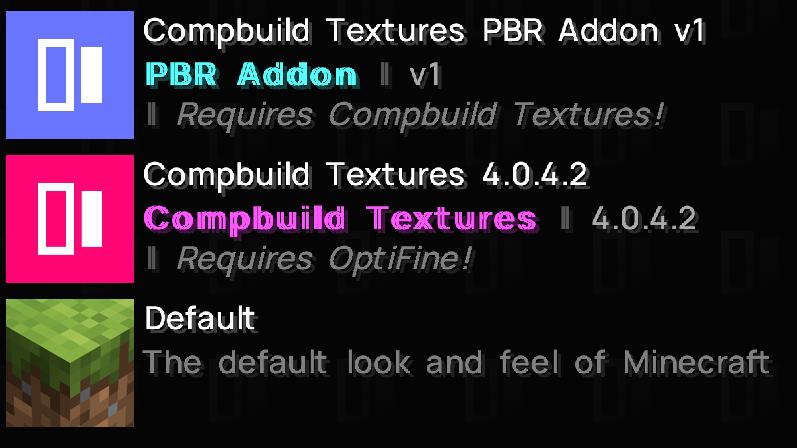
Installing the addon is very similar to installing the main pack, all you need to do is place the addon over the main pack.
- SEUS PTGI (https://www.patreon.com/sonicether) - Set Texture Resolution to 128 in Shader Options. For the best experience, we recommend turning on Full Raytrace Reflections in Raytracing Options. In Surface Options, turn on Physically Based Max Roughness
- Continuum RT (https://continuum.graphics/store/) - Use the Focal Engine version of Continuum RT
- Continuum 2.1 (https://continuum.graphics/store/) - No modifications of settings required
- BSL Shaders (https://www.curseforge.com/minecraft/customization/bsl-shaders) - Make sure to set Advanced Materials to ON in the shader by going to Video Settings > Shaders > Shader Options > Material > Advanced Materials: ON
- Kappa Shaders (https://www.curseforge.com/minecraft/customization/kappa-shader-by-rre36) - No modifications of settings required, however if you'd like to take screenshots of our PBR, turn ON Depth of Field
Want to stay anticipated for updates? Compbuild also has social media to connect with! Catch up with the latest updates and news on our Discord server, and follow us on Instagram!
- Instagram (https://www.instagram.com/compbuildredux/)
- Twitter (https://twitter.com/compbuild_redux)
- Discord (https://discord.gg/Kw7stMa)