Repository navigation
Releases
Elite AI Bridge 2.0.7

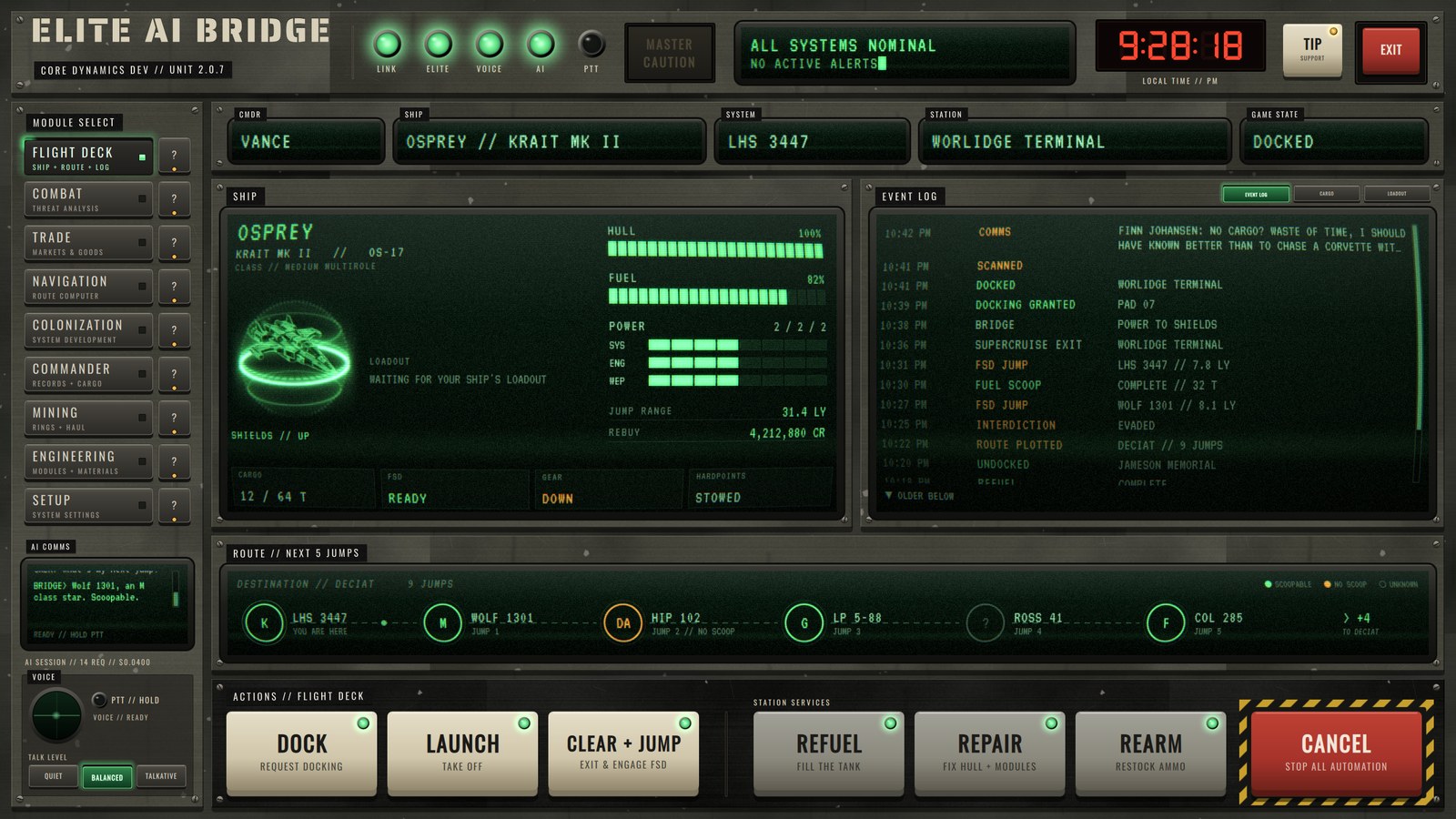
Fixed
- First-time setup and newer Python: setup now uses Python 3.12 or 3.13 for the Bridge's private runtime. If your PC only had Python 3.14, setup picked it, and one of the Bridge's parts (pygame) doesn't support 3.14 yet, so setup failed with "A required Bridge component failed to install". If you only have 3.14, setup now installs 3.12 alongside it.
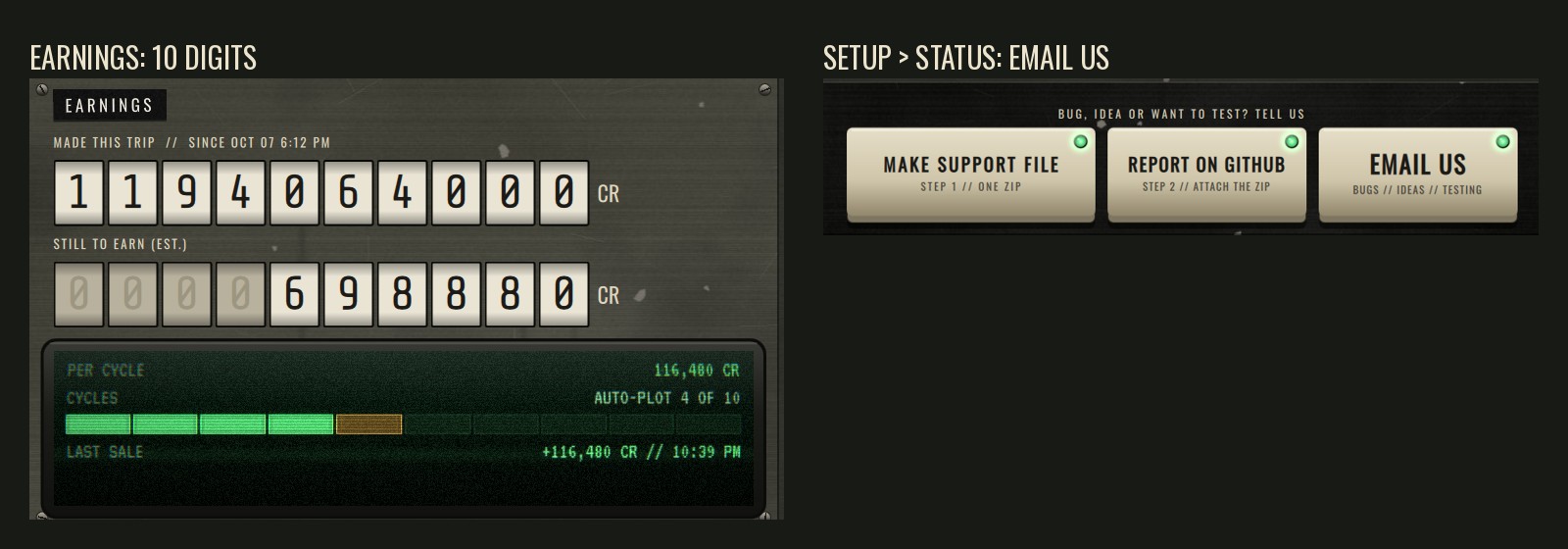
- Trip earnings over 100 million: the EARNINGS counters on Trade > MY RUN have 10 digits now (up to 9,999,999,999 CR). Big trips no longer lose their top digit.
- Colonization WHERE TO BUY: now uses the Trade LANDING PAD and STATIONS filters and says how many stations it hid. This was meant to ship in 2.0.6 but didn't make it in.
Changed
- Easier to reach us: Setup > Status has an EMAIL US key for bugs, ideas, or if you'd like to help test. The setup wizard's last screen has the same email link.
- Support file: MAKE SUPPORT FILE now includes the first-time setup log, so setup problems come with the rest.
- The turkey: the Autumn turkey now gobbles like a real turkey.
- Emerald is a deeper green, so it no longer looks like the default Green.
- Setup > Display: the STATIC and SCREEN FX sliders sit side by side, so nothing overlaps on smaller screens.
Thank you
Thanks to mirko8054 for finding and reporting the Python setup problem, and to nhok0169 for the earnings counter. Reports like these are how the Bridge gets better. If something breaks or you have an idea, open an issue here or email coredynamicsdev@gmail.com.
Installing
Download Elite_AI_Bridge_Setup_2.0.7.exe below and run it. It upgrades 2.0.x in place and keeps your settings. Windows may show a SmartScreen warning because the installer isn't code-signed: choose More info, then Run anyway.
Verify your download
SHA-256 of Elite_AI_Bridge_Setup_2.0.7.exe:
ca01196c9c2fcb68e54455225fb9b0c0b358c92ea849ec74b32c60aeb3e6dd61
In PowerShell: Get-FileHash .\Elite_AI_Bridge_Setup_2.0.7.exe -Algorithm SHA256
Current test pilots
CMDR Alphabrodawg and CMDR AJustaFire fly the Bridge, send in the logs and find what breaks first. Thank you.
Want to help test the Bridge? Fly it, tell us what breaks, and get any future supporter extras free. Email coredynamicsdev@gmail.com.
Elite AI Bridge v2.0.6
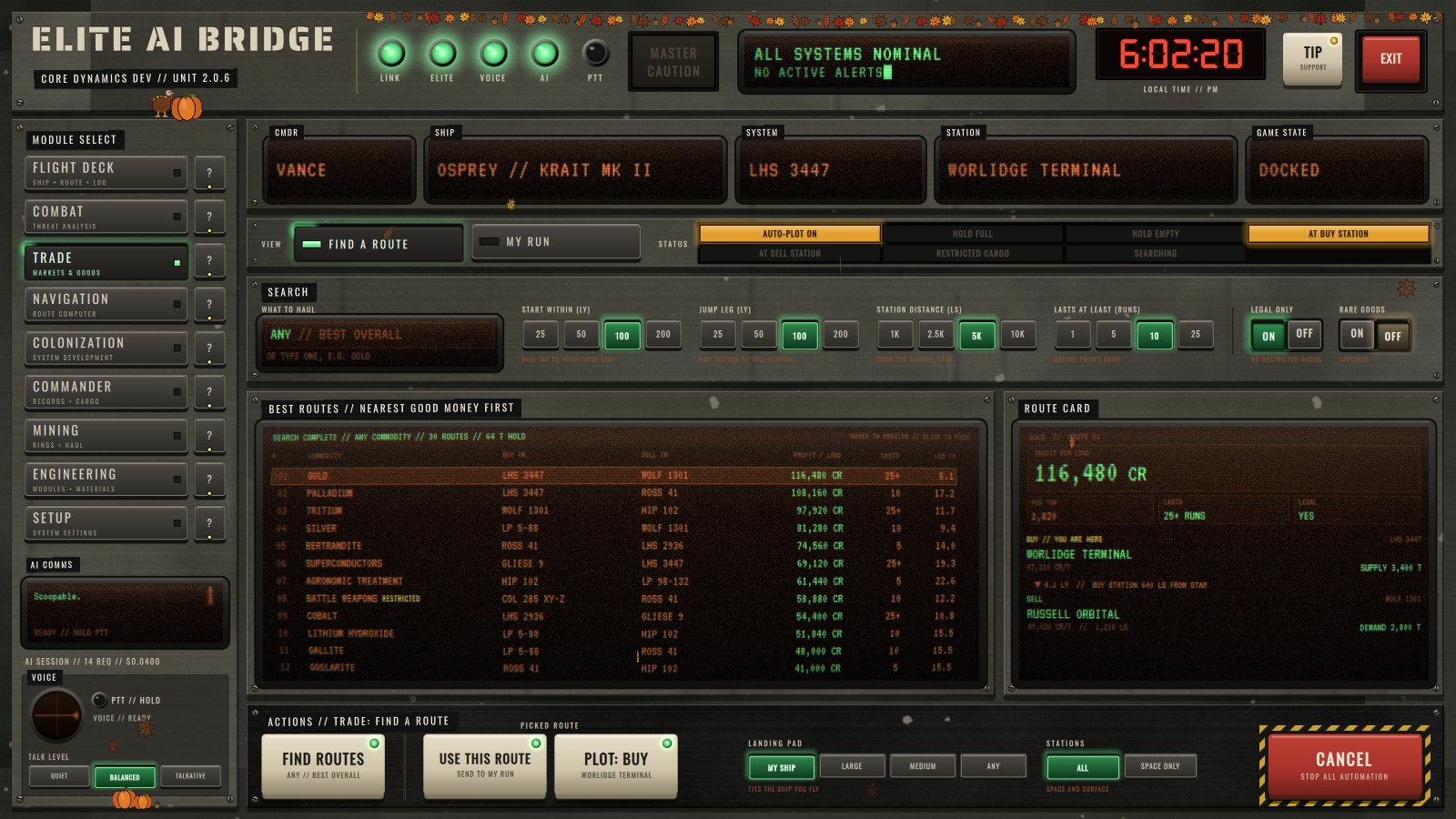
Screens shown use demo data.
What's new
- Trade search filters (from a tester's request), on the FIND A ROUTE deck:
- Landing pad: MY SHIP (fits the ship you fly, as before), LARGE, MEDIUM or ANY.
- Stations: ALL or SPACE ONLY. SPACE ONLY drops planetary ports and settlements.
- Both are saved and used by every route search. Colonization's WHERE TO BUY list uses them too, and says how many stations it hid.
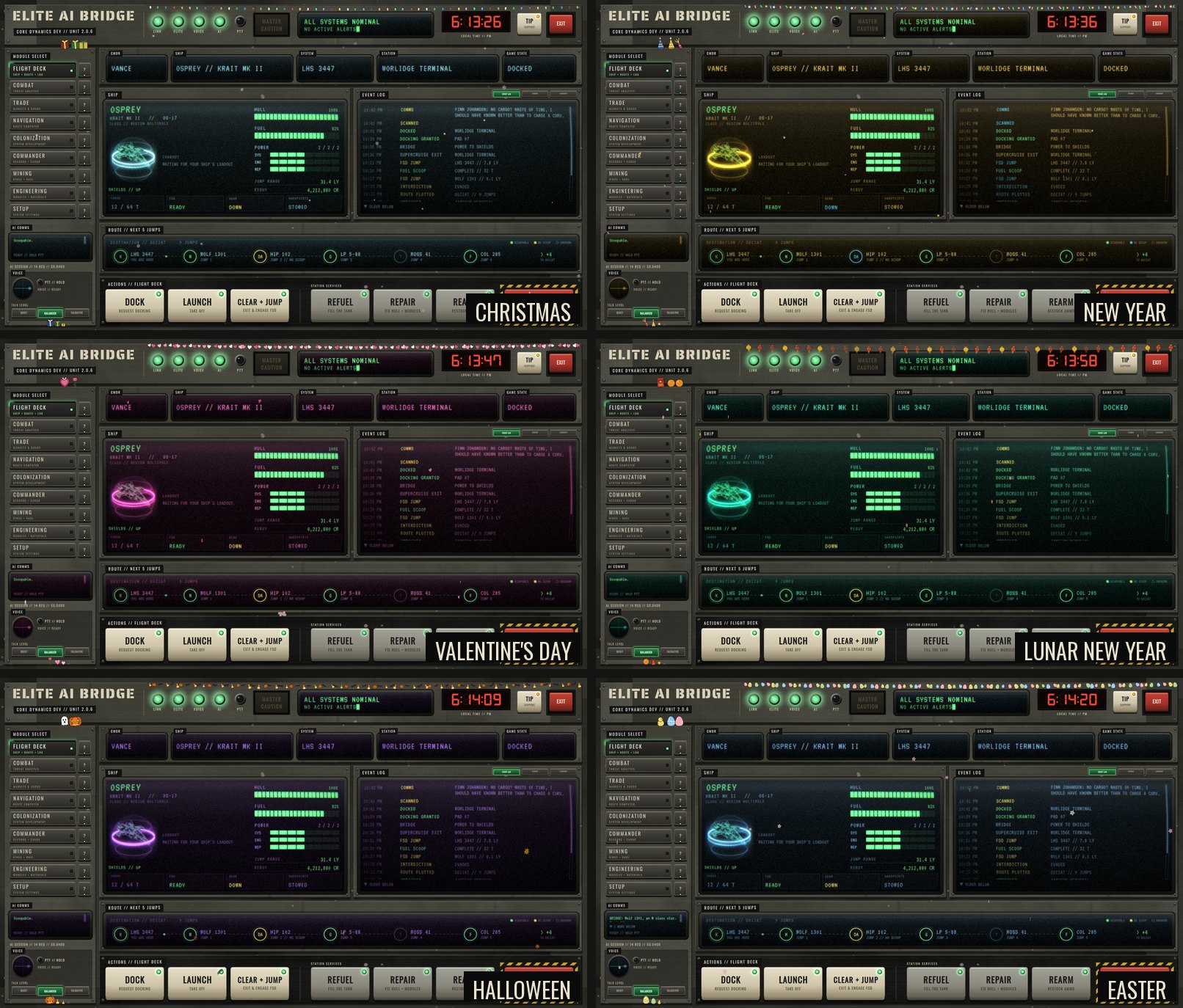
- Holidays: seasonal decorations through the year, on by default and following the date. Each one brings its own screen colour, decorations along the edges, things drifting down the window, and a sound when you click them.
- New Year, Valentine's Day, Lunar New Year, St. Patrick's Day, Easter, Halloween, Autumn (November) and Christmas.
- Setup > Display > HOLIDAYS: ON (follows the date), OFF, or pick one to keep all year.
- Decoration only: nothing reacts to the game, it stays off the in-game overlay, and it pauses while the window is minimized.
- There may be a secret or two.
- Screen colours: ten to choose from in Setup > Display > THEME: Green, Old School Amber, Copper, Gold, Emerald, Jade, Sky Blue, Ice Blue, Purple and Rose. Only the screens change; keys, lamps and plates stay the same, and red still only means danger. Picking a colour turns holidays off (a holiday brings its own colours); set HOLIDAYS back to ON to get them again.
- THEME and HOLIDAYS use a new picker: arrows to step through, or click the name for the full list.
Installing
Download Elite_AI_Bridge_Setup_2.0.6.exe below and run it. It upgrades 2.0.x in place and keeps your settings. Windows may show a SmartScreen warning because the installer isn't code-signed: choose More info, then Run anyway.
Verify your download
SHA-256 of Elite_AI_Bridge_Setup_2.0.6.exe:
a8489e8dd0470da9676f866ba8cfcd35b140b5bec4b8c5548e7e337b8ce20353
In PowerShell: Get-FileHash .\Elite_AI_Bridge_Setup_2.0.6.exe -Algorithm SHA256
Elite AI Bridge 2.0.5
Elite AI Bridge v2.0.5
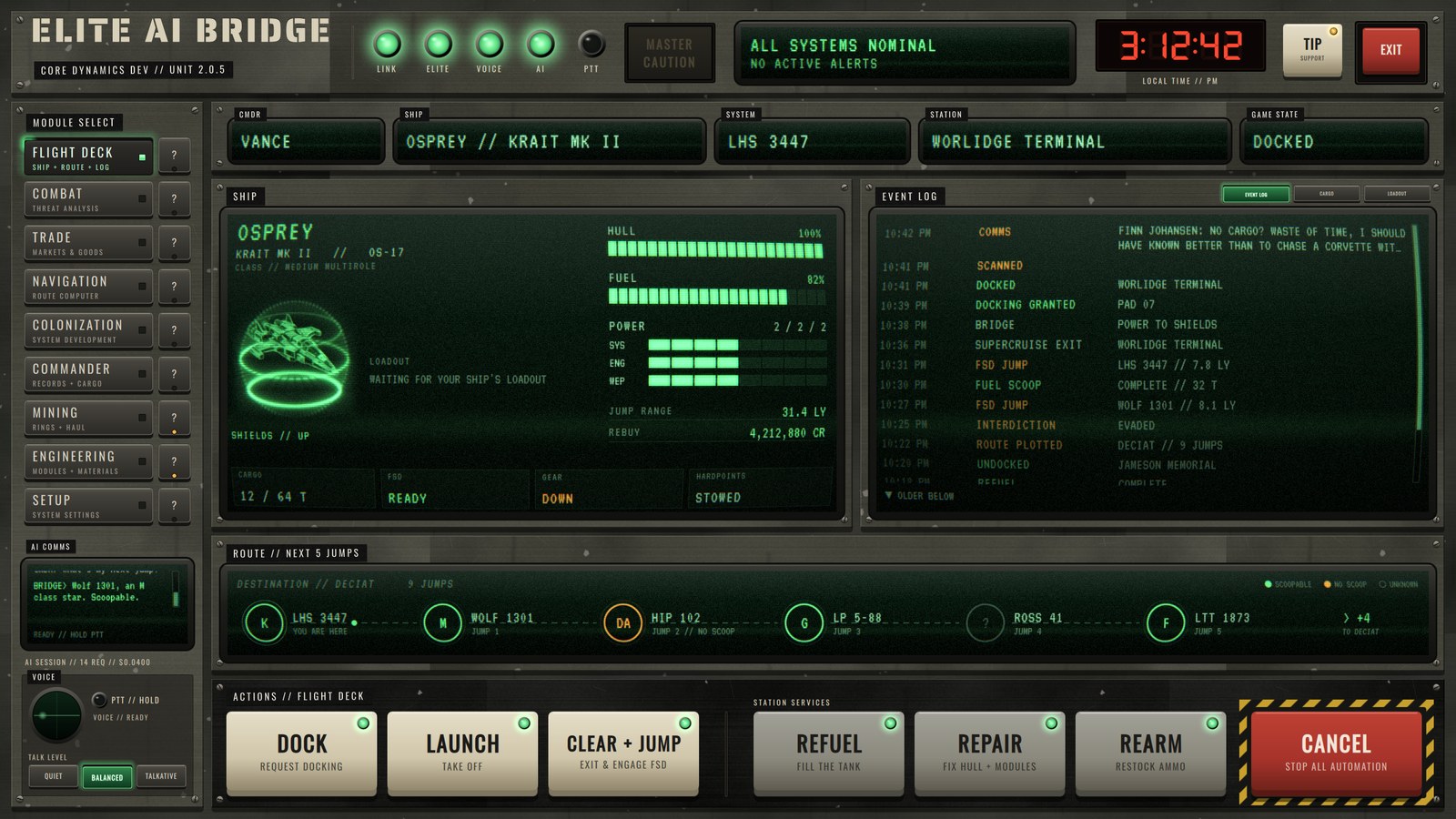
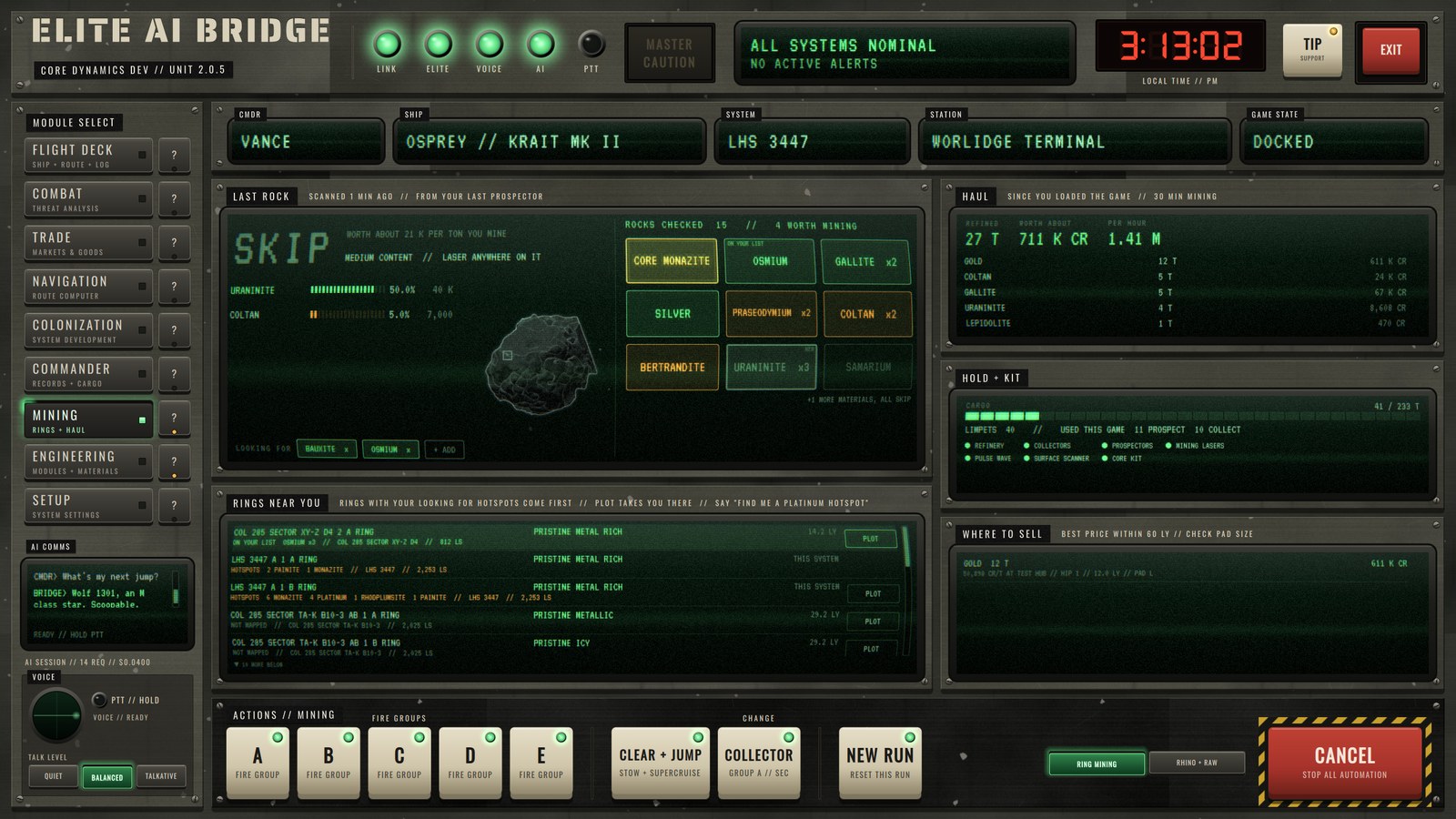
Screens shown use demo data.
What's new
- MINING page: a new module between COMMANDER and SETUP.
- Last rock: every rock you prospect gets a verdict (MINE, MAYBE, SKIP, or CORE for a motherlode) with what it's worth per ton, and a live asteroid beside it. The ship voice calls out the material and the verdict.
- Rocks checked: one tile per material, best first. Tap a tile to see its best rock.
- Looking for: pick up to 3 materials. Any rock with one of them at 5% or more is a MINE, and the ship tells you.
- Haul, Hold + Kit, Where to sell: tons refined, worth and per hour; cargo, limpets and a kit check; the best place to sell what's in your hold within 60 LY.
- Rings near you: rings from your scans with reserve level and hotspots, and a key to plot to them.
- Rhino + raw: surface mining in the SRV (hold, rig collections, mining locations on the body) and all 28 raw materials against their caps. Tap a raw material to set a target, and the ship tells you when you reach it.
- Keys for fire groups A to E, a COLLECTOR key, CLEAR + JUMP and NEW RUN, plus a spoken tour on the ? key.
- ENGINEERING page: the engineered modules on your ship and in storage (blueprint, grade, experimental, engineer), your engineers by rank, and your manufactured and encoded materials.
- Commander page: DELIVERIES (modules and ships on their way, with a countdown) and a SESSION DEBRIEF of what you did last time, which the ship can read out at startup. ODD STATS is one scrolling list.
- Fire groups A to H: Bridge shortcut keys and voice ("fire group C").
- Emergency Escape talks you through each step, and the overlay and header turn red while it runs. Pirate callouts from the game's own pirate messages.
- Find Best Target says when it starts, scans the winner and tells you if it's wanted.
- Ship voice: more varied wording for common lines; on TALKATIVE it also tells you about the star after each jump, jumps left, and cargo scans. What the ship says shows in the overlay's chat panel.
- Startup sound: new keyboard clicks and an original logo sting.
Fixes
- Auto dock: waits longer for the station's reply before moving to the next panel tab, and counts a late reply. It no longer cycles past the right tab and reports a fail when the request actually went through.
- Route plot: if your UI keys are the same as your galaxy map camera keys (for example W/A/S/D on both), the Bridge now uses your other key for that control, or tells you which key is shared instead of trying and failing. Plotting also keeps going if you switch to the Bridge window while it confirms the route.
- Clear + Jump closes the cargo scoop and retracts hardpoints first, and goes to supercruise when you're away from a station.
- Window not opening on some PCs: the Bridge loads Qt's display files itself before the window opens, and the installer no longer builds the runtime on the Microsoft Store copy of Python (that copy can't open the window). If your runtime was built on it, run this installer and it rebuilds it.
- Launcher: the Start menu and desktop shortcuts now check that the Bridge's runtime is in place before starting, and open a repair window if it isn't. There's also a "Repair Elite AI Bridge" shortcut in the Start menu.
- A Bridge key press now waits for Ctrl, Alt, Shift and Windows to be let go, so a Stream Deck still holding a key can't turn it into a different shortcut.
Installing
Download Elite_AI_Bridge_Setup_2.0.5.exe below and run it. It upgrades 2.0.x in place and keeps your settings. Windows may show a SmartScreen warning because the installer isn't code-signed: choose More info, then Run anyway.
Verify your download
SHA-256 of Elite_AI_Bridge_Setup_2.0.5.exe:
9ca9c9e4072d15319af8239ec17a6a067b0ade1bded35e637b47f2e0d571df3d
In PowerShell: Get-FileHash .\Elite_AI_Bridge_Setup_2.0.5.exe -Algorithm SHA256
Elite AI Bridge 2.0.4
What's new
- OLD SCHOOL AMBER: a new screen theme. Go to Setup > Display, SCREEN EFFECTS, and pick THEME: OLD SCHOOL AMBER. Green is still the default. Only the screens change colour; keys, lamps and plates stay the same. Danger stays red, and heads-up messages turn yellow so they still stand out on amber.
- Startup sound: the opening animation now has its own sound: power-on, self-test relays, radar ping, target lock, docking clamps and a chime. It plays at your SOUND EFFECTS level. Turn it off in Setup > Sound (STARTUP SOUND), or use the STARTUP SOUND key there to hear it.
Fixes
- The setup wizard no longer starts talking while the opening animation is still playing. It waits until the animation is gone.
Installing
Download Elite_AI_Bridge_Setup_2.0.4.exe below and run it. It upgrades 2.0.x in place and keeps your settings. Windows may show a SmartScreen warning because the installer isn't code-signed yet: choose More info, then Run anyway.
Verify your download
SHA-256 of Elite_AI_Bridge_Setup_2.0.4.exe:
42dc67a5c63d8cb4454dcbf3a268a38a8e06be322c25e4039160612c2b99386a
In PowerShell: Get-FileHash .\Elite_AI_Bridge_Setup_2.0.4.exe -Algorithm SHA256
Elite AI Bridge 2.0.3
Elite AI Bridge v2.0.3
What's new
- Update check on every start: the Bridge now asks GitHub for a new version each time it starts and every 6 hours while it's open, so a new release shows up the next time you launch. The switch on Setup > Status is now called CHECK FOR UPDATES.
- Voice pitch works: DEEP, VERY DEEP and HIGH now change the ship's voice on installed copies. Before, the setting did nothing. If you had one of them picked, the voice will sound different after this update; change it in Setup > Voice & AI.
Fixes
- Setup > Status on small screens (1366x768): text no longer runs under the name box or the setup wizard switch.
Installing
Download Elite_AI_Bridge_Setup_2.0.3.exe below and run it. It upgrades 2.0.x in place and keeps your settings. Windows may show a SmartScreen warning because the installer isn't code-signed yet: choose More info, then Run anyway.
Verify your download
SHA-256 of Elite_AI_Bridge_Setup_2.0.3.exe:
785f24b53b53baa191c076097a4e88c723cf007764861d6b2d2e8d9d6c73c536
In PowerShell: Get-FileHash .\Elite_AI_Bridge_Setup_2.0.3.exe -Algorithm SHA256
Elite AI Bridge 2.0.2
Elite AI Bridge v2.0.2
What's new
- Fleet: Commander page, switch ODD STATS to FLEET to see where every stored ship is, nearest first, with its station, system and value. Ships on their way show when they arrive. Pick one and PLOT: SHIP plots a route to it.
- The list comes from your game journal and is as of your last shipyard visit. Open any shipyard once and it fills in; swaps, buys, sells and transfers after that are picked up as you play.
Installing
Download Elite_AI_Bridge_Setup_2.0.2.exe below and run it. It upgrades 2.0.x in place and keeps your settings. Windows may show a SmartScreen warning because the installer isn't code-signed yet: choose More info, then Run anyway.
Verify your download
SHA-256 of Elite_AI_Bridge_Setup_2.0.2.exe:
062db1fc7d518d41e0257b79dd3e4812c1fcc45f277cbb430b76b31df7a44386
In PowerShell: Get-FileHash .\Elite_AI_Bridge_Setup_2.0.2.exe -Algorithm SHA256
Elite AI Bridge 2.0.1
Elite AI Bridge v2.0.1
A small fix release for 2.0.
What's new
- Update notice: once a day the Bridge checks GitHub for a newer version. When one is out, a slow amber lamp and an UPDATE tag appear next to the version under the title (click it), the top status screen says UPDATE AVAILABLE when nothing more urgent is showing, and Setup > Status shows what's new with a DOWNLOAD key that opens this page. The Bridge never downloads or installs anything by itself, and CHECK DAILY on Setup > Status turns the check off.
Fixes
- ELITE lamp at the main menu: the lamp no longer turns green while Elite is sitting at the main menu. It shows amber with "ELITE AT MAIN MENU" until you load into your ship or step out on foot, and the deck no longer shows shields down or empty ship data at the menu.
- Colonization, My Sites: build sites you haven't visited in 30 days now show NOT SEEN instead of BUILDING forever. Elite doesn't log it when a site is abandoned or finished under a new name, so the Bridge can't tell which; NOT SEEN sites no longer count as still building. Releasing a system claim also clears that system's sites.
Installing
Download Elite_AI_Bridge_Setup_2.0.1.exe below and run it. It upgrades 2.0.0 in place and keeps your settings. Windows may show a SmartScreen warning because the installer isn't code-signed yet: choose More info, then Run anyway.
Verify your download
SHA-256 of Elite_AI_Bridge_Setup_2.0.1.exe:
9e683b5be13587c7f1cda09920111e51ed8e3545304fe3e6506b69b63ea90d66
In PowerShell: Get-FileHash .\Elite_AI_Bridge_Setup_2.0.1.exe -Algorithm SHA256
Note: 2.0.0 has no update check, so this is the last version you'll need to find by hand. From 2.0.1 on, the Bridge tells you.
Elite AI Bridge v2.0.0
Elite AI Bridge v2.0.0
A completely redesigned command deck for Elite Dangerous.
Elite AI Bridge is a free Windows companion application that puts ship information, flight controls, navigation, trade, combat, colonization, and optional AI voice assistance into one cockpit-inspired interface.
What's New in v2.0.0
- Complete UI Redesign: A new retro-futuristic command deck with dedicated modules.
- Flight Deck: Live ship status, shields, hull, fuel, modules, cargo, event logs, and flight controls.
- Combat: Target information, fighter and wing controls, and bounty-hunting site discovery.
- Trade: Trade route searches, automated route planning, and trip tracking.
- Navigation: Route monitoring, fuel-star information, and bookmarks.
- Colonization: Construction progress, material requirements, and supply locations.
- Commander: Career statistics, ranks, session information, and additional statistics.
- In-Game Overlay: Optional on-screen information while playing in borderless or windowed mode.
- Ship Voice: Locally generated spoken alerts and callouts.
- Guided Setup: Improved first-run wizard and spoken module tutorials.
- Improved Installation: Guided installer progress, pinned dependencies, and simplified startup without VBScript.
Optional AI Co-Pilot
Elite AI Bridge works without AI or an API key.
For conversational voice commands and AI assistance, users can supply their own OpenAI API key. API usage may incur separate charges.
Installation
- Download
Elite_AI_Bridge_Setup_2.0.0.exefrom the Assets section below. - Run the installer and follow the instructions.
- Launch Elite AI Bridge and complete the setup wizard.
- Start Elite Dangerous and enjoy your new command deck.
Windows Security Notice: This installer is not yet code-signed. Windows may display an unknown-publisher or SmartScreen warning. Download only from this official GitHub repository.
SHA-256 Verification
File: Elite_AI_Bridge_Setup_2.0.0.exe
SHA-256:
4EE8B0C838076C6298B094E011D6BA45A56055F0C84E0D127018660BD326270A
Verify your downloaded installer using PowerShell:
Get-FileHash .\Elite_AI_Bridge_Setup_2.0.0.exe -Algorithm SHA256Source Code
The complete readable source code and documentation are publicly available:
https://github.com/CoreDynamicsDev/Elite-AI-Bridge
Support Development
Elite AI Bridge is free to use. If you enjoy the software and want to support continued development:
https://ko-fi.com/eliteaibridge
Elite AI Bridge is an independent community project and is not affiliated with or endorsed by Frontier Developments or OpenAI.
Elite AI Bridge 1.0.1
The 1.0.1 release of Elite AI Bridge.
This release includes the updated startup sequence, CRT-style boot splash, improved application startup/shutdown handling, Supertonic voice support, and other stability and interface improvements.
Elite AI Bridge is a free Windows companion application for Elite Dangerous.
AI features are optional and require your own OpenAI API account and API key.
Source code:
https://github.com/CoreDynamicsDev/Elite-AI-Bridge
Elite AI Bridge is an independent community project and is not affiliated with, endorsed by, or sponsored by Frontier Developments or OpenAI.
Fly dangerous, Commander. o7
Elite AI Bridge 1.0
Elite AI Bridge 1.0

The first public release of Elite AI Bridge, a free Windows companion application for Elite Dangerous.
Features include live game telemetry, navigation and trade tools, combat assistance, HOTAS/controller integration, an in-game overlay, voice controls, and an optional AI co-pilot.
Installation
Download Elite_AI_Bridge_Setup_1.0.exe below and run the installer. The setup process will install and configure the components required by Elite AI Bridge.
AI features are optional. If enabled, they require your own OpenAI API account and API key and may result in API usage charges from OpenAI.
Elite AI Bridge is an independent community project and is not affiliated with, endorsed by, or sponsored by Frontier Developments or OpenAI.
Support development: https://ko-fi.com/eliteaibridge
Fly dangerous, Commander. o7