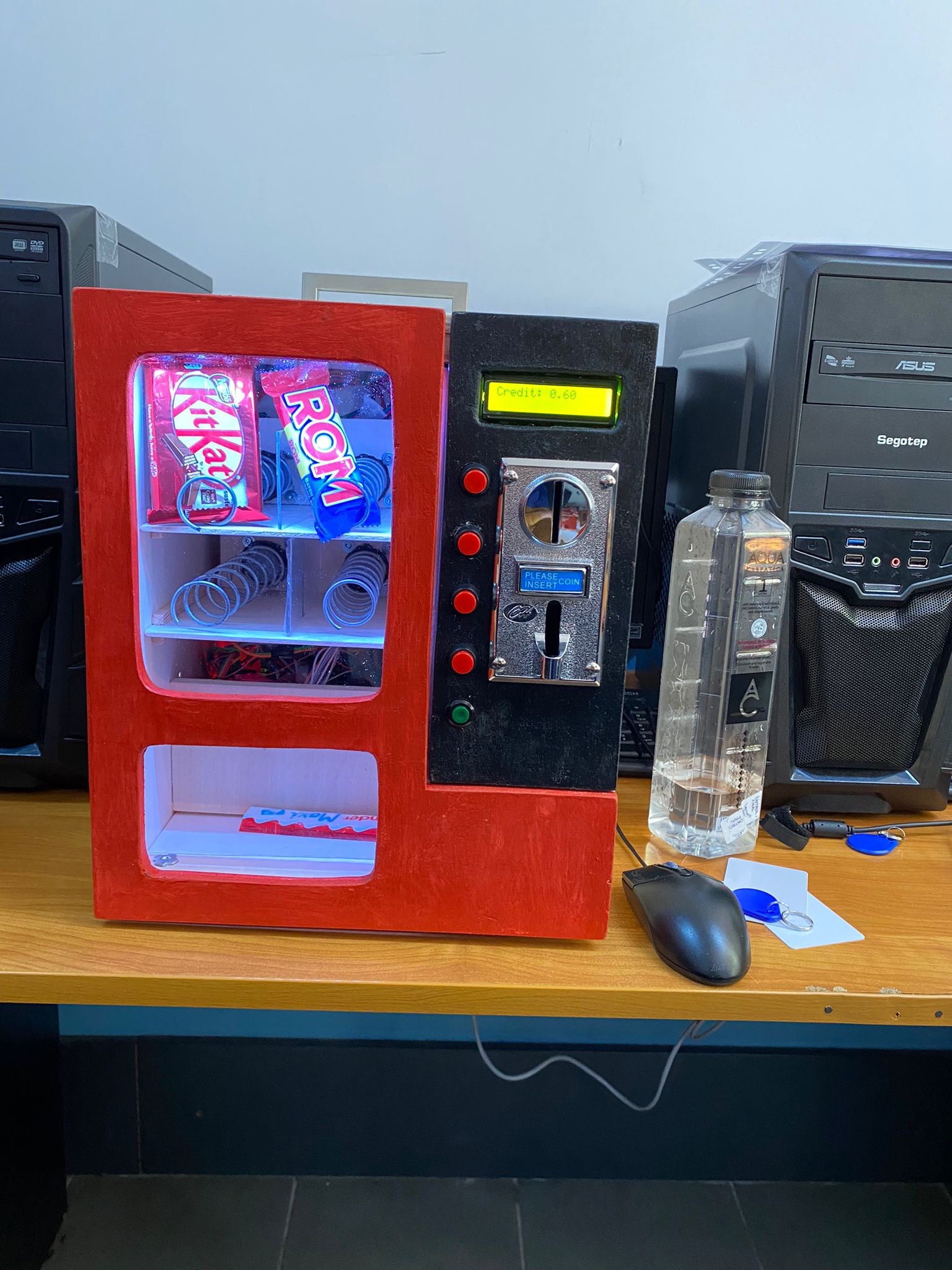
A fully functional vending machine with dual operation modes: standard coin-operated mode and company mode with RFID authentication. Features a web-based admin panel for managing users, products, and monitoring transactions.
- Microcontroller: ESP8266
- Programming Language: C++ (Arduino framework)
- Communication Protocols: I2C, Serial
- Frontend Framework: Vue.js
- UI Library: Semantic UI
- Backend: ESP8266 Web Server
- Data Format: JSON
- Web Technologies: HTML5, CSS3, JavaScript (ES6+)
- Arduino IDE
- Fritzing (circuit diagrams)
The coin acceptor module identifies coins based on consecutive pulses and supports up to 3 different coin types.
Specifications:
- Power Supply: 12V DC
- Supported Coins: 5, 10, and 50 cents
- Detection Method: Pulse-based (1 pulse = 5¢, 2 pulses = 10¢, 3 pulses = 50¢)
- Output: Digital signal via SIG pin
Wiring:
- VCC → 12V power supply
- GND → Ground
- SIG (Coin) → ESP8266 D3 (via transistor from 3.3V)
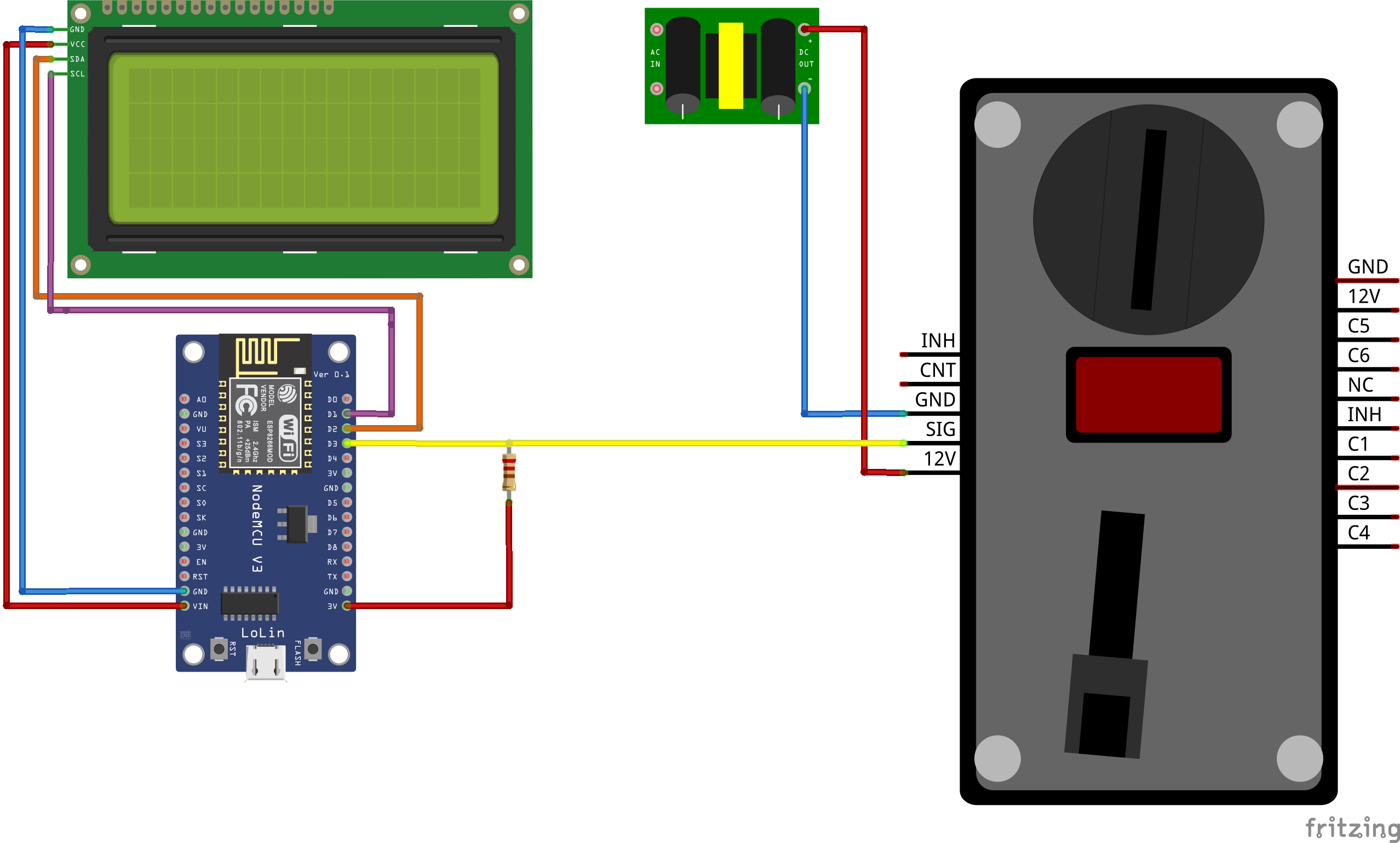
Implementation:
The coin detection uses interrupt-based reading to avoid overloading the microcontroller:
attachInterrupt(digitalPinToInterrupt(CoinPin), CoinEvent, CHANGE);The interrupt handler captures coin insertion events:
void CoinEvent() {
    crtValue = digitalRead(CountPin);
    Serial.print("CoinEVENT_____________");
    Serial.print("\n");
    Serial.print(crtValue);
    Serial.print("\n");
}
The main coin processing function counts pulses and updates credit:
void Coins() {
    crtTime = millis();

    if (crtTime > prevTime) {
        if (crtValue != prevValue) {
            prevTime = crtTime;
            prevValue = crtValue;
            changed = true;
        }

        if (crtTime - prevTime > 30 && changed) {
            counter++;
            Serial.print(counter);
            Serial.print("\n");
            changed = false;
            number++;
            Time1 = millis();
            changed = false;
        }
    }

    Time2 = millis();

    if ((Time2 - Time1 > TIMER) && (number)) {
        Serial.print("Number: ");
        Serial.print(number);
        Serial.print("\n");

        if (number == 3) {
            credit = credit + 0.50;
            totalCoins3++;
            number = 0;
        }
        else if (number == 2) {
            credit = credit + 0.10;
            totalCoins2++;
            number = 0;
        }
        else if (number == 1) {
            totalCoins1++;
            credit = credit + 0.05;
            number = 0;
        }

        lcd.setCursor(0, 0);
        lcd.print("Credit: ");
        lcd.setCursor(8, 0);
        lcd.print(credit);
        Serial.print("Credit: ");
        Serial.print(credit);
        Serial.print("\n");
    }
}Specifications:
- Display Size: 16 characters × 2 lines
- Communication: I2C protocol
- I2C Address: 0x27
- Backlight: Yes
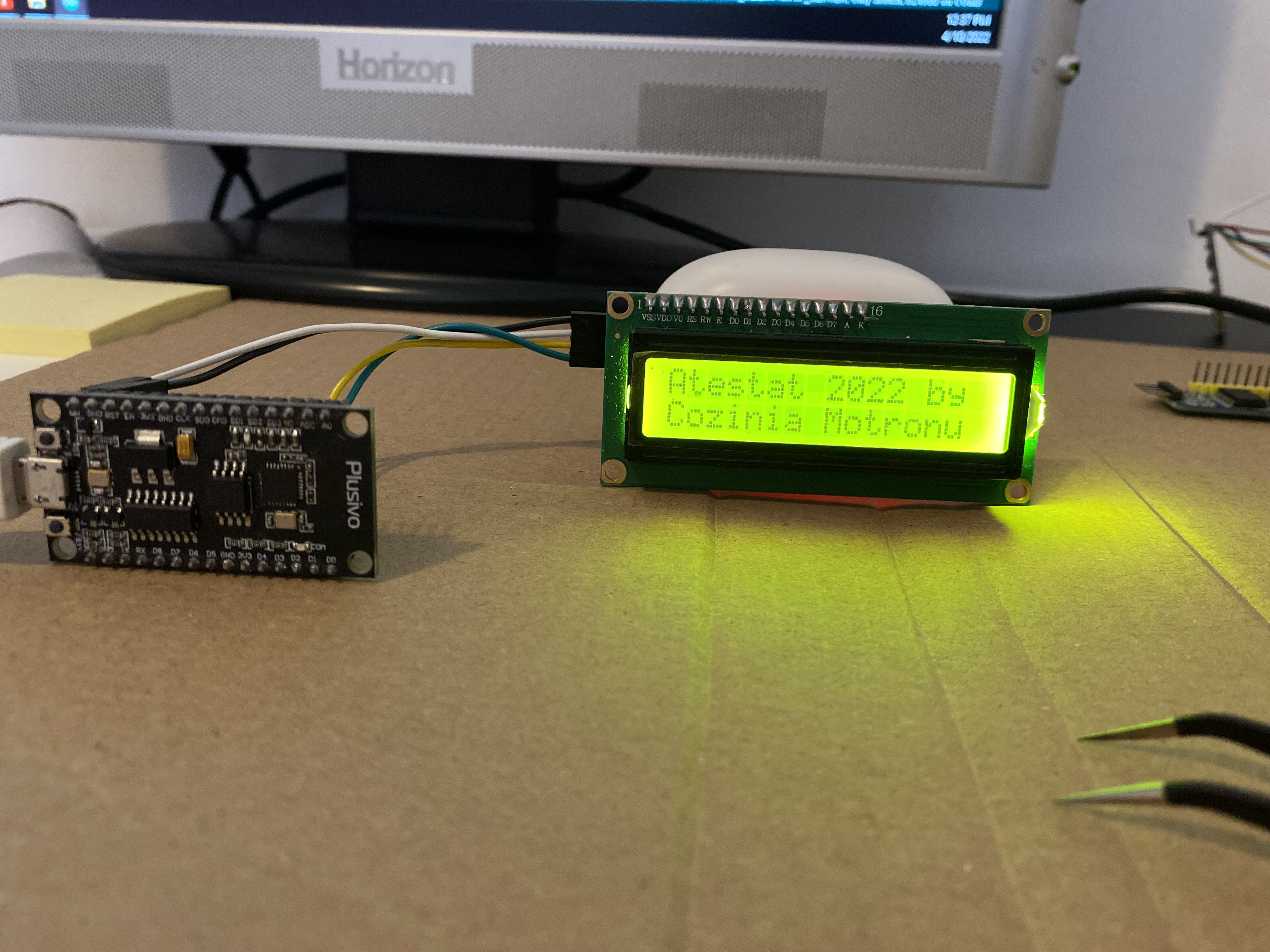
Wiring:
- SCL → ESP8266 D1 (purple wire)
- SDA → ESP8266 D2 (orange wire)
- VCC → 5V
- GND → Ground
Implementation:
#include <Wire.h>
#include <LiquidCrystal_I2C.h>

LiquidCrystal_I2C lcd(0x27, 16, 2);

void setup() {
    lcd.init();
    lcd.backlight();

    lcd.setCursor(0, 0);
    lcd.print("Atestat 2022 by");
    lcd.setCursor(0, 1);
    lcd.print("Cozinia Motronu");
}

void loop() {
    // Display updates handled in main loop
}
Stepper motors control product dispensing mechanisms for each product slot.
Specifications:
- Type: Bipolar stepper motors
- Driver: CNC Shield compatible
- Connections: 4 wires per motor to CNC shield
- Control: 2 additional wires to PCF8574 expansion module
Why Expansion Modules? The ESP8266 has limited GPIO pins. With multiple motors, LCD, coin acceptor, RFID reader, and buttons, PCF8574 I2C expansion modules are necessary to provide additional digital pins.
Specifications:
- Communication: I2C protocol
- Additional Pins: 8 GPIO pins per module
- Addressable Range: 0x20 to 0x27 (allows up to 8 modules)
- Address Configuration: Manual via jumper pins
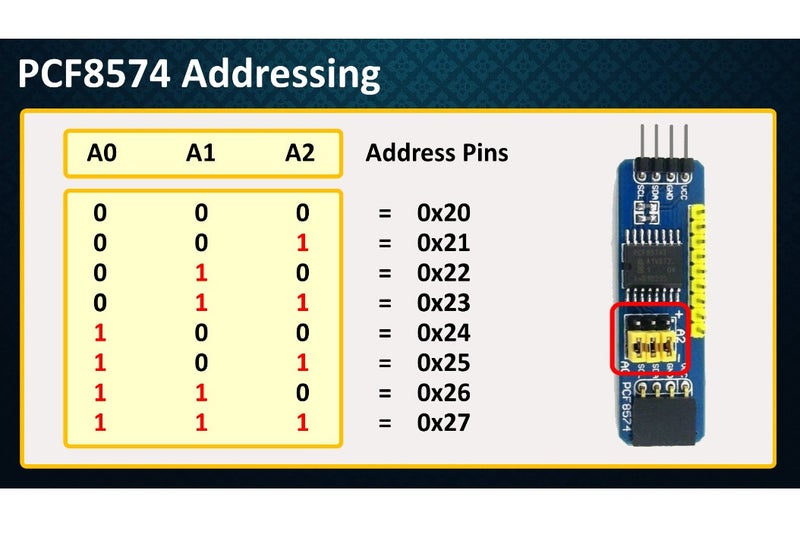
Why I2C? I2C protocol allows multiple devices on the same two-wire bus (SDA and SCL), making it perfect for projects with many components. Each device has a unique address, enabling independent control.
Used for company mode authentication, allowing employees to use their RFID cards/tags to make purchases charged to their accounts.
Features:
- Contactless card reading
- User identification
- Transaction logging
The ESP8266 runs a web server that handles API requests from the frontend.
void Users() {
    MyBuffer[0] = NULL;
    TempBuffer[0] = NULL;
    strcat(MyBuffer, "[");

    for (int i = 0; i < fileDb.userCount; i++) {
        Serial.print(MyBuffer);
        sprintf(TempBuffer,
            "{\"CNP\":\"%s\", \"FirstName\": \"%s\", \"LastName\":\"%s\", \"isAdmin\": %d, \"Credit\": %f, \"TagNumber\": \"%s\", \"isActive\": %d}",
            fileDb.users[i].CNP,
            fileDb.users[i].FirstName,
            fileDb.users[i].LastName,
            fileDb.users[i].isAdmin,
            fileDb.users[i].Credit,
            fileDb.users[i].TagNumber,
            fileDb.users[i].Enabled
        );

        if (i < fileDb.userCount - 1) {
            strcat(MyBuffer, TempBuffer);
            strcat(MyBuffer, ",");
        }
        else {
            strcat(MyBuffer, TempBuffer);
        }
    }

    strcat(MyBuffer, "]");
    server.send(200, "application/json", MyBuffer);
}The web interface provides admin functionality for managing the vending machine.
async GetUsers() {
    const responseUsers = await fetch("/Users");
    this.UserInfo.Users = await responseUsers.json();
    this.users = this.UserInfo.Users;
}async EditUser() {
var toEditFirstName = document.getElementById("FirstName-modal").value;
var toEditLastName = document.getElementById("LastName-modal").value;
var toEditPassword = document.getElementById("Password-modal").value;
var toEditCredit = document.getElementById("Credit-modal").value;
var toEditAdmin = document.getElementById("CheckIfAdmin-modal");
if (toEditAdmin.checked == true) {
toEditAdmin = 1;
} else {
toEditAdmin = 0;
}
var toEditTagNumber = document.getElementById("TagNumber-modal").value;
var CNP = this.TempUserEdit.CNP;
if (toEditFirstName != "" && toEditLastName != "" && toEditCredit != "" && toEditTagNumber != "") {
var editUrl = encodeURI("/EditUsers" + "?" +
"CNP=" + CNP + "&" +
"toEditFirstName=" + toEditFirstName + "&" +
"toEditLastName=" + toEditLastName + "&" +
"toEditPassword=" + toEditPassword + "&" +
"toEditCredit=" + toEditCredit + "&" +
"toEditAdmin=" + toEditAdmin + "&" +
"toEditTagNumber=" + toEditTagNumber
);
var editResult = await fetch(editUrl);
console.log(editResult.status);
if (editResult.status == 200) {
this.ShowModal("User's info has been updated!");
}
else {
this.ShowModal("Couldn't update user's info!");
}
} else {
this.ShowModal("Fill all fields before submitting the form!");
}
this.GetUsers();
$('.modal').modal('hide');
}<div class="ui basic segment" v-if="Menu.ViewProducts">
<div id="ShowSubmenuProducts">
<div class="ui top attached tabular menu">
<a class="item active" v-on:click="ShowSubmenuProducts('ViewProductsMenu')" id="ViewProducts">
View Products
</a>
<a class="item" v-on:click="ShowSubmenuProducts('DisableProductsMenu')" id="DisableProducts">
Disabled products
</a>
</div>
<div class="ui bottom attached segment" v-if="ProductsSubmenu.DisableProductsMenu">
<div class="row">
<table class="ui unstackable table">
<thead>
<tr>
<th>ID</th>
<th>Name</th>
<th>Quantity</th>
<th>Position</th>
<th>Price</th>
<th>isActive</th>
<th>Edit product</th>
<th>Enable product</th>
</tr>
</thead>
<tbody v-for="product in products">
<tr v-if="!product.isActive">
<td>{{product.ID}}</td>
<td>{{product.Name}}</td>
<td>{{product.Quantity}}</td>
<td>{{product.Position}}</td>
<td>{{product.Price}}</td>
<td>{{product.isActive}}</td>
<td style="text-align:center">
<i class="edit outline icon disabled"></i>
</td>
<td style="text-align:center">
<i class="ban icon" v-on:click="EnableProduct(product)" style="color:red;"></i>
</td>
</tr>
</tbody>
</table>
</div>
</div>
</div>
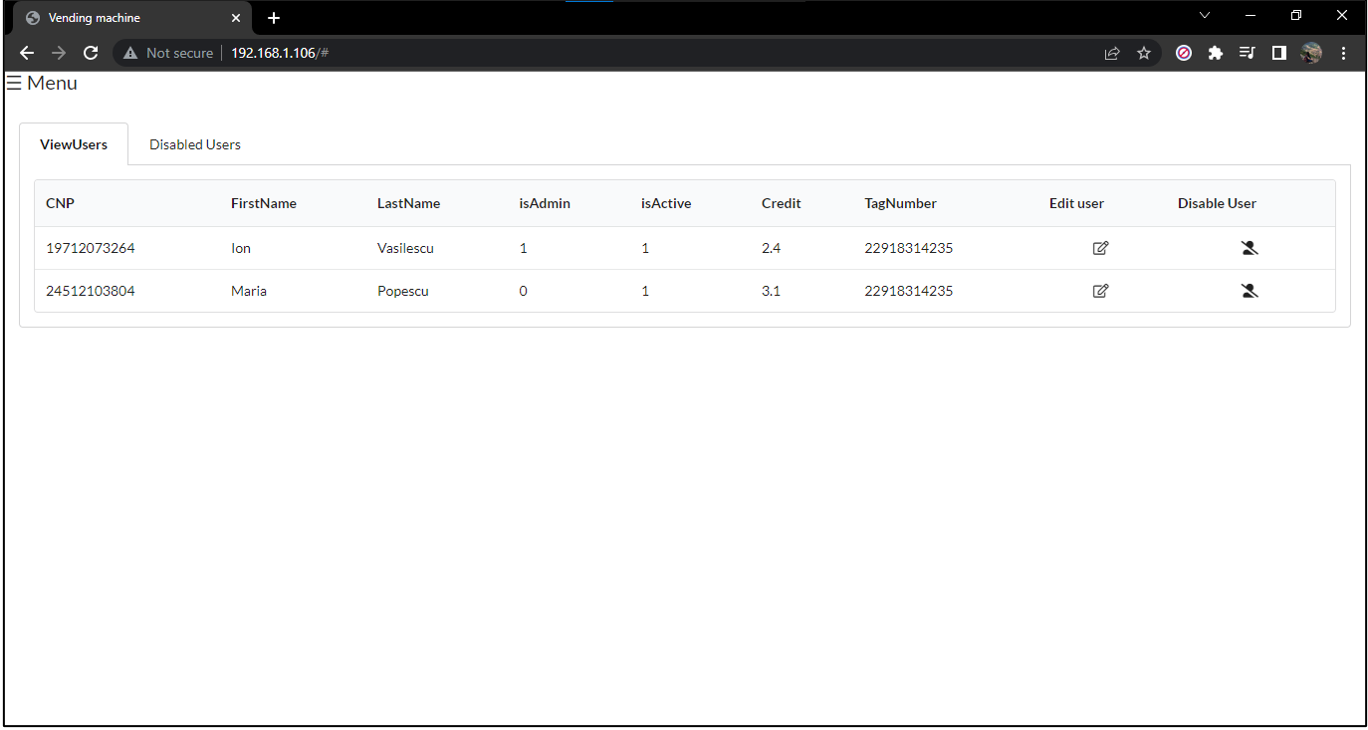
</div>View, edit, and manage all registered users with their information.
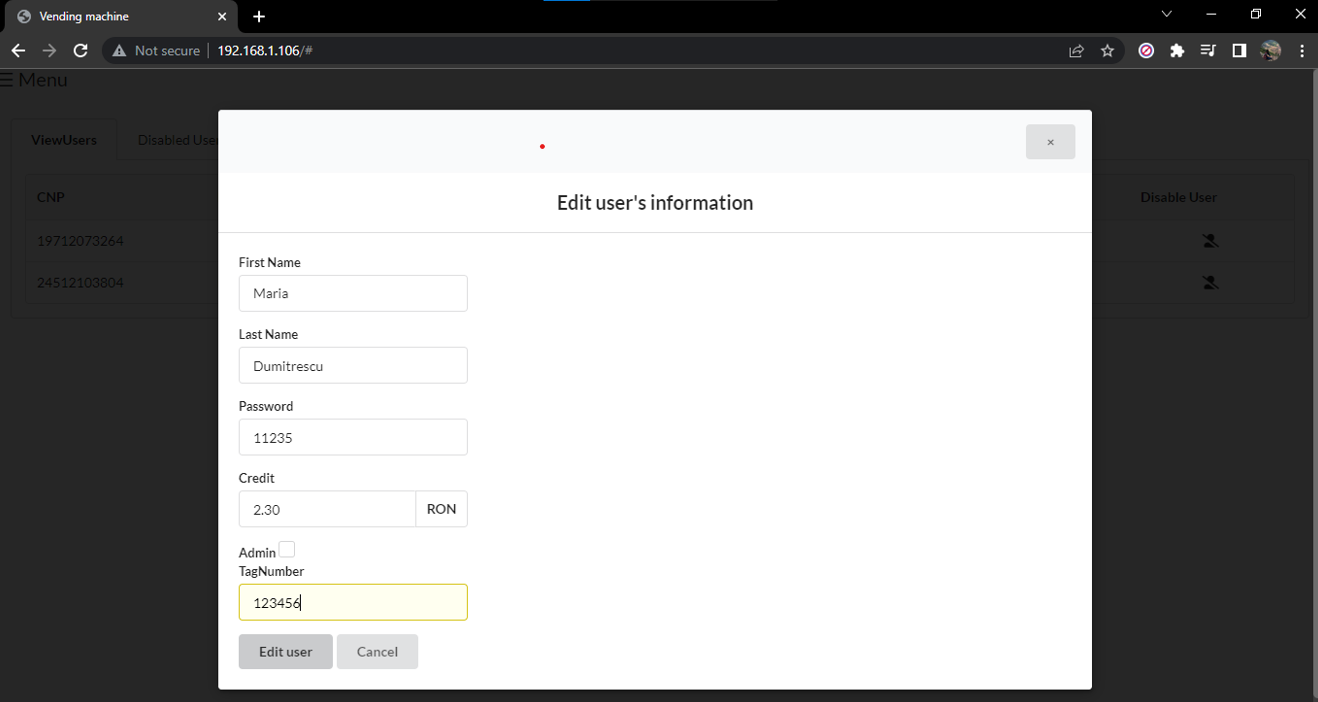
Modify user details including name, credit, admin status, and RFID tag.
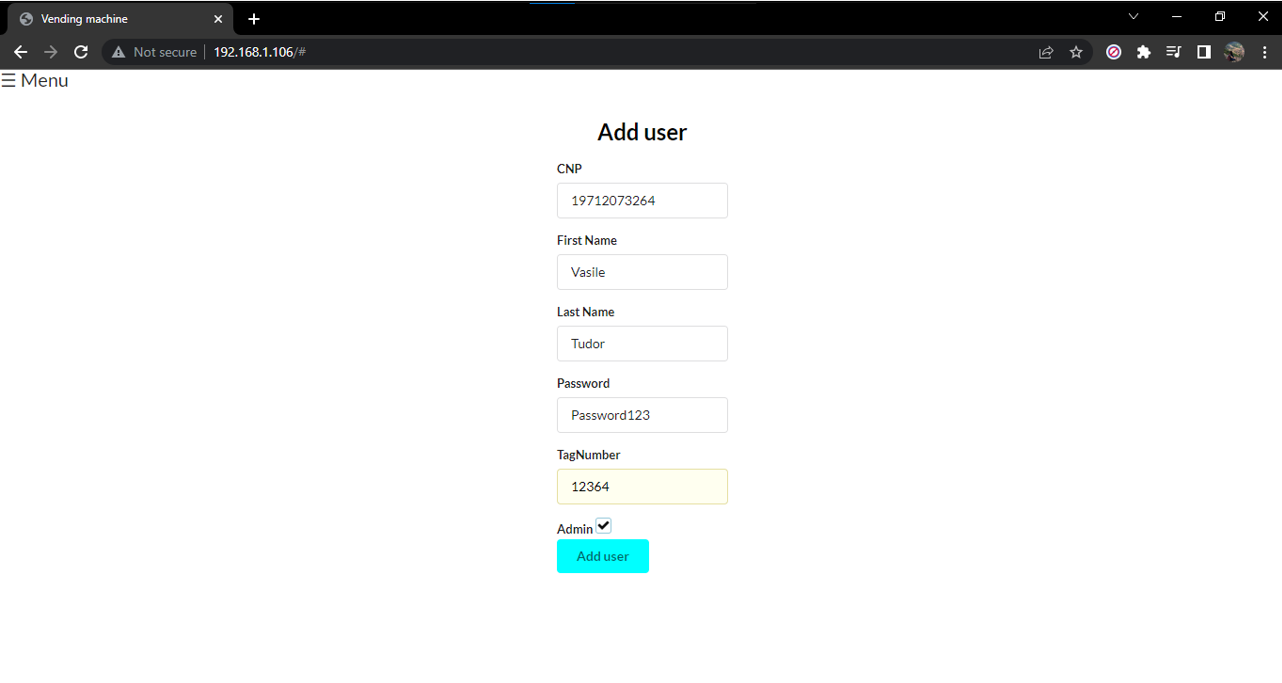
Register new users with CNP, name, password, initial credit, and RFID tag assignment.
Flow:
- User inserts coins (5, 10, or 50 cents)
- LCD displays current credit
- User presses button to select desired product
- System checks:
- Product stock availability
- Sufficient credit for selected product
- If conditions met: motor dispenses product
- Credit is deducted
Supported:
- 3 coin types: 5¢, 10¢, 50¢
- 4 product slots
- Real-time credit display
Flow:
- User connects to vending machine WiFi network
- User scans RFID card at machine
- Welcome message displays on LCD for 3 seconds
- LCD shows user's account credit
- User selects product via button
- System validates stock and credit
- Product is dispensed
- Transaction logged to user account
- User presses logout button when finished
Features:
- RFID card authentication
- Account-based purchases
- Transaction history tracking
- Web-based credit management
- Admin panel for system management
Administrators have access to additional features through the web interface:
- User Management: Add, edit, view, enable/disable users
- Product Management: Add, edit, view, enable/disable products
- Stock Control: Monitor and update product quantities
- Motor Testing: Test individual motor functionality
- Transaction Logs: View purchase history and credits
- ESP8266 microcontroller
- 12V power supply (for coin acceptor)
- 5V power supply (for logic components)
- Stable WiFi connection (for company mode)
- Arduino IDE with ESP8266 board support
- Required Libraries:
- Wire.h (I2C communication)
- LiquidCrystal_I2C.h (LCD display)
- ESP8266WiFi.h (WiFi connectivity)
- ESP8266WebServer.h (web server)
- Connect coin acceptor to 12V power supply and ESP8266 D3 pin
- Wire LCD display via I2C (D1 for SCL, D2 for SDA)
- Connect stepper motors to CNC shield
- Attach PCF8574 expansion modules via I2C bus
- Install RFID reader and connect to ESP8266
- Connect all grounds to common ground
- Install Arduino IDE and ESP8266 board package
- Install required libraries via Library Manager
- Upload firmware to ESP8266
- Configure WiFi credentials in code
- Set I2C addresses for LCD and PCF8574 modules
- Calibrate coin acceptor for coin types
- Test motor directions and steps
- Connect to ESP8266 WiFi network
- Access web interface via ESP8266 IP address
- Login with admin credentials
- Configure initial users and products
- Assign RFID tags to users
Uses hardware interrupts instead of polling to efficiently detect coin insertion without blocking other operations.
Multiple devices share the same two-wire bus, reducing pin usage and simplifying wiring.
PCF8574 modules allow easy expansion of GPIO pins, making the system scalable for additional features.
Standardized data format between microcontroller and web interface ensures reliable communication.
Web interface uses async/await patterns for smooth user experience without page reloads.
- Mobile app integration
- Payment gateway for cashless transactions
- Temperature monitoring for perishable products
- Machine learning for inventory prediction
- Cloud-based analytics dashboard
- Multi-language support
- Receipt printing capability
Developer: Cozinia Motronu
Year: 2022
Purpose: Educational project demonstrating embedded systems, web development, and IoT integration
This project is provided as-is for educational purposes.