Repository navigation
Getting Started
-
Install Sticky Notes for your Minecraft version and loader on the server and on every client (see Supported Versions). Fabric also needs Fabric API.
-
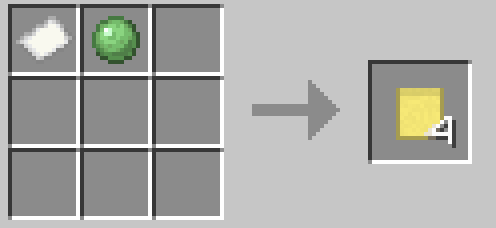
Craft notes: one Paper and one Slime Ball anywhere in a crafting grid give 4 yellow Sticky Notes. In creative mode, the Sticky Notes tab has all 16 colours.
-
Stick one on a wall: hold a note and right-click a block face. The note sticks exactly where you clicked, and the editor opens.
-
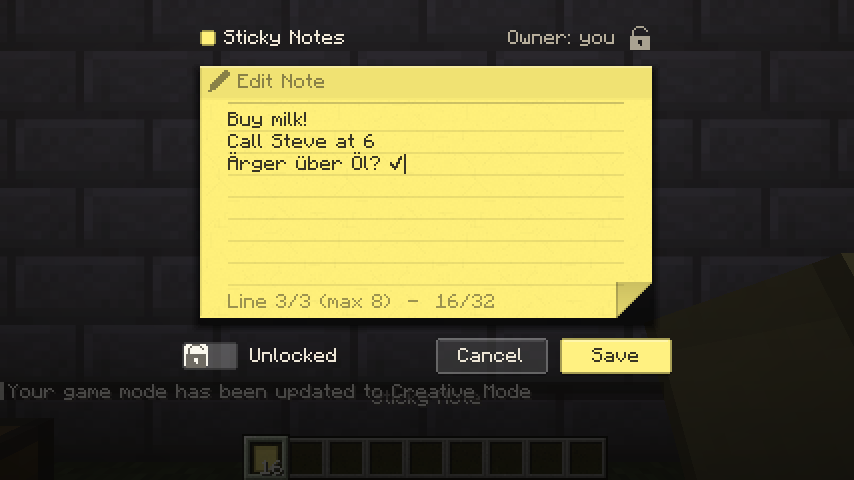
Write: type your text (Enter starts a new line, long lines wrap by themselves), then click Save or press Ctrl + Enter. Cancel or Esc closes without saving.
-
Read it: the text is now on the note in the world. Right-click the note to open it again.
-
Take it back: Shift + left-click your note. You get it back as an item that keeps its text, colour and owner.
Next: Placing and Editing · Crafting and Colours · Ownership and Locking