Repository navigation
Fleet Dashboard
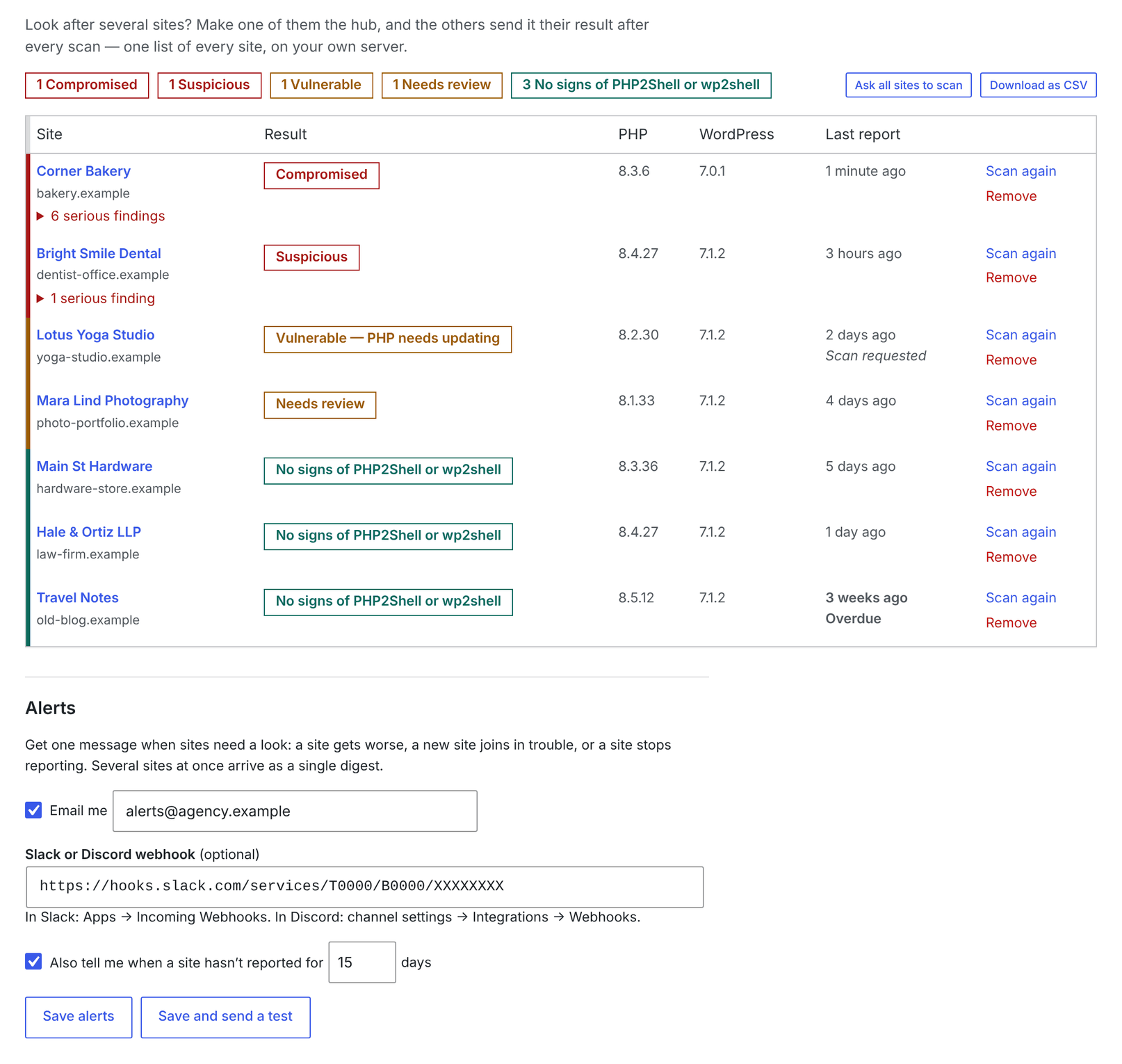
Pick one of your sites as the hub. Every other site sends its result there after each scan, and the hub's Fleet tab shows all of them on one screen — worst first, with stale sites (no report in 15 days) marked.
flowchart LR
    subgraph Members["Your other sites"]
        M1["site-a.com<br/>weekly scan"]
        M2["site-b.com<br/>weekly scan"]
        M3["site-c.com<br/>weekly scan"]
    end
    M1 -- "signed HTTPS POST<br/>verdict + counts" --> H
    M2 --> H
    M3 --> H
    H["Hub site<br/>Tools → JAT Shell Scanner → Fleet"] --> T["One table, worst first<br/>CSV export"]
- On the hub: Fleet → This site is the hub → Save. Copy the fleet key.
- On each other site: Fleet → Report to a hub, paste the hub address and key, Save, then Send now. Or from the command line on all of them at once:
wp jat-shell fleet hub                                    # on the hub — prints the key
wp @all jat-shell fleet join https://hub.example.com KEY  # on every other site
wp @all jat-shell scan --format=summary                   # each scan reports in
wp jat-shell fleet list --format=csv > fleet.csv          # on the hub
What a member sends (and nothing else):
| Sent | Not sent |
|---|---|
| Site address and name, link to its scanner page | File contents, logs, database data |
| Verdict, WordPress and PHP version, PHP type | Usernames' e-mail addresses (stripped) |
| Number of findings per severity | Low/info findings |
| The text of up to 10 critical/high findings | Anything at all if fleet mode is off (the default) |
How it's protected
sequenceDiagram
    participant M as Member site
    participant H as Hub
    Note over M: On joining, makes its own<br/>random secret
    M->>H: First report + its secret<br/>signed with the fleet key and the secret
    H->>H: Registers the secret for that address
    M->>H: Later reports, signed with both
    Note over H: A report for a registered address<br/>without that site's secret is refused
- Two signatures on every report: the shared fleet key proves it's one of your sites; the site's own secret, registered with its first report, proves which one. So someone who steals the fleet key from one member can't overwrite another site's row, and nobody can report for the hub's own address.
- Reports more than 10 minutes old or more than a minute "in the future" are refused, as is anything older than what the hub already has.
- Everything received is cleaned before it's stored or shown; a member's "open scanner" link is only kept if it's on that member's own address.
- Reinstalled the scanner on a member? Click Remove on its row on the hub, then report again — it registers afresh. Empty the list does that for every site.
- If the fleet key leaks, Make a new key on the hub and re-join the members. Use HTTPS for the hub — the screen warns you if you don't.
- Members only send to public addresses. For a hub on a private network (
10.x,192.168.x,localhost), adddefine( 'WP2SS_FLEET_PRIVATE_HUB', true );to each member'swp-config.php. - To keep the key out of your shell history and process list:
WP2SS_FLEET_KEY=… wp jat-shell fleet join https://hub.example.com, or… fleet join https://hub.example.com - < keyfile.
The hub can tell you when something changes, so you don't have to keep checking:
| You get a message when | Example |
|---|---|
| A site gets worse | Corner Bakery is now “Compromised” (was “No signs”) — with the new findings |
| A site that's already in trouble has new serious findings | Bright Smile Dental has new serious findings |
| A new site joins already in trouble | Lotus Yoga Studio joined the fleet: “Vulnerable — PHP needs updating” |
| A site stops reporting (default: 15 days, adjustable) | Travel Notes hasn't reported for 16 days |
| An overdue site reports again | Travel Notes is reporting again |
- Email, a Slack or Discord webhook, or both. Set them on the hub's Fleet → Alerts, then click Save and send a test.
- Changes are collected for two minutes and sent as one digest, so 50 sites scanning at once send one message.
- Messages are plain text; anything that could ping a channel (
@everyone,<!channel>) or add links is neutralised, since site names and findings come from other sites.
wp jat-shell fleet alerts --email=ops@agency.example --webhook=https://hooks.slack.com/services/… --stale-days=10
wp jat-shell fleet test-alertScan again on a row (or Ask all sites to scan) asks members to scan at their next check-in. Members on 1.3 or later check in with the hub every hour, so the new result arrives within about an hour — useful right after you've patched a server. From the command line: wp jat-shell fleet rescan (all) or wp jat-shell fleet rescan https://shop.example.
flowchart LR
    A["Your sites"] --> B["Install / update the plugin<br/>wp plugin install URL --activate --force"]
    B --> C["wp jat-shell scan --format=summary"]
    C --> D{"Exit code"}
    D -- 0 --> E["🟢 OK"]
    D -- 1 --> F["🟠 Patch PHP / WordPress, or review"]
    D -- 2 --> G["🚨 Incident"]
With WP-CLI aliases (@all defined in wp-cli.yml):
URL=https://github.com/CptNope/JAT-Shell-Scanner/releases/latest/download/jat-shell-scanner.zip
wp @all plugin install "$URL" --activate --force
wp @all jat-shell scan --format=summary
Every WordPress on one server, flagging the bad ones:
#!/usr/bin/env bash
URL=https://github.com/CptNope/JAT-Shell-Scanner/releases/latest/download/jat-shell-scanner.zip
for wp in $(find /var/www /home -maxdepth 4 -name wp-config.php -printf '%h\n' 2>/dev/null); do
  wp --path="$wp" plugin install "$URL" --activate --force --quiet 2>/dev/null
  wp --path="$wp" php2shell scan --format=summary 2>/dev/null
  case $? in 2) echo "!!! COMPROMISED: $wp";; 1) echo "!   check: $wp";; esac
done
Run as the user that owns each site (e.g.
sudo -u www-data …), not as root, so file ownership doesn't change.
Tip
Hosts and server admins: PHP2Shell is fixed per server, not per site. Check the PHP that actually serves the sites (php-fpm -v, or your control panel), not just php -v, and look at your distribution's changelog for CVE-2026-109618 / 109619 — e.g. apt changelog php8.3-fpm | grep 1096 or rpm -q --changelog php-fpm | grep 1096.
Collect JSON reports centrally
for wp in /var/www/*/; do
  wp --path="$wp" php2shell scan --format=json > "reports/$(basename "$wp").json"
done
jq -r '[.site, .verdict, .php.version] | @tsv' reports/*.json | sort -k2