Repository navigation
Install and Scan
No technical skills needed. It takes about two minutes.
flowchart LR
    A["Plugins →<br/>Add New Plugin"] --> B["Search<br/>JAT Shell Scanner"]
    B --> C["Install Now<br/>→ Activate"]
    C --> D["Tools →<br/>JAT Shell Scanner"]
    D --> E["Click<br/>Scan now"]
    E --> F["Read your result"]
- Log in to WordPress as an administrator and go to Plugins → Add New Plugin.
- Search for JAT Shell Scanner. It's listed on WordPress.org, so WordPress finds it directly.
- Click Install Now, then Activate.
- Go to Tools → JAT Shell Scanner (or click Scan under the plugin on the Plugins screen).
- Click Scan now. A progress bar shows how it's going. Most sites finish in under a minute; very large ones take a few minutes.
- Read your result — see Understanding your results.
Can't reach WordPress.org from your site? Download jat-shell-scanner.zip (don't unzip it), go to Plugins → Add New Plugin → Upload Plugin, choose the zip and click Install Now, then carry on from step 4.
Installed from WordPress.org, the plugin updates from your Dashboard → Updates screen like any other plugin.
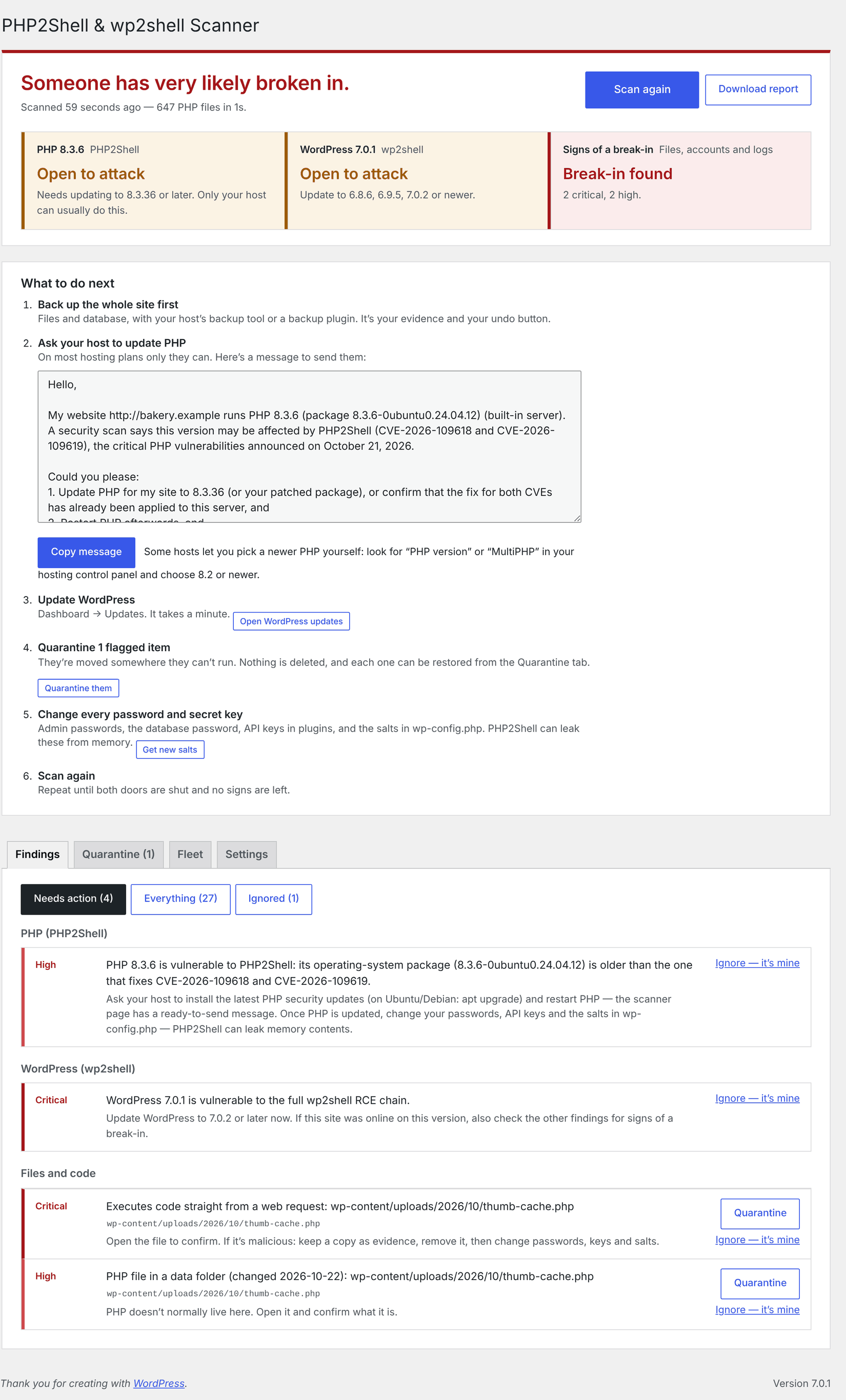
What the scanner page looks like
| Part | What it shows |
|---|---|
| Result at the top | One plain sentence ("Your site looks clean", "Your host needs to update PHP"…) and three panels: PHP2Shell, wp2shell and Signs of a break-in, each green, amber or red |
| What to do next | Your personal to-do list in order — back up, message your host, update WordPress, quarantine flagged files, check admins, change secrets, scan again — only the steps that apply to you |
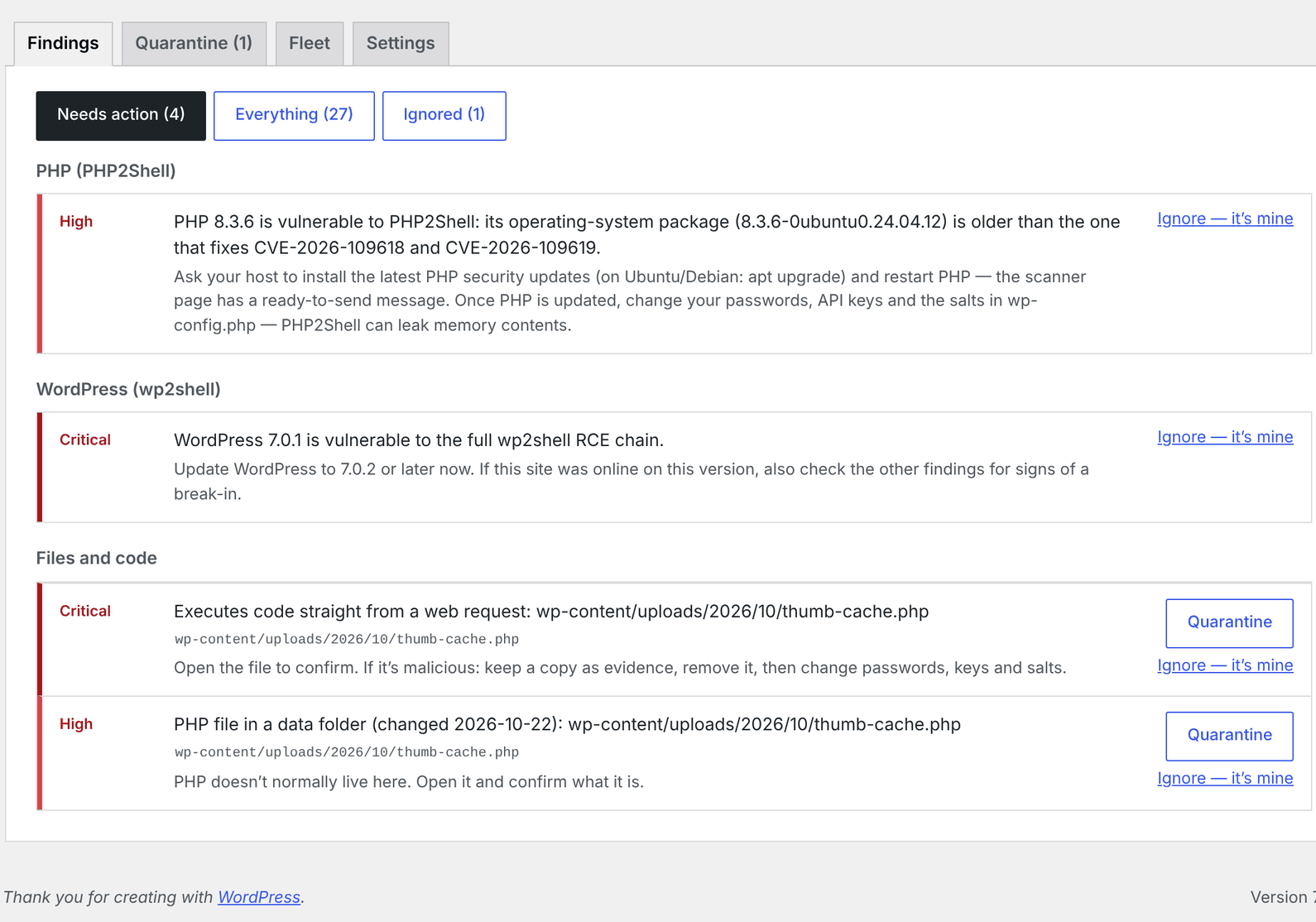
| Findings tab | Everything found, grouped by area, with Needs action / Everything / Ignored filters and the fix buttons |
| Quarantine tab | What you've quarantined or demoted, with Restore and Delete |
| Fleet tab | The multi-site dashboard |
| Settings tab | Schedule, email alerts, log paths |
From then on it scans automatically once a week and emails you only if something serious and new turns up.
Tip
Multisite? Go to Network Admin → Plugins, upload, and choose Network Activate. The scanner lives under Network Admin → Settings → JAT Shell Scanner and covers the whole network.
Warning
Use the download link above — not GitHub's green Code → Download ZIP button. That one is the raw source code; it works, but the release zip is the one that can check its own files for tampering.
No "Upload Plugin" button? Some hosts and plans don't allow plugin uploads (for example WordPress.com's lower plans, or sites with DISALLOW_FILE_MODS). Ask your host to install it, or to run the scan for you with WP-CLI.
There are two editions, built from the same code:
| Edition | Install from | Updates from | Self-check against |
|---|---|---|---|
| WordPress.org — JAT Shell Scanner | Plugins → Add New Plugin, search "JAT Shell Scanner" | WordPress.org, like any directory plugin | WordPress.org's published checksums |
| GitHub | The zip on the releases page | This repository's releases (below) | The release's manifest.json
|
The WordPress.org edition is the same plugin without includes/class-updater.php (WordPress.org plugins may only update through WordPress.org). To switch from GitHub to WordPress.org, delete the GitHub copy and install from the directory — deleting removes settings and quarantine, so restore anything you need first.
The GitHub edition updates itself from this repository, through the normal WordPress update screen.
sequenceDiagram
    participant WP as Your WordPress
    participant GH as GitHub Releases
    WP->>GH: Is there a newer version? (at most twice a day)
    GH-->>WP: Latest release + download link
    alt Newer than installed
        WP->>WP: Shows "update available" on Plugins and Dashboard → Updates
        WP->>GH: Downloads jat-shell-scanner.zip when you update (or automatically)
    else Up to date
        WP->>WP: Nothing to do
    end
- Click Update now when WordPress offers it — or Enable auto-updates on the Plugins screen (recommended: new indicators are added as attacks evolve).
- Updates only come from this repository's official releases. The plugin declares its own update source, so a different plugin with the same folder name elsewhere can never replace it.
- Manual update: upload the latest zip under Plugins → Add New Plugin → Upload Plugin and choose Replace current with uploaded.