Repository navigation
If Your Site Is Compromised
Don't panic, and don't start deleting things yet. Work through these steps in order:
flowchart TD
    A["🚨 Compromised or Suspicious"] --> B["1. Back up everything<br/>files + database"]
    B --> C["2. Close the way in<br/>update PHP and WordPress"]
    C --> D["3. Remove what was flagged<br/>files · plugins · admin users"]
    D --> E["4. Change every secret<br/>passwords · DB · API keys · salts"]
    E --> F["5. Hunt for other ways back in<br/>mu-plugins · .htaccess · .user.ini · cron"]
    F --> G["6. Scan again"]
    G --> H{"Clean?"}
    H -- Yes --> I["🟢 Keep scanning weekly"]
    H -- No --> J["Restore a clean backup<br/>or get professional help"]
| Step | How |
|---|---|
| 1. Back up | Use your host's backup tool or a backup plugin to copy files and database. It's your evidence and your undo button. |
| 2. Close the way in | PHP: have your host update it (see section 5). WordPress: Dashboard → Updates. Update all plugins and themes too. |
| 3. Remove what was flagged | Delete flagged plugins on the Plugins screen; flagged files with your host's file manager or SFTP; unknown admins under Users (assign their content to yourself). For modified core files use Dashboard → Updates → Re-install. If this scanner's files were modified, delete and reinstall it from the release. |
| 4. Change every secret | PHP2Shell can leak memory, so assume anything that passed through PHP is known: reset every admin password; revoke unknown application passwords (Users → Profile); change the database password (hosting panel + wp-config.php); regenerate API keys stored in plugins (payment, email, backup, CDN…); replace the salts in wp-config.php with fresh ones from the WordPress salt generator (this logs everyone out). |
| 5. Look for other ways back in |
wp-content/mu-plugins/, every .htaccess and .user.ini, scheduled tasks (a plugin such as WP Crontrol lists them), your hosting panel's cron jobs, FTP/SFTP and SSH accounts. |
| 6. Scan again | Click Scan again until the result is clean. |
For the most common clean-up jobs you don't need a file manager. Next to a finding you'll see a button when there's a safe fix:
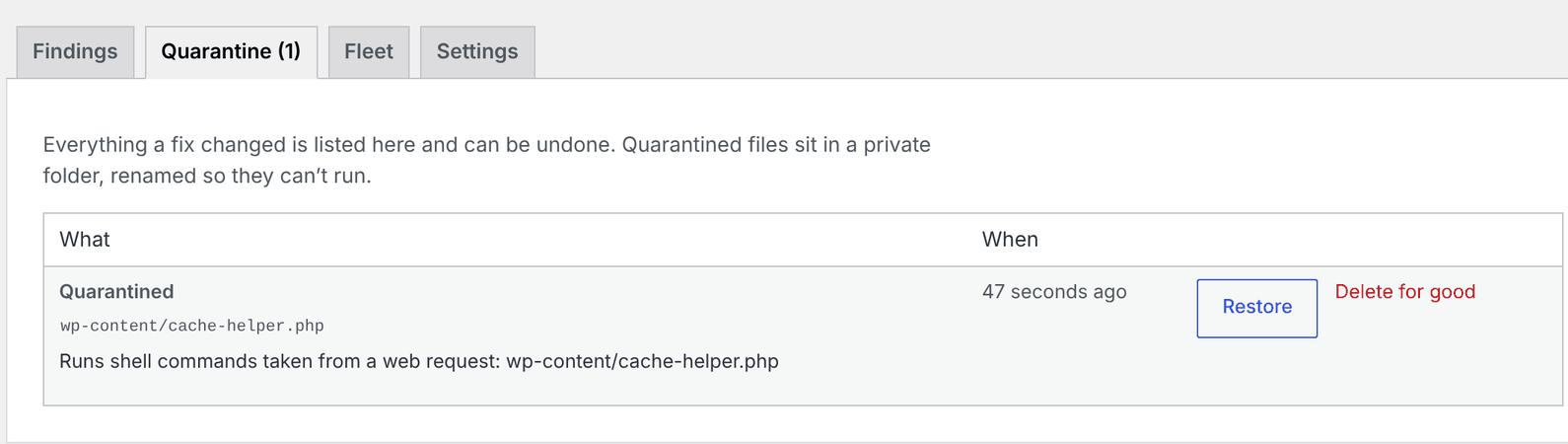
| Button | When it appears | What it does | Undo |
|---|---|---|---|
| Quarantine | A flagged file (webshell, PHP in uploads, a modified file) rated Medium or worse | Moves it into a private, locked quarantine folder in uploads/jat-shell-scanner/ and renames it (no .php left anywhere in the name) so it can never run |
Restore puts it back exactly where it was |
| Quarantine plugin | A malicious or suspicious plugin folder | Moves the whole folder into quarantine (WordPress deactivates it) | Restore |
| Remove admin rights | An unknown or newly promoted administrator (never you) | Makes them a Subscriber on every site, revokes Super Admin, logs them out everywhere | Undo gives the role back |
| Quarantine them all | Several critical/high file findings | Applies every file fix in one go (asks first) | Each one can be restored |
flowchart LR
    F["Finding"] --> Q{"Safe to fix<br/>automatically?"}
    Q -- "No: core folder, wp-config,<br/>whole theme, this scanner" --> M["Shown with manual<br/>instructions only"]
    Q -- Yes --> A["You click the button"]
    A --> R["Moved to quarantine<br/>or admin demoted"]
    R --> L["Signed record kept<br/>on the Quarantine tab"]
    L --> U["Restore / Undo"]
    L --> D["Delete for good"]
Safety rules:
-
Scans never change anything — only a button you click (or
wp jat-shell fix) does. - It refuses to touch WordPress core folders and root files (
wp-login.php,xmlrpc.php…),wp-config.php, the site's.htaccessand.user.ini, the drop-ins (db.php,object-cache.php,advanced-cache.php,sunrise.php), the root ofwp-content,plugins,themes,uploadsormu-plugins, a whole theme, or this scanner's own files. Modified core files are left to Dashboard → Updates → Re-install. - It only moves the file the scan saw: if the file changed since (different contents), or was swapped for a link, it refuses and asks you to scan again. Restoring refuses too if the original folder has been replaced by a link.
- It never removes the rights of the last administrator.
- Every other finding about a quarantined file counts as handled; if a webshell is dropped again at the same path, it needs action again.
- It respects
DISALLOW_FILE_MODS— if your site forbids file changes, the buttons don't appear. - Each fix record is signed with your site's secret keys, so an attacker can't plant a fake "restore" that moves a file somewhere else.
- Quarantined files are deleted when you uninstall the plugin, or individually from the Quarantine tab.
Tip
Not comfortable doing this yourself? Your host's support team or a WordPress security service can clean the site — many for a fixed fee. Give them the Download report (JSON) file; it lists everything found.