Repository navigation
Node Lite M5StickC
Status: working test device (2026-10-31). Firmware:
firmware/node-litein the repository.
The M5StickC is our Node-Lite test device: a Hive-Rail lite node on a small ESP32 with a screen and two buttons. It joins the mesh as a district (M5StickC, RocNet 199), with fake hardware instead of a real track: its buttons switch the district's power, fake a short circuit and send the global emergency stop. It is the test bed for the lite node of the Hive-Rail board (phase B0).
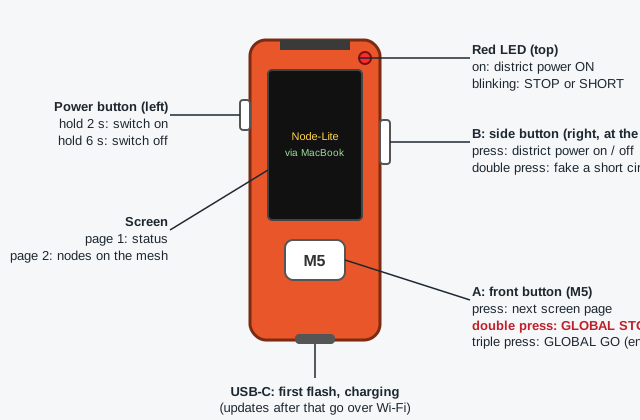
Held with the screen facing you and the USB-C port at the bottom:
| Control | Single press | Double press | Triple press |
|---|---|---|---|
| A: front button (M5) | Next screen page | GLOBAL STOP: every district that is ON goes to emergency stop, as the board's long press on stop | GLOBAL GO: ends the global stop; every district in emergency stop goes back on |
| B: side button, right, at the screen | District power on / off (the board's go and stop) | Fake a short circuit in this district | – |
| Power button, left | Hold 2 s: switch on; hold 6 s: switch off | – | – |
| Light | Meaning |
|---|---|
| Red LED (top) | On: district power ON. Blinking: STOP or SHORT. Off: power OFF |
-
After a global stop: a triple press on A (or
Gon the dispatcher or a node's screen) is the global go: every district in emergency stop goes back on. Districts that are OFF stay OFF, a district with a SHORT stays in SHORT. - One district on again: press B (the board's go). That also clears a SHORT.
- Why not a double press to end it: a stop gesture must always stop. If a district were still stopped from an earlier stop, a toggle would resume instead.
- The district starts OFF after a restart, as a real district does.
- A single press acts a fraction of a second after the press: the M5StickC first waits to see whether a second press follows.
The front button switches between the pages.
Page 1, status:
| Line | Shows |
|---|---|
| Title | Node-Lite M5StickC 199 |
| Wi-Fi | Signal strength (dBm) and IP address |
| Zenoh |
open (green) or CLOSED (red), and via: the full node it reaches the mesh through |
| Mesh | Nodes online, and this district's power: ON (green), OFF (grey), STOP or SHORT (red) |
| hb | Heartbeats sent (tx) and received (rx) |
| heap, cpu | Free memory now and its lowest point; CPU load per core (estimate) |
| up | Time since start |
| Last line (cyan) | The last event, for example district power ON (button)
|
Page 2, nodes: every node seen on the mesh with its RocNet address and district power. Green: online. Red: stale, with the seconds since its last heartbeat. via marks the node that carries the M5StickC.
Page 3, layout: its district's part of the layout, fetched from the mesh: the layout checksum, its modules, how many blocks, sensors and signals, the neighbouring districts, and the first blocks with their role and occupancy address. asking the mesh … until a full node with the layout answers.
The M5StickC does not need to know any computer's address. It scouts for lite servers: full nodes or the dispatcher started with --lite-server, which run Zenoh as a router on a fixed port. It attaches to the first one that answers. Ordinary nodes are Zenoh peers and do not answer this scouting, so only the designated servers carry lite nodes.
- Failover: with two or more lite servers on the mesh, the M5StickC moves to another one when its server stops. Tested 2026-10-31: its lite server stopped, and it moved to the other without missing a single heartbeat (zenoh-pico scouts again and attaches to the next router).
- Where they run: at a meeting the dispatcher's computer, a dedicated Raspberry Pi, or both. At least two are recommended.
-
Layout: a lite server started with
--layout <file>also answers the lite nodes' requests for their district's layout (hive/<session>/layout/district/<name>). -
Fallback: if no lite server answers the scouting, the addresses in
HIVE_LOCATORS(orHIVE_LOCATOR) insecrets.hare tried in turn. If a session cannot recover, the M5StickC restarts and scouts again. - Later: lite servers publish how many lite nodes they carry, and a lite node moves to the least loaded one (load balancing).
- The dispatcher's districts table shows
M5StickCwith199 → 101(its RocNet address, and the address of the node that carries it) and the register aslite: none. - Its district power is in its heartbeat and in a RocNet status event on
hive/<session>/rn/cs/node/M5StickC, so every node and the dispatcher see ON, OFF, STOP and SHORT. - Every power change appears in the dispatcher's event list, for example
district power STOP (GLOBAL STOP from Windows). - A lite node never becomes the throttle allocator or the fast clock master.
- In
firmware/node-lite, copyinclude/secrets.example.htoinclude/secrets.hand fill in the Wi-Fi network and an OTA password (and, as a fallback only, a full node's address).secrets.his never committed. - Start one or more lite servers, with the layout:
hive-rail --mode node --session bench --id MacBook --rocnet-address 101 --lite-server --layout examples/layout/bench-m5.jsonA second lite server on the same computer needs its own port: add--listen tcp/0.0.0.0:7448. The test layoutbench-m5.jsonhas three districts: MacBook, M5StickC in the middle, Windows. -
First flash, over USB:
pio run -e m5stick-c -t upload. zenoh-pico's build needs CMake next to PlatformIO (pip install cmake). -
Every update after that, over Wi-Fi:
PLATFORMIO_UPLOAD_FLAGS="--auth=<HIVE_OTA_PASS>" pio run -e m5stick-c-ota -t uploadThe screen shows the progress; the M5StickC restarts with the new firmware.
| Problem | What to do |
|---|---|
Flashing over USB: No serial data received
|
The M5StickC may have switched itself off: hold the power button 2 s. If it still fails, flash at 115 200 baud with esptool |
The Mac sees no /dev/cu.usbserial-…
|
A charge-only cable, or macOS blocking the accessory: use a data cable; check System Settings → Privacy & Security → Allow accessories to connect |
The screen keeps showing looking for lite servers
|
No lite server is running: start a node or the dispatcher with --lite-server (the dispatcher's example config has it off). The M5StickC tries again every few seconds; this is not a restart |
Zenoh CLOSED, or the node never sees it |
A lite server must be on the same network (--lite-server, Zenoh router on tcp/0.0.0.0:7447); a fallback address in secrets.h must be that computer's; allow incoming connections for hive-rail in macOS |
| It flips between online and stale | Heartbeats must come every 250 ms; the nodes call a peer stale after 750 ms |
| Date | Test | Result |
|---|---|---|
| 2026-10-31 | zenoh-pico 1.10.1 on the ESP32 against the Rust nodes (Zenoh 1.10.1) | Joins as a district; other peers see it through the node that carries it, both ways |
| 2026-10-31 | Resources | About 177 KB free heap, CPU 6 % and 15 % per core with Wi-Fi, Zenoh and the screen |
| 2026-10-31 | Global stop from the mesh | A stop sent by another node puts the M5StickC into STOP within the same second |
| 2026-10-31 | Firmware update over Wi-Fi | Works (ArduinoOTA, two app slots) |
| 2026-10-31 | Global stop and global go from the M5StickC | Reach every node; a stop only stops districts that are on |
| 2026-10-31 | Layout over the mesh | Its district's package (841 bytes) from both lite servers; checksum and borders to MacBook and Windows |
| 2026-10-31 | Lite servers and failover | Found by scouting; when its lite server stopped, it moved to the other without a missed heartbeat |
A lite node follows no trains itself: the full node that carries it (its lite server, with --layout) adopts its district (2026-11-02). That node follows the trains there from the lite node's sensor reports (RocNet group 8 on rn/node/<id>/sr), publishes the district's track and train picture in its name, takes trains in and hands them back at the border, and sends the lite node the holds before a border (node/<id>/holds), which the lite node applies on its command station. When the lite node moves to another lite server, that one adopts the district. Tested with a node standing in for the lite node (--lite-via MacBook, tools/district_sim_step9.py). Still to do in the firmware: report its detectors as RocNet sensor reports, and apply the holds.
- Fake track from the simulator: the layout simulator drives the sensors, blocks, turnouts and signals of the M5StickC's district as its hardware; the M5StickC reports them like a real node and lists the locos in its district. Its district power stops the trains in its district (the simulator already stops trains in any district without power).
- Load balancing across lite servers.
Done since: the scenario driver (2026-10-31, tools/bench_m5_test.py with --sim-hw): shorts, district stop and go, global stop and go and fast clock changes injected into all three districts for about 20 minutes with six trains; only the trains of the faulty district stop.