
AI-powered Jira workflow inside VS Code.
Turn prototype code into epics and stories. Generate customer-facing release notes. Create tickets from a code selection. Never leave your editor.




Every engineering team loses hours every sprint to the friction between "we built a prototype" and "here are the Jira tickets engineering will actually build". SpecPilot closes that gap.
- Vibe Code → Jira — diff a prototype branch against production, let AI propose epics and stories with acceptance criteria, review and edit inline, then create the tickets with screenshots attached.
- Ticket Jumpstart —
Cmd+Alt+Jand you're in. AI tells you which files to open, what the AC imply, and what patterns from similar resolved stories to mimic. - Inline ticket creation — highlight buggy code, hit
Cmd+Shift+J, get a fully-formed BDD Story or Bug with acceptance criteria. - Customer-facing release notes — pick a version, AI groups and summarizes your tickets, publish to Confluence and the Jira version description with one click.
- Sprint + automation rules at a glance — see your active sprint and all project automation rules in the sidebar without opening Jira.
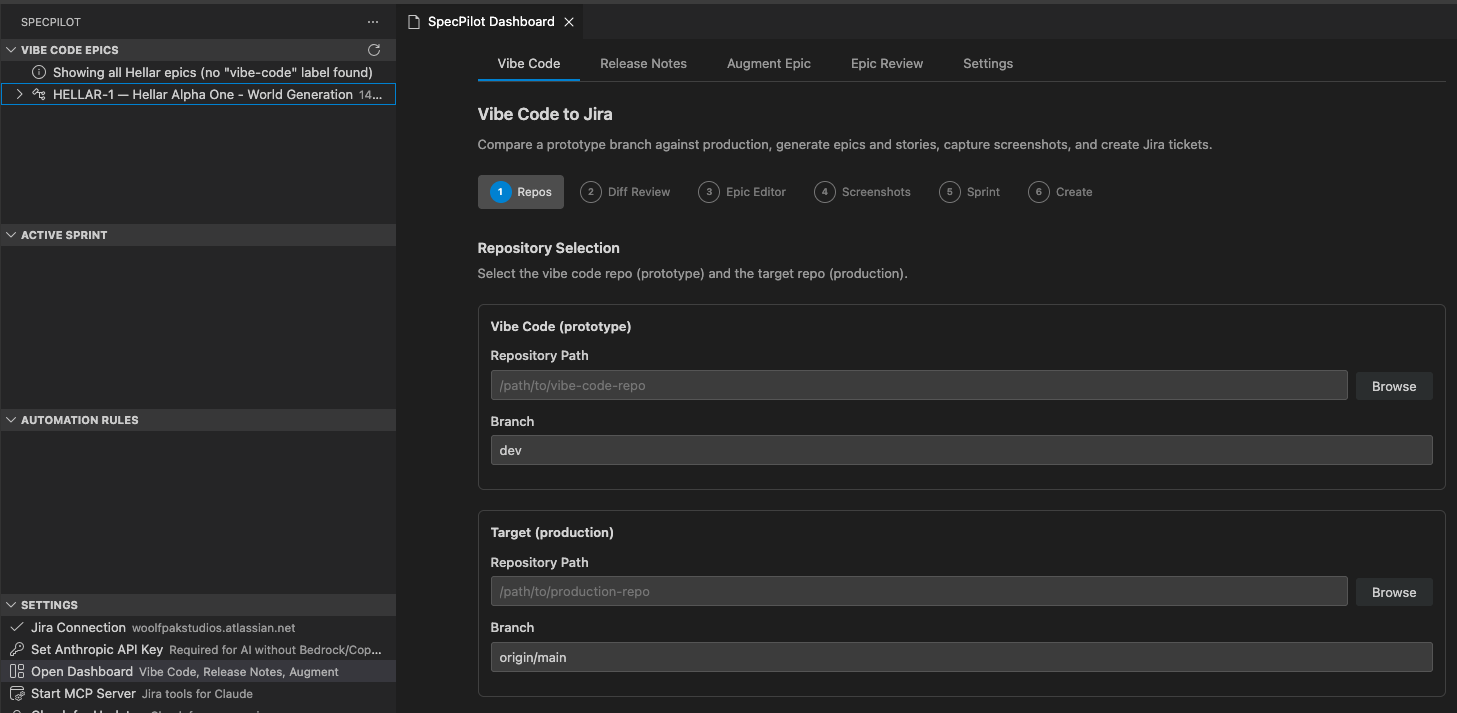
The dashboard opens beside your editor with the full sidebar visible. Five tabs: Vibe Code, Release Notes, Augment Epic, Epic Review, and Settings.
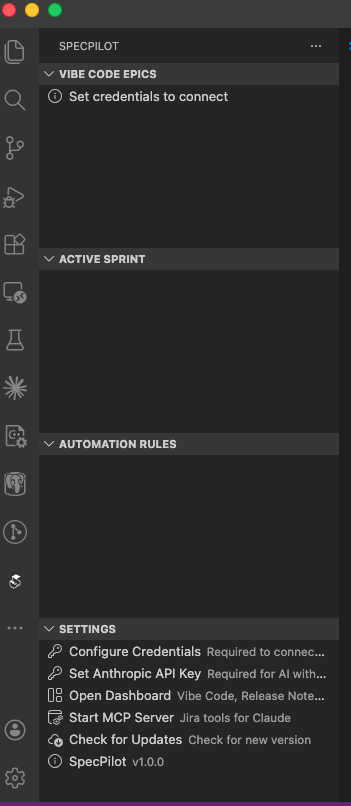
Four tree views under the SpecPilot icon:
| View | What it shows |
|---|---|
| Vibe Code Epics | Epics with your configured label (default vibe-code), expandable to child stories |
| Active Sprint | Current sprint issues grouped by status |
| Automation Rules | Every project automation rule, sorted enabled-first |
| Settings | Credentials, dashboard, MCP server, version info |
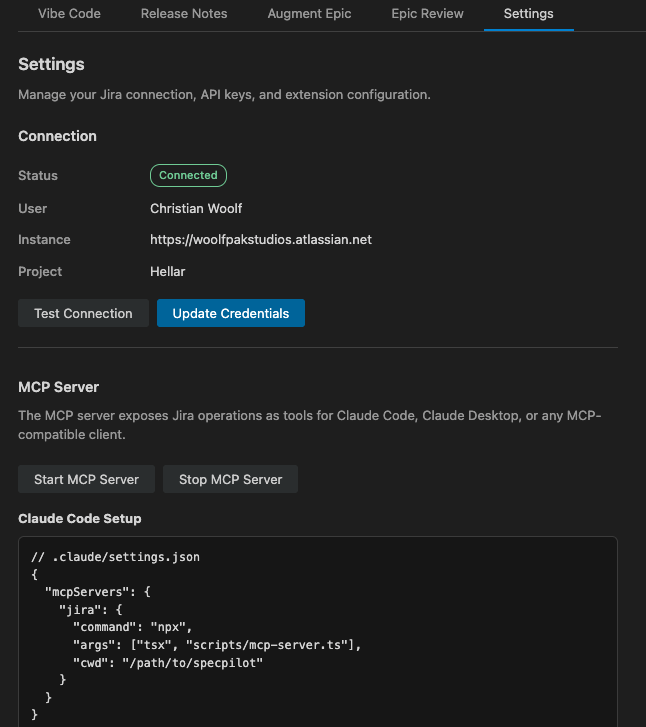
The Settings tab shows live connection status, current user/instance/project, and a copy-pasteable MCP server config for Claude Code.
Install SpecPilot from the VS Code Marketplace, or search SpecPilot in the Extensions view.
- Open the Command Palette (
Cmd+Shift+P) - Run SpecPilot: Set Credentials
- A four-step prompt walks you through the required values:



Use your Jira base URL, email, API token, and default project key. The status bar shows your connection state. Click it to open the dashboard. Issue types and projects are auto-discovered — no manual ID wiring.
SpecPilot uses a three-provider fallback chain: AWS Bedrock → Anthropic API → VS Code Language Model API (Copilot). Set up any one:
- Anthropic API (simplest) — get a key at https://console.anthropic.com, run SpecPilot: Set Anthropic API Key
- AWS Bedrock (enterprise) —
aws sso login --profile <profile>; Bedrock picks up SSO creds automatically - GitHub Copilot — no setup; works if you already have Copilot Chat installed
Skip the "where do I even start?" ceremony. Hit Cmd+Alt+J (mac) / Ctrl+Alt+J (win/linux) and SpecPilot:
- Picks the ticket — next unassigned in your active sprint, one of your assigned tickets, or an issue key you type
- Pulls AC, description, parent epic, and resolved stories from the same epic as prior art
- Samples your workspace for grounding files, then asks AI for a concrete plan
- Opens a panel with: a one-line summary, 1–4 files to open (click to jump to the exact line), 2–4 starter steps, AC implications, and similar stories to mimic
Configure default behavior with specPilot.ticketJumpstart.source (ask | nextUnassigned | myAssigned | byKey) and specPilot.ticketJumpstart.maxSimilarStories. The briefing uses the same Bedrock → Anthropic → VS Code Language Model fallback as the rest of the extension.
Highlight code and create a Jira Bug or Story directly:
- Keybinding:
Cmd+Shift+J(mac) /Ctrl+Shift+J(win/linux) - Context Menu: Right-click on a selection → Create Issue from Selection
- Command Palette:
SpecPilot: Create Issue from Selection
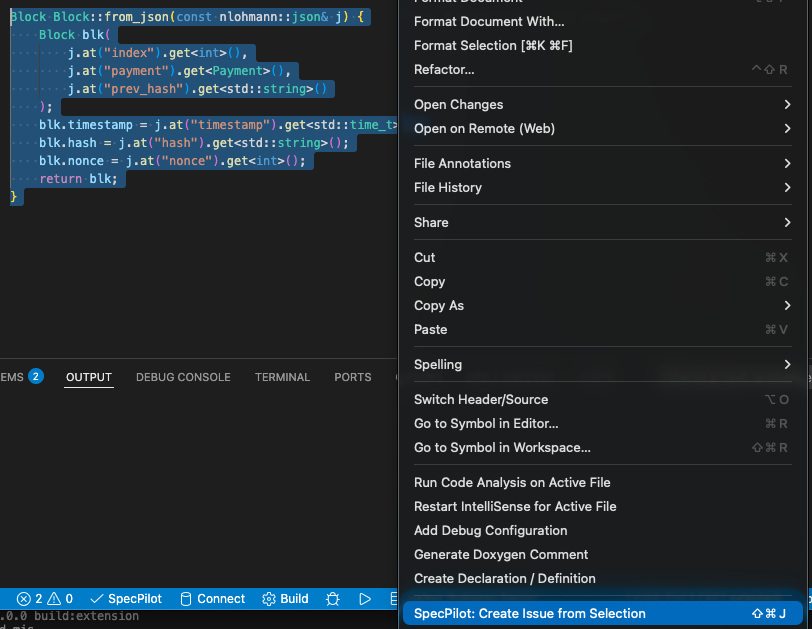
Pick the issue type, enter a short summary, and (optionally) add extra context:



A review panel opens beside your editor. AI enhances the ticket in the background using BDD templates — you can edit every field before clicking Create Issue:
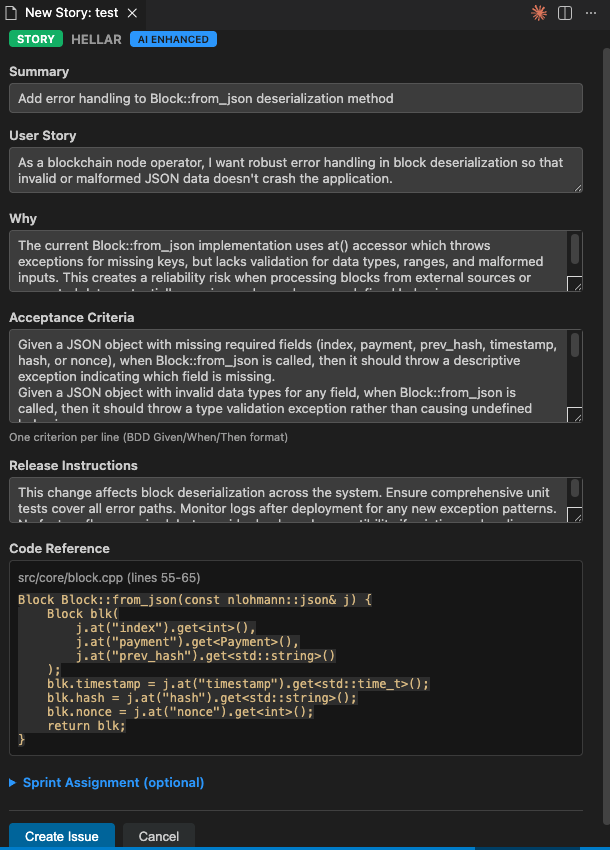
- Stories — User Story, Why (business value), Acceptance Criteria (Given/When/Then), Release Instructions
- Bugs — problem statement, expected vs actual behavior, reproduction steps
Bring your own templates from the dashboard's Settings → BDD Templates section, or via the specPilot.ai.storyTemplatePath / specPilot.ai.epicTemplatePath settings.
Compare a prototype branch (the "vibe code") against production, and let AI propose the Jira breakdown:
- Select repos — pick the prototype branch and the production comparison point
- Review diff — see the stat summary, categorized files, and detected routes
- Generate analysis — AI proposes epics with child stories, each with AC, source files, and screenshot routes
- Edit — every field is inline-editable; add/remove stories, tweak AC, reorder dependencies
- Capture screenshots — Playwright walks through the prototype and attaches UI screenshots per story
- Create in Jira — moves stories into the sprint you select, links blockers, and sets parents
Supports cross-repo diffs (monorepo or standalone), focus-area filtering for large diffs, and dry-run mode that exports MCP-compatible JSON instead of touching Jira.
4-step wizard: pick version → select issues (with sprint filter) → AI drafts grouped customer-facing notes → publish to Confluence + Jira version description.
Add UI screenshots to stories that already exist. Supports pre-built scenario JSON or keyword-based route matching.
Fetch an existing Jira epic, review its details and existing stories, then generate new stories with AI. Export as MCP-compatible JSON for further review, or create them directly in Jira.
Exposes Jira operations to Claude Code, Claude Desktop, or any MCP client. Tools: jira-search, jira-get-issue, jira-create-issue, jira-add-attachment, jira-list-sprints, jira-move-to-sprint, jira-transition. Start from the Settings tree view or Command Palette.
| Setting | Default | Description |
|---|---|---|
specPilot.aiEnhanceIssues |
true |
Enable/disable AI enhancement entirely |
specPilot.ai.provider |
"auto" |
auto (Bedrock → Anthropic → Copilot), bedrock, anthropic, or vscode-lm |
specPilot.ai.anthropicModelId |
claude-sonnet-4-5-20250929 |
Anthropic API model ID |
specPilot.ai.bedrockRegion |
AWS_REGION env |
AWS region for Bedrock |
specPilot.ai.bedrockProfile |
AWS_PROFILE env |
AWS SSO profile name |
specPilot.ai.bedrockModelId |
us.anthropic.claude-opus-4-6-v1 |
Bedrock model ID |
specPilot.ai.storyTemplatePath |
(built-in) | Path to custom BDD Story template (.md / .txt / .template) |
specPilot.ai.epicTemplatePath |
(built-in) | Path to custom BDD Epic template |
specPilot.epicLabel |
"vibe-code" |
Label for filtering tool-created epics |
specPilot.acceptanceCriteriaFieldId |
"" |
Custom field ID for AC (e.g., customfield_10334) |
specPilot.releaseNotes.excludeIssueTypes |
(see defaults) | Issue types excluded from release notes |
specPilot.autoUpdate |
false |
Self-hosted update checks from a GitHub repo |
specPilot.updateCheckIntervalMinutes |
60 |
Check interval (minimum 5) |
specPilot.selfHostedUpdateRepo |
"" |
GitHub owner/repo for self-hosted updates |
| Command | Description |
|---|---|
SpecPilot: Open Dashboard |
Open the main webview panel |
SpecPilot: Set Credentials |
Configure Jira API credentials |
SpecPilot: Set Anthropic API Key |
Configure Anthropic API key |
SpecPilot: Create Issue from Selection |
Create Bug/Story from selected code |
SpecPilot: Jumpstart Next Ticket |
AI briefing for your next ticket (Cmd+Alt+J) |
SpecPilot: Check for Updates |
Check for new extension versions (self-hosted only) |
SpecPilot: Start MCP Server |
Start the MCP server process |
SpecPilot: Stop MCP Server |
Stop the MCP server process |
- VS Code 1.90+
- Jira Cloud with an API token
- One of: Anthropic API key, AWS SSO access, or GitHub Copilot Chat (optional — for AI features)
Credentials are stored in VS Code Secret Storage (primary) with a .env fallback for CLI use. SpecPilot only sends data to:
- Your Jira instance (direct HTTPS)
- Your AI provider — only when an AI feature is invoked, and only the specific prompt (code selection, diff context, or ticket list)
No telemetry. No analytics. No third-party servers.
- Website — woolfpakstudios.com
- Discord — Join the community for questions, feature requests, and release announcements
- Issues — file bugs and feature requests on GitHub