Repository navigation
Releases
Labelburg v5.0.0

Highlights
New printers
- Epson TM-T20II: receipt printers on ESC/POS, on 80 mm (the default) or 58 mm paper, by @randybb. Labels are cut after the last one at least, and the 12 mm the printer feeds before each cut label shows in the label designer. Set it up like any other printer, e.g.,
TM-T20II=file:///dev/usb/lp0inPRINTERS.
Features
- Pictures for kids: a new wizard category with 20 pictures of vehicles and a unicorn, each as a sticker and with the child's name. They print in color on the 25 and 50 mm tapes of the VC-500W and in gray on black QL tape (62, 29 and round 24 mm).
- Endless labels of a fixed length: a length next to the tape makes an endless DK or TZe label as long as typed, as cut, with its content laid out in it as on a die-cut label. On a QL-800 and a QL-1100, labels of 30 and 80 mm came out at exactly 30 and 80 mm.
- Vertical position: the content of die-cut labels, of labels along endless tape and of endless labels with a length can sit at the top, in the middle or at the bottom.
- Stronger contrast for light drawings: an image on VC-500W tape can get stronger contrast, so watercolor drawings no longer print faint. The label designer suggests it for light images.
- All files in the preview: with several images or PDFs loaded, the preview steps through them.
- Labels leave the printer top first: the preview shows QL and P-touch printers below the label, the way it comes out, by @randybb.
- Smaller image: 141 MB instead of 199 MB, a 62 MB download instead of 83 MB.
Upgrading
The images are tagged :5.0.0, :5.0, :5 and :latest, as ghcr.io/dl6er/labelburg and still as ghcr.io/dl6er/brother-ql-web.
In the API, label_length sets the length of an endless label in millimeters, vertical_align places the content (top, center or bottom) and image_contrast=1 gives an image on VC-500W tape stronger contrast.
The label designer no longer offers a layout with only a code: a code with empty text prints the same. Saved labels of that layout load as such, and print_type=qrcode keeps working.
The image no longer contains pip, git and fontTools. Images built on top of this one no longer find pip in it: to install more packages, build from the new dev stage of the Dockerfile, which has pip and git. .devcontainer/devcontainer.json builds it for development.
What's Changed
Changes
- Step through all files in the preview of the label designer by @DL6ER in #221
- Add the PT-P900 series, printer names and the large preview to the README by @DL6ER in #222
- Add the project website, built from the README by @DL6ER in #223
- Show labels leaving a QL or P-touch printer top first by @randybb in #218
- Remove the code-only layout from the label designer by @DL6ER in #224
- Add a driver for Epson receipt printers on ESC/POS by @randybb in #219
- Add stronger contrast for light drawings on full-color printers by @DL6ER in #227
- Add pictures for kids to the demo labels by @DL6ER in #225
- Make the image smaller by @DL6ER in #228
- Place the content at the top or bottom of labels with room to spare by @DL6ER in #178
- Print endless labels of a fixed length by @DL6ER in #179
Full Changelog: v4.1.0...v5.0.0
Why 5.0.0: support for a new kind of printer, Epson receipt printers on ESC/POS, makes a major version. The image also no longer contains pip, which breaks images that install packages on top of it.
Contributors


Assets 2
Labelburg v4.1.0
Highlights
- Cable flags: a checkbox under the tape turns a label into a flag that wraps around a cable. The label is printed twice with room between them, so both ends stick together back to back and read upright, with marks where the cable goes. The room fits the diameter of the cable, 6.5 mm (a Cat.7 patch cable) if left empty. On continuous tape, the cable labels in the wizard are flags now.
- Image, code and text on one label: a new layout puts an image on one side, a code on the other and the text between them. The wizard has the first label made with it, the sticker of this project for the 50 mm tape of the VC-500W.
- Printers with names: an entry of
PRINTERSmay start with a name, e.g.,Kitchen:QL-700=usb://0x04f9:0x2042. The label designer shows it, and requests can choose the printer by it. - New icon: a castle cut like a sticker, as app icon, favicon and in the top bar.
- PT-P900W and PT-P950NW: margins, gaps and label lengths on their wide tapes are shown in the right mm, and PDF pages on P-touch tapes come out at their size.
- Transparent images: their transparent parts print white like the label instead of in the color stored under them, often black.

I printed this version on the VC-500W, the wizard sticker by the name of the printer.
Upgrading
The images are tagged :4.1.0, :4.1, :4 and :latest, as ghcr.io/dl6er/labelburg and still as ghcr.io/dl6er/brother-ql-web.
In the API, print_type=image_qrcode_text prints an image, a code and text, cable_flag=1 with cable_diameter prints a cable flag, and printer also takes the name of a printer listed in PRINTERS. Nothing else changes.
What's Changed
Changes
- Use the Labelburg castle as the app icon by @DL6ER in #214
- Print cable flags by @DL6ER in #208
- Add a layout with image, code and text by @DL6ER in #215
- Print transparent parts of images white by @DL6ER in #216
- Use 360 dpi for the tapes of the PT-P900 series by @DL6ER in #207
- Name the printers listed in
PRINTERSby @DL6ER in #184
Full Changelog: v4.0.0...v4.1.0
Contributors
Assets 2
Labelburg v4.0.0
Highlights
- New name: brother_ql_web is now Labelburg, "design and print labels 100% offline". The project outgrew the limitation to Brother, the PUQU Q00 is the first printer of another maker. The new name is not a step towards anything commercial, Labelburg stays free software under the GPLv3. Old links to the repository lead to the new one.
- PUQU Q00: the first printer from a maker other than Brother, contributed by @randybb. The Bluetooth printer for die-cut labels of 40 and 50 mm is configured as
bt://<MAC>, also as the Reekon P1 Tagger, the same printer in a rubber shell. In a container it needsnetwork_mode: host. - Large preview: a button in the corner of the editor's stage lets the label fill the stage, up to 16 px per mm. It is off by default and kept for the next visit.
- Printers are named by maker and model, e.g., "Brother QL-800" or "PUQU Q00".
- Network printers at IPv6 addresses, as
tcp://[<address>]. - Labels longer than the printer prints are refused before anything is sent, e.g., "Labels on the QL-800 can be at most 1000 mm long".
- Offline: the date and time codes are explained in the label designer instead of on strftime.org, and the links to GitHub ask before they open.
- QL-500: Cutting is disabled, its labels are cut off with the lever on the printer.
- Under the hood, every printer protocol sits behind a small driver interface, and the Brother raster code is part of the Brother driver now instead of the archived brother_ql-inventree. Jobs on every label size and model give the same bytes as before.

I printed this version on the QL-810W and the VC-500W, @randybb on the PUQU Q00 and the Reekon P1L from a Raspberry Pi.
Upgrading
The images are now called ghcr.io/dl6er/labelburg, tagged :4.0.0, :4.0, :4 and :latest. Their earlier name, ghcr.io/dl6er/brother-ql-web, keeps getting the same tags, so existing installations update as before, switching means changing only the image name. :3 stays on v3.0.0.
Without Docker, install the requirements again: brother_ql-inventree, attrs, dominate and visitor are no longer needed.
In the API, labels longer than the printer prints are refused, and a VC-500W at tcp://<host> works like vc500w://<host>.
What's Changed
Changes
- Move the printer protocols into drivers by @DL6ER in #194
- Carry the Brother raster code in the Brother driver by @DL6ER in #195
- Add a driver for the PUQU Q00 by @randybb in #196
- Accept network printers at IPv6 addresses by @DL6ER in #198
- Refuse labels longer than the printer prints by @DL6ER in #197
- Ask before links to the internet, show the date codes offline by @DL6ER in #200
- Name the maker with each printer in the label designer by @DL6ER in #203
- Disable cutting on the QL-500, its labels are cut by hand by @DL6ER in #204
- Remove the unused
dominateandvisitorrequirements by @DL6ER in #205 - Add an optional large preview to the label designer by @DL6ER in #206
- Rename the project to Labelburg by @DL6ER in #212
Dependency updates
- Bump dominate from 2.9.1 to 3.1.0 by @dependabot[bot] in #202
Full Changelog: v3.0.0...v4.0.0
Contributors

Assets 2
Brother QL Web v3.0.0
Highlights
- Brother VC-500W: the color label printer for ZINK tape of 9 to 50 mm prints text, codes, frames and photos in full color, borderless and at their exact length. It works over Wi-Fi and USB and is detected like the other printers, or configured as
vc500w://<host>. - While it prints, the label designer shows the stage of the job and the tape left. A label takes about 40 s, most of it to prepare and preheat. On a weak Wi-Fi, the printer panel suggests moving the printer closer to the router.
- Cutting: a full cut where a label is cut, a half cut between the others unless half cuts are off. "Never" is not offered, the printer would keep the labels until the next print. A cut label starts with a 9 mm tab, which the printer does not let us turn off.
docs/vc500w.mdhas my measurements of the printer,docs/usbip.mdexplains how to use a USB printer plugged into another computer.
I tested the VC-500W with all five tapes over USB and Wi-Fi. If you have one, please tell in an issue how it prints for you. For its protocol I started from different sources online and worked out the rest on my printer.
Upgrading
The images are tagged :3.0.0, :3.0, :3 and :latest. :2 stays on v2.0.0.
For QL and P-touch printers one thing changes: on labels without red, red text, codes and frames are shown and printed in black.
In the API, color of a text line takes any color as #rrggbb for the tapes of the VC-500W. cut=none is refused for the VC-500W.
What's Changed
Changes
Full Changelog: v2.0.0...v3.0.0
Contributors
Assets 2
Brother QL Web v2.0.0
Highlights
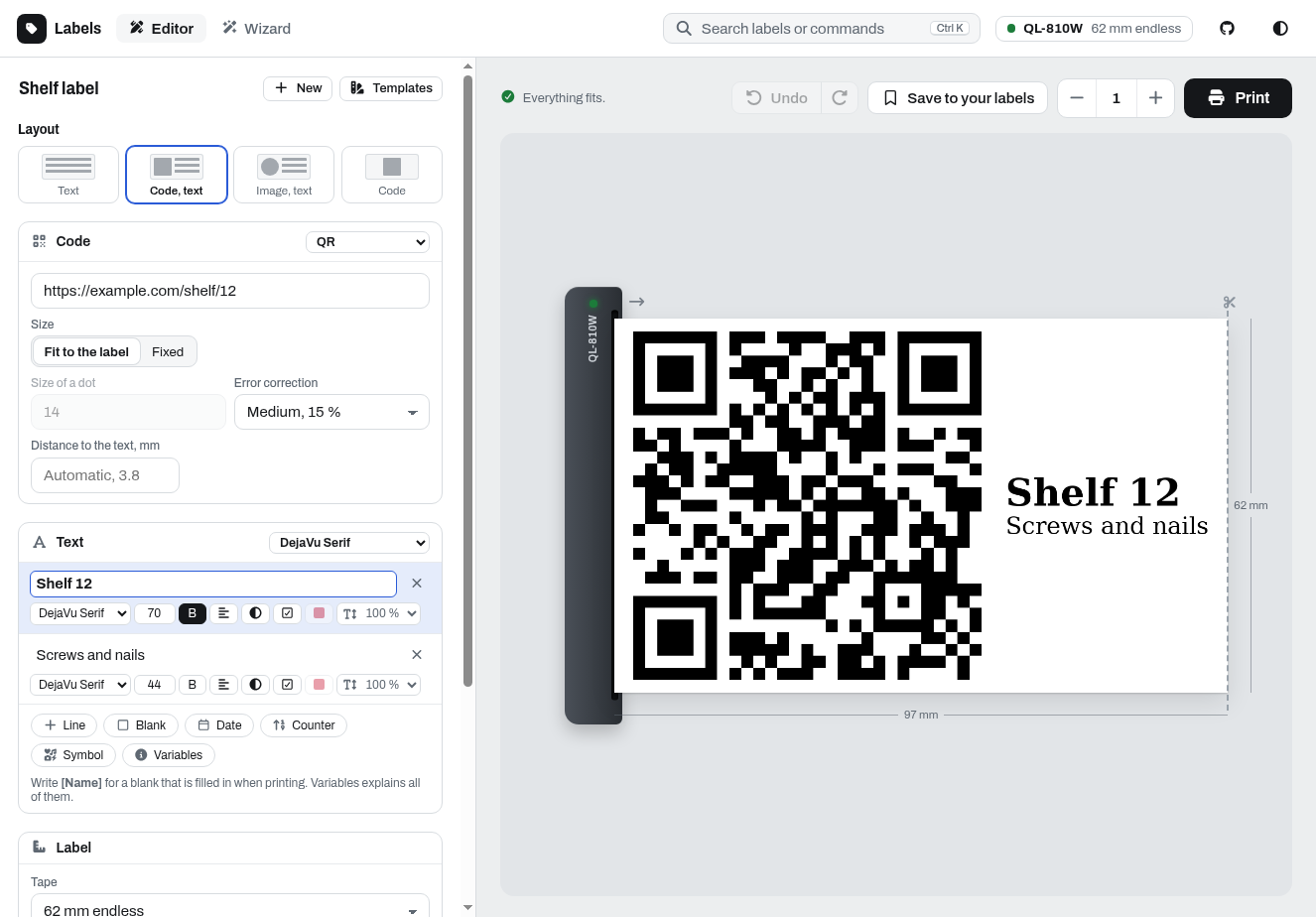
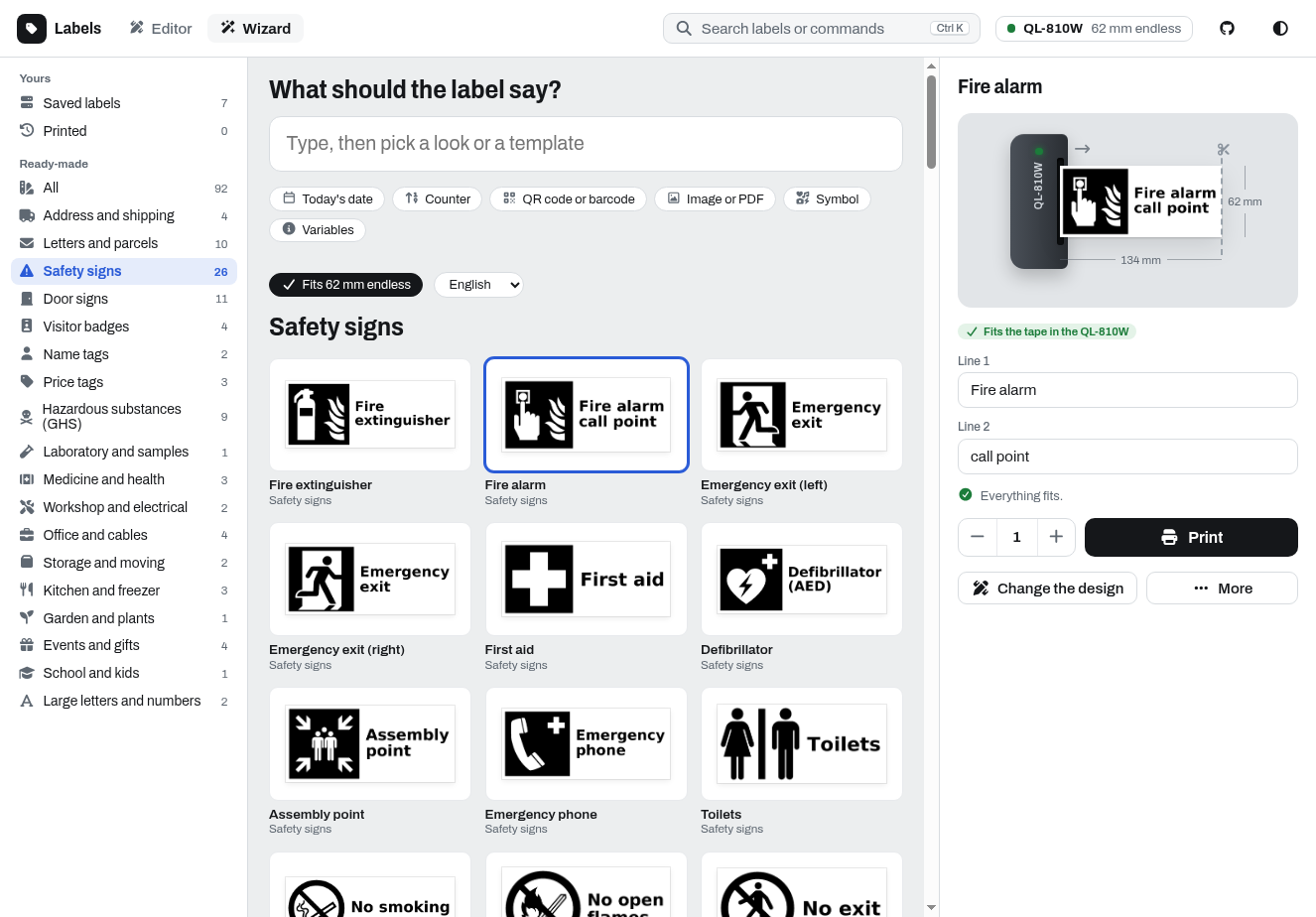
- A new label designer: rebuilt around the label itself. An editor with its own font, size, alignment and color for every line, symbols and Material Design Icons, undo and redo, several images or PDFs per label, and a preview that shows the label leaving the printer. A wizard turns typed text into six ready looks and finds fitting templates next to your saved and printed labels. Search with Ctrl K, dark mode, and phones with the tabs at the bottom. Previews are faster, as the server measures each text size once and keeps codes and images.
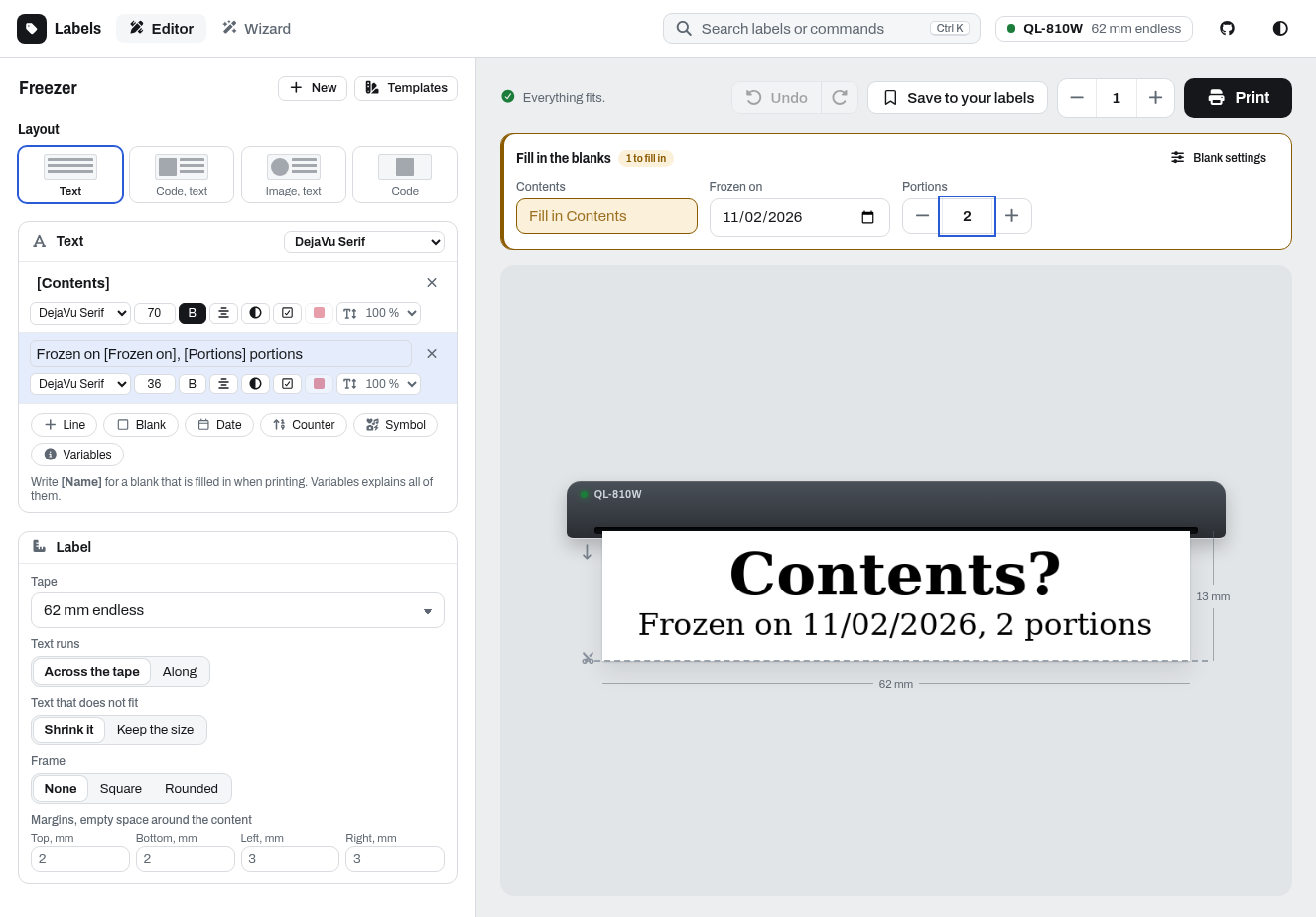
- Blanks:
[Name]in a line becomes a field that is filled in when printing, as text, number or date, with a default if you like. The server fills them in, so a saved label prints the same from the designer and through the API (blanks). - P-touch printers: the PT-E550W, PT-P700 and PT-P750W print on TZe tapes of 6 to 24 mm, laminated, non-laminated, fabric and heat-shrink tubes.
- Cutting for each printer: after each label, after the last one or never, on P-touch printers also half cuts and chain printing. A label can keep its own cutting, and the preview shows the strip as it leaves the printer.
- Material Design Icons in any text with
{{mdi:<name>}}, e.g.{{mdi:lightbulb}} Light, also from the API and the webhook. - Printing is more reliable: all labels of a request are one job, long labels on USB printers are waited for, and every label of a job over USB is confirmed, also on the QL-700, QL-800 and QL-1100. When a printer does not answer, the designer says why in plain words, and with several printers in
PRINTERSone that is switched off no longer holds up the others. SYSTEM_FONTS=falseoffers only the fonts ofFONT_FOLDER.
| Saved and ready-made labels | Blanks, filled in when printing |
|---|---|
 |
 |
Upgrading
The images are tagged :2.0.0, :2.0, :2 and :latest. :1 stays on v1.3.0, so if you pinned it, switch to :2 or :latest. Bookmarks of /labeldesigner/classic open the new designer.
Changes that clients of the API may notice:
- A print the printer did not do, because it reports an error, does not answer or is busy, is answered with 503 instead of 400. Refused requests stay 400.
- Refused requests get fixed messages, the details are in the log of the server.
- The distance between a code or image and the text is now two fifths of the largest text, at least two modules of a QR code. Labels with both come out slightly different.
image_text_gapsets it in dots. /api/repository/loadgivesimage_fitandimage_cropas1or0, and thetext_fitof labels saved withshrink_textonly./api/repository/listreturns the title a label was saved under./api/repository/savewithreplacefalse keeps a label saved under the name and answers 409. Saving and deleting answer 503 after waiting 10 seconds for another save.- Unknown label sizes, unknown image modes and barcodes with a wrong check digit are refused.
PRINT_BATCH_SIZEis gone, a request is printed as one job.- New parameters:
cut(each,lastornone,cut_oncestill works),half_cut,chain,blanks,fields,mark_blanks,text_fitandimage_position./labeldesigner/api/openapi.jsondescribes them.
What's Changed
Changes
- Print P-touch tapes as endless labels by @randybb in #156
- Offer 6 and 9 mm TZe tapes by @randybb in #158
- Offer only the fonts of FONT_FOLDER with SYSTEM_FONTS=false by @randybb in #160
- Insert Material Design Icons with {{mdi:}} by @randybb in #161
- Print on P-touch printers: compressed lines, no "no tape" media type by @randybb in #157
- List the P-touch printers among the supported printers by @randybb in #159
- Redesign the label designer by @DL6ER in #162
- Refuse unknown image modes by @DL6ER in #163
- Organize the tests by topic by @DL6ER in #164
- Keep the letters of white on black lines inside their box by @DL6ER in #165
- Refuse barcodes with a wrong check digit by @DL6ER in #166
- Tell the PT-E550W from the PT-P750W by @DL6ER in #168
- Answer 503 when the printer could not print by @DL6ER in #170
- Wait for long labels on USB printers to be printed by @DL6ER in #171
- Keep the browser data of instances below one host apart by @DL6ER in #172
- Read label sizes saved as numbers and refuse unknown ones by @DL6ER in #173
- Tell in plain words why a printer does not answer by @DL6ER in #174
- Print line breaks in a text line as lines of their own by @DL6ER in #167
- Offer the 12, 18 and 24 mm TZe tapes only to printers they fit by @DL6ER in #169
- Answer refused requests with fixed messages, log the details by @DL6ER in #175
- Fix jobs of several labels reported as failed over USB by @DL6ER in #187
- Print all labels of a request as one job by @DL6ER in #190
- Offer cut options for each printer and label, show them in the preview by @randybb in #188
- Read the status of a USB printer while the job is written by @DL6ER in #192
- Do not wait for printers that do not answer the status query by @randybb in #193
Full Changelog: v1.3.0...v2.0.0
Contributors
Assets 2
Brother QL Web v1.3.0
Highlights
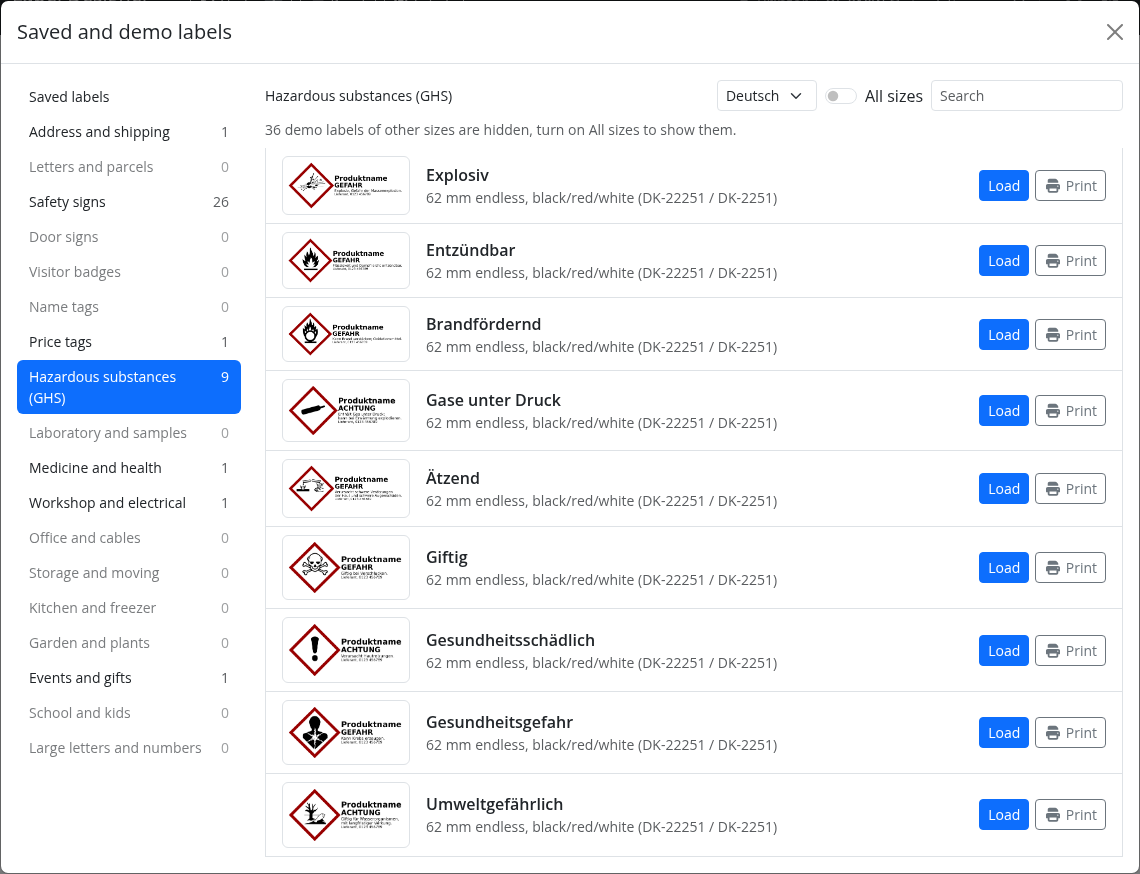
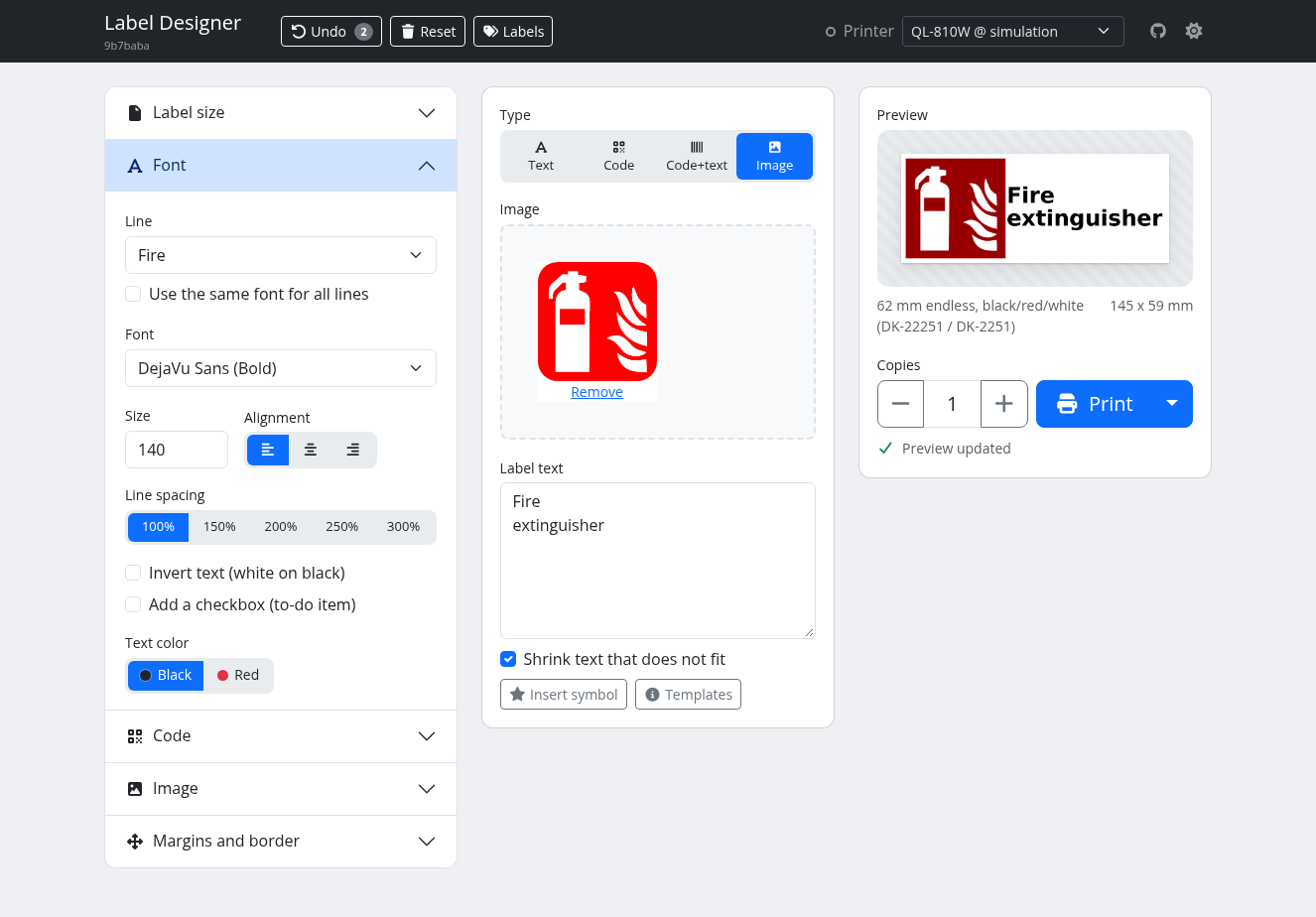
- Demo labels to start from: the "Labels" button opens your saved labels and 477 demo labels in 18 categories, like the templates of Brother's apps. Load one into the label designer or print it with one click: addresses and shipping, letters and parcels, safety signs, door signs, visitor badges, name tags, price tags, hazardous substances (GHS), laboratory, medicine, workshop and electrical, office, storage, kitchen, garden, events, school, large letters and numbers.
- For the labels you have: most demo labels exist in several label sizes. The list shows those for the selected size, "All sizes" shows all.
- English and German: every demo label exists in both languages, the dialog shows the language of your browser and lets you switch.
- Official pictograms: ISO 7010 safety signs, the 9 GHS pictograms and the toilet symbol, in black on black labels and in red on black/red labels. All of them are public domain or CC0, see SOURCES.md.
- The image field no longer shows an upload progress bar over every image.
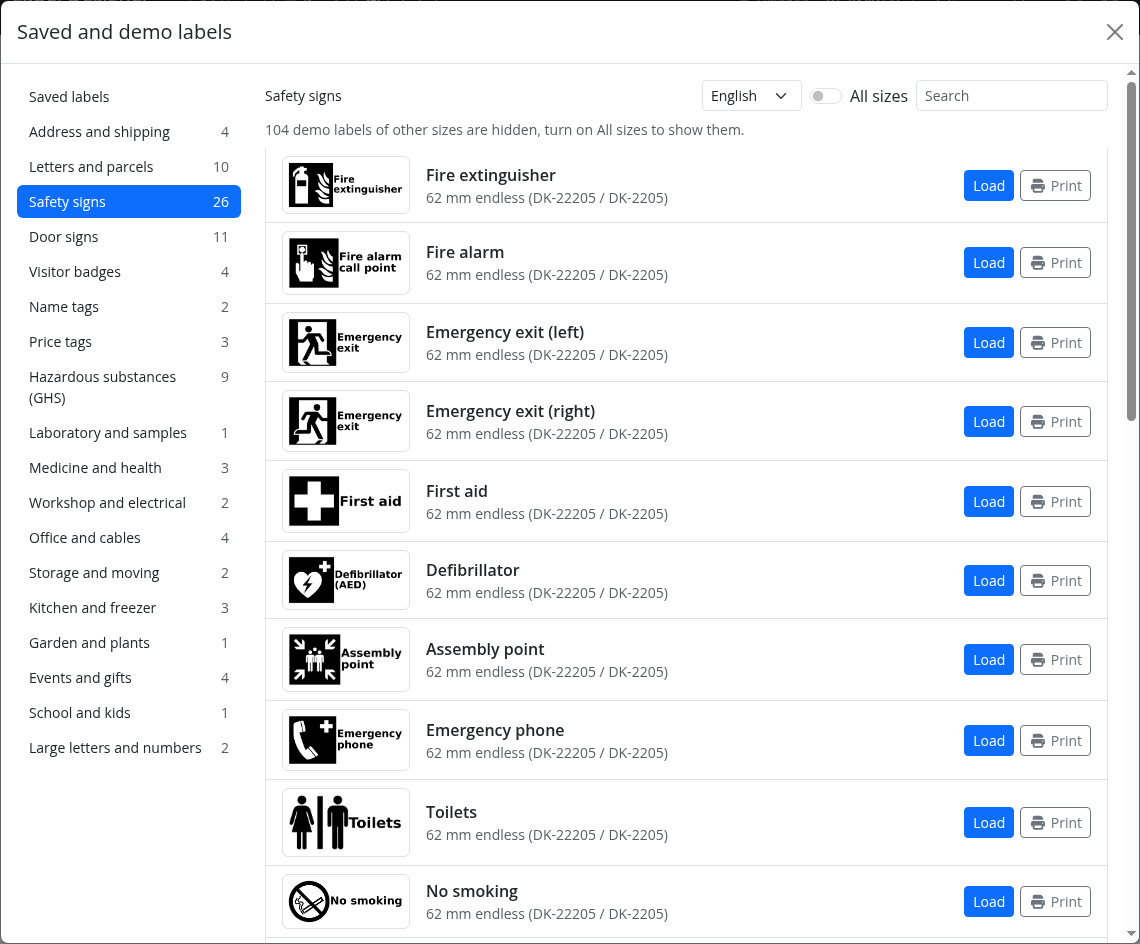
The demo labels in German, here the GHS labels for black/red labels:
A demo label loaded into the label designer:
What's Changed
Changes
Full Changelog: v1.2.0...v1.3.0
Contributors
Assets 2
Brother QL Web v1.2.0
Highlights
- Network printers report their model, the loaded labels and errors over SNMP, like to Brother's apps, with the same detail as over USB: no labels, labels that do not fit the job, open cover, labels not fed. Printers without SNMP still report over IPP.
- Printing: Fast, Quality or 600 dpi. Fast is quicker and a little less sharp, e.g. a 29 x 90 mm label on a QL-810W takes 1.8 s instead of 3.0 s. Quality stays the default, the API takes
fast_printing=1. The QL-1100 series no longer offers 600 dpi, it cannot print it. - Several printers of different models with
PRINTERS, each with its own settings in the browser. SERVER_PORTforpython3 run.py, andPROXY_COUNTto run behind a reverse proxy, also below a path, see Reverse proxy.- Saved labels show only those of the selected label size, the switch "All sizes" shows all.
- A printer that stops answering status requests, like the QL-560, gets a reset and keeps reporting its status.
Thanks to @randybb for #142 to #146.
What's Changed
Changes
- Let Dependabot update the GitHub Actions, update them once by @DL6ER in #141
- Use American spelling throughout by @DL6ER in #151
- Turn off 600 dpi printing for the QL-1100 series by @DL6ER in #152
- Configure several printers with PRINTERS, each with its own settings by @randybb in #146
- Improve network printer support using (SNMP) by @DL6ER in #153
- Add fast print mode by @DL6ER in #154
- Take the port from the environment variable SERVER_PORT by @randybb in #142
- Serve the label designer below a path behind a reverse proxy by @randybb in #143
- Invalidate and initialize a printer that does not answer its status request by @randybb in #144
- Show the saved labels of the selected label size, all with a switch by @randybb in #145
Dependency updates
- Bump fonttools from 4.66.1 to 4.68.0 by @dependabot[bot] in #147
- Bump pluggy from 1.6.0 to 1.7.0 by @dependabot[bot] in #148
- Bump iniconfig from 2.3.0 to 2.3.1 by @dependabot[bot] in #149
- Bump pytest from 9.1.1 to 9.2.0 by @dependabot[bot] in #150
New Contributors
Full Changelog: v1.1.0...v1.2.0
Contributors
Assets 2
Brother QL Web v1.1.0
What's Changed
Changes
- Publish release images as :latest and master as :dev by @DL6ER in #127
- Name the loaded label, print with Ctrl+Enter, paste images by @DL6ER in #129
- Show the release instead of the commit in release images by @DL6ER in #128
- Use the default font when a label's font is not installed by @DL6ER in #130
- Let browsers install the label designer as an app by @DL6ER in #131
- Restructure the README by @DL6ER in #132
- Keep the tests away from real printers by @DL6ER in #133
- Shrink text that does not fit, if asked to by @DL6ER in #134
- Take images, PDFs and links from the share menu of Android by @DL6ER in #135
- Print the pages of a PDF as labels of their own by @DL6ER in #136
- Network printers: status over IPP, discovery, checks around jobs by @DL6ER in #137
- Say when the orientation is chosen to fit the label best by @DL6ER in #138
- Print several images or PDFs at once by @DL6ER in #139
- Offer Discussions for questions when an issue is opened by @DL6ER in #140
Full Changelog: v1.0...v1.1.0
Contributors
Assets 2
Brother QL Web v1.0
What's Changed
- Add CodeQL analysis workflow configuration by @DL6ER in #1
- Add CI workflow with automated tests by @DL6ER in #2
- Build images and deploy to GHCR.io by @DL6ER in #3
- New features by @DL6ER in #4
- Add native darkmode by @DL6ER in #5
- Allow text together with images by @DL6ER in #6
- Add template and import-export features by @DL6ER in #7
- Move away from the deprecated brother_ql.devicedependent class by @DL6ER in #8
- Increase test coverage by @DL6ER in #9
- Add further tests by @DL6ER in #10
- Allow setting font color individually per line by @DL6ER in #11
- Enable Dependabot for Docker and pip by @DL6ER in #12
- Bump python-barcode from 0.15.1 to 0.16.1 by @dependabot[bot] in #13
- Add TODO lines printing option by @DL6ER in #15
- Add high-res printing mode by @DL6ER in #16
- Update README by @DL6ER in #17
- Add {{random[:len]}} and add optional [start] for {{counter}} by @DL6ER in #18
- Include {{random}}, {{uuid}} and {{short-uuid}} in tests by @DL6ER in #19
- Overall improvements and simplifications on the code by @DL6ER in #20
- Self-contained font management and tests by @DL6ER in #21
- Tweak test suite by @DL6ER in #22
- Allow setting options via ENV vars and add offline mode by @DL6ER in #23
- Implement UNDO feature (up to 40 steps) by @DL6ER in #24
- Simplify font management *** BREAKING CHANGE *** by @DL6ER in #25
- Add randomness shifting option by @DL6ER in #26
- Bump pytest from 8.4.1 to 8.4.2 by @dependabot[bot] in #27
- Migrate UI to self-hosted Boostrap 5 by @DL6ER in #28
- Update DropZone to 7.3.1 by @DL6ER in #29
- Improve random shifting by @DL6ER in #30
- Tweak fonts dropdown by @DL6ER in #31
- Bump fonttools from 4.59.2 to 4.60.0 by @dependabot[bot] in #32
- Add image scaling feature by @DL6ER in #33
- Add image rotation option by @DL6ER in #34
- Bump markupsafe from 3.0.2 to 3.0.3 by @dependabot[bot] in #35
- Bump fonttools from 4.60.0 to 4.60.1 by @dependabot[bot] in #36
- Fix the multiprocessing test by @DL6ER in #41
- Bump attrs from 25.3.0 to 25.4.0 by @dependabot[bot] in #37
- Bump iniconfig from 2.1.0 to 2.3.0 by @dependabot[bot] in #40
- Bump click from 8.2.1 to 8.3.0 by @dependabot[bot] in #38
- Bump pillow from 11.3.0 to 12.0.0 by @dependabot[bot] in #39
- Bump pytest from 8.4.2 to 9.0.0 by @dependabot[bot] in #43
- Bump pytest from 9.0.0 to 9.0.1 by @dependabot[bot] in #44
- Bump click from 8.3.0 to 8.3.1 by @dependabot[bot] in #45
- Bump werkzeug from 3.1.3 to 3.1.4 by @dependabot[bot] in #47
- Bump fonttools from 4.60.1 to 4.61.0 by @dependabot[bot] in #48
- Bump pytest from 9.0.1 to 9.0.2 by @dependabot[bot] in #49
- Bump fonttools from 4.61.0 to 4.61.1 by @dependabot[bot] in #53
- Add docker example for privileged access to README by @TechHummel in #51
- Fix automatic image scaling on die-cut labels by @DL6ER in #55
- Add multi-printer support and auto-detection + printing simulation by @DL6ER in #56
- Support network backends by @DL6ER in #58
- Network printers do not repond with status information by @DL6ER in #59
- Allow code content different from label text by @DL6ER in #60
- Bump pillow from 12.0.0 to 12.1.0 by @dependabot[bot] in #61
- Add label repository by @DL6ER in #62
- Bump werkzeug from 3.1.4 to 3.1.5 by @dependabot[bot] in #63
- Store images in label repository by @DL6ER in #64
- Update README by @DL6ER in #65
- Include images in history by @DL6ER in #66
- Bump packaging from 25.0 to 26.0 by @dependabot[bot] in #67
- Bump pillow from 12.1.0 to 12.1.1 in the pip group across 1 directory by @dependabot[bot] in #68
- Bump the pip group across 1 directory with 2 updates by @dependabot[bot] in #74
- Add symbol picker by @DL6ER in #75
- Add (limited) automatic network printer detection support by @DL6ER in #76
- Fix printer model selection possibly preventing cutting, large labels and other special printer features by @DL6ER in #77
- Add auto-crop to content image feature by @DL6ER in #78
- Bump fonttools from 4.61.1 to 4.62.1 by @dependabot[bot] in #79
- Bump attrs from 25.4.0 to 26.1.0 by @dependabot[bot] in #80
- Bump werkzeug from 3.1.6 to 3.1.7 by @dependabot[bot] in #82
- Bump pygments from 2.19.2 to 2.20.0 by @dependabot[bot] in #81
- Bump werkzeug from 3.1.7 to 3.1.8 by @dependabot[bot] in #83
- Bump click from 8.3.1 to 8.3.2 by @dependabot[bot] in #84
- Bump pillow from 12.1.1 to 12.2.0 by @dependabot[bot] in #85
- Bump packaging from 26.0 to 26.1 by @dependabot[bot] in #87
- Bump packaging from 26.1 to 26.2 by @dependabot[bot] in #88
- Bump pytest from 9.0.2 to 9.0.3 by @dependabot[bot] in #86
- Bump click from 8.3.2 to 8.3.3 by @dependabot[bot] in #89
- Bump fonttools from 4.62.1 to 4.63.0 by @dependabot[bot] in #91
- Bump click from 8.3.3 to 8.4.1 by @dependabot[bot] in #92
- Add webhook print endpoint and save simulated labels as PNG by @DL6ER in #94
- Split large print jobs into batches to avoid printer timeouts by @DL6ER in #95
- Bump pytest from 9.0.3 to 9.1.1 by @dependabot[bot] in #97
- Bump packaging from 26.2 to 26.3 by @dependabot[bot] in #100
- Bump pillow from 12.2.0 to 12.3.0 by @dependabot[bot] in #99
- Bump click from 8.4.1 to 8.4.2 by @dependabot[bot] in #98
- Bump pillow from 12.3.0 to 13.0.0 in the pip group across 1 directory by @dependabot[bot] in #113
- Bump markupsafe from 3.0.3 to 3.0.4 by @dependabot[bot] in #111
- Bump fonttools from 4.63.0 to 4.66.1 by @dependabot[bot] in #110
- Bump werkzeug from 3.1.8 to 3.1.9 by @dependabot[bot] in #109
- Bump click from 8.4.2 to 8.5.0 by @dependabot[bot] in #105
- Bump pygments from 2.20.0 to 2.21.0 by @dependabot[bot] in #104
- Poll printer status until full response arrives (fixes QL-1100 status) by @mattwolfgang in #112
- Fix security issues and bugs in printing, preview and repository by @DL6ER in #114
- Centre 103 x 164 mm die-cut labels on the QL-1100 b...

