This program allows for the user to input two matrices, an output file, and a mode depending on what type of matrices the user inputted. This program stores all the matrices, either given or created as a linked list. The program will display menus, which the user will choose the value, inorder to bring them to another menu, perform the tak specified, or bring them back to the previous menu. The different tasks this program performs is adding or multiplying the two given matrices, printing the matrices given by the user to terminal, printing the output matrice to user;if there is one; determining if a specific matrix is considered a sparse matrix, and printing to the user the sparsity of a given matrix.
If the user inputs too many or too few inputs the program will inform inform you of the error and will end the session.
-Below is the psuedo code our group created prior to creating the program
- This file has menu options which the user will be able to input a value and
perform a various tasks or get information on the matrices. This file also
holds the the functions to add matrices, multiply matrices, write matrices
to a file, read a file in simple matrix form, and read a file in linked list
matrix form . All the tasks are in a loop with each subtask having its own
loop. If the user inputs any incorrect values or information the program
will inform the user. All the menu loops will run until the user inputs the
value take cause them to exit the current menu.
- Task 1: This will allow you to view either your first matrix, second matrix, or result matrix. It will print it to the screen in simple matrix form.
- Task2: This will let you add or multiply the first and second matrices and the result of the calculation will be placed in the result matrix.
- Task 3: This will print how sparse either the first, second, or result matrices is. This gives the percentage of zeros in the matrix compared to the number of values.
- Task 4: This will return whether the specified matrix is considered a sparse matrix or not.
- Task 5: This allows the user to save or not save the result matrix in either simple matrix form or linked list matrix form.
public void WriteFile(std::string file_name, MatrixLinkedList* matrix,std::string option)
- This function will write the result matrix to a given file. It will write the contents of the given matrix either as a simple matrix or as a linked list style depending on the option. If the option given is not valid the result matrix will not be saved.
void ReadFile(std::string file_name, std::vector<std::vector > * image_data)
- this is the ReadFile for mode 1, if the file is in simple matrix form.
MatrixLinkedList* ReadFile(std::string file_name, MatrixLinkedList* matrix)
- this is the ReadFile for mode 2, if the file is in linked list matrix form.
MatrixLinkedList* MatrixMultiplier(MatrixLinkedList* matrix_a, MatrixLinkedList* matrix_b, MatrixLinkedList* result)
- This function allow will test if the linked lists for the inputted matrices can be multiplied, then it will create a linked list with the number of columns as matrix_a and number of rows as matrix_b. Then the function will loop for as many rows and columns the resulting matrix has. The most inner loop with loop for the number of columns that matrix_a has and testing if the values in the current position are zero or not. If not zero then the values in matrix_a and matrix_b will be multiplied and added to tmp value. Once the loop for matrix_a is complete tmp will be pushed into the result linked list with the row and column it belongs in.
MatrixLinkedList* MatrixAddition(MatrixLinkedList* matrix_a, MatrixLinkedList* matrix_b, MatrixLinkedList* result)
- This function enables the program to add two matrices. This function tests if the two matrices can be added and if they can it will create a result linked list with the number of columns and rows it should have. Then it loops through the number of rows and columns and tests if the one of the values from matrix_a and matrix_b are non-zero. if it is them the values are added and pushed into the result list with the value respective row and column.
- This class creates a linked lists and allows the user to add more nodes to the list or retrieve information regarding the respective matrix.
MatrixLinkedList()
- a constructor that sets a head pointer to null and size, num_rows, and num_cols to 0
MatrixLinkedList(int num_rows, int num_cols)
- A constructor that sets the head pointer to null and the size to 0, but the num_rows and num_cols are set to what was given as parameter values
MatrixLinkedList(std::vector<std::vector > two_dem_vector)
-This is a constructor that takes in a vector of vector of integers and loops through the vectors to find if there are any values no equal to zero. If non-zero
values are found, a node will be created. If this is the first node, the head point will point to it other wise it will be linked to the last node within the
linked list. This loop will run until all values within the vectors are looked at.
~MatrixLinkedList();
- this is deconstructor that will delete the node that the head pointer is pointing to.
int getNumRows();
- this will return what how every many rows the respective matrix has
int getNumCols();
- this will return what how every many columns the respective matrix has
float getSparsity();
- This calculates how much sparsity the matrix is and returns the value
void push_back(int row, int col, int data);
- This function create a node with the given paramenters and place it at the end of the linked list making sure that the one before it has the memory address of the new one
int nextRowInCol(int col, int cur_row);
- This function returns next row with non-zero entry with the column given.
int nextColInRow(int row, int cur_col);
- This function returns next column with non-zero entry with the row given.
bool isSparse();
- This functions determines if the repective matrix is considered sparse or not. It calls the isSparsity function and determines if the sparsity is greater then 50% of not. If it is then it return true, other wise it is false
std::string to_string();
- This function iterates through the repective linked list and puts all the values in the correct locations and zeros if a position does not have a non-zero value into a string. Once the string is finished it is returned
- This class creates a node which can hold the row, column, data, and next node location
MatrixNode();
- This constructor creates a node with data, row, col set to zero and next as a null pointer.
MatrixNode(int row, int col, int data);
- This constructor creates a node with row, col, and dat set the values given as a parameter, but next is set to null pointer.
MatrixNode(int row, int col, int data, MatrixNode* next)
- This creates a node with row, col, data, and next all set to the given from the parameters.
~MatrixNode()
- this deconstructor tests if the current node has a node memory in next and deletes the node memory if it does.
//getter and setter int getData();
- This returns the data within the respective node
void setData(int data);
- This changes the data value that the node holds
int getRow();
- This returns which row value in the node can be found in
void setRow(int row);
- This sets the row which the data in the value has been changed to
int getCol();
- This returns which column value in the node can be found in
void setCol(int col);
- This sets the column which the data in the value has been changed to
For a simple matrix file:
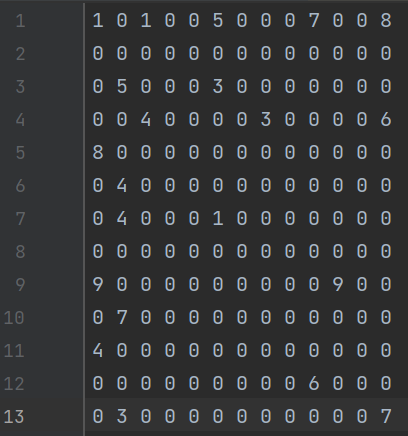
The file should look like just a regular matrix. The program will caluate the number of rows and columns the matrix has.
For a linked List matrix file:
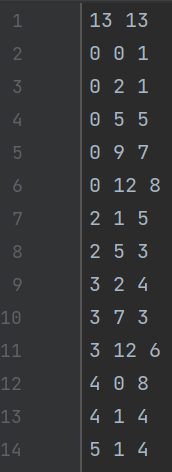
The first line of the file should have the number of columns and rows the matrix should have. The following lines should be row, column, value. It is important
that the file is in this order, otherwise the program will produce the wrong outputs.
To run this program on CLion ensure all your .ccp and .h files are in the CMakeLists.txt. The files should include:
- main.cpp
- MatrixLinkedList.cpp and .h
- MatrixNode.cpp and .h
- test files(optional)
- ll_matrix_a/b/c/d.txt or matrix_a/b/c/d.txt
Then ensure you have the two matrix files in the folder with your .exe file for the program. Ensure the matrix files are either in simple matrix form or linked list form, both files should be the same form and .txt files. Once these files are in their proper location you can click run>>edit configurations. Once this window opens in your program arguements line put in your first matrix .txt file, then your second matrix .txt file, then the .txt file for the output, and a mode; either 1 for simple matrices or 2 for linked list matrix files. Then click apply>>ok. Once back on the main screen you can press the play button in the toolbar and your program should run properly.
If you are using the terminal, ensure you are in the correct directory with all the correct .cpp and .h and .txt files within it. To execute the program type g++ -std=c++11 main.cpp MatrixLinkedList.cpp MatrixNode.cpp -o main press enter, then type ./main <matrix1 file name> <matrix 2 filename> <output filename> <mode for the 1 or 2> then press enter. If this is done correctly they program will run.
Link to all files needed and test files
At runtime, the program will automatically read the given matrices files and store its data as linked lists. It will then print out a set of instructions that informs the user of what to input, and what each option presented does. If an option requires additional input from the user, it will specify. After a certain function has been carried out, the program will print out the menu again, and allow the user to perform additional functions. Once the user is done, choosing the final option will close the program and the user has the choice to save the results or not, and if the user would like for the results to be saved in simple matrix form or linked list form.