In this project, I trained an object detection model using a deep reinforcement learning algorithm and applied this model to detect a walking person in a video. I followed this research paper . This model can be used in Gait analysis.
-
Dataset
I used the pascal-voc-2007 dataset to train it. (that contains the annotations(coordinates) files and images).
-
Training
I used the DQN algorithm with experience replay (stores state transitions) for training with epsilon greedy exploration. I used VGG16 CNN Architecture to get the features from the image.
- Reward
I used the IOU (intersection over union) value for reward, +ve reward if increases -ve reward otherwise terminate if IOU > 0.5 (as defined by officials).
- Predictions
The model predicts an action associated with either the moving or termination of the current bounding box like moving it right, left, up, down or terminate. We change the bounding box according to the chosen action (5 movement actions). Get new annotations using offset.
- Results
Plotted the average precision score and precision-recall curve. and no steps were taken in each image histogram.
- To Detect a walking person
I changed the ratio of contracting the bounding box so that it contracts on the person. and trained the model again with slight modifications like in the bonding box shape for a better fit.
I have extracted each frame and applied the object detection model on each frame individually.

Aeroplace detection in Image: -
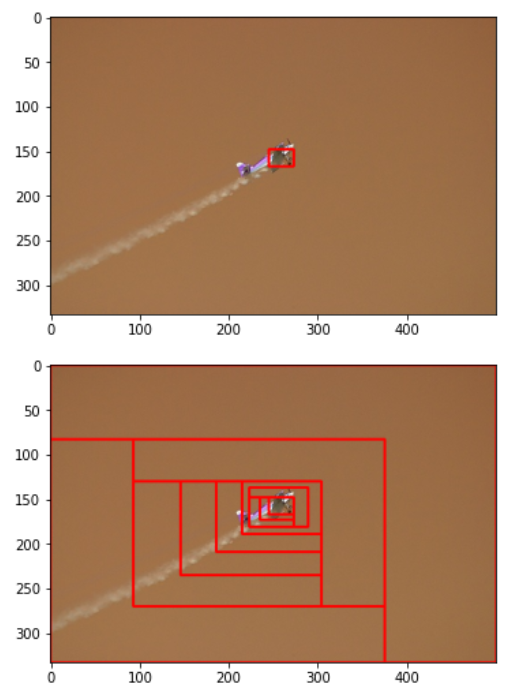
Python 3.8.5 is used. torch 1.8 with torchvision 0.9 versions are used.
Download the Pytorch setup (cuda supported version):
conda install pytorch torchvision torchaudio cudatoolkit=10.2 -c pytorch
Other package requirements are in requirements.txt file. You can install them using
pip install -r requirements.txt command.
If it shows "Module Not found error" on any cell, you can simply use PIP command to install that package, like -> pip install package_name
Note- Some errors were encountered during import of libraries. As follows:
- to resolve the cv2 error, I used
apt-get install -y python3-opencv - to resolve the ipywidgets issue, I used
conda install -c conda-forge ipywidgetsandjupyter nbextension enable --py widgetsnbextension
we have only used Pascal VOC 2007 dataset during training and testing. But you can also use Pascal VOC 2012 dataset, both datasets have similar files and data structure.
- Set Kaggle Credentials
kaggle_data={"username":"","key":""} os.environ['KAGGLE_USERNAME']=kaggle_data["username"] os.environ['KAGGLE_KEY']=kaggle_data["key"]
from kaggle import api
- Download Pascal Voc Datasets
! kaggle datasets download -d zaraks/pascal-voc-2007
and [optional]
! kaggle datasets download -d huanghanchina/pascal-voc-2012
- Unzip Datasets
!unzip \*.zip
Note - You can also follow above steps in train.ipynb, in Dataset Cells by uncommenting code.
Create Data and Models Folder. Create 2 sub Folders Train and Test inside Data Folder.
After unzipping Pascal voc 2007 zip files.
-
Open the voctrainval_06-nov-2007--> VOCdevkit --> Move the VOC2007 folder (containing Annotations, JpegImages folder, etc) to train folder created above.
-
Open the voctest_06-nov-2007 --> VOCdevkit --> Move the VOC2007 folder (containing Annotations, JpegImages folder, etc) to the test folder created above.
[optional] Similarly, After unzipping Pascal voc 2012 folder.
- Open the VOC2012 folder --> Move VOC2012 folder (containing Annotations, JpegImages folder, etc) to the train folder created above.
Note - Some folder names are reduntant, but before moving folder make sure it contains the annotations, JpegImages folder.
- Create Custom_Data Folder Inside test Folder.
- Create 2 sub-folders inside Custom_Data folder, a)Images b) video
- Inside Video Folder, create sub-folders frames and Annotations.
- You can download the images for the Test/Custom_Data/Images sub-folder from the repository.
- Similarly, you can download the video of walking person for the Test/Custom_Data/Video sub-folder from the repository.
- Then download the all annotations files(.xml) and frames images (.jpg) from the repository and store them in Test/Custom_Data/Video/Annotations and Test/Custom_Data/Video/frames folder respectively.
Note - Since the person is not visible in all frames, so i have not used all frames images.
After setting, the environment and data folders.
- Train.ipynb
Follow the given instructions in the train.ipynb notebook for model training and saving it, Also for downloading the PASCAL dataset.
2.Test.ipynb
- Note-> this notebook is only for testing aeroplane detection model, so run the cells after training an aeroplane detection model and saving it.
In this notebook you have to only follow the given instructions.
3.test_custom_data.ipynb
- Note -> in this you need to have both trained model, aeroplane detection and person detection model.
In this notebook you have to only follow the given instructions.
You can also do testing between the cells, but remember to run the cells in correct sequence as denoted by the Nos.
Final File structure:
./
Data/
    Test/
        VOC2007/
            Annotations/
            SegmentationClass/
            JPEGImages/
            SegmentationObject/
            ImageSets/
                Segmentation/
                Main/
                Layout/
        Custom_Data/
            Images/
            Video/
                Annotations/
                frames/
    Train/
        VOC2012/
            Annotations/
            SegmentationClass/
            JPEGImages/
            SegmentationObject/
            ImageSets/
                Segmentation/
                Action/
                Main/
                Layout/
        VOC2007/
            Annotations/
            SegmentationClass/
            JPEGImages/
            SegmentationObject/
            ImageSets/
                Segmentation/
                Main/
                Layout/
Models/
    DQN_with_optimizer_25
    DQN_with_optimizer_Person_25_10_ModMask
features.py
image_helper.py
metrics.py
parse_xml_annotations.py
reinforcement.py
test_custom_data.ipynb
test.ipynb
train.ipynb