Project name : Inventory
Description : Capture and report on stock-taking activities for sports shoe warehouses.
Contents :
- Summary
- Input and output files
- Classes and methods
- Functions
- Installation guide
- Usage
- Credits
1. Summary
The project consumes inventory information from a text file (or via the console) and populates the information into a class representing shoes.
It presents a menu to the user enabling view, re-stock and search options, along with a value-of-stock calculator and a recommendation for sale items
(based on highest available quantity). The program is written in Python 3.11.
2. Input and output files
Input: "inventory.txt", expected to be in same directory as python file Output: additional items written back to "inventory.txt"
3. Classes and methods
Class Shoe has these attributes: Country - location of warehouse Code - product identifier Product - shoe style name Cost - unit cost per shoe Quantity - number of pairs in stock.
Methods available for Class Shoe:
*init to construct class item *get_code to return the code of the shoe *get_cost to return the cost of the shoe as an integer *get_quantity to return the quantity of the shoes as an integer *str to return a string representation of a Shoe class (detail view) *tabular_list to return a list of Shoe instances to be used by tabulate function. Values returned as strings, with new line at end of list.
4. Functions
read_shoes_data(): Open file inventory.txt, read data and create a shoes object and append into shoe_list. Return shoe_list to main program. The first line of the file (index == 0) is disregarded as it contains headers.
capture_shoes(): Create a new shoe object from user input; append to shoe list and write to inventory.txt file.
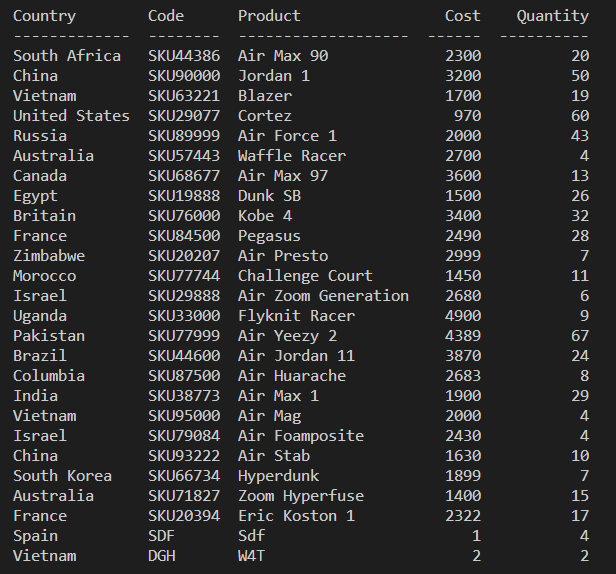
view_all(): Create an on-screen table of the details of the shoes, using tabluate module.
re_stock(): Find the shoe object with the lowest quantity; ask the user if they want to add this quantity of shoes and then update it in shoe object and in inventory.txt. If there are multiple items with the same low quantity, this function presents the first item in the list.
seach_shoe(): Search for a shoe from the list using the shoe code and return this object so that it will be printed.
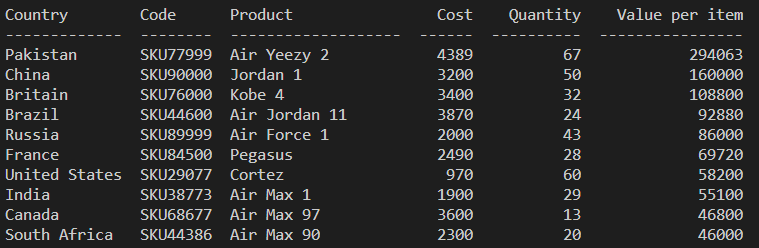
value_per_item(): Calculate the total value for each item using value = cost * quantity. Sort into descending order and print to console.
highest_qty(): Find the product with the highest quantity and suggest it's put on sale.
update_file(index, update_list): Write updated data from update_list back to inventory.txt at position index + 1 (as first line in file is headings).
add_inventory(update_list): Write new data to inventory.txt
5. Installation guide
No specific installation requirements other than Python.
6. Usage
On initiation, the program will automatically search for and open the file "inventory.txt" and print a table of current inventory to user (same as Option 1 View all shoes - see below) and then present user with menu of options:
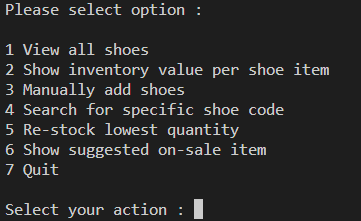
Option 1 View all shoes prints table of shoes:
Option 2 Show inventory value per shoe item shows similar table with additional column for value (calculated as number of pairs x cost per pair) in tabular form, presented in descending value:
Option 3 Manually add shoes presents user with further input prompts:
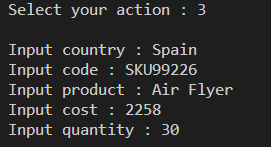
Cost and quantity must be input as an integer. On successful input, the inventory.txt file and other menu options will include additional shoe items.
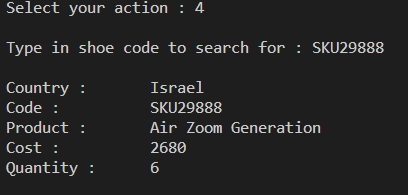
Option 4 Search for specific shoe code presents user with input prompt:
Type in shoe code to search for :
If the code exists, program will return detail record of shoe inventory:
If shoe code not found, program will request input of valid code:
Selected shoe code not found; please re-enter :
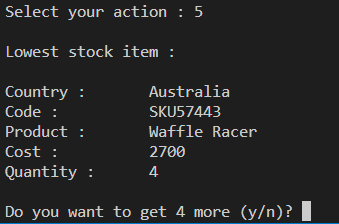
Option 5 Re-stock lowest quantity will return detail record of lowest quantity item and prompt user to double the quantity. If 'y' selected, program will update inventory.txt file and other menu options to reflect the update.
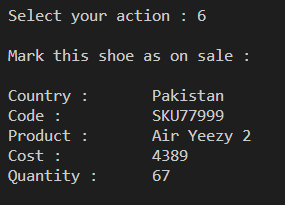
Option 6 Show suggested on-sale item will return detail record of highest quantity item:
Option 7 Quit returns user to command prompt.
7. Credits:
LinkedIn: linkedin.com/in/debbieweston
GitHub: https://github.com/DebbieWeston
GitHub project link: https://github.com/DebbieWeston/finalCapstone
Thanks to Hyperion Dev for software engineer bootcamp (December 2022 cohort).