Before submitting the issue
Describe the bug
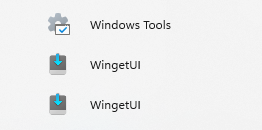
There are two duplicate "WingetUI" shortcuts in the Windows 11 start menu instead of only one.
To Reproduce
Steps to reproduce the behaviour:
- Download WingetUI 1.7.0
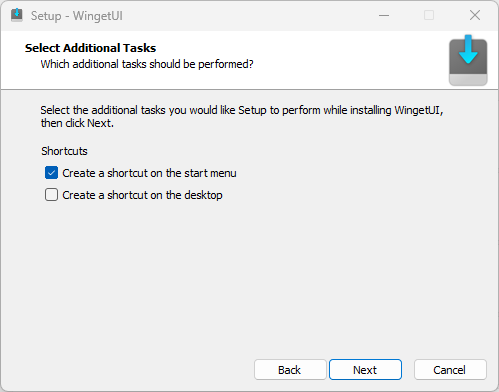
- Install WingetUI 1.7.0 with the default options (Leave "Create a shortcut on the start menu" tick enabled)
- Finish installation
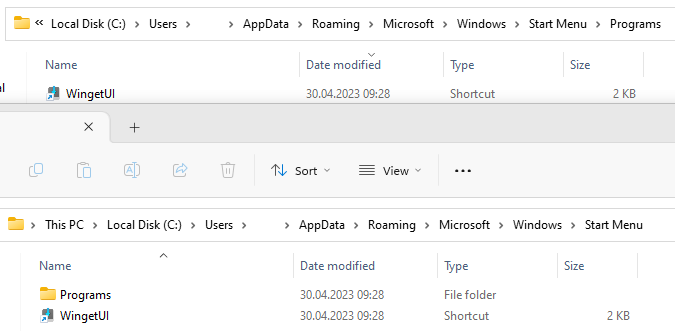
- It created a shortcut in "C:\Users\username\AppData\Roaming\Microsoft\Windows\Start Menu"
- Start WingetUI
- It creates another shortcut in "C:\Users\username\AppData\Roaming\Microsoft\Windows\Start Menu\Programs"
- On Windows 11 start menu, there is now a double entry
Expected behaviour
Only have one shortcut and in the right location which should be "Start Menu\Programs" like all other apps and not in "Start Menu".
Probably using :
"%AppData%\Microsoft\Windows\Start Menu\Programs" (shell:Programs)
or
"%ProgramData%\Microsoft\Windows\Start Menu\Programs" (shell:Common Programs) for system wide installations
Screenshots
Cropped Windows 11 start menu:
Thank you for having a look.


Before submitting the issue
Describe the bug
There are two duplicate "WingetUI" shortcuts in the Windows 11 start menu instead of only one.
To Reproduce
Steps to reproduce the behaviour:
Expected behaviour
Only have one shortcut and in the right location which should be "Start Menu\Programs" like all other apps and not in "Start Menu".
Probably using :
"%AppData%\Microsoft\Windows\Start Menu\Programs" (shell:Programs)
or
"%ProgramData%\Microsoft\Windows\Start Menu\Programs" (shell:Common Programs) for system wide installations
Screenshots
Cropped Windows 11 start menu:



Thank you for having a look.