This repository contains the code for the Mental Health Chatbot, designed to provide mental health assistance using advanced AI technology powered by Llama 3.1. Follow this guide to install and run the chatbot locally.
To use this chatbot, you need the following:
| Component | Minimum | Recommended |
|---|---|---|
| Python | 3.8 | Latest 3.x |
| RAM | 16 GB | 32 GB |
| GPU | Not required | CUDA-compatible for faster inference |
| Internet | Needed to download the model | |
| Ollama | Latest version | – |
| Git | Required only if you will git clone the repo |
– |
Ollama is required to manage and run the Llama 3.1 model. Download and install it from Ollama's official website.
Once installed, verify it by running the following command in your terminal:
python --version
pip --version
If either command is not recognized, download Python from https://www.python.org/downloads/ and be sure to check “Add Python to PATH.”
git --versionIf Git is missing, install it from [https://git-scm.com/downloads]
Ollama is required to manage and run the Llama 3.1 model. Download and install it from Ollama's official website.
Once installed, verify it by running the following command in your terminal:
ollamaYou should see a help menu or version output indicating Ollama is installed correctly.
Use the following commands to pull and verify the Llama 3.1 model:
ollama pull llama3.1
ollama list
The ollama list command should display llama3.1 as one of the available models.
Run the following commands to install all necessary Python packages:
pip install streamlit
pip install langchain
pip install langchain-ollama
pip install ollama
pip install pathlib
These dependencies include libraries for managing the AI model, building the chatbot interface, and running it as a web app. Specifically, ensure the following libraries are available in your environment:
streamlit: For creating the chatbot interface.datetime: For handling timestamps.langchain-ollama: For integrating Llama 3.1 with LangChain.langchain-core: For prompts and chaining logic.os: For handling file and directory operations.pathlib: For creating and managing directories.socket: For obtaining user IP.
Download the project code from the Digital Health repository:
git clone https://github.com/DigitalHealthpe/DH_chatbot.git
cd DH_chatbotStart the chatbot by running the following command from the project directory:
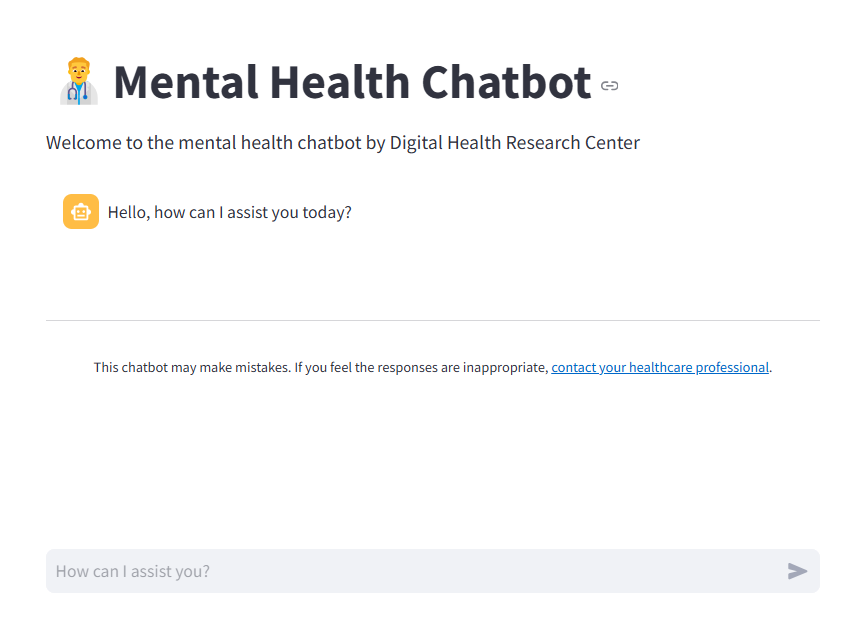
streamlit run main.py --server.port 8501This will launch the chatbot on http://localhost:8501 by default. Open this URL in your browser to interact with the chatbot.
-
Access the chatbot: Open the browser and navigate to
http://localhost:8501. -
Interact with the chatbot: Ask questions or start a conversation, and the chatbot will respond using Llama 3.1's advanced language capabilities.
-
Error Reporting: If you encounter any inappropriate responses or issues, consult your healthcare professional and report the error.
-
Issue:
ollama: command not found
Solution: Ensure Ollama is installed correctly and added to your system PATH. -
Issue:
llama3.1 not found after pulling
Solution: Retryollama pull llama3.1and verify your internet connection. -
Issue:
streamlit: command not found
Solution: Ensure Python and pip are installed, and reinstall Streamlit usingpip install streamlit.
Feel free to contribute by opening issues or submitting pull requests to improve the chatbot.
For support or inquiries, contact Digital Health Research Center.