Hi,
Currently, a range field cannot work with materialize-icons prefix because no offset is set like for other fields :
.input-field .prefix ~ input,
.input-field .prefix ~ textarea,
.input-field .prefix ~ label,
.input-field .prefix ~ .validate ~ label,
.input-field .prefix ~ .helper-text,
.input-field .prefix ~ .autocomplete-content {
  margin-left: 3rem;
  width: 92%;
  width: calc(100% - 3rem);
}
Thus, giving that html code
    <div class="row">
        <div class="input-field">
            <i class="material-icons prefix">straighten</i>
            <p class="range-field">
                <input id="distance" type="range" min="500" max="10000" step="100">
                 <label for="distance">Max. distance</label>
             </p>
        </div>
    </div>
Produces an incorrect ui
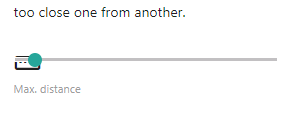
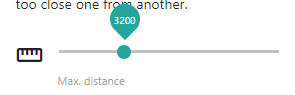
Whereas adding the same rule as other fields fix everything, including the thumb associated with the range
.input-field .prefix ~ .range-field {
        margin-left: 3rem;
        width: 92%;
        width: calc(100% - 3rem);
    }
Adding that rule to the above sets does not work however (the rule is not applied). Being no css expert, I'm guessing that something later in the file prevents it from being applied.
It would be great if you could bring the fix into the main css and make it work 👍

Hi,
Currently, a range field cannot work with
materialize-icons prefixbecause no offset is set like for other fields :Thus, giving that html code
Produces an incorrect ui

Whereas adding the same rule as other fields fix everything, including the thumb associated with the range
Adding that rule to the above sets does not work however (the rule is not applied). Being no css expert, I'm guessing that something later in the file prevents it from being applied.
It would be great if you could bring the fix into the main css and make it work 👍