Dữ liệu được các Beats (shipper) thu thập và gửi về cho Logstash; Logstash tiếp nhận và phân tích dữ liệu. Sau đó dữ liệu được gửi vào Elasticsearch; Elasticsearch nhận dữ liệu từ Logstash và lưu trữ, đánh chỉ mục; Kibana sử dụng các dữ liệu trong Elasticsearch để hiển thị và phân tích cú pháp tìm kiếm mà người dùng nhập vào để gửi cho Elasticsearch tìm kiếm.
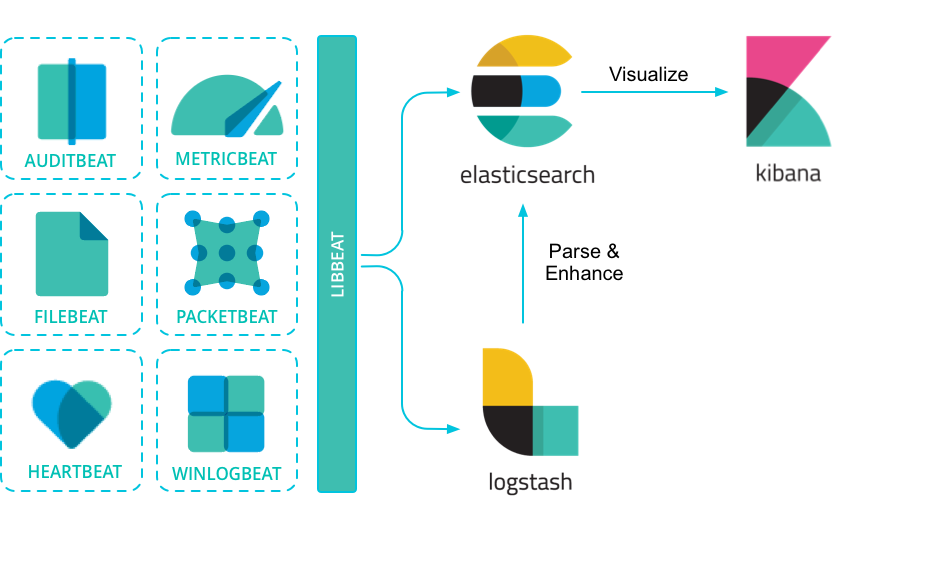
- Packetbeat : lấy / gửi các gói tin mạng
- Filebeat : lấy / gửi các file log của Server
- Metricbeat : lấy / gửi các log dịch vụ (Apache log, mysql log ...) Cai dat ELK ver 8.4.2 (Elasticsearch - Logstash - Kibana) on MAC OS
Link tham khao
- Install Elasticsearch 8.4.2 on MAC
- Install Kibana 8.4.2 on MAC
- Install Filebeat 8.4.2 on MAC
- Config ELK
-
Install:
curl -O https://artifacts.elastic.co/downloads/elasticsearch/elasticsearch-8.4.2-darwin-x86_64.tar.gz
curl https://artifacts.elastic.co/downloads/elasticsearch/elasticsearch-8.4.2-darwin-x86_64.tar.gz.sha512 | shasum -a 512 -c -
tar -xzf elasticsearch-8.4.2-darwin-x86_64.tar.gz
ln -sf $HOME/elasticsearch-8.4.2/bin/elasticsearch /usr/local/bin/elasticsearch ln -sf $HOME/elasticsearch-8.4.2/bin/elasticsearch-cli /usr/local/bin/elasticsearch-cli ln -sf #HOME/elasticsearch-8.4.2/bin/elasticsearch-env /usr/local/bin/elasticsearch-env elasticsearch --version -
Config:
$HOME/elasticsearch-8.4.2/config/elasticsearch.yml
-
Restart service:
elasticsearch -d -p pid
ps xua |grep elastic pkill -f elastichttps://ip:9200
User: elastic
Pass: genarate tu command: /bin/elasticsearch-reset-password -u elastic
- Install:
brew install logstash && logstash --version
- Config
/etc/logstash/conf.d/syslog.conf
- Restart
brew services restart logstash
- Checklog
/usr/local/bin/logstash -l logstash.txt
- Check index:
- Install:
curl -O https://artifacts.elastic.co/downloads/kibana/kibana-8.4.2-darwin-x86_64.tar.gz
curl https://artifacts.elastic.co/downloads/kibana/kibana-8.4.2-darwin-x86_64.tar.gz.sha512 | shasum -a 512 -c -
tar -xzf kibana-8.4.2-darwin-x86_64.tar.gz
ln -sf $HOME/kibana-8.4.2/bin/kibana /usr/local/bin/kibana kibana --version - Config:
/usr/local/etc/kibana/kibana.yml
- Tao thu muc cert, sau do copy file http_ca.crt cua elasticsearch vao cert cua kibana
- Restart:
pkill -f kibana && kibana &
- Login browser: Giong tai khoan login elastic
Neu quen pass thi co the gen bang cu phap:
/bin/elasticsearch-reset-password -u elastic
- Install
curl -L -O https://artifacts.elastic.co/downloads/beats/filebeat/filebeat-8.4.2-darwin-x86_64.tar.gz tar xzvf filebeat-8.4.2-darwin-x86_64.tar.gz - Config
$HOME/filebeat-8.4.2/filebeat.yml
- Restart
./filebeat &
cluster.routing.allocation.disk.watermark.low parameter
Mặc định giá trị trên là 85%. Có nghĩa chỉ cho phép sử dụng 85% dung lượng của ổ đĩa phục vụ cho việc đánh index lên ES
/etc/elasticsearch/elasticsearch.yml
cluster.routing.allocation.disk.threshold_enabled: true
cluster.routing.allocation.disk.watermark.flood_stage: 5gb
cluster.routing.allocation.disk.watermark.low: 30gb
cluster.routing.allocation.disk.watermark.high: 20gb
Đối với 1 cluster thì cần tính toán đảm bảo sao cho 1 node chết thì các node còn lại vẫn có thể tái bổ sung các shard từ node fail:
(disk per node * .85) * ((node count - 1) / node count))
Ví dụ: Hệ thống cluster gồm 3 node, mỗi node có dung lượng 1TB. Sau khi 1 node fail thì ES rebuild để đảm bảo đủ 1 bản sao để backup lên 2 node còn lại
- Với 1TB thì dung lượng ES có thể lưu trữ tối đa là 850GB
- Nếu 1 node fail thì các replica và primary sẽ chuyển qua 2 node còn lại. Để đảm bảo dung lượng ổ cứng còn lại trên 2 node đáp ứng được lưu trữ bản backup cho node fail thì dung lượng tối đa đang lưu trên 2 node phải theo công thức:
(1TB * 85%) * ((3 - 1)/3) = 566 GB
- Theo công công thức trên nếu 3 node đều chưa 566GB dữ liệu thì trường hợp 1 node faild thì ES rebuild trên 2 node còn lại và việc đánh index vẫn xảy ra bình thường.
- Công thức trên sẽ đúng với 1 replica, nếu nhiều replica thì công thức tính như sau:
(disk per node * .85) * ((node count - replica count) / node count)