🎩 Appear offline in League of Legends, VALORANT, and Legends of Runeterra
Features • Installation • Usage • How It Works • FAQ • Contributing


- 🎭 Appear Offline - Hide your online status from friends while still being able to play
- 💬 Full Functionality - Chat in lobbies, queue with friends, and send invites normally
- 🎮 Multi-Game Support - Works with League of Legends, VALORANT, Legends of Runeterra, and 2XKO
- 📱 Mobile Status - Optionally appear as if you're on the mobile app
- 🖥️ Cross-Platform - Available for Windows, macOS, and Linux
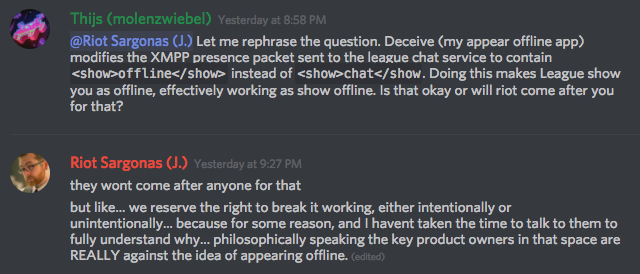
- 🔒 Safe to Use - Riot has confirmed you won't get banned for using Deceive
- Go to the Releases page
- Download the appropriate version for your operating system:
- Windows:
deceive-node-win.exe - macOS:
deceive-node-macos - Linux:
deceive-node-linux
- Windows:
- Run the executable
npm install -g league-deceiver# Clone the repository
git clone https://github.com/Dyn4sty/deceive-node.git
cd deceive-node
# Install dependencies
bun install
# Run in development
bun run dev
# Build standalone executable
bun run package # or package:win / package:mac / package:linuxSimply run League Deceiver and select your game:
league-deceiver launch# Launch League of Legends
league-deceiver launch lol
# Launch VALORANT
league-deceiver launch valorant
# Launch Legends of Runeterra
league-deceiver launch lor
# Launch 2XKO
league-deceiver launch lion# Launch with specific status
league-deceiver launch lol --status offline # Appear offline (default)
league-deceiver launch lol --status mobile # Appear on mobile
league-deceiver launch lol --status online # Appear online
# Use different patchline
league-deceiver launch lol --patchline pbeOnce running, you can change your status by messaging the "Deceive Active!" friend in your friends list:
offline- Appear offlineonline- Appear onlinemobile- Appear on mobileenable- Enable Deceivedisable- Disable Deceivestatus- Check current statushelp- Show available commands
League Deceiver uses a proxy approach to intercept and modify your presence:
flowchart LR
    A[Riot Client] -->|1. Get Config| B[League Deceiver]
    B -->|2. Modified Config| A
    A -->|3. Chat Connection| B
    B -->|4. Modified Presence| C[Riot Servers]
- Config Proxy: Redirects chat server connections through League Deceiver
- Presence Interception: Catches your online status updates
- Status Modification: Changes your status to "offline" or "mobile"
- Transparent Operation: All other functionality works normally
For more technical details, see TECHNICAL_OVERVIEW.md.
| Game | Status |
|---|---|
| League of Legends | ✅ Fully Supported |
| VALORANT | ✅ Fully Supported |
| Legends of Runeterra | ✅ Fully Supported |
| 2XKO (Project L) | ✅ Supported |
Click the Releases tab to download the latest version.
Your friends list works as normal - you can invite everyone. However, friends cannot invite you while you appear offline, even if they enter your name manually.
Yes! Only your global presence is hidden. You can chat in lobbies and champion/agent select without issues.
Riot has confirmed that you won't get banned for using Deceive. However, it may break at any time if Riot changes their systems.
Yes! The game client always shows you as online to yourself, but your friends see you as offline. The "Deceive Active!" friend confirms that Deceive is working.
League Deceiver needs to launch the Riot Client with special parameters to redirect chat connections. If the client is already running, it can't intercept the chat traffic.
Contributions are welcome! Please read our Contributing Guide for details.
- Fork the repository
- Create your feature branch (
git checkout -b feature/amazing-feature) - Commit your changes (
git commit -m 'feat: add amazing feature') - Push to the branch (
git push origin feature/amazing-feature) - Open a Pull Request
This project is licensed under the GPL-3.0 License - see the LICENSE file for details.
- Original Deceive by molenzwiebel - The C# application this project is based on
- The Riot Games community for testing and feedback
League Deceiver is not endorsed by Riot Games and doesn't reflect the views or opinions of Riot Games or anyone officially involved in producing or managing Riot Games properties. Riot Games, and all associated properties are trademarks or registered trademarks of Riot Games, Inc.
Made with ❤️ for the League community