Repository containing the distribution version of the EM Cmap Scoring Tool
- Please go over and click the EM_Cmap_Scoring_Tool_Launcher.zip at the top of this page, then clik on the Download option on the right side of the screen.
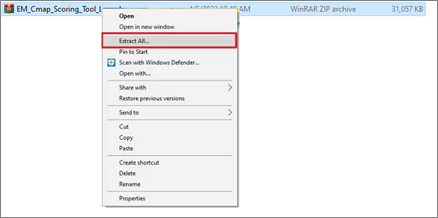
- Under your computer folder, right-click EM_Cmap_Scoring_Tool_Launcher.zip and select Extract all.
⚠️ Please do not go diectly into the .zip folder
 |
|---|
| Figure 1: .zip extraction procedure |
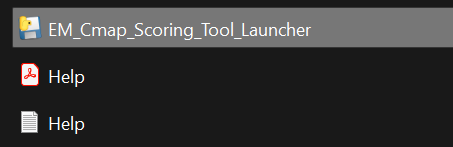
- Open the resulting folder after the extraction and double click on the Cmap_Scoring_Tool_Launcher application file to run the program (Figure 2).
 |
|---|
| Figure 2: Launch program |
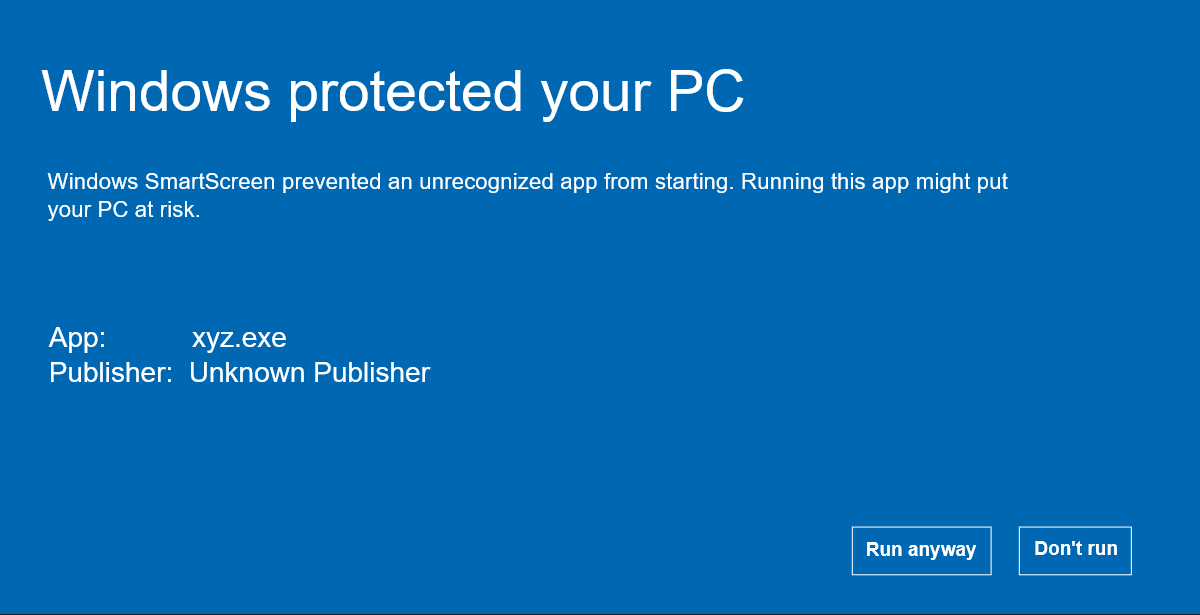
- If Windows alerts you because of the application beign unknown, please click on Run anyway or More information and then Run anyway
 |
|---|
| Figure 3: Protection window |
 |
|---|
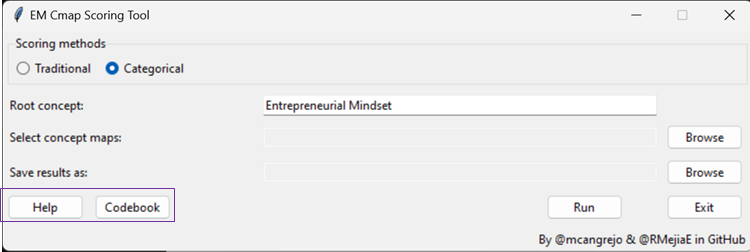
| Figure 4: EM Cmap Scoring tool GUI UPDATE |
Figure 4 shows the GUI, it elements are described below:
- Text box to write the root concept.
- Browse button to select the Cmap files for scoring.
- Browse button to select the path where scoring report will be saved.
- Scoring method selection
- Help button that opens a window to explain how to prepare the Cmaps files and how to use the Scoring Tool.
- Run button to execute the scoring.
Additional elements were added to the program that help the user to identify the categories and subcategories in the Manual Categorization GUI.
Categories were left in the same level and subcategories are presented with a tab and a '-' at the start, as can be seen in Figure 5.
 |
|---|
| Figure 5: Manual Categorization GUI dropdown menu update |
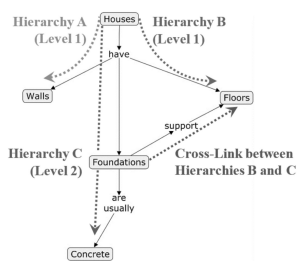
Figure 6: Cmap example[1]
This method assigns a score based on the number of concepts (NC), the number of hierarchies (NH), the highest hierarchy (HH), and the number of cross links (NCL) between concepts.
As seen in Figure 6, the NC is the ammount of bubbles, the NH are the different paths that leave the root concept, the HH is the hierarchy containing most concepts, and the NCL are the connections between concepts of different hierarchies.
Score = (NC) + 5*(HH) + 10*(NCL)
This method identifies the number of concepts (NC) present in the Cmap, then classifies the concepts into categories, and lastly, it calculates the number of concepts in each category to finally compute the number of categories (NCAT) that contain at least one concept. After that, it calculates the number of connections between concepts of different categories, better known as interlinks (NIL). The score is meassure by the level of complexity (CO) of the Cmap.
CO = NC*(NIL/NCAT)
On Figure 6, each concept would be assigned a number depending on the category for the NC and NCAT calculation, and them the connection between Foundations and Floor would be checked to see if the two concepts are from different categories.
The program receives the Cmap files as a .cxl extention that contains the different concepts listed and the connections between them. The extraction algorithm takes all the concepts and concepts linked pairs and stores them as two lists to be used for scoring calculation.
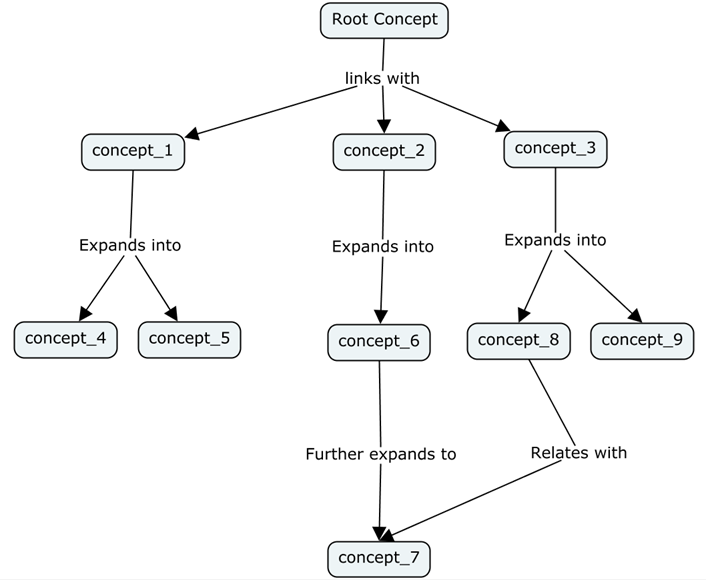
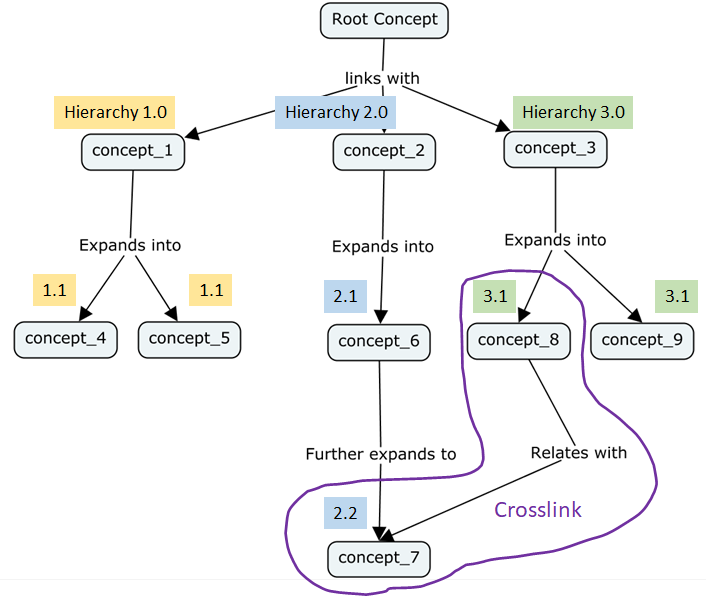
The number of concepts (NC) is obtained by counting all the concepts, excluding the root concept, present in the Cmap. The number of hierarchies (NH) is obtained by identifying the concepts that are connected directly to the root conept. The highest hierarchy (HH) corresponds to the hierarchy with the longest level. Lastly, the number of cross links (NCL) is obtained by counting the connections between paired concepts that are from different hierarchies.
 |
 |
 |
|---|---|---|
| Figure 7: EM Cmap example with number of concepts (NC) identification. | Figure 8: Number of hierarchies (NH) and highest hierarcy (HH) identification. | Figure 9: Number of crosslinks (NCL) identification. |
Figure 7 shows an example of a concept map with 9 concepts. After listing them, hierarchies and its concepts are identifyed (Figure 8). The subindex after the dot serves here to illustrate the level of each hierarchy and hence, the longest one. Finally crosslinks are identified (Figure 9). For this example, the NC will correspond to 9, NH is 3, the HH will be hierarchy 2 with 3 levels, and NCL value corresponds to 1.
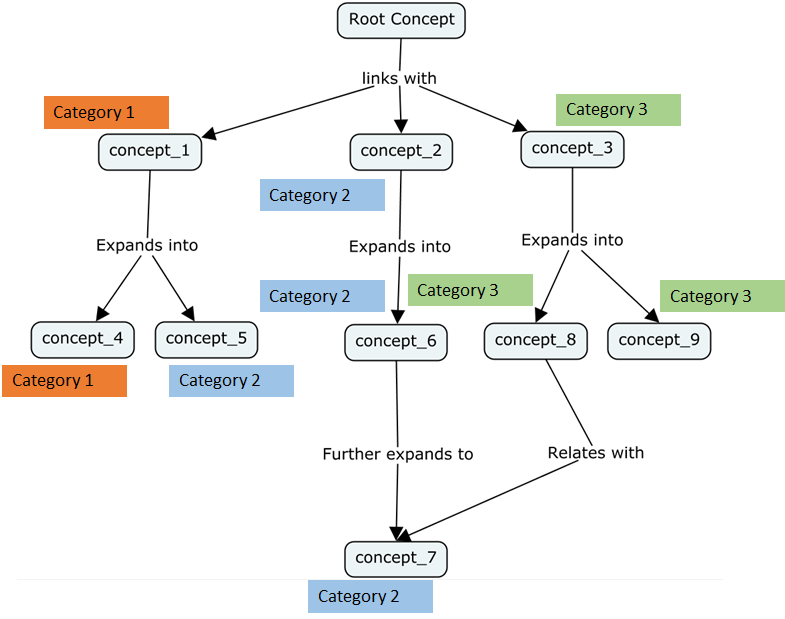
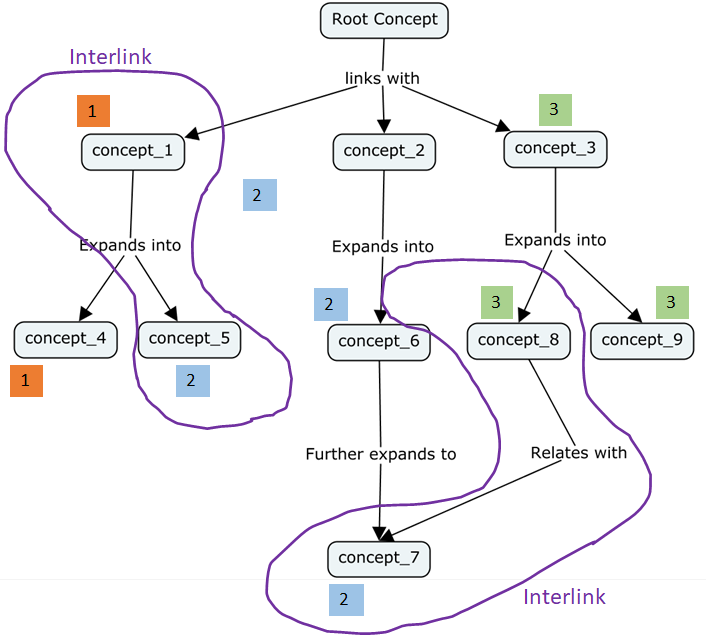
The number of concepts (NC) is obtained by counting all the concepts, excluding the root concept, present in the Cmap. The number of categories (NCAT) is obtained by classifying the concepts present into each of the categories and counting the ones that contain at least one concept. For the case of Entrepreneurial Mindset (EM), the cateogries were defined by the Word Bank developed by the research team members. Lastly, the number of interlinks (NIL) is obtained by counting the connections between paired concepts that are from different categories.
 |
 |
 |
|---|---|---|
| Figure 10: EM Cmap example with number of concepts (NC) identification. | Figure 11: Number of categories (NCAT) identification. | Figure 12: Number of interlinks (NIL) identification. |
Figure 10 shows an example of a concept map with 9 concepts. After listing the concepts, they are categorized using a word bank (Figure 11) and finally interlinks are identified (Figure 12). For this example, the NC will correspond to 9, NCAT will be 3, and NIL value corresponds to 2.
- Watson MK, Barrella E, Pelkey J. Assessment of conceptual knowledge using a component-based concept map scoring program. The International journal of engineering education. 2018;34(3):1025-1037.