-
Notifications
You must be signed in to change notification settings - Fork 0
Initial concept
Look at the design document.
It is possible to find the related scripts here.
The first implementation of the manifest document adopts the METS format, according to the METS schema.
The METS model is a container which can accomodate different metadata models. The Library of Congress (LOC) METS web site hosts some examples of METS profiles which combine different metadata schemas (PREMIS, MODS, MIX, DC, etc.). EUDAT should implement its own profile, but it is necessary to implement and consolidate the manifest schema before thinking about it. Particularly interesting is the profile ECHO Dep Generic METS Profile for Preservation and Digital Repository Interoperability because it mixes PREMIS and METS models.
A very minimal EUDAT manifest document could look like this:
<?xml version="1.0" encoding="utf-8"?>
<ns1:mets ID="_EUDATMETS_6c9ce44a-92b5-4235-9dba-54c069f31e35" LABEL="EUDAT METS document" xmlns:ns1="http://www.loc.gov/METS/" xmlns:ns2="http://www.w3.org/1999/xlink">
  <ns1:fileSec>
    <ns1:fileGrp>
      <ns1:fileGrp ID="claudio_50c05e40-a2bd-4f74-80a4-59daef0548e6">
        <ns1:fileGrp ID="claudio_50c05e40-a2bd-4f74-80a4-59daef0548e6__files__">
          <ns1:file ID="test2.txt_db1e9746-4ac7-4f9f-be90-42fe68822004">
            <ns1:FLocat LOCTYPE="URL" ns2:href="file://claudio/test2.txt" ns2:type="simple"/>
          </ns1:file>
          <ns1:file ID="test3.txt_bf985828-f3b9-4514-98b5-447795641cf5">
            <ns1:FLocat LOCTYPE="URL" ns2:href="file://claudio/test3.txt" ns2:type="simple"/>
          </ns1:file>
          <ns1:file ID="test.txt_8cd22ae9-63c8-4bdb-8719-6771a5361e33">
            <ns1:FLocat LOCTYPE="URL" ns2:href="file://claudio/test.txt" ns2:type="simple"/>
          </ns1:file>
        </ns1:fileGrp>
        <ns1:fileGrp ID="collection_A_aecf921d-a31b-40ed-8f61-63f44de7e5c1">
          <ns1:fileGrp ID="collection_A_aecf921d-a31b-40ed-8f61-63f44de7e5c1__files__">
            <ns1:file ID="datum_1.dat_4ba59a86-3eb9-4a75-9437-54ce62e8e920">
              <ns1:FLocat LOCTYPE="URL" ns2:href="file://claudio/collection_A/datum_1.dat" ns2:type="simple"/>
            </ns1:file>
            <ns1:file ID="metadatum_1.txt_b223c425-db73-44db-9f1d-8d14e4e3035a">
              <ns1:FLocat LOCTYPE="URL" ns2:href="file://claudio/collection_A/metadatum_1.txt" ns2:type="simple"/>
            </ns1:file>
          </ns1:fileGrp>
        </ns1:fileGrp>
        <ns1:fileGrp ID="collection_C_22dd3e5f-8d6c-4f0a-bd31-498d25629995">
          <ns1:fileGrp ID="collection_C_22dd3e5f-8d6c-4f0a-bd31-498d25629995__files__">
            <ns1:file ID="proofn1.txt_0751977d-e1fa-404c-a6ef-f8531851d2ba">
              <ns1:FLocat LOCTYPE="URL" ns2:href="file://claudio/collection_C/proofn1.txt" ns2:type="simple"/>
            </ns1:file>
          </ns1:fileGrp>
          <ns1:fileGrp ID="collection_C1_03addca3-4ff0-47fa-8f30-22e05090ff36">
            <ns1:fileGrp ID="collection_C1_03addca3-4ff0-47fa-8f30-22e05090ff36__files__">
              <ns1:file ID="proofn2.txt_d83a9d0f-fec5-4f0e-b5d2-ba34607ed22d">
                <ns1:FLocat LOCTYPE="URL" ns2:href="file://claudio/collection_C/collection_C1/proofn2.txt" ns2:type="simple"/>
              </ns1:file>
            </ns1:fileGrp>
          </ns1:fileGrp>
        </ns1:fileGrp>
        <ns1:fileGrp ID="collection_B_88551ac4-f8a1-4327-b55e-287e9193782c">
          <ns1:fileGrp ID="collection_B_88551ac4-f8a1-4327-b55e-287e9193782c__files__"/>
        </ns1:fileGrp>
      </ns1:fileGrp>
    </ns1:fileGrp>
  </ns1:fileSec>
  <ns1:structMap TYPE="Relational">
    <ns1:div LABEL="claudio" TYPE="digital collection">
      <ns1:div LABEL="rel_cb1e9746-4ac7-4f9f-be90-42fe68822007" TYPE="entity relation">
        <ns1:div LABEL="dataless" TYPE="DescriptiveMetaData">
          <ns1:fptr FILEID="test2.txt_db1e9746-4ac7-4f9f-be90-42fe68822004"/>
        </ns1:div>
        <ns1:div LABEL="miniseed" TYPE="Data">
          <ns1:fptr FILEID="test.txt_8cd22ae9-63c8-4bdb-8719-6771a5361e33"/>
        </ns1:div>
        <ns1:div LABEL="seed" TYPE="Composite">
          <ns1:fptr FILEID="test3.txt_bf985828-f3b9-4514-98b5-447795641cf5"/>
        </ns1:div>
        <ns1:div LABEL="miniseed" TYPE="Data">
          <ns1:fptr FILEID="datum_1.dat_4ba59a86-3eb9-4a75-9437-54ce62e8e920"/>
        </ns1:div>
      </ns1:div>
      <ns1:div LABEL="rel_ab1e9746-4ac7-4f9f-be90-42fe68822000" TYPE="entity relation">
        <ns1:div LABEL="miniseed" TYPE="Data">
          <ns1:fptr FILEID="datum_1.dat_4ba59a86-3eb9-4a75-9437-54ce62e8e920"/>
        </ns1:div>
        <ns1:div LABEL="miniseed" TYPE="Data">
          <ns1:fptr FILEID="test.txt_8cd22ae9-63c8-4bdb-8719-6771a5361e33"/>
        </ns1:div>
        <ns1:div LABEL="seed" TYPE="Composite">
          <ns1:fptr FILEID="test3.txt_bf985828-f3b9-4514-98b5-447795641cf5"/>
        </ns1:div>
        <ns1:div LABEL="dataless" TYPE="DescriptiveMetaData">
          <ns1:fptr FILEID="metadatum_1.txt_b223c425-db73-44db-9f1d-8d14e4e3035a"/>
        </ns1:div>
      </ns1:div>
      <ns1:div LABEL="unknown" TYPE="Data">
        <ns1:fptr FILEID="proofn1.txt_0751977d-e1fa-404c-a6ef-f8531851d2ba"/>
      </ns1:div>
      <ns1:div LABEL="unknown" TYPE="Data">
        <ns1:fptr FILEID="proofn2.txt_d83a9d0f-fec5-4f0e-b5d2-ba34607ed22d"/>
      </ns1:div>
    </ns1:div>
  </ns1:structMap>
</ns1:mets>
The above manifest represents the following iRODS collection:
ils -r /cinecaDMPZone2/home/claudio
  manifest.xml
  test2.txt
  test3.txt
  test.txt
  C- /cinecaDMPZone2/home/claudio/collection_A
/cinecaDMPZone2/home/claudio/collection_A:
  datum_1.dat
  metadatum_1.txt
  C- /cinecaDMPZone2/home/claudio/collection_B
/cinecaDMPZone2/home/claudio/collection_B:
  C- /cinecaDMPZone2/home/claudio/collection_C
/cinecaDMPZone2/home/claudio/collection_C:
  proofn1.txt
  C- /cinecaDMPZone2/home/claudio/collection_C/collection_C1
/cinecaDMPZone2/home/claudio/collection_C/collection_C1:
  proofn2.txt
And the metadata relations described in the following json-ld file:
{
  "@context": {
    "@vocab": "./conf/EudatControlledVocabulary.jsonld",
    "path": "@id"
  },
  "Structure": [
    {
      "@type": "Entity",
      "path": "_:claudio/test.txt",
      "type": "Data",
      "format": "miniseed"
    },
    {
      "@type": "Entity",
      "path": "_:claudio/test2.txt",
      "type": "DescriptiveMetaData",
      "format": "dataless",
      "isRelatedTo": [
        { "@id": "_:claudio/test.txt" },
        { "@id": "_:claudio/test3.txt" },
        { "@id": "_:claudio/collection_A/datum_1.dat" }
      ]
    },
    {
      "@type": "Entity",
      "path": "_:claudio/test3.txt",
      "type": "Composite",
      "format": "seed"
    },
    {
      "@type": "Entity",
      "path": "_:claudio/collection_A/datum_1.dat",
      "type": "Data",
      "format": "miniseed",
      "isRelatedTo": [
        { "@id": "_:claudio/test.txt" },
        { "@id": "_:claudio/test3.txt" },
        { "@id": "_:claudio/collection_A/metadatum_1.txt"}
      ]
    },
    {
      "@type": "Entity",
      "path": "_:*meta*",
      "type": "DescriptiveMetaData",
      "format": "dataless"
    }
  ]
}
The use of json-ld to describe the metadata relations requires the definition of a controlled vocabulary.
The aforementioned example shows the adopted approach to ingest metadata into the B2SAFE service. The json-ld format and controlled vocabulary are flexible enough to support unix-like syntax to define the data and metadata entity patterns. For example:
all the files ending with the character sequence ".hdf5" are data and all the file
ending with ".meta" are metadata and are associated to the hdf5 file with the same name.

{
  "@type": "Entity",
  "path": "_:*.hdf5",
  "type": "Data",
  "format": "HDF5"
},

{
  "@type": "Entity",
  "path": "_:${name}.meta",
  "type": "DescriptiveMetaData",
  "format": "MyFormat"
  "isRelatedTo": [
    { "@id": "_:${name}.hdf5" }
  ]
}
The whole process is implemented through two separate scripts:
- mets_factory.py: it takes a collection path in input and provide a METS file as output.
- b2safe_neo4j_client.py: it takes an iRODS path to a manifest file as input, parses it and uploads the content to a neo4j instance.
The final result of the process in the graphDB appears like this: neo4j picture
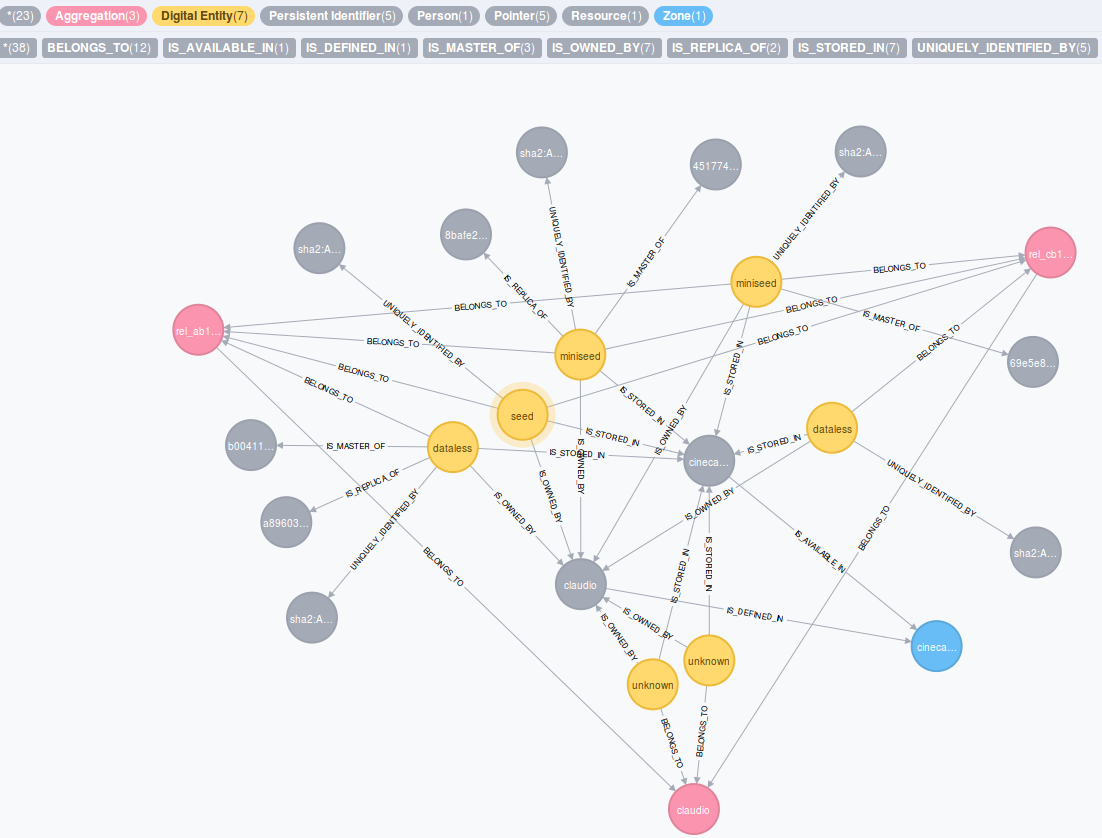
- additionally there is a script to validate the mets manifest file validate_mets_manifest.py: it takes the path to the manifest file, that needs to be validated, analyse this of inconsistencies inside the mets dokument, so if there is no file element defined in fileSec that is referenced in structural map, and if all files referenced are existence in iRODS collection. The XML parser checks if the xml itself is well-formed and if not the exception is cached and logged in the log file. At the end it writes the validaiton results in the log file and validaiton status in iRODS metadata and as attribute RECORDSTATUS of the metsHdr element inside the manifest.
$ validate_mets_manifest.py -h
usage: validate_mets_manifest.py [-h] [-confpath CONFPATH] [-dbg] [-d]
                                 [-path PATH] [-u USER]

B2SAFE manifest validation

optional arguments:
  -h, --help            show this help message and exit
  -confpath CONFPATH    path to the configuration file
  -dbg, --debug         enable debug
  -d, --dryrun          run without performing any real change
  -path PATH            irods path to the manifest to validate
  -u USER, --user USER  irods user