
IDE: Microsoft Visual Studio
Language: C++
Libraries: SDL2 (Simple DirectMedia Layer)
Multiple scenes implemented with Object-Oriented State Machine
Inheritance, polymorphism, operator overloading
Time based movement (framerate indipendence), multiple collision detection
File writing and file reading to implement saves
Stages designed with customizable tiling
Sound effects and music. VSync active. Average FPS counter
Multiple stages with parallax scrolling
- Five scene game: Title, Game (Stage 1-2-3), Game Over
- Single player mode, three stages with increasing difficulty
- Left and Right Arrows for movement
- Up Arrow for jumping
- Make sure to extract the game in a folder where you can create files
- The game autosaves in a binary file at the start of each stage (not checkpoints!)
- The info stored in the file are: starting stage, lives, coins and score
- If you want to delete the savefile, you can find it in the
datafolder
- The stages are realized with a tiling system
- In the
datafolder you can find 3 files:stage1.mapstage2.mapstage3.map - Inside these file there are the maps for the entire stages
- You can freely customize these files as you like, just follow the format and use valid tile codes
My advice, however, is to edit your levels using the spreadsheet
map_editor.xlsxincluded in the project.
It's much easier to work this way and the effect of your changes is much more direct and understandable.
Open the spreadsheet and you will find one sheet for each stage, each cell represents a tile:
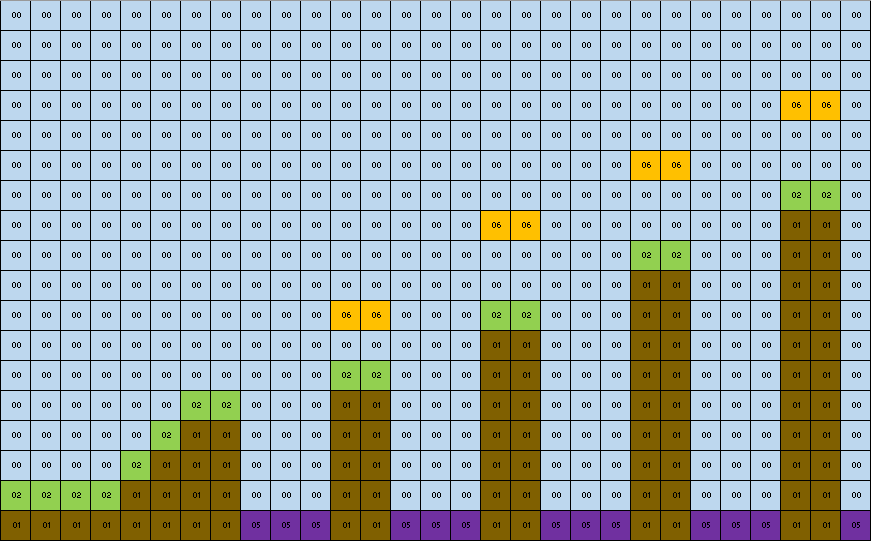
The color is not relevant, it is just used to give a better prospective of the layout.
The only data that matters is the code inside every cell:
 00 00 |
 01 01 |
 02 02 |
 03 03 |
 04 04 |
 05 05 |
 06 06 |
 12 12 |
 13 13 |
 14 14 |
You can now edit the file as you like, just make sure the dimensions stay
18 x 400cells.
Once you're done just export the sheet as a new.csvfile.
Open it with any text editor and replace every";"with a blank space" "
Finally replace the rows in the filestageX.maprelative to the desired stage and you're good to go!
Code is a little over-commented just to help anyone interested to navigate it better