A minimal dark-style web video manager built with Flask — browse, play, annotate, and organize your local MP4 library from any browser or iPad.
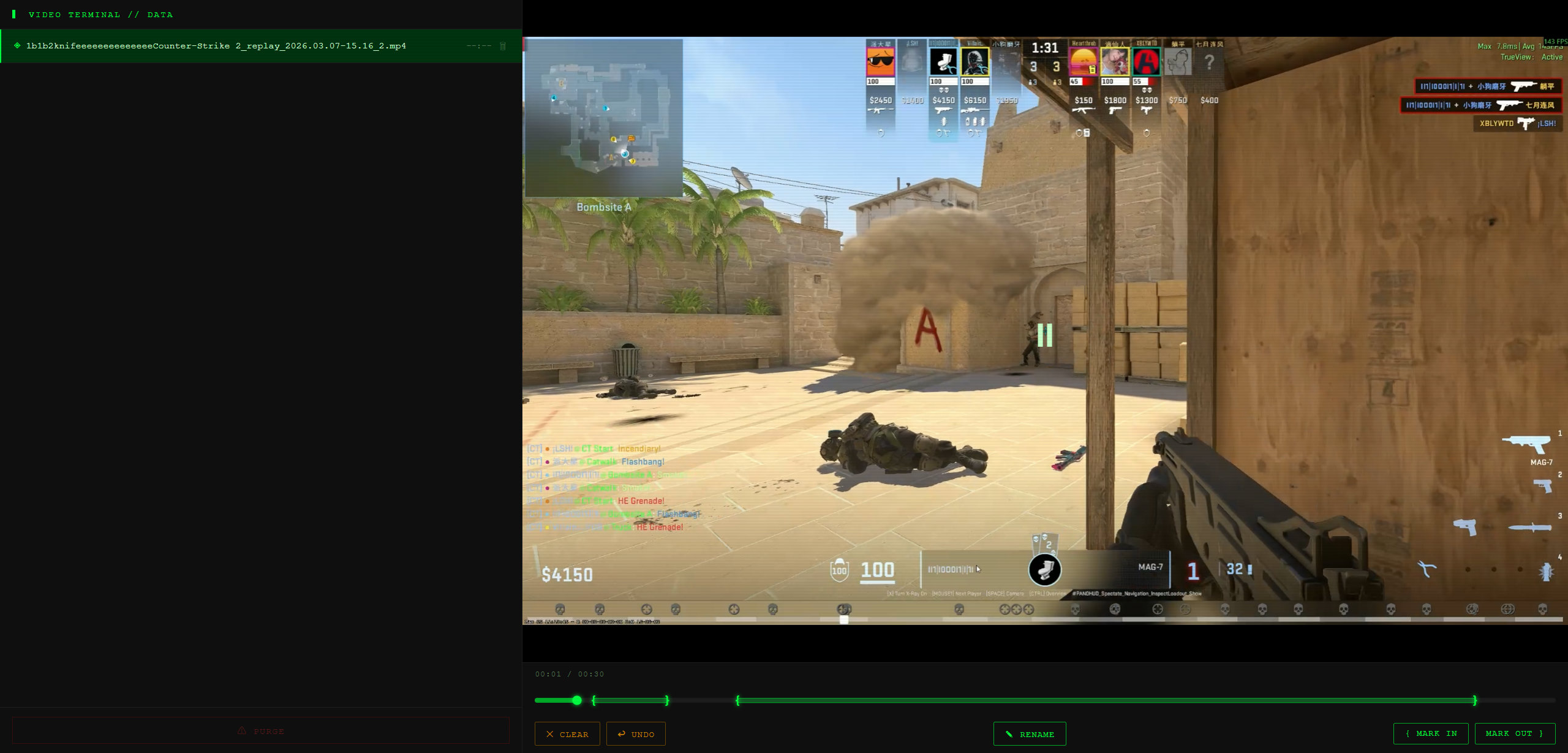
- Dark UI with scanline aesthetic and green-on-black color scheme
- File browser — lists all
.mp4files in thedata/folder, sorted by modification time (newest first), with duration display - Click-to-play — select any file to load and play in the right panel; click the video to toggle play/pause
- Timeline scrubber — large 40px hit-area progress bar with drag support (mouse & touch); click or drag anywhere to seek
- Segment markers — mark
{start and}end points at the current playback position; matched pairs are highlighted on the timeline; supports multiple segments, undo (last marker), and clear all (with confirmation) - Auto-save markers — markers are saved to a
.jsonsidecar file alongside the video on every change; lonely start markers are auto-paired with the video end, lonely end markers with0:00 - JSON indicator — files with saved marker data show a
◈icon in the file list - Rename workflow — prefix a video with a custom string (e.g.
1b2k); the prefix is parsed into reusable tags (1b,2k) stored inconfig.iniand shown as clickable chips in the rename dialog - Trash & bulk delete — mark files for deletion with the 🗑 icon; a confirmation dialog lists all pending files before permanent removal (sidecar
.jsonfiles are also deleted)
# Pull and run the pre-built image directly
docker run -d \
  -p 5000:5000 \
  -v $(pwd)/data:/app/data \
  --name video_organizer \
  ghcr.io/evlos/video_organizer:latest
Visit http://localhost:5000 to start using the app.
- Python 3.7+
- FFmpeg (for video duration detection)
# macOS
brew install ffmpeg

# Ubuntu / Debian
sudo apt install ffmpeggit clone https://github.com/Evlos/video_organizer.git
cd video_organizer
pip install flaskpython app.pyThen open your browser at http://localhost:5000
Place your
.mp4files inside thedata/directory (created automatically on first run).
video-organizer/
├── app.py        # Flask backend — file listing, video streaming, deletion API
└── data/         # Drop your .mp4 files here
| Action | How |
|---|---|
| Play a video | Click a filename in the left panel |
| Seek | Click anywhere on the progress bar |
| Scrub | Click and drag along the progress bar |
| Mark segment start | Click { Mark In button during playback |
| Mark segment end | Click Mark Out } button during playback |
| Mark file for deletion | Click the 🗑 icon next to a filename |
| Delete marked files | Click ⚠ PURGE, then confirm |
| Variable | Default | Description |
|---|---|---|
DATA_DIR |
./data |
Directory scanned for .mp4 files |
host |
0.0.0.0 |
Server bind address |
port |
5000 |
Server port |
Edit the bottom of app.py to change these values.
- File paths are sanitized with
os.path.basename()to prevent directory traversal attacks - Only
.mp4files are listed and served; other file types are ignored
| Package | Purpose |
|---|---|
flask |
Web framework & file serving |
ffprobe |
Video duration detection (via subprocess) |
This project is open-sourced under the GNU General Public License v3.0.