-
Notifications
You must be signed in to change notification settings - Fork 32
Requirements for using the FOSDEM video system externally
You'll need:
- documentation about the venue
- power
- a quiet video operations control room
- a reliable network uplink
- a reliable wired network or tools to build one
- camera gear: tripod, camera, hdmi or sdi cables
- audio gear: lavallier microphones for speakers, wireless hand microphones for audience questions and panel discussions
- preparation time
- beamers
- laptops: for video processing, (optionally) for speakers
Let's go over all of these in more detail.
Experience teaches us it is very useful to have as much information about the venue as possible. We are especially keen on getting info on the following:
- a roster of room names and their use during the conference
- maps of the rooms, with power, wired network, audio and video connections clearly mapped out
- precise map of the entire venue
- pictures of the inside of the venue. HINT: mapillary.com might allow you to make a good view.
- phone and email for:
- venue network responsible (!!!)
- venue a/v responsible (if applicable)
The FOSDEM video boxes are on a 110v/230v power supply with CEE 7/7 plug. Any other gear requiring mains power that we bring is equiped with a 230v https://en.wikipedia.org/wiki/Europlug .
Our microphone sets (see below) are micro USB powered. You may want to get a few local high quality, high amperage multi-port USB chargers.
HINT: We use the IKEA Koppla 3x USB chargers. They're cheap, decent quality and easily available in much of the world.
Not required when streaming just one room. Highly recommended otherwise.
In this room, we need:
- quiet
- a desk for two people and their laptops
- a well ventilated household rack for streaming gear (video processing laptops, backup system, network switches, ...). We recommend the IKEA Omar 92x36x94 cm metal shelving rack if available in your corner of the world. It's cheap, decent quality, offers excellent venting, and stores compactly. One Omar rack will suffice for up to 8 rooms.
- (recommended) a big lcd screen with hdmi input cable, displayport->hdmi, vga->hdmi, mini displayport->hdmi adapter
- 2x headphones with 3.5mm connector. We usually use Sennheiser HD20x series headphones, but anything decent quality will do.
Don't worry if you don't immediately understand the below section. Ask the venue network administrator for help. Lacking that, consult with us and we'll do our best to help you as best as we can.
Our ideal setup requires:
- a separate vlan for video streaming
- 10 Mbit of outgoing bandwidth ("upload speed") per room streamed
- on a multihomed uplink
- wired network access to our vlan from all rooms streamed
We can do with less. Our minimum is 2Mbit per room, but that sacrifices resilience. You lose:
- external dumps of the individual slides (2Mbit), camera (2Mbit) and mixed (2Mbit) streams
- backup streaming server (2Mbit)
We need the video network and uplink separated from the visitor wifi network. Thing might or might not work without that separation. We just can't guarantee anything because we're not in control.
HINT: A decent estimate of outgoing bandwidth can be obtained from http://speedtest.net .
If no wired network is available, we strongly prefer setting one up. If we're driving, we bring our own gear. In case we're flying in, we need:
- 3x RJ45 crimping tools
- 1x good quality cable testers
- 3x 100 RJ45 plugs
- 3x 305m roll of cat5e cable (or more, depending on the venue layout)
- helping hands with some crimping experience
A robust switch is also needed. At FOSDEM, we use a used 48 port Juniper EX2200 for the video network for 24 rooms. Each of the video boxes we bring has a builtin unmanaged Gbit switch with 3 ports exposed.
HINT: In case no wired network and/or wired uplink is available at all, for streaming just one room, a 4g uplink can often be just manageable. No guarantees though, as 4g spectrum can be congested, especially at tech conferences!
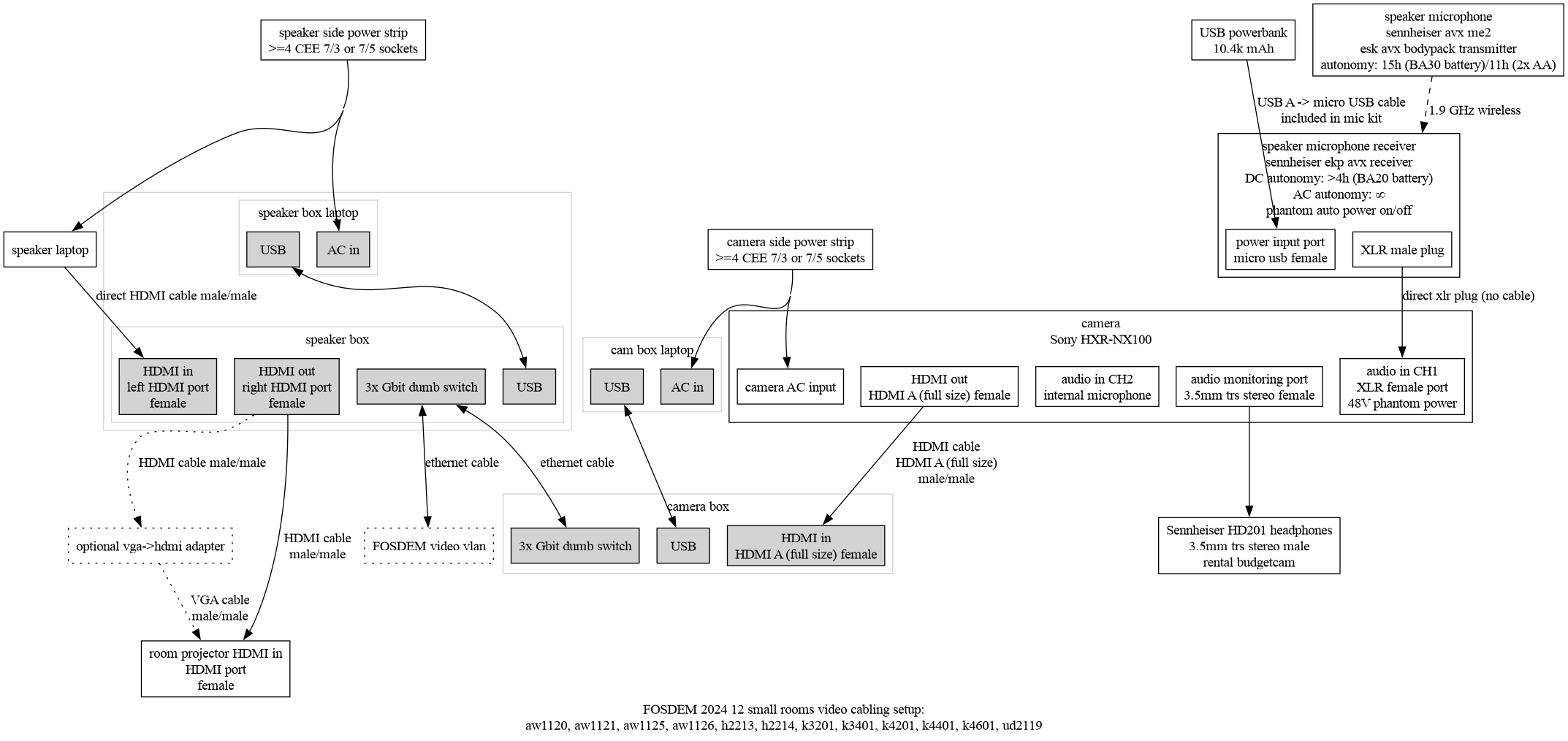
For small rooms that require no amplification of the speaker's voice and no panel discussions, you can get away with a lavalier microphone for the speaker. This can be plugged into the camera's XLR input directly. Optionally the internal microphone of the camera for audience questions, or the speaker can be asked to repeat the question.
The setup will be similar to our cabling diagram for small rooms at FOSDEM
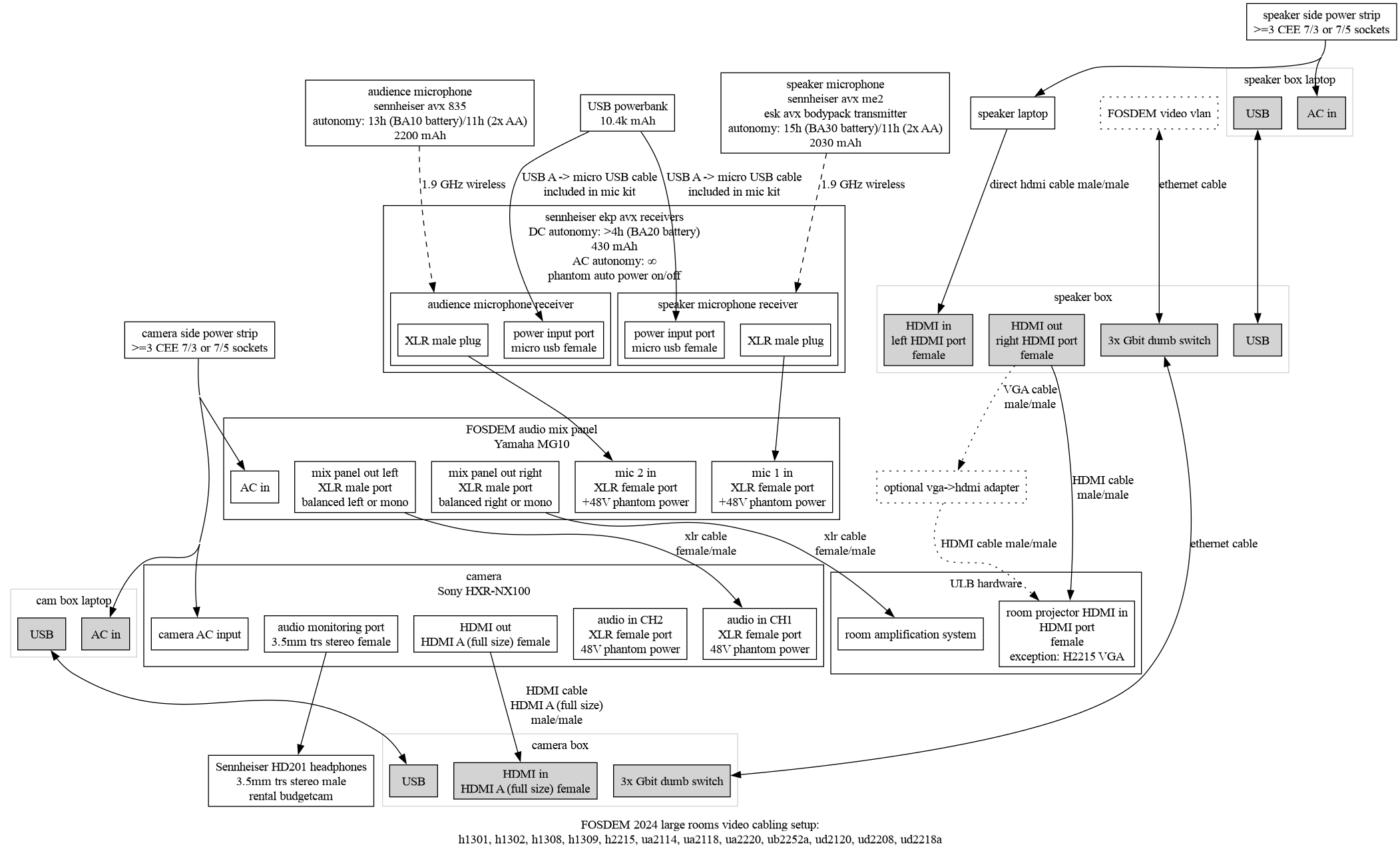
For bigger rooms that require amplification of the presenter, or for smaller rooms where panel discussions are to be held, a different setup is required. You want a lavalier microphone for the main speaker and one or more hand microphones for audience or panel discussion. These plug into a mixer that feeds the room amplification system and/or the camera.
The setup will be similar to our cabling diagram for large rooms at FOSDEM
As long as the microphone receiver has XLR out, we'll probably manage.
That said, we highly recommend the Sennheiser AVX ME2 lavalier microphone. There are five variants of this product available, each license free in its specific area:
- EU (Sennheiser product code 505851)
- UK (Sennheiser product code 505855)
- US set 4 (Sennheiser product code 505861)
- AU (Sennheiser product code 506155)
- LA (Sennheiser product code 506158)
- US set 5 (Sennheiser product code 505867)
As long as the microphone receiver has XLR out, we'll probably manage. We highly recommend the Sennheiser AVX ME835 hand microphone. There are four variants of this product available, each license free in its specific area:
- EU (Sennheiser product code 505853)
- LA (Sennheiser product code 506159)
- US (Sennheiser product code 505863)
- UK (Sennheiser product code 505857)
Has the room itself got a mixer and amplification system already? Then we need detailed documentation: pictures of it its current state, and a pdf of the manual in English.
No reliable mixer available? These are often difficult and not at all cost effective to rent, but they're relatively cheap. We have two widely available recommendations for you:
- The Yamaha MG10 is around 150€ and sufficient for our needs.
- The Soundcraft Ui12 is a tad bit more expensive at around 225€ and much easier for us, as we can manage it from the network.
Get a pile of XLR cables. They're not that expensive.
In the large rooms, XLR cables will need to be run:
- from the mixer to the camera
- from the mixer to the room amplification system
Get a few short ones too, as DI boxes (see also below) may be needed to cut out ground loops from the audio system in large rooms.
It's safest to have one DI box available per large room.
We use a rendering farm of used Lenovo Thinkpad X2xx series laptops for processing the video streams locally. Anything x220 or higher will do.
How many do we need?
- one per room streamed
- one for dumping streams
- (preferably) one for running a pxe server to get things installed
- (optional) one presentation laptop per room streamed
The rooms probably come with beamers. We'd like to know:
- if these are 4/3 or 16/9
- what resolution they support
- what inputs they support: VGA, HDMI, or both
- where these inputs are physically located in the room, compared to the speaker
- precrimped short & long network cables
- hdmi cables (& vga if applicable, for projectors)
- (optional) video adapters for speakers
- usb power banks (in case Sennheiser mics are used)
- power extension cords
- room maps with network and power indicated
- duct tape, straps