Releases: Fieldtrans/EdgeGesture
EdgeGesture 1.3.1

EdgeGesture 1.3.1
-
在 Android 12 及更高版本中启用 Material You 动态颜色。
-
减小了自适应应用程序图标的前景尺寸。
-
对概览状态卡进行了改进,使其使用 Material 3 颜色角色。
-
使用 ktlint 格式化 Kotlin 项目,并添加了支持 Compose 的 ktlint 命名配置。
-
Enabled Material You dynamic color on Android 12 and newer.
-
Reduced the adaptive app icon foreground size.
-
Refined the overview status card to use Material 3 color roles.
-
Formatted the Kotlin project with ktlint and added Compose-aware ktlint naming configuration.
Verification
:app:ktlintCheck:app:testDebugUnitTest:app:assembleReleaseapksigner verify --print-certs
SHA256: 9C3D58F34035E0C4E8C4EA46F4AE21FBD6B64A97C1E1AB6E5B4B334C4204958F
EdgeGesture v1.3.0
更新内容
新功能
- 触觉反馈(可在设置中关闭)
- 支持 Android 8.0+(之前仅支持 Android 16)
指针控制优化
- 加入死区过滤,并让
pointerCurve参数实际生效 - 删除控制圆设置,仅保留取消圆半径设置
- 修复指针预览
- 滑块底色调整为灰白低对比
- 默认控制圆半径从 120dp 调整为 72dp
动画
- 指针出现/消失缩放淡入淡出
- 页面切换淡入缩放
- 滑块数值弹跳动画
- 状态卡片 animateContentSize
诊断
- 关于页面新增查看崩溃日志入口。
指针手感
- 移除快速滑动时的速度增益放大,指针改为线性移动,减少惯性感。
EdgeGesture v1.2.0
更新内容
架构重构
- 重构 MainActivity (2296行 → 341行,减少85%)
- 引入 MVVM 架构 (ViewModel + Repository)
- 拆分 UI 为独立模块
兼容性提升
- 支持 Android 8.0+ (之前仅支持 Android 16)
开发体验
- 添加代码质量工具 (Detekt + ktlint)
- 添加单元测试框架
- 优化 Gradle 构建速度 30-50%
文件
- app-release.apk - 安装包
EdgeGesture v1.1.1
EdgeGesture v1.1.1
更新内容
- 修复 LSPosed 增强模式重启后需要手动开关总开关才能恢复的问题。
- 新增开机、解锁、进入桌面时自动广播保存配置,让 LSP Hook 重新拿到当前配置。
- 打开 App 时会主动同步一次当前配置,确保不需要手动切换总开关。
- LSPosed 运行时会在亮屏 / 解锁后重新刷新配置和 InputFilter 状态。
- GitHub Topics 新增无障碍 / no-root 相关标签,方便普通用户发现。
安装提示
- 从 v1.1.0 升级后建议重启一次手机。
- 如果系统拦截开机广播,打开一次 App 也会自动同步配置,不需要再手动切换总开关。
APK
上传附件:EdgeGesture-v1.1.1.apk
EdgeGesture v1.1.0
EdgeGesture v1.1.0
更新内容
- 新增免 Root 无障碍模式,支持直线指针和 Tracker + Cursor。
- 新增无障碍模式与 LSPosed 增强模式共存处理,避免重复触发。
- 新增边缘双击最近任务,并加入可调“双击等待时间”。
- 优化普通边缘单击穿透:LSPosed 与无障碍模式下,单击不再被双击检测吞掉或长时间等待。
- 新增通知栏触发方式切换:碰到顶部就下拉,或松手点击顶部再下拉。
- 优化通知栏触发:碰到就下拉后指针不消失,可继续点击通知栏内容。
- 新增首次使用操作教程,并优化成系统教程式列表卡片。
- 触发页新增真实屏幕边缘预览和普通 / LSPosed 双模式小预览,可查看触发区、系统侧滑保留区、上划距离和允许夹角。
- 设置项改为滑动即保存,并实时广播给运行中的 LSPosed / 无障碍引擎。
- 新增自愿支持开发入口。
- 优化底部导航跨页切换,减少总览到动作页的过渡卡顿。
- 优化设置界面、双语说明、安装指南和排错文档。
安装提示
- 普通模式:无需 Root,开启 EdgeGesture 无障碍服务即可。
- 增强模式:需要 Root + LSPosed,并建议重启手机。
- 如果从很早的 debug 签名版本升级失败,请先卸载旧版再安装。
APK
上传附件:EdgeGesture-v1.1.0.apk
EdgeGesture v1.0.4
修复内容
- 删除下边缘动作选项,避免与 Android 系统底部上划 Home/最近任务手势冲突。
- 动作设置页现在只保留左边缘和右边缘。
当前已实现功能
- 边缘上划:可选择单手点击屏幕、返回、主页、最近任务。
- 边缘双击:可选择最近任务。
English
- Removed the bottom-edge action option to avoid conflicts with Android Home/Recents gestures.
- Action settings now focus on left and right edges only.
- Edge swipe up supports One-hand tap, Back, Home, and Recents.
- Edge double tap supports Recents.
EdgeGesture v1.0.3
当前已实现功能
- 边缘上划:可选择单手点击屏幕、返回、主页、最近任务。
- 边缘双击:可选择最近任务。
- 动作设置页只保留当前已实现的动作,删除未实现项。
- 动作边缘保留左边缘、右边缘、下边缘,删除上边缘动作设置。
- 继续使用稳定的 InputFilter / system_server 检测路径。
English
- Edge swipe up supports One-hand tap, Back, Home, and Recents.
- Edge double tap supports Recents.
- This release keeps only currently implemented action rows in settings.
EdgeGesture 1.0.2 Hotfix
EdgeGesture 1.0.2 is an emergency hotfix release.
What changed
- Restored the stable v1.0.1 input handling path.
- Removed the experimental all-action gesture detector build from the release path because it could cause high
system_serverCPU usage on real devices. - This release is intended to replace the problematic test build and restore stable one-handed pointer behavior.
Important
If your phone is currently hot or system_server CPU is high, disable EdgeGesture in LSPosed and reboot first. Then install this APK.
Install
- Download
EdgeGesture-v1.0.2.apkbelow. - Install the APK.
- Enable EdgeGesture in LSPosed.
- Reboot the phone.
- Test only the stable right-edge swipe-up one-handed pointer first.
Docs:
EdgeGesture 1.0.1
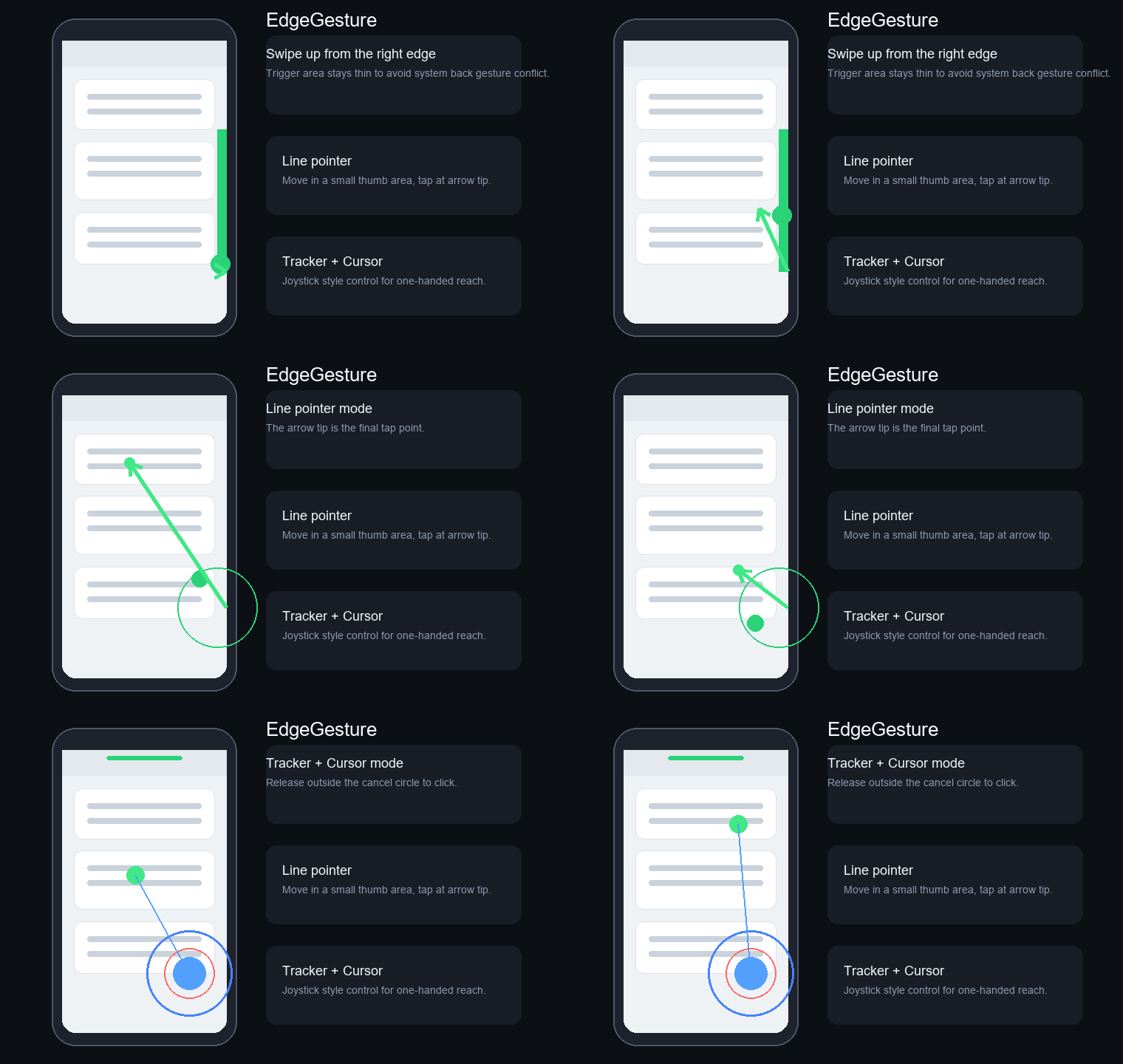


EdgeGesture 1.0.1 is a small official release update focused on project packaging and signing.
Changes
- Added GPL-3.0 license.
- Added GitHub Actions release APK build.
- Added install and troubleshooting documentation.
- Added real-device screenshots to the project page.
- Removed non-download demo GIF from Release assets.
- Added local release signing support.
Important
Starting from v1.0.1, the attached APK is signed with a release certificate. If you installed v1.0 or an earlier debug-signed APK, Android may refuse to install v1.0.1 as an update. In that case, uninstall the old APK first, then install v1.0.1.
Install
- Download
EdgeGesture-v1.0.1.apkbelow. - Install the APK.
- Enable EdgeGesture in LSPosed.
- Make sure the scope includes Android system/framework.
- Reboot the phone.
- Open EdgeGesture and enable the gesture mode you want.
Docs:
EdgeGesture 1.0 正式版
EdgeGesture is an LSPosed/Xposed module for one-handed edge gestures on Android. It helps you tap hard-to-reach areas of the screen with a right-edge gesture.
Highlights
- Line arrow pointer mode: release to tap at the arrow tip.
- Tracker + Cursor mode for joystick-style one-handed control.
- Adjustable trigger area, control circle, pointer speed, smoothing, color, cancel timeout, and cancel distance.
- Top-edge notification shade trigger with lightweight pre-animation.
- Configuration import and export.
- Overlay is visual-only; no transparent full-screen touch layer.
Install
- Download
EdgeGesture-v1.0.apkbelow. - Install the APK.
- Enable EdgeGesture in LSPosed.
- Make sure the scope includes Android system/framework.
- Reboot the phone.
- Open EdgeGesture and enable the gesture mode you want.
If gestures do not respond, search for EdgeGesture in LSPosed logs. See the install guide and troubleshooting guide.
中文说明
EdgeGesture 是一个 LSPosed/Xposed 单手边缘手势模块,用来解决大屏手机单手点不到屏幕上方或远处区域的问题。
主要功能:
- 直线箭头模式:松手点击箭头尖的位置。
- Tracker + Cursor 摇杆光标模式。
- 可调触发区域、控制圆、速度、平滑度、颜色、取消时间和取消距离。
- 顶部触发通知栏下拉,并带轻量预动画。
- 支持配置导入和导出。
安装后请在 LSPosed 中启用模块,确认作用域包含 Android 系统/框架,然后重启手机。
License: GPL-3.0.