Phone Authentication - Custom Routing Fails #161


Description

https://intercom.help/flutterflow/en/articles/6300011-custom-routing-when-a-user-logs-in
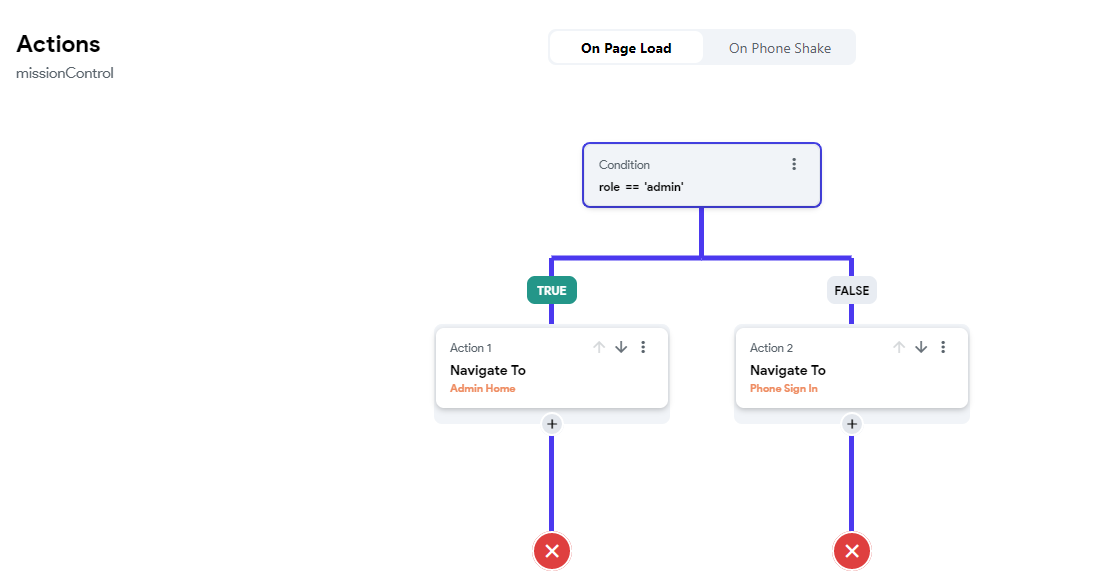
I'm following the above article, I need to route the admin user to the admin home page only if the "role" field is set to "admin". I have a condition on my "missiongControl" page to check if the user "role" == admin, this works fine, routing is successful, but it breaks the authentication persistance session. So everytime the user closes the web browser and open it again, he will need to go through the authentication process again. The expected behaviour for the authentication session to persist.
If I remove the condition on "missionControl" page, the authentication session persists successfully.
Expected behavior (required)
Authentication session should persist, even if I have a condition on the "missonContorl" page.
Current behavior (required)
Everytime the user close his browser, re-open it again, he will need to authenticate, enter his phone and sms code.
To Reproduce (required)
Simply follow this guide as documented by flutterflow team: https://intercom.help/flutterflow/en/articles/6300011-custom-routing-when-a-user-logs-in
- create a phoneSignIn page
- create an smsCode page
- create a missionControl page
- create adminHomePage
- complete the usual steps to configure authentication
- Configure authenticaiton in flutterflow

- configure missionControl on pageLoad
Bug Report Code
I've create a new project only to simulate this bug, here the Bug Report Code:
ITFficnf8cpIsdtK0L6JcO4w+WAUJk8cTIMziNZ+exUbfaL1Bu0XPMylSExBTbCjaVNcBlD+/ToCpvCOkfOWDsdcGyWtR4hi1pFUWw32KTbkEuzyT+3IHDUHZbsSXTTm
Context (required)
Authenticating everytime the user need to access the application will discourage him from using it, making the application useless.
Screenshots / recordings
Your environment
- FlutterFlow: v3.0
- Platform: Web only
- Browser name and version: Chrome / Safari
- Operating system and version (desktop or mobile): Windows 11 (Desktop, using Chrome), Android 13 (Mobile, using Chrome), macOS 12.6 (using Safri)