In test mode, a container is missing on one of my pages and one of the fonts is incorrect #189


Description

Expected behavior (required)
When I run test mode, I expect the fonts to match exactly to what I built and I expect all the widgets that I built to be visible and laid out how I built them.
Current behavior (required)
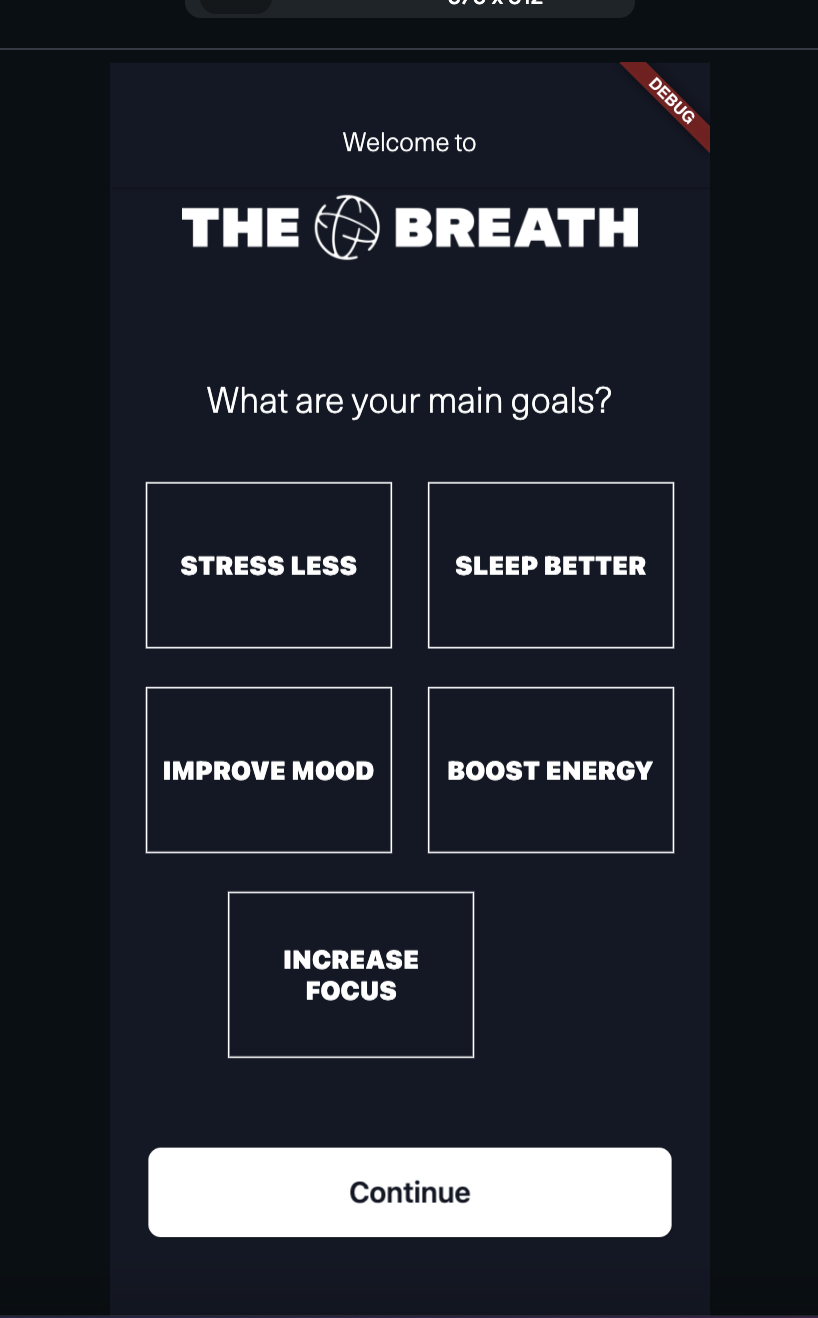
When I run test mode, one of the main headings is showing in a different font to what I built and one of the containers I built is missing which is leading to the container next to it being in the wrong position.
To Reproduce (required)
- Create new page
- Add 1 row
- Add a stack into row
- Add two containers ontop of each other into the stack
- Add text into each container
- Set the colours of each container to slightly different colours from each other
- Set conditional visibility for each of them based on a boolean local state. One appears when it is true and the other when it is false
- Set actions for each of them - when the visible container is tapped, it changes local state to True so that the invisible one will appear. When the invisible one appears and then is tapped it clears the local state so that the original visible container appears
- Set the one that is invisible on page load to be hidden in UI builder
- Copy and paste this entire stack into the same row
- Copy and paste the row twice onto the page so that there are now 3 rows in the page, each with two stacks in and each stack has two containers in
- Set up an additional 5 local states based on boolean and replicate the conditional visibility logic and actions on each of the containers. Each of the 6 stacks in the page will now relate to a different local state
- Add headings into the page with a custom font
- Run test mode and see one of the headings in wrong font and and one of the stacks with each of its containers missing
Code can be included in this section if it is relevant to reproducing the bug.
-->
Steps to reproduce the behavior:
1.
2.
3.
4.
Bug Report Code
When I try to do this it says bug report code failed
Context (required)
It's prevented me from having the correct onboarding flow. I am building an investment backed app for a friend, trying to convince him to have it built in Flutterflow rather than coded by developers and this issue is making him doubt Flutterflow.
Screenshots / recordings

The above photo shows what the app page looks like in the UI builder and the below page shows what it looks like in Test Mode. Please note that in this most recent test mode the fonts are all showing correctly but in the last test mode they weren't. I have changed NOTHING between test modes
Your environment
- Version of FlutterFlow used: V3 - 3.3.4
- Platform Mac
- Browser name and version: Google Chrome
- Operating system and version (desktop or mobile): MacOS 11.6.8