Data from datatype not appearing on Google Maps widget, especially when I filter the data by integer #841


Description

Has your issue been reported?
- I have searched the existing issues and confirm it has not been reported.
- I give permission for members of the FlutterFlow team to access and test my project for the sole purpose of investigating this issue.
Current Behavior
I am trying to have data from my Firebase, circled in red then populate on the Google Maps widget, however, while trying to do that I am trying to filter it based on a location filter i had set.
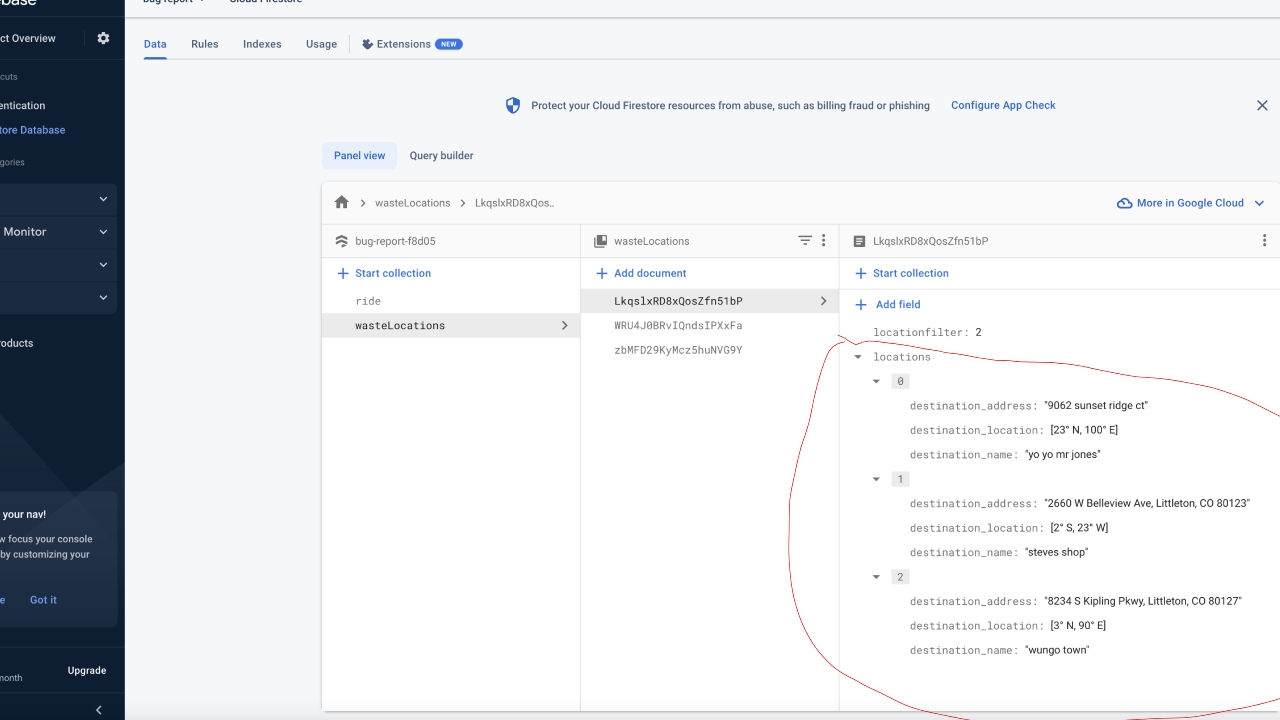
Expected Behavior
I thought if i query collected from my waste locations collection and filtered it based on the same number in the ride doc, i could then see, the markers i had created then populated on the google maps widgetI
Steps to Reproduce
-
I had to create a ride document with a location filter: integer
-
I then made a wasteLocations collection with a location filter: integer with data types containing, destination_location: lat Lng, destination_name: string, destination_address: string
-
I query collected a list view, the ride document, then when clicking on filterlocationbutton
-
It brings you to the maps page that allows, in which I document from reference the whole page, and then query collect on the google maps the wasteLocations Collection, and filter it based on locationfilter


Reproducible from Blank
- The steps to reproduce above start from a blank project.
Bug Report Code (Required)
IT4gls/l6otPm9tH1s7yKe9VtDw6JVw1bZc0sd0bGA4jfaLyCokAePWlaltCXbCkSn9HeESmmmMEwNLyieLyU8E7Cz+sbJ9xyMxqUBbhXlqhe5OBBqWKekF6QMBMCWKl4J+CkRF4XbZuc1Fh3V2EAtiWSgXZNLrLIndISq/LZO4=
Context
I am trying to see the markers display my waste locations, based on the locationfilter I had set.
Visual documentation
https://drive.google.com/file/d/1Lxuus6gyKv8yRhucSldOvJ2-m9EwcobT/view?usp=sharing
Additional Info
No response
Environment
- FlutterFlow version: 3.7.12
- Platform: Web
- Browser name and version: Chrome Version 112.0.5615.137
- Operating system and version affected: Mac Ventura 13.2.1