Skip to content

Demo in Swift to create a circular timer or progress bar

Notifications You must be signed in to change notification settings

Gagan5278/CicularProgressBar

Folders and files

NameName
Last commit message
Last commit date

Latest commit


History

21 Commits


Repository files navigation

CicularProgressBar An Example to show circular progressbar in Swift 5.0

Below is the output of the deemo Simulator Screen Shot - iPhone 11 Pro Max - 2020-03-17 at 19 29 06

HOW TO USE:

  1. Drag and Drop CircularProgressView.swift in your project.
  2. Open your ViewControler's Storyboard and add a UVIeewe.
  3. Set the layout of UIView in storyboard and also set background color (While/Clear)
  4. Set UIView as a subclass of CircularProgressView in storyboard.
  5. You can set stroke colors from Storyboard as below
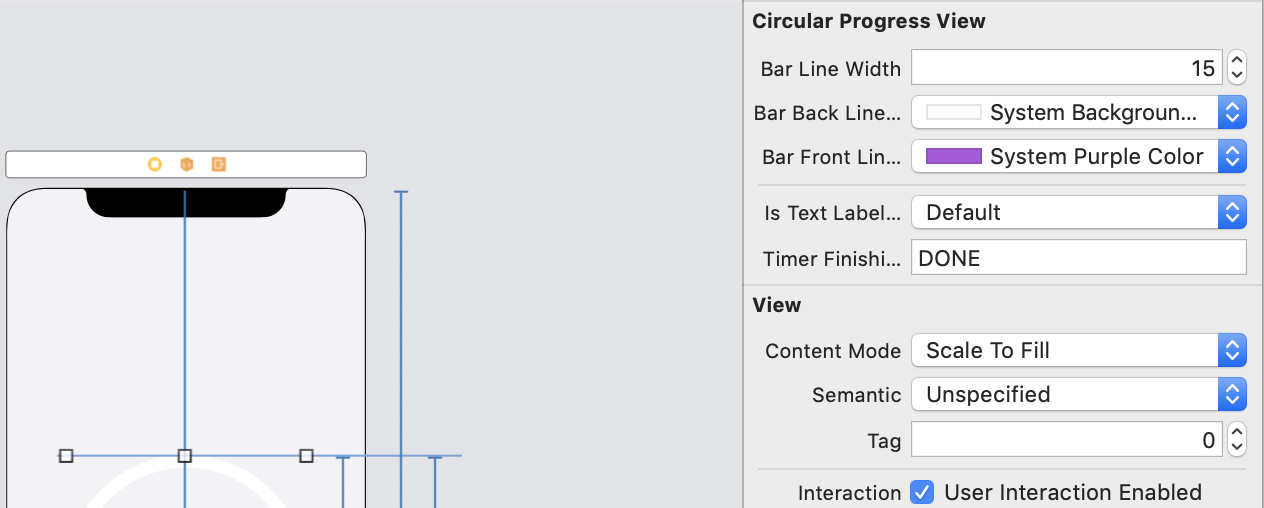
Screen Shot 2020-03-17 at 7 37 55 PM

About

Demo in Swift to create a circular timer or progress bar

Resources

Stars

Watchers

Forks

Releases

No releases published

Packages

No packages published

Languages