
Stack your stones. Find your way back.
Cairn is a workspace-scoped file mark system for Neovim with a custom floating picker. Drop marks on the lines that matter, navigate back instantly, and keep your working set intentional.
Inspired by the philosophy of Harpoon and the UI feel of Telescope, but built from scratch with a normal-mode-first picker and full line/column memory.
See it in action (Youtube):
https://youtu.be/O0baxiIQ8nQ
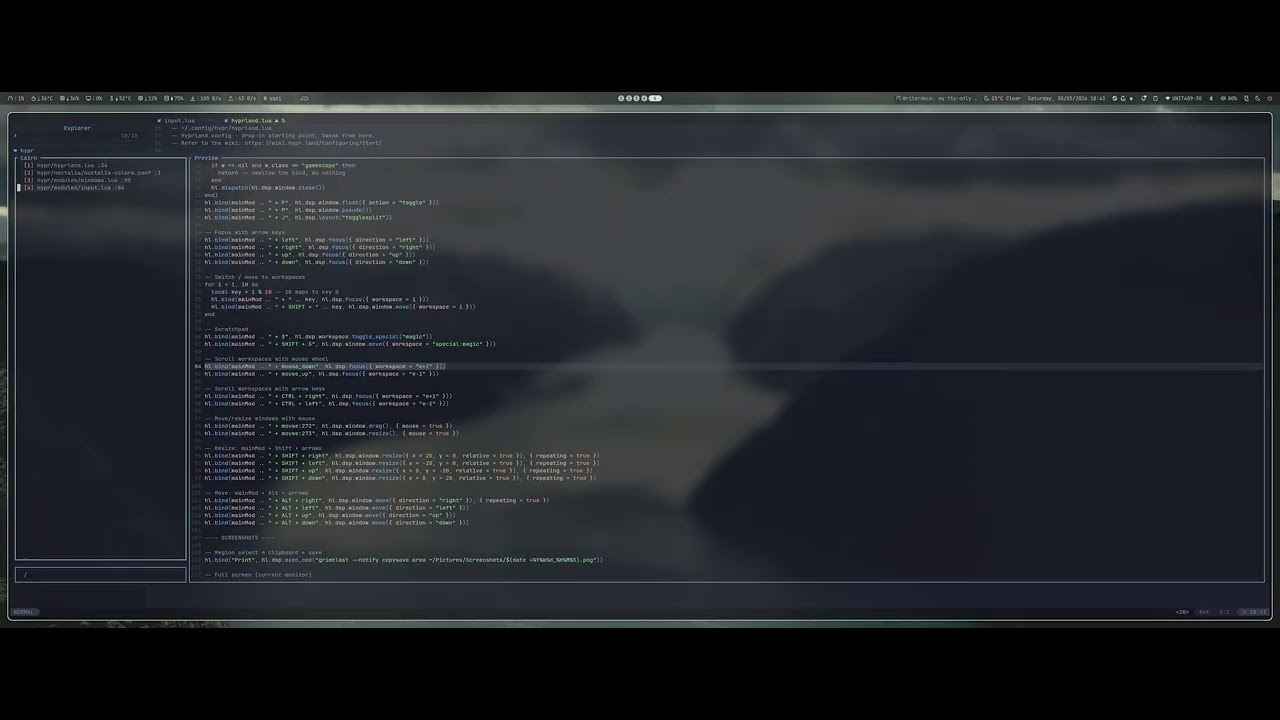
When you mark a file, Cairn saves its absolute path, line, and column to a JSON
file keyed by your git root (or cwd). The picker opens as a floating UI with a
live fuzzy filter and a syntax-highlighted preview scrolled to the marked line.
Normal mode is the default — you navigate the list with j/k and only drop
into insert mode when you want to filter. Everything persists across restarts
and SSH reconnections.
- Workspace-scoped marks — each git root (or cwd) has its own independent list
- Line + column memory — marks land you exactly where you set them
- Smart re-marking — marking an already-marked file updates its position, no duplicates
- Custom floating picker — normal-mode-first, no Telescope dependency
- Syntax-highlighted preview — real file buffer with Treesitter, scrolled to the marked line
- Live fuzzy filter — type to narrow,
<Esc>back to normal to navigate results - In-picker reordering — move marks up/down, cursor follows instantly
- Index-based jumps —
<leader>1through<leader>9for zero-thought navigation - Resize-aware — picker redraws automatically when the terminal is resized
- Persistent storage — plain JSON on disk, inspect or back it up freely
- Zero required dependencies — no external plugins needed
- Neovim
>= 0.9
{
  "GooseRooster/cairn.nvim",
  config = function()
    require("cairn").setup()
  end,
}use {
"GooseRooster/cairn.nvim",
config = function()
require("cairn").setup()
end,
}Open any file and press <leader>ma to drop a mark at your current line and
column. The mark is saved immediately to disk.
If the file is already marked, the existing mark is updated to your current position.
| Keymap | Action |
|---|---|
<leader>1 |
Jump to first mark |
<leader>2 |
Jump to second mark |
<leader>3–9 |
Jump to respective marks |
Press <leader>mm (or run :Cairn) to open the picker.

The preview pane shows a real buffer with full syntax highlighting and Treesitter, scrolled to and highlighting the marked line. It hides automatically on narrow terminals.
| Key | Action |
|---|---|
j / k |
Navigate the mark list |
<CR> |
Open mark in current window |
<C-s> |
Open in horizontal split |
<C-v> |
Open in vertical split |
<C-t> |
Open in new tab |
dd / <C-d> |
Delete selected mark |
<C-S-j> |
Move mark down |
<C-S-k> |
Move mark up |
/ or i |
Enter filter mode |
q / <Esc> |
Close picker |
| Key | Action |
|---|---|
| Type | Narrow list live (fuzzy match) |
<C-j/k> |
Navigate filtered results |
<CR> |
Open the top/selected match |
<C-s/v> |
Open in split without leaving filter |
<Esc> |
Return to normal mode, keep results |
<leader>md— remove the mark for the currently open fileddor<C-d>inside the picker — remove the selected mark
Call setup() with any overrides. Below is the full default configuration:
require("cairn").setup({
  -- Where mark files are stored (one JSON file per workspace)
  data_dir = vim.fn.stdpath("data") .. "/cairn",

  -- Use git root as workspace key; falls back to cwd when not in a git repo
  use_git_root = true,

  ui = {
    -- Terminal width (columns) below which the preview pane is hidden
    min_width_for_preview = 120,

    -- Keymaps active inside the picker
    keymaps = {
      open_split  = "<C-s>",    -- open mark in horizontal split
      open_vsplit = "<C-v>",    -- open mark in vertical split
      open_tab    = "<C-t>",    -- open mark in new tab
      delete      = "<C-d>",   -- delete selected mark
      move_down   = "<C-S-k>", -- move selected mark down
      move_up     = "<C-S-j>", -- move selected mark up
    },
  },

  -- Global keymaps (set to "" to disable any of them)
  keymaps = {
    add          = "<leader>ma", -- add or update mark at cursor
    remove       = "<leader>md", -- remove mark for current file
    picker       = "<leader>mm", -- open picker
    index_prefix = "<leader>",   -- prefix for <leader>1–9 jumps
  },
})Pass "" to suppress any keymap and define your own:
require("cairn").setup({
  keymaps = {
    add          = "",
    remove       = "",
    picker       = "",
    index_prefix = "",
  },
})

local cairn = require("cairn")
vim.keymap.set("n", "<C-a>", cairn.add_mark,                    { desc = "Cairn: mark" })
vim.keymap.set("n", "<C-e>", cairn.open_picker,                  { desc = "Cairn: picker" })
vim.keymap.set("n", "<C-1>", function() cairn.goto_index(1) end, { desc = "Cairn: go to 1" }){
"GooseRooster/cairn.nvim",
dependencies = { "folke/which-key.nvim" },
config = function()
require("cairn").setup()
require("which-key").add({
{ "<leader>m", group = "cairn", icon = "" },
})
end,
}| Command | Action |
|---|---|
:Cairn |
Open the picker |
| Function | Description |
|---|---|
cairn.setup(opts) |
Configure and initialise the plugin |
cairn.add_mark() |
Mark current file at cursor position |
cairn.remove_current() |
Remove mark for the current file |
cairn.goto_index(n) |
Jump to the nth mark |
cairn.open_picker() |
Open the picker |
cairn.close_picker() |
Close the picker |
cairn.get_marks() |
Return current workspace mark list (table) |
cairn.clear_marks() |
Remove all marks for the current workspace |
Marks are stored as plain JSON in data_dir, one file per workspace. The
workspace key (git root or cwd path) is sanitised into a safe filename:
~/.local/share/nvim/cairn/
  _home_user_projects_myapp.json
  _home_user_projects_other.json
Each file is a simple array:
[
  { "file": "/home/user/projects/myapp/src/api.lua", "line": 42, "col": 1 },
  { "file": "/home/user/projects/myapp/src/db.lua",  "line": 108, "col": 5 }
]
You can inspect, back up, or version-control these files freely.
- Harpoon — the original idea of a curated file working set
- Telescope — picker UI philosophy and preview approach
Improvements, suggestions, and pull requests are all welcome. Please open an issue first for anything beyond small fixes so we can discuss the direction.
MIT — see LICENSE