Releases: GraphLens/graphlens
v0.2.1

v0.2.1
Localization
- Improved English terminology and grammar
Documentation
Updated README
- Added Quick Start Guide links
- Added new repository status badges for GitHub last commit, issues, and downloads metrics
- Improved badges for VS Code Marketplace metrics
Installation
Download and install this version manually using the .vsix file attached below OR get the latest version from the VS Code Marketplace

v0.2.0 – New Visualization Update
🎉 New Visualization Update
Original release date: January 25, 2026
Features
Core
- Support for component content projection
- Enhanced component selector matching strategy
Visualization & UI/UX
- Visualization of content projections as dashed lines on the Component Tree graph
- Display of content projections in the Structure Tree view
- Popover menus with individual layout/connection settings and legends for each graph panel
- Redesigned Toolbar: moved algorithm settings to a new Graph Settings popover component
Check the example below:
📸 Content projections example
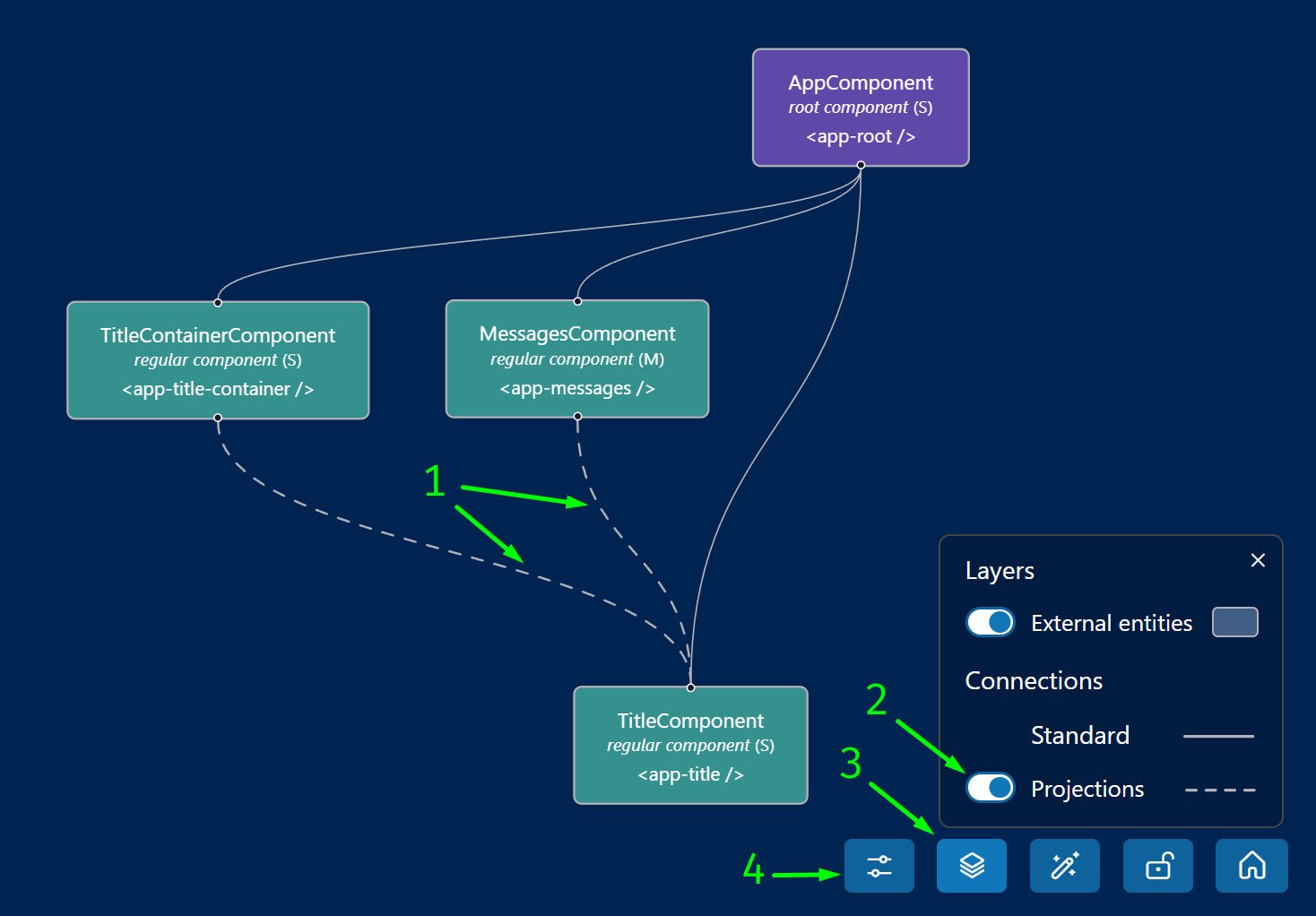
- 1 – Connections representing component content projections
- 2 – Toggle switch for visualizing content projections with legends
- 3 – Layers & Connections button in Toolbar; also controls external entities visibility and includes other options for Navigation Map graph
- 4 – Graph settings button, currently contains only layout algorithm settings
Fixes
- Improved code fragment slicing to correctly handle self-closing tags and comments in templates
- Fixed parsing for HTML and JSON code fragments without a trailing newline
Chores
- Deactivated seasonal holiday atmosphere and preserved for future use
Documentation
Updated README and LICENSE
- Added new badges for GitHub stars and VS Code Marketplace metrics
- Added feedback and contribution links in the Updates section
- Updated Current Limitations section regarding Content projection and Directive support
- Updated LICENSE and Copyright years range
Installation
Download and install this version manually using the .vsix file attached below OR get the latest version from the VS Code Marketplace
v0.1.10
Original release date: January 18, 2026
Fixes
Template Parser
- Expanded and updated attribute parsing to fully support namespaces and property access syntax.
- Implemented case-insensitive element matching for more reliable component detection.
Installation
Download and install this version manually using the .vsix file attached below OR get the latest version from the VS Code Marketplace
v0.1.9
Original release date: January 12, 2026
Documentation
Updated README
- Added Roadmap links
Demo
UI Improvements
- Updated demo page titles in
index.htmlfiles
Installation
Download and install this version manually using the .vsix file attached below OR get the latest version from the VS Code Marketplace
v0.1.8
Original release date: January 6, 2026
Fixes & Improvements
Enhanced processing of application config
- Added safeguard and warning notification for application project configurations with no
architect,architect.buildorarchitect.build.optionsproperties in theangular.json(#2) - Improved other config safeguards
- Added notification for case of missing HTML entry point
- Improved readability of notification messages
Documentation
Updated README
- Enhanced and simplified the "Disclaimer" section
- Clarified the "Current Limitations" section by adding "Configurations" entry
- Refined descriptions for "Project Types", "Monorepos", and "Frameworks"
Installation
Download and install this version manually using the .vsix file attached below OR get the latest version from the VS Code Marketplace
v0.1.7
Original release date: January 4, 2026
Documentation
Updated README
- Refined the "Definition & Purpose", "Features" and "TypeScript Language Server" sections for better clarity and readability.
- Added "FAQ" and "Notes & Terminology" sections.
Updated project governance files
- Refined GitHub Issue templates.
Documentation (Unreleased)
Original release date: January 3, 2026
- Added contribution guidelines
CONTRIBUTING.md. - Added GitHub Issue Templates
BUG_REPORT.mdandFEATURE_REQUEST.md.
Installation
Download and install this version manually using the .vsix file attached below OR get the latest version from the VS Code Marketplace
v0.1.6
Original release date: January 3, 2026
Documentation
Updated README
- Added interactive Marketplace badges of installs and rating, and added links to all badges.
- Updated top links for better readability.
- Added a link to "Current limitations" in the "Disclaimer" section.
- Refined the "Current limitations" list for better clarity and readability.
Installation
Download and install this version manually using the .vsix file attached below OR get the latest version from the VS Code Marketplace
v0.1.5 – New Year Release
New Year Release 🎄❄️✨
Original release date: December 31, 2025
Holiday Atmosphere in the WebView
- Added New Year decorations and animations: garlands, falling snow, and Santa hats on root nodes. To enable these features check the "General info" panel.
- Internal improvements for better UX.
Core & Architecture
- Implemented bidirectional communication to persist settings between the Extension and WebView
Installation
Download and install this version manually using the .vsix file attached below OR get the latest version from the VS Code Marketplace
v0.1.4
Original release date: December 30, 2025
Documentation
Updated README
- New Demo Content: added "Demo" and "New to GraphLens?" linking to the demo repository.
- Current Limitations: clarified lack of support for Angular SSR.
- Improved readability.
Installation
Download and install this version manually using the .vsix file attached below OR get the latest version from the VS Code Marketplace
v0.1.3
Original release date: December 27, 2025
Documentation & License
Updated LICENSE to v1.2
- Explicitly included Tree views results in the list of outputs owned by the user.
- Reordered clauses in Section 2 for better logical flow.
Updated README
- Aligned "License" section with LICENSE v1.2.
- Improved readability.
- Updated version badges.
Installation
Download and install this version manually using the .vsix file attached below OR get the latest version from the VS Code Marketplace