Welcome to the EnhancelyCompare wiki!
EnhancelyCompare is a lightweight and intuitive web tool designed to compare two images side-by-side via direct links. Developed with the help of Google Gemini and Claude Sonnet 4.6, this tool enables precise visual analysis thanks to its zoom functions. It features customizable themes (light/dark) and a mode that allows users to switch between link fields and a browse mode for uploading directly from the interface.


View two images simultaneously to detect the slightest differences.
Explore the details with the built-in zoom function. A "Reset" button automatically appears to return to the initial view.

Search and edit your comparisons using the history in the sidebar.


You can delete or pin each comparison individually. Or delete everything using the red "Delete All" button. The entire list will be removed. You can also import and export the entire history list in JSON format.

If you import the history while you have entries identical to the json file, a pop-up window will appear asking if you want to "replace", "Add a copy" or simply "Cancel".

If you want to export or delete part of the history in 1 or 2 clicks, you can press and hold (+/- 2 seconds) on one of the entries and they will all go into selection mode.

You can then select one or more entries that you wish to export or delete. Example:

Of course, you have the "Select All" button to select all entries. This is ideal if you want to subtract a few entries (e.g., 2 or 3) from a large number of history entries.

And the 3rd button simply allows you to cancel by exiting selection mode.

If you accidentally reversed links or images, don't panic! No need to start all over again. A reverse button is available to correct reversed links or images and automatically updates the viewport after being clicked.

The image comparison is now the correct way around.

Works with Google Drive links, but also with any external image hosting service. Works perfectly on touch devices such as smartphones and tablets.
- Switch between dark and light mode according to your preferences.
- Smart theme control based on the browser's default theme.
- Built-in support to change the interface language with one click. Five languages available.
- French
- English
- German
- Italian
- Spanish
- Smart control of the default language based on the browser's selected language. If the browser's default language is not available in my comparison tool, it will default to English.
- Added a visit counter at the bottom of the page to the right of the credits (Note: If ad blockers are enabled, it will not be visible).
- Added a GitHub link to the image comparison tool documentation to the left of the credits.
Copy the URL of your images (Google Drive, Imgur, or other).
Paste the links into the corresponding fields and add a title to each image.
Navigate to the folder containing the images you want to import.
Click the "Generate view" button to display the comparison.
Use the mouse to zoom in on specific areas if necessary.

Learn how to integrate your images and generate a comparison view in just a few clicks. This video shows you how to retrieve direct links from various compatible image hosting services.

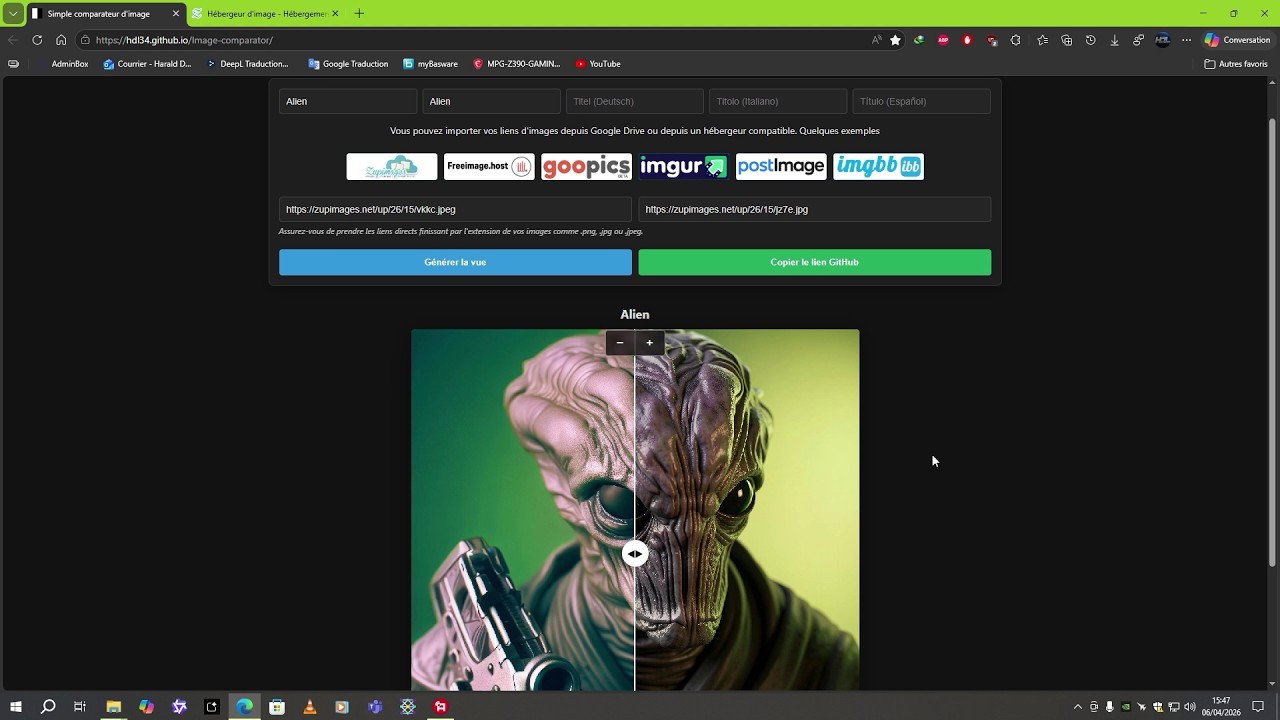
- Image Hosting: Using Zupimages, Freeimage.host, ImgBB, PostImage, and Imgur.
-
Direct Link Extraction: How to retrieve the URL ending in
.jpg,.png, or.webp(essential for display). - Customization: Editing titles (FR, EN, IT, ES, DE) and managing full-screen mode.
- Sharing: Generating a unique link via GitHub to share your comparison.
- Resolution: It easily supports high-resolution images. However, be aware that it takes a little longer to load before the images appear in the viewport.
- Different ratios: Added a control panel (maybe) to adjust images when the ratios of the 2 images are different.
March 22, 2026:
- Image Comparator created
- Renamed index to index.html
- Updated title and optimized image comparison links
- Updated title and optimized image rendering
- Updated title and fixed image display issues
- Redesigned HTML structure and style for the Image Comparator
- Updated HTML for the Dark Edition theme and features
- Upgraded to version 17 with Light Edition theme support
- Updated title in index.html
- Added favicon link to index.html
- Updated favicon link in index.html
- Updated favicon link with version query parameter
- Updated index.html
- Revised footer credits and translations
- Improved visibility and centering of masks and handles
- Redesigned CSS For the before-mask and handle elements:
- Improved handle visibility and centering
March 23, 2026:
- Refactored the logic for calculating and updating the viewport size
- Added a reset button and improved the zoom function
- Added floating controls and improved layout management
- Refactored the HTML structure and improved the style
- Fixed the Italian translation and optimized the URL text
- Removed support for Italian and Spanish languages
- Added Italian and Spanish language options
- Refactored styles for better layout and responsiveness
- Improved touch interaction and performance in index.html
- Optimized the HTML structure and style of the image comparison tool
- Updated index.html
- Updated index.html
- Updated index.html
- Updated index.html
- Updated index.html
March 24, 2026:
- 27 bug fixes and improvements.
March 25, 2026:
- 5 bug fixes and improvements.
March 26, 2026:
- 7 bug fixes and improvements.
March 27, 2026:
- 4 bug fixes and improvements.
March 28, 2026:
- 20 bug fixes and improvements.
March 29, 2026:
- 9 bug fixes and improvements.
March 30, 2026:
- 7 bug fixes and improvements.
March 31, 2026:
- 13 bug fixes and improvements.
April 3, 2026:
- 4 improvement fixes.
April 5, 2026:
- 8 improvement fixes.
April 8, 2026:
- 16 improvement fixes.
April 9, 2026:
- 2 improvement fixes.
April 10, 2026:
- 1 improvement fix.
April 12, 2026:
- 4 improvement fixes.
April 24, 2026:
- Update the Freeimage link to point to the download page.
April 25, 2026:
- Change the upload service: from Freeimage.host to ImgBB.
- Improved HTML structure and style
April 26, 2026:
- Moved the language dropdown menu button from the bottom left to the top right, next to the themes button.
- Adjusted the dropdown menu to switch between pasting links into text fields and uploading via ImgBB.
Now, when opening the interface, the "Upload via ImgBB" mode is the default. Hosting provider buttons are hidden in this mode.
April 28, 2026:
- Updated the viewport to minimize the offset between normal and full-screen modes.
- Improved the style and functionality of the download button
- Added hover styles for the download buttons and improved the download functionality with drag-and-drop support.
- Added a download progress bar and button containers.
- Update progress bar and button styles during upload
29/04/2026:
- Improve image rendering and transformation logic.
- Refactor render function for better image handling and transformations.
- Enhance viewport resizing logic and comments
- Refactor comments and improve zoom recalibration logic.
30/04/2026:
- Update the style of the progress bar and buttons during loading.
- Added a progress percentage.
- Update progress bar behavior during upload.
- Minor update. Restored the cleanup bar that validates the upload.
- Update alert copy messages in multiple languages.
- Enhance button hover and active effects.
- Added hover and active effects for buttons to enhance UI consistency.
- Add language detection and initial translation.
- Allows you to have the correct default language depending on the browser language.
01/05/2026:
- Refactor language detection and theme initialization.
- Added automatic switching between dark and light themes based on the browser's default theme.
- Added a listener for real-time system theme changes.
02/05/2026:
- Implement an automatic preview and validation system for uploaded files.
- Added automatic preview and file validation features for image uploads, including user interface elements for displaying selected files and progress bars.
- Replace the old counter with the one from hitwebcounter.
- The old counter from freecounterstat.com appears to be broken.
03/05/2026:
- Updated the meta title and viewport tags in index.html.
- Automated viewport generation.
- Real-time automation of title updates as each title field is filled.
- Changed the program title from "Simple Image Comparator" to "Welcome to EnhancelyCompare".
- Changed "Copy GitHub link" to "Copy share link
"
- Updated the title tag title with the name "EnhancelyCompare" for the preview in the browser tab.
- Added a header page and theme styling.
- Redesigned the header and command styles, and updated the theme colors.
- Updated home button styles and added header layout.
- Adjusting the position of the file delete button.
 "
"04/05/2026:
- Fixed the header bar and made the name selectable.
- Fixed the floating header bar to make it fixed.
- Prevent text selection within the slider display area.
- The
user-selectproperty has been modified to prevent text selection, andwebkit-user-selecthas been added for compatibility.
- The
- Update footer link to GitHub wiki
- Removal of the automatic return of the viewport slide bar when released and addition of recentering of the bar on each viewport refresh.
- Add responsive styles for small screens
- Enhance header styles for alignment and padding.
- Added styles to header for better alignment and padding.
05/05/2026:
- Replace home button with clickable brand name.
- Adjust styles and media query for main-title.
- Adjusting the height of the main title in portrait mode for smartphones.
06/05/2026:
- Refactor language change logic and clean CSS.
- Updated the wiki link based on selected language in changeLang function and removed unnecessary !important declarations.
- Refactor header styles for small screens.
- Revise hostHelp messages for clarity.
- Updated help text for image link imports in multiple languages.
07/05/2026:
- Add WebP compression functionality and UI updates.
- Implement language change with mouse wheel support.
- Added language change functionality using mouse wheel events.
- Update input placeholders for multilingual support.
- Updated placeholders for input fields in multiple languages.
08/05/2026:
- Add wheel event listener for mode selection.
- It is now possible to scroll using the mode button.
- Fix indentation and reorder host-help-text paragraph.
10/05/2026:
- Added a comparison history sidebar.
- Added a new feature: a
LocalStoragesidebar that allows you to retrieve comparisons and edit them. These can be links or titles. The edit will be reflected in your history. You can also delete each comparison individually or delete them all at once. Of course, since it'sLocalStorage, if you delete your browser history, you will lose all your comparisons.
- Added a new feature: a
- Implement thumbnail generation and update saveComparison.
- Added a function to generate a 40x40 thumbnail from an image URL, with fallback for CORS issues. Updated saveComparison function to use the generated thumbnail.
- Implement sharing mode detection in index.html.
- Added synchronous detection for sharing mode to prevent flash of the sidebar.
- Added reflection animation to the buttons when the mouse hovers over them.
11/05/2026:
- Adjust the position and z-index of the sidebar.
- Adjust the height of the sidebar to be positioned just below the header.
- Implement fullscreen toggle with center preservation.
- Added fullscreen toggle functionality with preserved center position.
- Added a swap button for input fields.
- A swap button has been added to allow switching between input fields, and the styles have been updated.
13/05/2026:
- Enhance sidebar styling with before pseudo-element.
- Added a pseudo-element to the sidebar for visual adjustment.
14/05/2026:
- Enhance SVG transition effects in swap button.
- Add smooth transition effects for SVG in swap button.
15/05/2026:
- Add rotation effect on hover for swap button.
- The SVG icon now rotates 180° on mouse hover.
16/05/2026:
- Updated the index.html file with various style and display changes.
- Added a reflection effect to the viewport's internal buttons. Also, made minor adjustments to the spinner and its container.
- Refactor the layout and selection styles of the mode.
- Recenter the mode button for perfect vertical alignment between the title fields and the "Browse" buttons.
02/06/2026:
- Add Google Analytics events for sidebar interactions.
03/05/2026:
- Implement Google Analytics tracking for sidebar actions.
- Added Google Analytics event tracking for sidebar edits and pinning.
05/06/2026:
- Added image format and resolution information to history entries.
- Updated translations for history entries and corrected formatting in index.html
08/06/2026:
- Refactor sidebar buttons and import modal styles
- Modification of the "Delete all" button of the sidebar and addition of 2 new buttons to import and export the contents of the sidebar entries.
- Increase the size of the thumbnails in the history entries.
09/06/2026:
- Fixed a bug in new history entries.
- When adding a new comparison, the resolution and format info was not displayed on the first try. You had to click on the entry for the acualization to be done. Now it's fixed.
10/06/2026:
- Adjust the style of the icons of the sidebar history entries.
- The icons on the sidebar entries are now perfectly transparent and are aligned vertically instead of horizontally.
- Implement a multi-select mode with action bar.
- Added the ability to select one or more entries in order to be able to export or delete the selection. To do this, a 2-second press is enough to trigger the system. 2 new buttons will appear. A basket🗑 and a cross❌. The first to delete the selection, and the second to cancel the selection.
11/06/2026:
- Add a button and full selection functionality.
- Improved zoom functionality and added an adaptive mask based on the theme under the image on the left.
- Added a background to the zoom container and updated the dimensions of zoomerB.
12/06/2026:
- Bug fix: Unable to regenerate the comparison entry if it is deleted.
- If we create a new comparison and delete the entry from the history, we can now regenerate the entry.
13/06/2026:
- Delete the API key and update the upload endpoint (New API key generated).
- Transfer of "enhancelycompare" to CloudFlare and hide the API key.
- Update GitHub links to the new repository.
- Updated the base URL for the file protocol.
14/06/2026:
- Improved handling of local storage inputs and updates.
- Redesigned the input event handler for more efficient handling of local storage updates and proper separation of new entries.
- Refactor history item selectors in index.html
- 2 small minor fixes. Changed the order in which entries were recorded in descending order to the more logical ascending order and corrected titles that were not updated in real time when editing a history entry.
- Update confirmation messages and import error texts.
- Added the alert message "❌ Invalid JSON file." in the 5 languages of the interface.
15/06/2026:
- Refactor date handling in history entries.
- Update title and add meta description in index.html.
- Enhance index.html with Open Graph meta tags.
- Added Open Graph meta tags for better social sharing.
16/06/2026:
- Enhance local storage handling for swap entries.
- Added functionality to save swap details in local storage and update entry modification status.
17/06/2026
- Add Open Graph and Twitter meta tags to index.html.
- Added meta line to display a thumbnail under the link once it has been posted on other sites and social networks.
- Add Open Graph site name meta tag.