Repository navigation
Contacts and call log
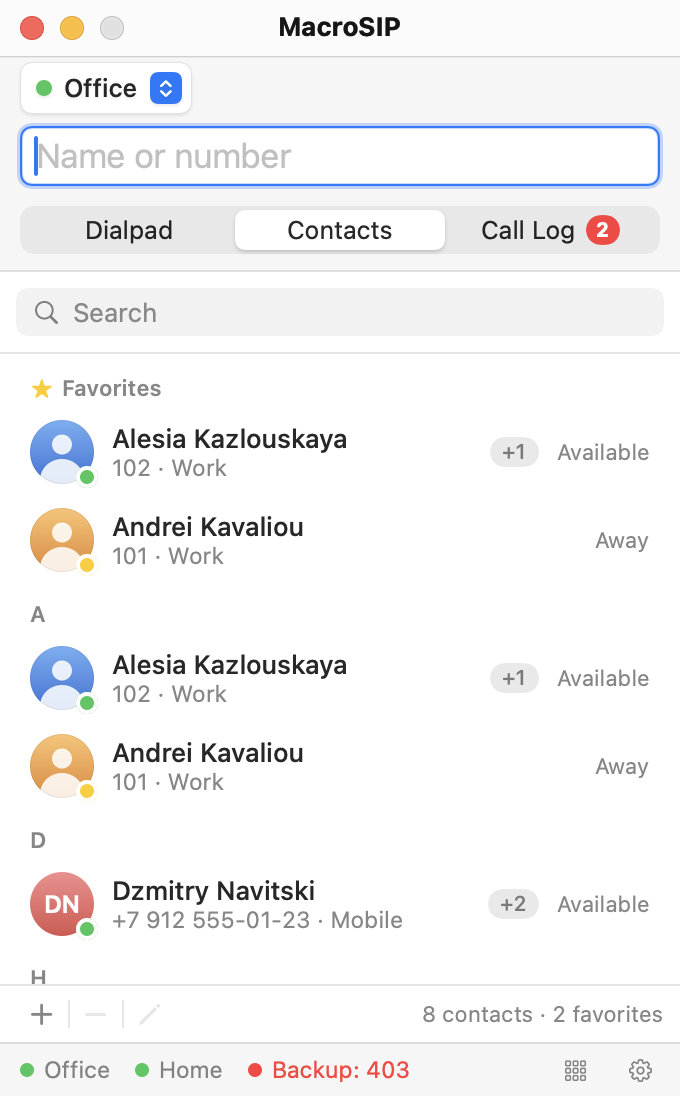
The Contacts and Call Log tabs work without an account and stay fully usable during a call. With messages switched on (Messages), the context menu of a contact and of a call log entry also has Send Message, which opens the conversation with that number.
Open it with + in the bottom bar (New Contact), the pencil button or Edit… in the context menu (⌘E), or Add to Contacts from a call log entry or a directory result. The card is a 500 pt panel that opens over the main window, and the main window stays usable behind it.
| Element | Meaning |
|---|---|
| Favorite star | Adds the contact to the Favorites section. |
| Photo, Choose… | Picks an image file, cropped to a circle; Remove Photo in the well's context menu. Without a photo the initials are shown. |
| First name, Last name, Organization | Names are always shown as "First Last"; if both are empty, the organization is shown, otherwise the default number. |
| Phone numbers | One row per number with a label (Work, Mobile, Home, Other, SIP), a Default radio and a remove button. Add number appends a row; there is no limit. "The default number is used by double-click, Return and presence." |
| Free text. | |
| Account | "Preferred account for calls to Katsiaryna Zhuk." Any (use default) uses the outgoing account. |
| Watch presence | "Subscribes to the default number." Off for new contacts. |
| Notes | Free text; Return inserts a line here. |
Save is enabled once a name, an organization or a number is filled.
Favourites form the first section, Favorites, and also stay in their letter section. The context menu offers Add to Favorites / Remove from Favorites. The count at the bottom reads "24 contacts · 3 favorites".
Settings › Directory › Contacts › Sort by: First name (default) or Last name. Sorting by last name also groups the sections by the last name's first letter.
The search field (⌘F, placeholder "Search") matches names, organization and every number; digits are compared without spaces, dashes and brackets. Return or a double-click calls the default number. The context menu lists Call Work 102, one item per number, then Call from ▸ (choose the account), Copy Number, Edit…, favourite, Watch Presence and Delete (⌘⌫; confirmed inline with "Delete Siarhei Lukashevich?").
Contacts with Watch presence on show a dot on the avatar and a text at the right:
| Dot | Text | Meaning |
|---|---|---|
| green | Available | The contact's phone is registered and idle. |
| yellow | Away | The contact published Away. |
| red | Do Not Disturb | Busy, on the phone (Asterisk reports this as busy) or DND. |
| grey | Offline | No subscription answer or offline. |
Your own status is published per account (Publish my presence in the account editor) and chosen under My Status in the menu bar menu; see Menu bar. Quick keys with BLF share these subscriptions (Quick keys).
Each row shows a direction icon (incoming, outgoing, or a red missed arrow), the name in bold (the number when nobody matched), the number or URI with a grey account chip ("102 · Office"), and at the right the time above the duration m:ss, or the word "missed". Date headers read "Today", "Yesterday", then "Mon, 6 Oct". The log keeps the last 1,000 entries. A caller is matched to a contact through any of its numbers, and a name found in a directory is stored with the entry.
All / Missed switch the list; Missed hides date groups without missed calls. The red badge on the tab (and the Dock and menu bar) counts unseen missed calls and clears when you open the tab. Clear… asks "Clear the call log?" — "All 312 entries are removed. Recordings stay in their folder."
Double-click or Return calls back through the account the call used. The context menu offers Call, Call from ▸, Add to Contacts (prefilled card), Copy Number and Delete Entry (no confirmation). Entries with a recording add Play recording and Show in Finder.
A blue play button appears on rows whose recording still exists. It opens an inline player under the row: play/pause, elapsed time, a scrubber, total time and a close button. One player at a time; leaving the tab, clearing the log or deleting the entry closes it, and a ringing call pauses it. If the file cannot be opened the strip says "The recording cannot be played." Recordings not linked to an entry are matched by file name (date, party and direction).
A third line explains calls you never heard ring:
| Note | Cause |
|---|---|
| "Rejected: rule" | A deny rule in Settings › Calls. See Incoming calls. |
| "Rejected: on another call" | Single-call mode turned the caller away with 486. |
| "Rejected: call limit" | A fifth simultaneous call. |
| "Connection lost" | The media did not return after a network change. |
Contacts are contacts.json and photos are photos/<id>.jpg in ~/Library/Application Support/MacroSIP/; the call log is calllog.json beside them. An entry that cannot be read is skipped and the original file is kept as contacts.damaged-<date>.json. Import from MicroSIP's Contacts.xml is planned for a later release.