Repository navigation
Settings
Settings opens with ⌘, from the MacroSIP menu, the account pop-up or the menu bar icon. It is a standard macOS Settings window with toolbar tabs; changes apply immediately, there is no Save button. The tabs, in order: General, Accounts, Audio, Network, Codecs, Recording, Calls, Quick keys, Directory.
| Row | Meaning |
|---|---|
| Launch at login | Registers MacroSIP as a login item. |
| Keep running in the menu bar when the window is closed | Off: closing the window quits the app. |
| Show icon in the Dock | Hides or shows the Dock icon; the menu bar icon stays. |
| Do Not Disturb | Off / On / For 30 minutes / For 1 hour / Until tomorrow 9:00. "Declines incoming calls and shows Do Not Disturb to contacts who watch you." Shows "Until 14:30 · 27 min left" while a timer runs. |
| Messages › Text messages (SIP MESSAGE) | Switch, off by default. "Shows the Messages tab, delivers incoming messages and adds Send Message to the Contacts and Call Log menus." With it off there is no Messages tab, no Send Message item, no notification and no sound, and incoming messages are dropped. See Messages. |
| Language | System / English / Русский. "Takes effect after MacroSIP restarts." |
| Updates | Check for updates automatically ("At launch and once a day. MacroSIP asks before installing an update."), Include release candidates, Check Now, "Last checked …" or "Not checked yet". See Installation. |
| Advanced › Links | "Open sip: and tel: links with MacroSIP" with Make Default (a warning names another app that handles tel: links). When a link is opened: Ask before calling (fills the field) / Call immediately / Only fill the dial field ("“Only fill the dial field” lets you check the number first."). |
| Advanced › Troubleshooting | Open Log Folder ("Saved in ~/Library/Logs/MacroSIP. Three files of 2 MB (8 MB in debug mode).") and Copy Diagnostics ("Versions, accounts and settings, without passwords. Paste it into a bug report."). |
| Debug mode | Switch, off by default. "Adds SIP messages and more detail to the log, so it grows faster. Turn it off when you are done." The log files grow to 8 MB each. It stays on across launches until you switch it off; if MacroSIP was started with --log-level, that level wins and the switch is disabled. See Troubleshooting. |
| Create Archive… | "A ZIP with the log files, the diagnostics report and recent crash reports. It contains phone numbers and server addresses but no passwords. Send it only to someone you trust." See Troubleshooting. |
The Advanced group is collapsed by default.
A table with a status dot, Name (blue Default badge on the default outgoing account), Address, Transport and Status (Registered, Registering…, a short error such as 403, Disabled, Needs password, Outgoing only, Reconnecting…). Drag to reorder; the order is used in the account pop-up and the status bar. Buttons +, − (confirms) and Edit…; double-click edits. Import from MicroSIP… at the right of the footer brings in the accounts and contacts of a MicroSIP installation (see Accounts). With eight or more accounts a Filter accounts field appears. The group "Office · last error" shows the last REGISTER failure with Retry. The editor's fields are described in Accounts; its Advanced group includes the Voicemail rows Voicemail number ("Dialled from the menu bar and the status bar.") and Voicemail indicator (MWI) ("Shows the number of new messages the server reports.").
| Group | Rows |
|---|---|
| Devices | Microphone (level meter, popup with System default), Speaker (popup), Ringtone device ("Plays the ringtone through the speakers even when calls use a headset."), Switch to a headset when it is connected, Headset buttons ("Connected: Jabra Evolve2 65" or "No headset with call controls"). |
| Ringtone | Sound (Classic / Digital / Soft / Custom file…, with Play; the preview plays the real choice at the chosen volume; a file that cannot be read keeps the previous choice and shows "The ringtone file could not be used: …"), Volume 0–100 %. "“Custom file…” accepts WAV, AIFF, M4A and MP3." Details in Audio. |
| Hold music | Source: Built-in / Custom file… / Off. "The other party hears this while the call is on hold." |
| Sound events | Call connected and ended, Dial pad key presses, New voicemail, Registration error and lost network, and New message while Messages is on; all off. "Short beeps on the speaker; the other party does not hear them." |
| Audio test | Speaker and microphone: Test and the microphone meter. "Plays two notes on the speaker for 2 seconds; the meter shows the microphone level." |
| Processing | Echo cancellation: "Turn it off only if your headset cancels echo itself." |
Details in Audio.
| Group | Rows | Default |
|---|---|---|
| Connection | STUN server ("Leave empty if you are not behind NAT."), Local SIP port ("0 picks a free port automatically."), Keep-alive interval in seconds ("Keeps NAT bindings open between registrations."), Use ICE ("Helps audio get through NAT. Uses the STUN server above."). | empty, 5060, 15, on |
| RTP | Port range with Start and Ports ("Ports for call audio, 1024–65535. Each call needs two."), Use rport ("Helps behind NAT: the server replies to the address you are calling from."). | 4000 / 1000, on |
| DNS | Use DNS SRV records ("Finds an account’s server automatically; if that fails, uses the domain itself."), Nameserver ("Address of a DNS server. Empty uses the system's servers."), enabled only with SRV on. | off, empty |
"Changing the port re-registers all accounts; calls in progress are not interrupted. Transport and SRTP are set per account." The footer "Port range and DNS changes apply after a restart." applies to the port range and DNS; the banner says "Network changes will apply after a restart. Accounts register again." and an orange banner offers Restart now (disabled during a call: "End your calls first.").
An account whose server has a private address (10.x, 172.16–31.x, 192.168.x or 100.64–127.x, on the LAN or over a VPN) does not use the STUN server, whatever is entered above, so the Mac announces its own address and the server does not have to correct it. See Accounts. Valid values: local port 0 or 1024–65535, keep-alive 0 (off) or 5–600 s.
"Audio codecs, in order of preference": a table with a checkbox, Codec, Sample rate, Bitrate and a drag handle; Move up, Move down, Restore Defaults. "Drag rows or use the arrows to reorder. Unchecked codecs are never offered. At least one codec must stay enabled." An Opus group adds Packet-loss correction (FEC) (on) and Silence suppression (DTX) (off). The codec list is in Audio.
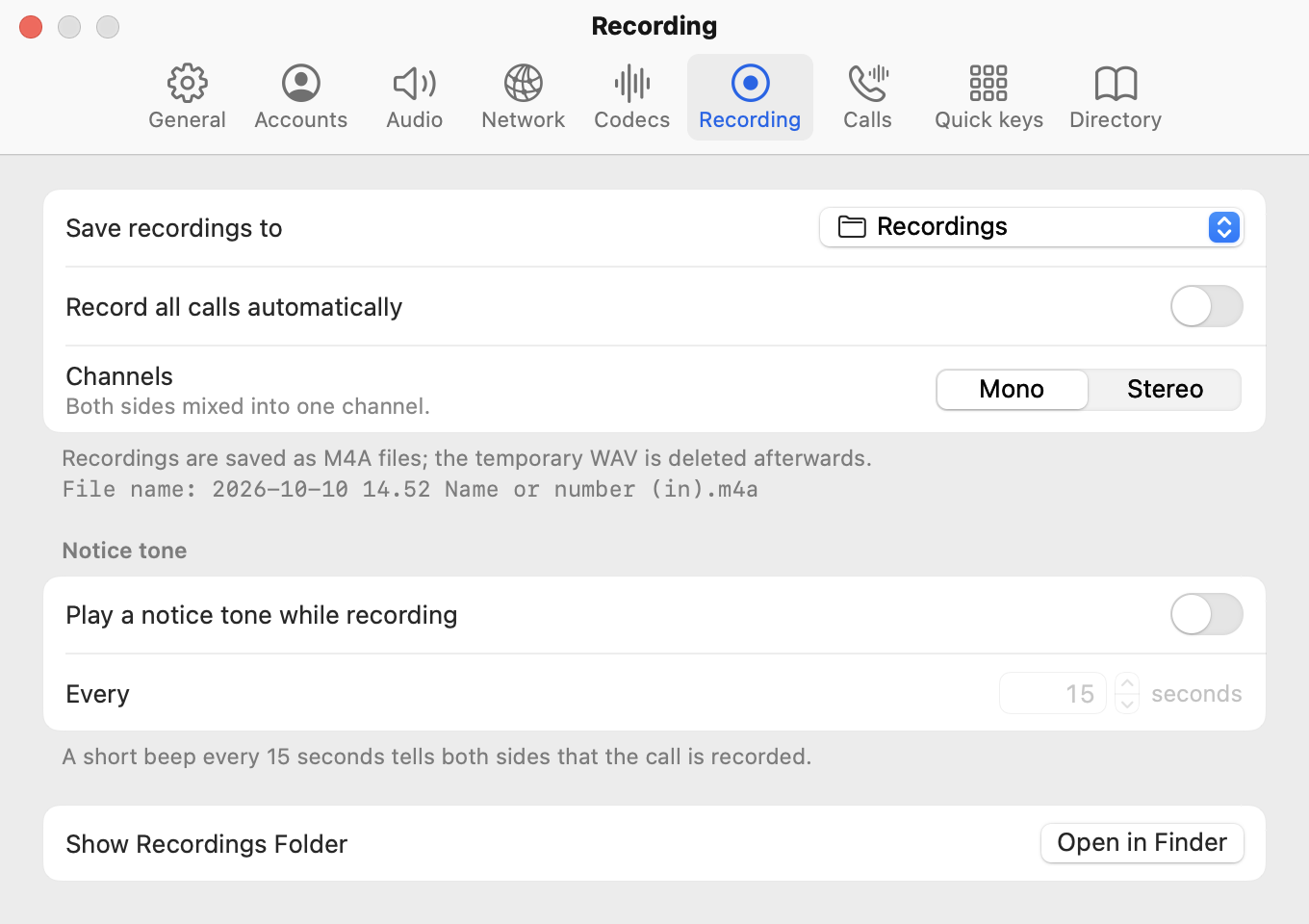
| Row | Meaning |
|---|---|
| Save recordings to | Folder popup, default "MacroSIP Recordings" in ~/Music; Choose Folder…. "Folder not found" if it went missing. |
| Record all calls automatically | Off by default; the Record button in the call panel works either way. |
| Channels | Mono ("Both sides mixed into one channel.") or Stereo ("You on the left channel, the other party on the right."; since 26.2 both channels stay in step, see Calls). |
| Notice tone › Play a notice tone while recording | Off by default. A short beep heard by both sides and written into the recording, one second after the recording starts and then Every 5–60 seconds (15). "A short beep every 15 seconds tells both sides that the call is recorded." |
| Show Recordings Folder | Open in Finder. |
Footer: "Recordings are saved as M4A files; the temporary WAV is deleted afterwards." and "File name: 2026-10-10 14.52 Name or number (in).m4a".
| Group | Rows |
|---|---|
| Incoming calls | Reject calls from: Nobody / Everyone / Numbers not in Contacts / Anonymous callers. "A rejected call never rings. The caller gets a refusal, and the call log shows “Rejected: rule”." |
| During a call | When a call comes in during a call: Call waiting (tone and window) / Window only / Busy (single-call mode). DTMF method: Automatic / RFC 2833 / SIP INFO / In-band ("Automatic picks the method your server supports."). Bring the main window to the front on an incoming call ("The incoming-call window appears either way."). |
| Global hotkeys | Use hotkeys in any app (off by default), then the Answer, Hang up and Mute key fields. The suggested combinations are ⌃⌥A, ⌃⌥H and ⌃⌥M. See Calls. |
| Auto-answer | Answer incoming calls automatically: Off / All calls / Contacts only. Delay before answering in seconds (5). Honour the server's answer-after request ("Answers when the PBX asks it to (intercom, paging), even if auto-answer is off."). |
Footer: "Do Not Disturb wins over auto-answer. Auto-answer never answers a second call while you are already on one." See Incoming calls.
A table of 12 rows (Name, Number, Type, BLF, Key), "5 of 12 keys", then Panel › Show panel (Off / Right / Bottom) and Pickup code (*8). See Quick keys.
Contacts › Sort by (First name / Last name); the source list with Source, Status, On, buttons +, −, Edit… and Import now; the Search group with Search directories from the number field, Minimum characters (2), Results per source (5) and Look up names of incoming callers. See Directory.
~/Library/Application Support/MacroSIP/settings.json (plus accounts.json, contacts.json, calllog.json); passwords in the login Keychain. See Troubleshooting.