Repository navigation
Directory
A directory source is a place where MacroSIP looks people up by name or number: your company's LDAP server, a CSV or JSON file on a URL, your Google contacts, or the macOS Contacts app. Results appear in the number field while you type, name incoming callers, and can be imported into Contacts. The pane is Settings › Directory.
Add one with + in Settings › Directory. The Add Directory Source sheet has a Type popup, a Name, type-specific fields, and the Results choice (below). Test checks the connection and answers "Connected · 184 entries".
| Type | Fields and behaviour |
|---|---|
| LDAP |
Server (ldap://ldap.example.com or ldaps://…; "ldaps:// or StartTLS when possible."), Use StartTLS switch (ignored for ldaps), Base DN, Bind DN ("Empty for anonymous search."), Password ("Stored in the Keychain."), Search filter (default (|(cn=*%s*)(telephoneNumber=*%s*)); "%s is the typed text."). |
| URL (CSV or JSON) |
URL (http, https or file), Format CSV / JSON (guessed from the extension until you touch it), Refresh every Hour / 6 hours / Day / Week. CSV needs a header row; comma, semicolon or tab separators; UTF-8 or Windows-1251. JSON is an array of objects (or an object that contains one). Recognised columns: name, first name, last name, number / phone / telephone / extension, mobile / cell, email / mail, organization / company (case, spaces, _ and - ignored). Rows without a number are skipped. |
| macOS Contacts | No fields. The source is named "macOS Contacts" and shows "This Mac". Allow access triggers the system Contacts permission prompt ("MacroSIP looks up names and numbers in Contacts when you search from the number field."); nothing is asked at launch. If you deny it the status reads "Access denied" with Open System Settings…. |
| Google Contacts | Sign in with Google: "Opens Google in your browser once to allow read-only access to your contacts. MacroSIP keeps only the access token, in the Keychain; you can remove access in your Google Account at any time." The browser shows Google's consent page; meanwhile the button is replaced by "Waiting for Google…" and closing the sheet abandons the sign-in. When Google returns you to the app, the Google account row shows your e-mail with a green check, and Add saves the source (status "Connected"). From then on it is searched, imported and asked for caller names like any other source; result rows carry the Google badge. A build without a Google client id answers "Google sign-in is not configured in this build". |
The source list shows Source (name, address, "search only" or "import into Contacts"), Status and an On switch. "Results are listed in this order; drag to reorder. A source that is switched off is not searched and not synced." − asks "Remove “Head office LDAP”?" — "Contacts already imported from this source stay in Contacts."
Signing out of Google Contacts is removing the source with −: the access token leaves the Keychain with it, and imported cards stay. Access can also be revoked in your Google Account; the source then shows Sign in required and the pane offers Sign In… ("Access has expired or was revoked" — "Search skips this source until you sign in again."), which opens the browser again.
Every source is one of:
- Search only — "results are not stored". Entries show up in the number field and in caller lookup, nothing is written.
- Import into Contacts — "copied and refreshed daily". Every entry becomes a contact card. URL sources refresh on their own interval; the others once a day, macOS Contacts only when access was already granted.
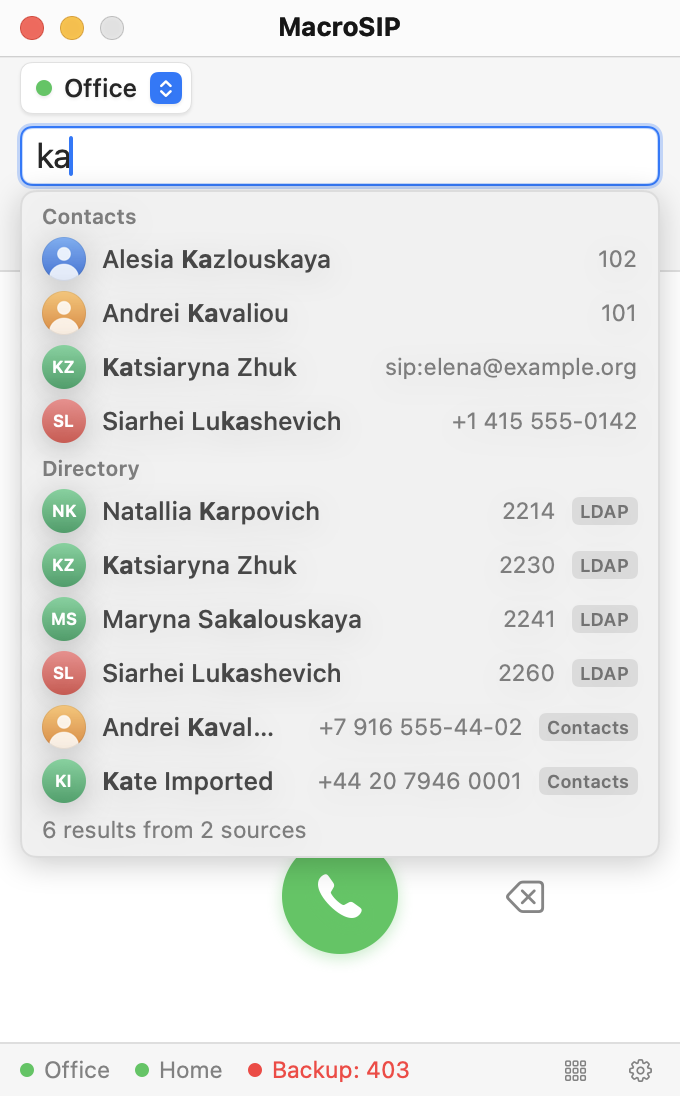
With Search directories from the number field on, typing in the number field shows a Contacts section (your own cards first) and a Directory section with results in source order. A row shows the avatar, the name with the matched letters in bold, the number and a source badge (LDAP, URL, Contacts, Google). "Searching Head office LDAP…" with a spinner marks a source that has not answered yet; the search stops waiting after 3 s. When all have answered the list ends with "7 results from 2 sources". A number already in Contacts is shown only once, as the local contact.
Settings: Minimum characters (1–5, default 2; "Search starts after this many characters and a 300 ms pause in typing.") and Results per source (1–10, default 5). Digit-only text is searched too.
Click a row to put its number into the field; Return on the highlighted row calls it; Escape closes the list, a second Escape clears the field. The context menu offers Call, Copy Number and Add to Contacts (makes a card of your own).
Look up names of incoming callers (on by default): "Asks search-only sources for at most 1 second while the call rings." Imported sources are already in Contacts and are matched locally. Numbers are compared by digits, so +1 202 555-0123 and 2025550123 are one line. A directory name is used when the SIP display name is empty or just the number, and is stored in the call log entry.
For a source set to import, the Status column shows Import now ("Importing…" while it runs). The result is a banner under the list for ten seconds: "Imported 120 contacts (14 updated)", "Nothing to import" or "Import failed: Cannot connect to ldap.example.com". A failed import does not disable the button or the schedule; the last successful time is what "Synced 5 min. ago" shows.
- Entries are matched to existing contacts by number and never duplicated.
- A card that the same source created follows the directory on every import: name, organization, email and photo are replaced, missing numbers added.
- A card you made or edited yourself keeps its name, photo and the rest; it only receives what it lacks (an empty organization or email, a missing photo, new numbers).
- Notes, favourite and the preferred account are never touched.
- New cards get the note "Imported from Head office LDAP".
| Status | Meaning |
|---|---|
| Connected | Test or the last search succeeded. |
| Synced 5 min. ago | Last successful import (URL sources: last fetch). |
| Sign in required | Google Contacts without a token, or whose access Google revoked; the source is skipped until you press Sign In… and complete the sign-in in the browser. |
| Access denied | macOS refused Contacts access; allow MacroSIP in System Settings › Privacy & Security › Contacts. |
| Off | The On switch is off. |
| Error text | "Timed out", "Cannot connect to ldap.example.com", "Invalid bind DN or password", "HTTP 404", "No number column in the header", "The file is not valid JSON", "No array of contacts in the JSON", "The server must be ldap://host or ldaps://host", "Google sign-in is not configured in this build". A failed source is skipped for 60 s, then tried again. |
See Troubleshooting for the LDAP errors and Contacts and call log for the card an import fills.