
Your complete hardware monitoring solution for Windows: real-time sensors, system diagnostics, and benchmarking — all in a single portable app.


Most hardware monitoring tools force complex installations, leave background processes running, or bundle unwanted utilities. HWInfo Portable solves this fragmentation by delivering a completely self-contained, executable-only solution.
HWInfo Portable solves one specific problem: accessing deep hardware sensor data (temperatures, voltages, clock speeds, fan RPM) on any Windows machine without leaving traces. No registry clutter, no drivers left behind, no confusing setup wizards. Just launch HWInfo Portable and immediately monitor CPU, GPU, motherboard, storage, and network sensors.
If you are tired of heavyweight installers or separate tools for each component, HWInfo Portable is for you.
| Feature | What It Means |
|---|---|
| One job, done well | HWInfo Portable integrates sensor monitoring, real-time graphs, and summary reports without feature creep. Every panel exists for system diagnostics. |
| Light on resources | HWInfo Portable runs below 70 MB RAM in typical use. Idles at near-zero CPU with sensor polling intervals adjusted. |
| Remembers your preferences | Sensor layouts, visibility settings, and alert thresholds persist across reboots and updates within HWInfo Portable. |
| Instant response | No lag switching between sensor categories. No delayed readings. HWInfo Portable refreshes data at up to 100 ms intervals. |
| Version | Summary |
|---|---|
| 8.10 | Completely redesigned sensor graph engine for smoother plotting in HWInfo Portable |
| 8.08 | Added native support for Intel Core Ultra 200 series and AMD Ryzen 9000 sensors |
| 8.06 | Remote monitoring via web interface and summary logging improvements |
| 8.04 | Dark mode refinements and 40% faster startup time for HWInfo Portable |
| 8.00 | Major rewrite: portable mode improvements and sensor threshold alerts |
| 7.46 | First stable release with full NVMe and GPU hotspot sensor integration |
- IT technicians — Diagnose failing power supplies or overheating CPUs using HWInfo Portable on customer machines without installations.
- System administrators — Validate hardware health across dozens of Windows workstations with HWInfo Portable running from a USB key.
- Overclockers and enthusiasts — Monitor voltages and frequencies in real time while stress-testing — HWInfo Portable provides precise readings.
- PC builders — Verify assembly correctness — fan headers, thermal sensors, and RAM detection through HWInfo Portable.
- Gamers — Fix stuttering by checking GPU thermal throttling and VRM temperatures via HWInfo Portable.
- Data center staff — Quickly check retired or repurposed hardware before redeployment using HWInfo Portable.
- Legacy system maintainers — Run HWInfo Portable on old Windows 7/8 machines where modern monitoring apps refuse to start.
- Get HWInfo Portable — Download the portable
.exe(no installation required). No admin rights needed. - Launch — Double-click
HWInfo_Portable.exe. The main sensor window opens in under 3 seconds. - Start monitoring instantly — By default, HWInfo Portable shows CPU temperatures, clock speeds, and fan RPM. Resize any column.
- Enable detailed sensors — Click "Sensors" → "Configure" → select voltages, power draw, drive temperatures, or network activity.
- Log to file — Go to "Logging" → "Start logging". HWInfo Portable saves CSV files for later analysis.
- Adjust alerts (optional) — Set temperature or voltage thresholds. HWInfo Portable plays a sound or shows warnings.
- Exit cleanly — Close the window. HW Info Portable leaves no processes, no registry keys, and no startup entries.
HWInfo Portable is not a simple thermometer. It combines several essential diagnostic systems:
- Kernel-level sensor driver (on-demand) — safely accesses CPU, GPU, motherboard, and disk sensors without permanent installation.
- Real-time sensor graphs — plot temperature, frequency, voltage, fan speed, and power consumption over time.
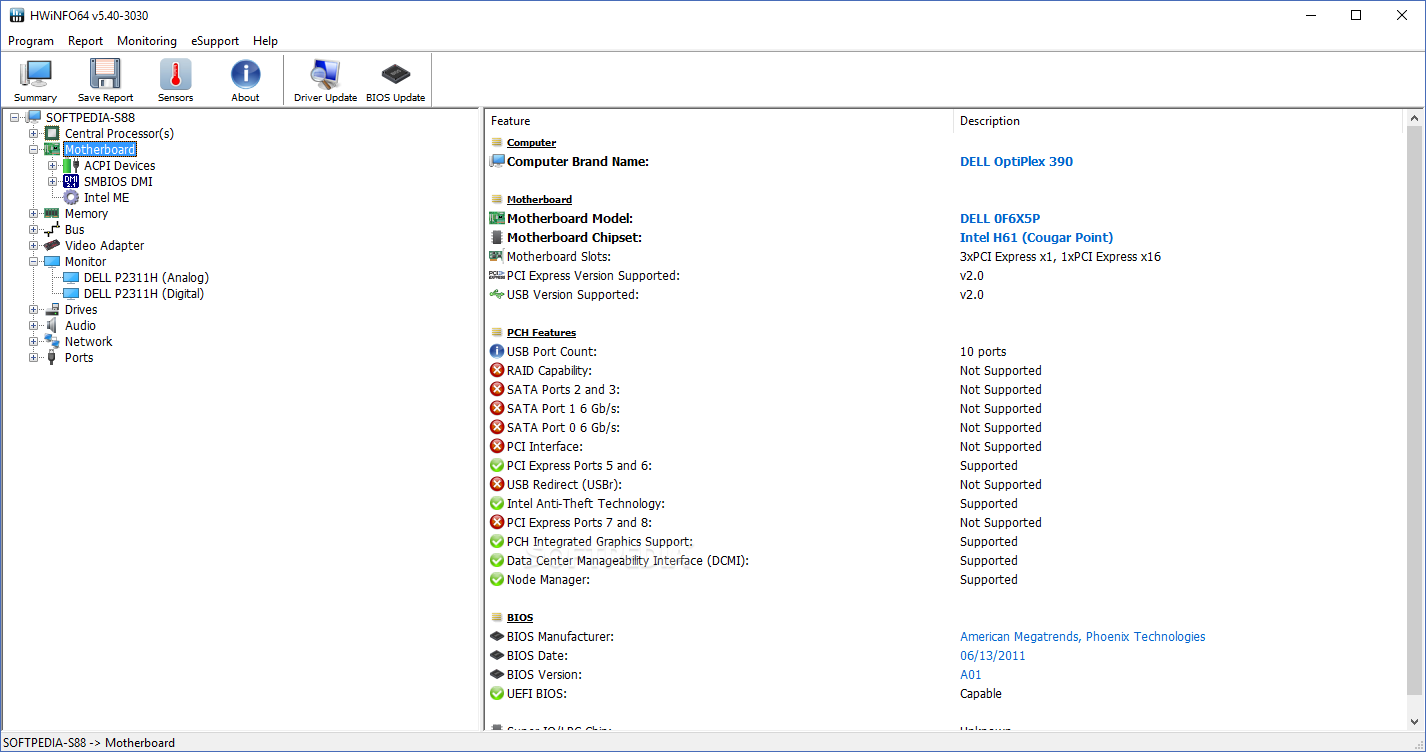
- Summary system report — one-click export of all hardware specifications: BIOS version, memory timings, PCIe link speeds.
- Remote monitoring — serve sensor data via lightweight web interface (optional, disabled by default).
- Alerting system — per-sensor minimum/maximum thresholds with visual or audio notifications.
- Logging and benchmarking — continuous CSV logging and timed benchmark runs.
All these work together through one portable executable. You never install separate drivers or kernel modules permanently.
Scenario 1: Silent PC troubleshooting Run HWInfo Portable in sensors-only mode. Minimize to system tray. Watch CPU temperature spikes during normal work without intrusive windows.
Scenario 2: Hardware acceptance testing Before accepting used servers or GPUs, launch HWInfo Portable and run a 30-minute stability log. Check maximum temperatures and voltage ripple.
Scenario 3: Overclocking validation Set HWInfo Portable to log every sensor at 200 ms intervals. Stress-test your CPU and GPU. Review the CSV to detect micro voltage drops or thermal throttling.
Scenario 4: On‑site service kit Copy HWInfo Portable to a USB stick alongside other portable tools. Plug into any client's Windows PC (no admin rights needed) and diagnose.