Track your time, get things done
check out my app : https://tpilot.herokuapp.com/
Tpilot is a simple time tracker application to enhance your time-spending habit. Tpilot offers three following functions:
- Timer Tpilot tracks how much time the user spend on each task by activating a timer.
- Alarm A user can set an alarm if user wants a notification when the set time is over while doing a task.
- Insight Tpilot will show you how much time you spend in every task and will compare the pattern weekly, for example this Monday to last Monday.
To check out the app, please clone this repository.
- clone our repository
git clone https://github.com/Heathercoraje/tpilot.git
- Install the dependencies
npm i
- Run start
npm run devStart
We want to create a web application:
- will track time spent on every task
- adds an alarm to send notification to a user.
- shows insight and comparision weekly using collected data.
As a user who waste his/her time I would like to Track...
- I can track my time in every task every single day.
As a user who is interested to analyze her own time spending pattern...
- I can see the insight and know how much time I spend in every single task.
- I can see my time spending pattern of today compared to the same day from last week.
Suggested additional requirements / stretch goals:
- I can analysis my data by daily/weekly/monthly or by each activity.
- I can auto-make a new task.
Users
| id | name | surname |
|---|---|---|
| 1 | Katia | Ashkar |
| 2 | Heather | coraje |
Activity-Time
| id | users_id | activity | time | date |
|---|---|---|---|---|
| 1 | 1 | Sleep | 8:00 | 11 Sep 2017 |
| 2 | 2 | Sleep | 00:45 | 11 Sep 2017 |
| 3 | 1 | Eat | 00:30 | 12 Sep 2017 |
| 4 | 2 | Rest | 00:35 | 12 Sep 2017 |
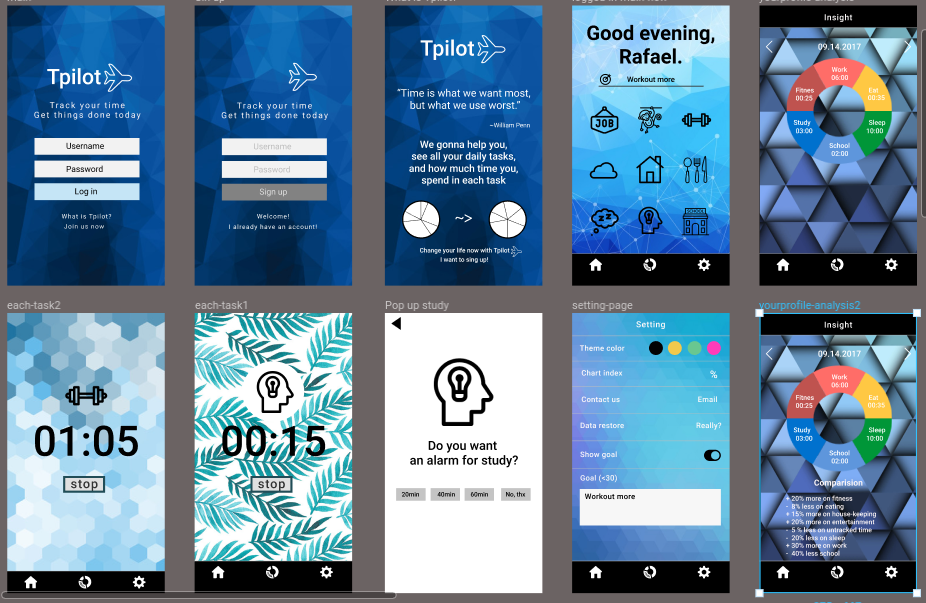
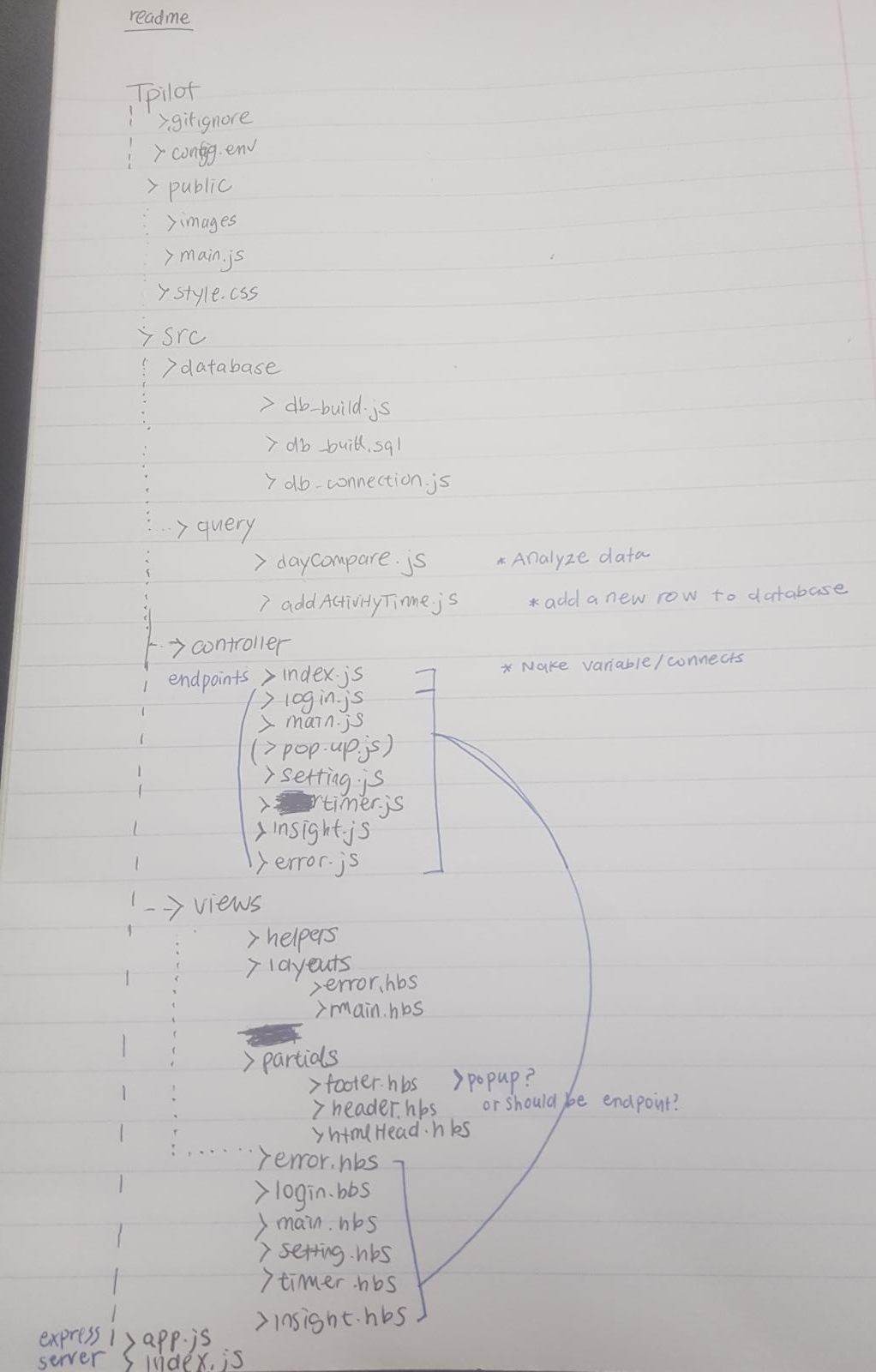
- User can put amount of time they spend on an activity manually.
- User can add specific name of activity(i.e. Fitness-running, Fitness - mountain cycling).
- User can open her/his report of selected activity and also report of different time period, for example, a monthly report.
- CamelCase for variable names
- Comments for code clarification
- ES6 on back-end / ES5 on front-end
- Use of QuerySelector to grab elements from html to js
- Express-handlebars
- Express
- postSQL
- Add Wireframe & Architecture & File structure in README.md
- Establish on Heroku
- Create issue and relates to issue when commit
- Add images on technical task
- Add labels to issues
- Assign teammates for review and wait for approval before merging
- Use sprint
- Break down user journey into user stories then technical tasks as small as possible
- promises over callbacks
- Make sure teammates understand each line of codes
- Working hour starts from 9:30 ends at 5:45
- Research about very next day technical tasks after working hour
- Daily stand-up with master Lubel at 10:00