Steps to reproduce this issue
- Have any data show, either in:
-
table 'definition' view (where you define column names, datatypes, etc):
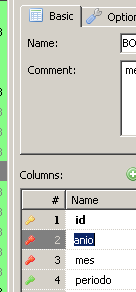
-
...Or in the Data tab for any table, or within a result set from a query.
e.g.
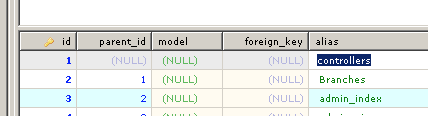
- enter 'edit' mode on any cell (double click or F2)
Current behavior
You can freely edit the data, BUT if you press BACKSPACE, it suddenly 'breaks', the data grid loses focus, and it somehow goes to the Host > Databases tab. At least it doesn't delete anything unintendedly.
I also noticed that if while editing you had the Filter Panel on...
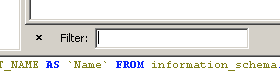
the first time you press backspace, it CLOSES that panel, instead of deleting a character. The cursor even stays at the same position, and the cell still shows the same data, without deleting anything.
If you press BACKSPACE again, the data grid loses focus and goes to the Host > Databases tab again.
Expected behavior
Editing should go as normal, and backspace should delete characters instead of messing around.
Possible solution
Maybe it is an error on the mapping of the backspace key while editing cells?
Note that backspace works normally on the query editor.
Also note that the Del key does delete characters, from left to right, and is a temporal solution, but obviously not ideal.
Note that I'm using Heidi on MacOS via Wine, and it may be an issue, but I really don't think so, because backspace works fine elsewhere on Heidi, or in other apps.
Environment
- HeidiSQL version: 10.3.0.5901 (but it has happened since a few versions back)
- Database system and version: MySQL 5.1.73 and 5.5.62 (irrelevant anyway)
- Operating system: MacOS 10.14 (Mojave), with Wine 5.0

Steps to reproduce this issue
table 'definition' view (where you define column names, datatypes, etc):

...Or in the Data tab for any table, or within a result set from a query.

e.g.
Current behavior
You can freely edit the data, BUT if you press BACKSPACE, it suddenly 'breaks', the data grid loses focus, and it somehow goes to the Host > Databases tab. At least it doesn't delete anything unintendedly.
I also noticed that if while editing you had the Filter Panel on...
the first time you press backspace, it CLOSES that panel, instead of deleting a character. The cursor even stays at the same position, and the cell still shows the same data, without deleting anything.
If you press BACKSPACE again, the data grid loses focus and goes to the Host > Databases tab again.
Expected behavior
Editing should go as normal, and backspace should delete characters instead of messing around.
Possible solution
Maybe it is an error on the mapping of the backspace key while editing cells?
Note that backspace works normally on the query editor.
Also note that the Del key does delete characters, from left to right, and is a temporal solution, but obviously not ideal.
Note that I'm using Heidi on MacOS via Wine, and it may be an issue, but I really don't think so, because backspace works fine elsewhere on Heidi, or in other apps.
Environment