Repository navigation
Releases: Herbrax/Chiral-FTP
Release list
Chiral-FTP 1.1

chiral-ftp 1.1


chiral-ftp now has downloads for Windows, Mac and Linux, next to
the PS5 and the Nintendo Switch. And every copy of chiral-ftp on
your network can now find and open the others in two presses: Quick
connect.
New: Quick connect
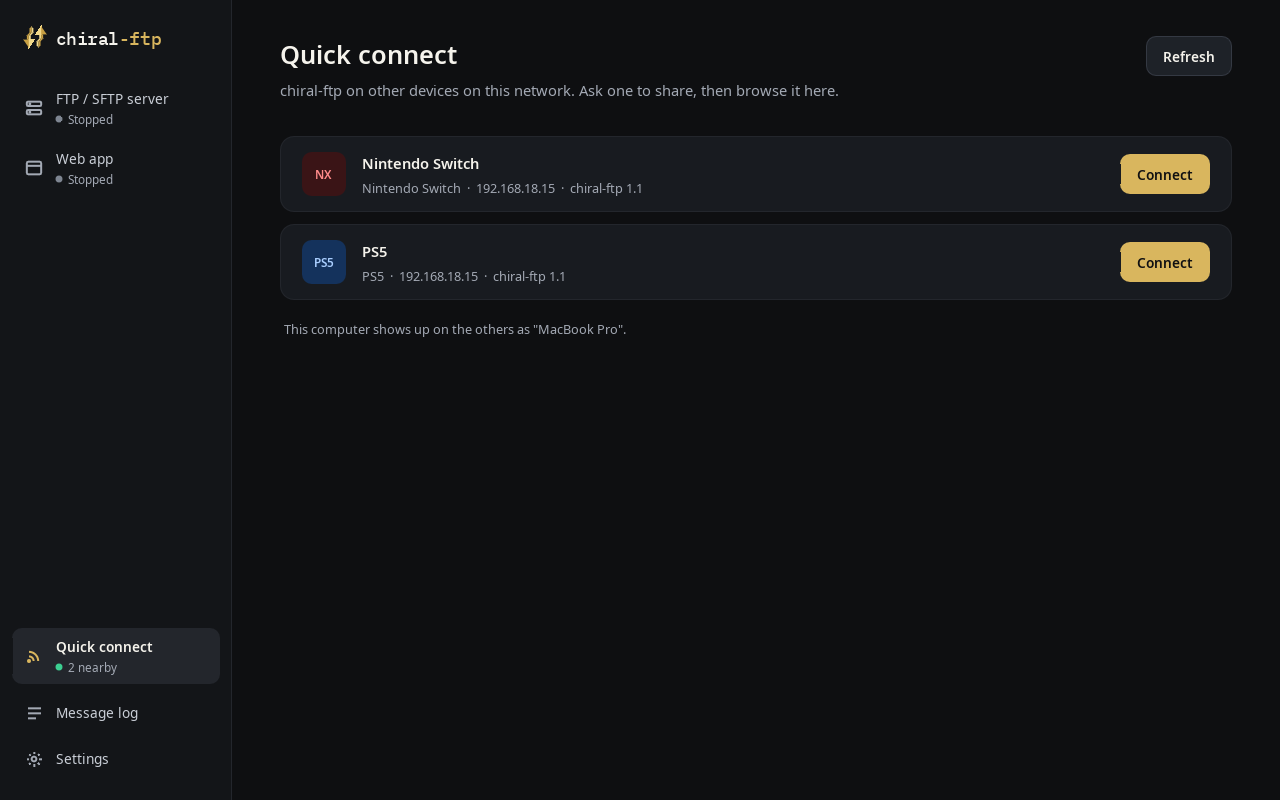
- Every copy of chiral-ftp on your network shows up, whatever it is
doing: no server has to be running, and nothing has to be set up. - Ask one to share. It shows your request with a 4-digit code; check
it's the same code on both screens and press Allow. The other device
starts its server, and you are connected and browsing it. - The login it hands out works only from the device that asked, and only
while that server runs. Deny, or let the request time out, and nothing is
shared. - On a console, Quick connect is on the start screen (press Up) and runs
while chiral-ftp is open there. On a computer it's in the sidebar (or
⌘K on a Mac) and runs whenever the app is open. - The list stays current even on Wi-Fi that drops broadcasts.
New: Windows, Mac and Linux
- Windows: one
.exe(x64; it runs on Windows on ARM too), nothing to
install. Mac:chiral-ftp.app. Double-click it, or drag it to
Applications; it carries its own libraries. Linux: one.AppImage
file. - Made for a computer (Windows, Mac and Linux alike): a sidebar with
the server, the web app, Quick connect, the message log and Settings, each
a page with ordinary switches, fields and buttons; on a Mac the menu bar
has everything, with shortcuts. - The mouse works everywhere: hover, click, right-click, scroll, and
click outside a panel to close it. - Sharp text: the layout follows the window instead of scaling a fixed
screen, and text is rendered with hinting. - SFTP server (encrypted, the default) or FTP, on the same screen.
- Shares your home folder by default. Whole computer shares
everything, after a confirmation. chiral-ftp's own settings (saved
passwords, the server's login and its private key) are never shared,
whatever folder is. - The web app opens in your browser. By default only this computer can
reach it; switch "Reachable from" to your home network to use it from a
phone or another device. - Network: when a computer is on several networks (Wi-Fi, Ethernet, a
VPN), Settings > Network chooses the address to show. Automatic prefers
your home network. - On a computer, the file manager and the FTP / SFTP client are in the web
app, in your browser.
New on the Switch: USB drives
- USB drives show up in the drive list as soon as they're plugged in:
FAT32, exFAT, NTFS and ext2/3/4. Browse, copy and move between them and
the SD card in the file manager, and reach them over the FTP server
(/usb0) and the web app. - Free space is shown again for the SD card and for USB drives.
New on the PS5
- Free space is shown for the internal storage, an M.2 drive and USB
drives. - The start screen says how the app got full storage access (the
jailbreak's resident service, or the Lapy helper), or why it didn't.
Everywhere
- Change permissions recursively: a folder and everything inside it,
as its own entry next to Change permissions (client, file manager and web
app). Folders keep x wherever they get r, so they stay openable. - Uploads to a PS5 homebrew folder end up 777 (files and folders, any
path with/data/homebrewin it, whichever FTP server the PS5 runs), so
homebrew copied from another device starts. - Rename, permissions and Delete for folders in the client's menu on
consoles (OPTIONS on the PS5, Plus on the Switch), for the item under the
cursor or everything marked. - A server that stops answering is let go after 30 seconds: the client
says the connection was lost and closes, instead of still saying
"Connected to…".
Fixes
- Switch: closing chiral-ftp during a transfer no longer crashes it:
transfers are stopped and waited for before the app exits. - Switch: tapping a card no longer opens Quick connect when the
controller's focus was on the Quick connect button. - Client: pressing Open again while a folder is loading no longer sends
the same request again behind the first. - Client: the loading spinner no longer covers Disconnect.
- Long drive names no longer run into the path next to them.
- Computers: folders made by the server, the web app or the file manager
can be opened (they were created without the x bit). - PS5: the start screen showed the Switch's wording for full access.
Install
PS5
- Download
chiral-ftp-ps5-1.1.zipbelow and unpack it: it contains
the folderPPSA96024. - Copy that folder to
/data/homebrew/PPSA96024on the PS5. - Make sure the folder and every file in it are 777 (the zip stores them
that way, but some FTP clients don't keep it), then start Chiral-FTP from
the dashboard.
Updating: close chiral-ftp first, then replace the folder. Your settings and
saved sites stay in /data/chiral-ftp.
Nintendo Switch
- Download
chiral-ftp.nrobelow. - Copy it into
/switchon your SD card. - Start it from hbmenu. For the whole console's memory, hold R while
launching a game and pick chiral-ftp from the menu that opens; starting it
from the album works too, with less memory.
Updating: replace the .nro. Your settings and saved sites stay in
/switch/chiral-ftp.
Mac (macOS 27 or later, Apple silicon)
- Download
chiral-ftp.appbelow. - Drag it to Applications.
- The app isn't notarized by Apple, so the first time macOS says it can't
check it: open System Settings > Privacy & Security and choose
Open Anyway (or runxattr -dr com.apple.quarantine /Applications/chiral-ftp.apponce).
Updating: replace the app. Your settings stay in
~/Library/Application Support/chiral-ftp.
Linux (Ubuntu 22.04, Debian 12, Fedora 36 or newer, and others like them)
- Download
chiral-ftp-1.1-aarch64.AppImage(ARM computers, such as a Raspberry Pi 4 or 5 on 64-bit) orchiral-ftp-1.1-x86_64.AppImage(most PCs) below. - Make it executable (
chmod +x chiral-ftp-*.AppImage, or Properties >
Allow executing as a program) and run it.
Updating: replace the file. Your settings stay in ~/.local/share/chiral-ftp.
Windows (Windows 10 or 11)
- Download
chiral-ftp-1.1-windows-x64.exebelow (it runs on Windows on ARM PCs too, through Windows' own x64 emulation). - Run it; nothing needs installing. The program isn't signed, so the first
time Windows SmartScreen says it doesn't recognise it: choose
More info > Run anyway. When Windows Firewall asks, allow private
networks, so that a console or phone can reach the server.
Updating: replace the .exe. Your settings stay in %APPDATA%\chiral-ftp.
To keep everything on a USB stick instead, settings included, make a folder
named data next to the .exe: chiral-ftp then keeps its settings there.
Checksums
02a080c268302ea713c87492b467a3ae79e6444669e94e00bc854fcd9937acde  chiral-ftp-ps5-1.1.zip
9bebec118873c0e734e2f4f27905655de8ef9f63baf4e5f2e7c8153dc76865b0  chiral-ftp.nro
1c1ee85c183983e77ff23f73967173f2a51d50f3acf1a87505d0eee717eaddef  chiral-ftp-1.1-aarch64.AppImage
adf47d8c4443d5e149d204c9ab9ac2920867275e4e127d7ba042ceb856f756f8  chiral-ftp-1.1-windows-x64.exe
2624ea8409622ce494a6107b73dd6dae2b07d256b780783ed94a1c2b99b8dfb3  chiral-ftp-1.1-x86_64.AppImage
cc7c3a4b09be2bbc9015868a689bce74e7c9e941028bf752a5cb2af15f74a0a8  chiral-ftp.app/Contents/MacOS/chiral-ftp
Made by Herbrax (Simo Hakim). Bugs and pull requests are welcome:
https://github.com/Herbrax/chiral-ftp/issues
chiral-ftp.app.zip is the MAC OS version
chiral-ftp.nro is the Switch (1) version
chiral-ftp-ps5-1.1.zip is the PS5 version
chiral-ftp-1.1-x86_64.AppImage is the Linux x86 version
chiral-ftp-1.1-aarch64.AppImage is the Linux ARM version
chiral-ftp-1.1-windows-x64.exe is the Windows version
Chiral-FTP 1.0.1
chiral-ftp 1.0.1

chiral-ftp is now cross-platform. The same app runs on the PS5, the
Nintendo Switch (new) and on PC and Mac, from one codebase. Support
for Android, PS4 and other platforms is coming soon.
New: Nintendo Switch
The first release for the Switch, as homebrew (.nro) started from hbmenu.
Everything the PS5 version does is there:
- FTP server, web app, file manager (the SD card) and
FTP / SFTP client with saved sites, history, resume and up to 30
transfers at once. - Controls follow the PS5 layout by position: A opens, B goes back,
Y marks, X transfers, R switches sides, Plus opens the
menu and Minus shows the transfer queue. The bottom bar shows the
Switch's own buttons. - The touch screen works: tap a row, a card, a menu item or a setting,
drag a list to scroll, tap outside a menu to close it. - Text is typed with the system keyboard.
- Sleep is held off and the HOME menu can't close the app while it runs,
so a transfer isn't cut short. - The start screen says whether the app got the console's full memory
(launched over a game, holding R) or the album's smaller share. - English, Spanish, French, Italian and Russian.
- Settings, saved sites and history are kept in
/switch/chiral-ftp.
New: PC and Mac
The same app in a window on Windows, macOS or Linux, with the keyboard or
a game controller. There's no download yet: build it from source with
make PLATFORM=sdl (see the README).
PS5
- Creating, renaming, moving, deleting and uploading files no longer fail
on folders the app isn't allowed to change (755 or 766 ones, for
example): chiral-ftp sets the folder to 777 and tries again. This works in
the file manager, the web app, the FTP server and the client. - Change permissions works again.
- New folder and rename work in the two-pane file manager: the PS5
keyboard is loaded before the app asks for full storage access. If the
keyboard still can't open, the app says so instead of doing nothing. - Hold Circle to go back to the start screen from anywhere.
- Faster drawing: menus and lists respond more quickly to the
controller. - The FTP server notices when its connection died while the console slept,
instead of claiming to still be running. - In the client, Disconnect is on the server pane while connected.
Everywhere
- The About screen says which platforms chiral-ftp runs on, and thanks the
projects each version is built with. - The FTP server's default login is now
chiral/ftpon every
platform. A login you already set is kept; "Reset to chiral / ftp" on the
FTP server screen switches to the new one.
Downloads
chiral-ftp-ps5-1.0.1.zip: the PS5 title (PPSA96024). Close chiral-ftp
before you replace it; your settings in/data/chiral-ftpare kept.chiral-ftp.nro: the Switch homebrew. Copy it into/switchon the SD
card; to update, replace it.
Install
PS5
- Download
chiral-ftp-ps5-1.0.1.zipbelow and unpack it: it contains
the folderPPSA96024. - Copy that folder to
/data/homebrew/PPSA96024on the PS5. - Make sure the folder and every file in it are 777 (the zip stores them
that way, but some FTP clients don't keep it), then start Chiral-FTP from
the dashboard.
Updating: close chiral-ftp first, then replace the folder. Your settings and
saved sites stay in /data/chiral-ftp.
Nintendo Switch
- Download
chiral-ftp.nrobelow. - Copy it into
/switchon your SD card. - Start it from hbmenu. For the whole console's memory, hold R while
launching a game and pick chiral-ftp from the menu that opens; starting it
from the album works too, with less memory.
Updating: replace the .nro. Your settings and saved sites stay in
/switch/chiral-ftp.
Checksums
d48085f1ea271b21c9c809b06eedb67ab782d6b493fa106b8e698165d34d33d1  chiral-ftp-ps5-1.0.1.zip
448e7b6ba26c39059f20acc95a6060d02d1aea4f763039c50b885a7cad017723  chiral-ftp.nro
Made by Herbrax (Simo Hakim). Bugs and pull requests are welcome:
https://github.com/Herbrax/chiral-ftp/issues
Chiral-FTP 1.0
chiral-ftp 1.0


The first release of chiral-ftp: the ultimate file manager and FTP interface
for PS5. It runs as a native homebrew title from the dashboard (via
ShadowMountPlus) and is used with the controller on the TV.
What's in it
- FTP server. Other devices connect to the PS5 with FileZilla, a file
manager or any FTP app. The screen shows the address and login; change the
username, password or port, or allow anonymous logins. Live activity:
connected clients, transfers and speed. - Web app. Open the address it shows in a browser on your PC or phone:
browse the PS5's files, download them, upload from the browser (drag and
drop works), copy, move, rename and delete. The FTP client is there too. - File manager. Two panes for copying and moving files on the PS5:
internal storage, Homebrew, USB drives and extended storage. Copies run in
the background with progress; a folder is deleted with everything inside. - FTP / SFTP client. Connect to a laptop, PC or NAS and transfer both
ways: saved sites and recent connections, resume, and up to 30 transfers
at once (5 by default). - Full storage access. At start, chiral-ftp asks the jailbreak for access
to the console's real storage (OnionHEN, a resident Lapy, or the packaged
Lapy helper sent to elfldr on port 9021), the way ProsperoEden does. - Every file chiral-ftp writes to the PS5 is 777, so homebrew you copy
starts. Files it uploads to a server are set to 777 there too when the
server allows it. - Nine languages: English, Spanish, French, Italian, Japanese, Korean,
Chinese, Russian and Arabic, with a language selector in Settings
("Automatic" follows the PS5's system language). Japanese, Korean, Chinese
and Arabic use the PS5's own system fonts. - Servers and transfers keep running while you use another mode or go to the
PS5 home screen.
Requirements
- A jailbroken PS5 with ShadowMountPlus, and an ELF loader (elfldr) on port
9021 when chiral-ftp starts. - Tested on PS5 firmware 13.60.
Known limitations
- Closing chiral-ftp stops its servers and transfers.
- There is no SFTP server yet (the FTP server is plain FTP).
- The web app has no login: anyone on your network can use it while it runs.
- The technical message log and the web pages are in English.
- Arabic text reads right to left, but the screen layout stays left to right,
and Arabic file names aren't joined. - Free space on drives isn't shown.
Install
- Download
chiral-ftp-1.0.zipbelow and unpack it: it contains the folderPPSA96024. - Copy that folder to
/data/homebrew/PPSA96024on the PS5. - Make sure the folder and every file in it are 777 (the zip stores them that
way, but some FTP clients don't keep it), then start Chiral-FTP from the
dashboard.
Updating: close chiral-ftp first, then replace the folder. Your settings and
saved sites stay in /data/chiral-ftp.
Checksum
1759b57b363307acbf1f6bf5924f91910a131cbf6a0cee4ac30978256578aadf chiral-ftp-1.0.zip
Made by Herbrax (Simo Hakim). Bugs and pull requests are welcome:
https://github.com/Herbrax/Chiral-FTP-PS5/issues