Self-hosted, open-source feedback platform. Drop a single <script> tag into any web app to give your users:
- In-app announcements (changelog / product updates) with read-tracking and per-user mute
- One-click bug reports with auto-attached page context (URL, viewport, user agent)
- Feature requests + voting so you can prioritize what users actually want
- A public roadmap (Now / Next / Shipped) — also available as a standalone shareable page
The widget is anonymous by default: on first boot it POSTs /api/v1/identity, receives an opaque anonymous_id, stores it in localStorage under ideabug:state, and re-sends it as X-Ideabug-Anon-Id on later API calls. JWT-based identity is an optional upgrade — when a user logs into your app, their anonymous reads + votes are atomically merged into their identified profile.
Status: usable but pre-1.0. Schema can change without a major bump until tagged
v1.0.
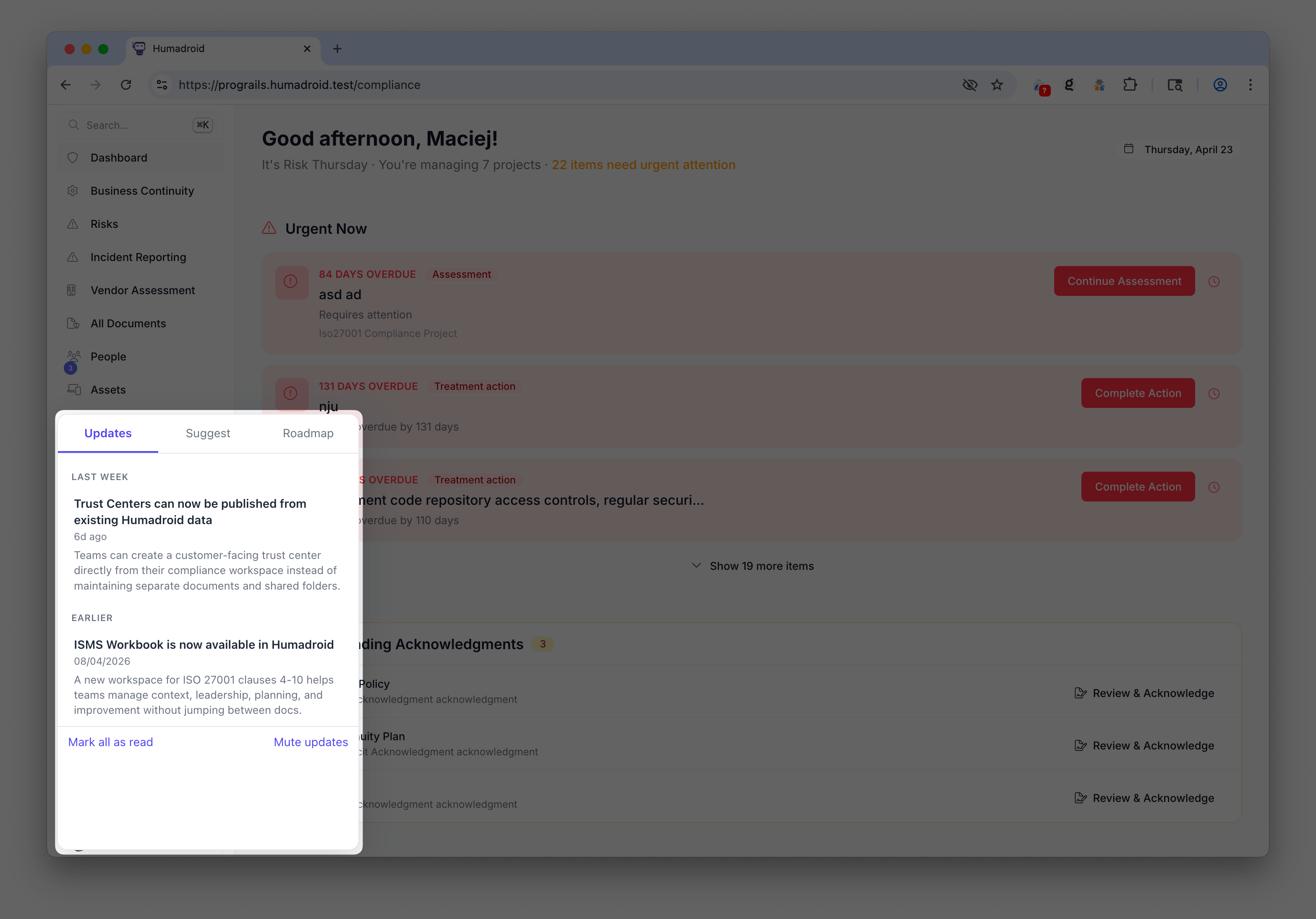
Expanded widget |
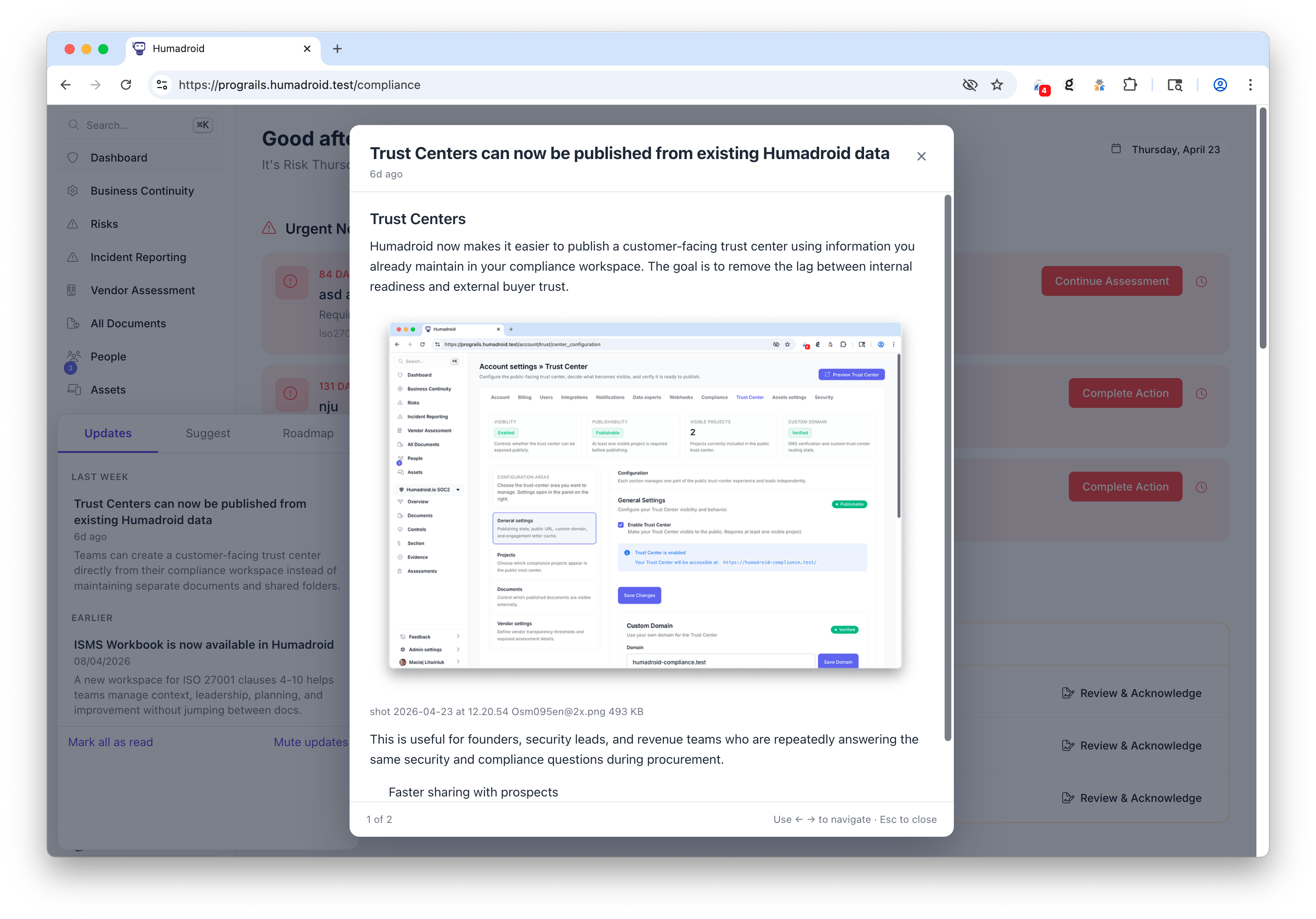
Announcement details |
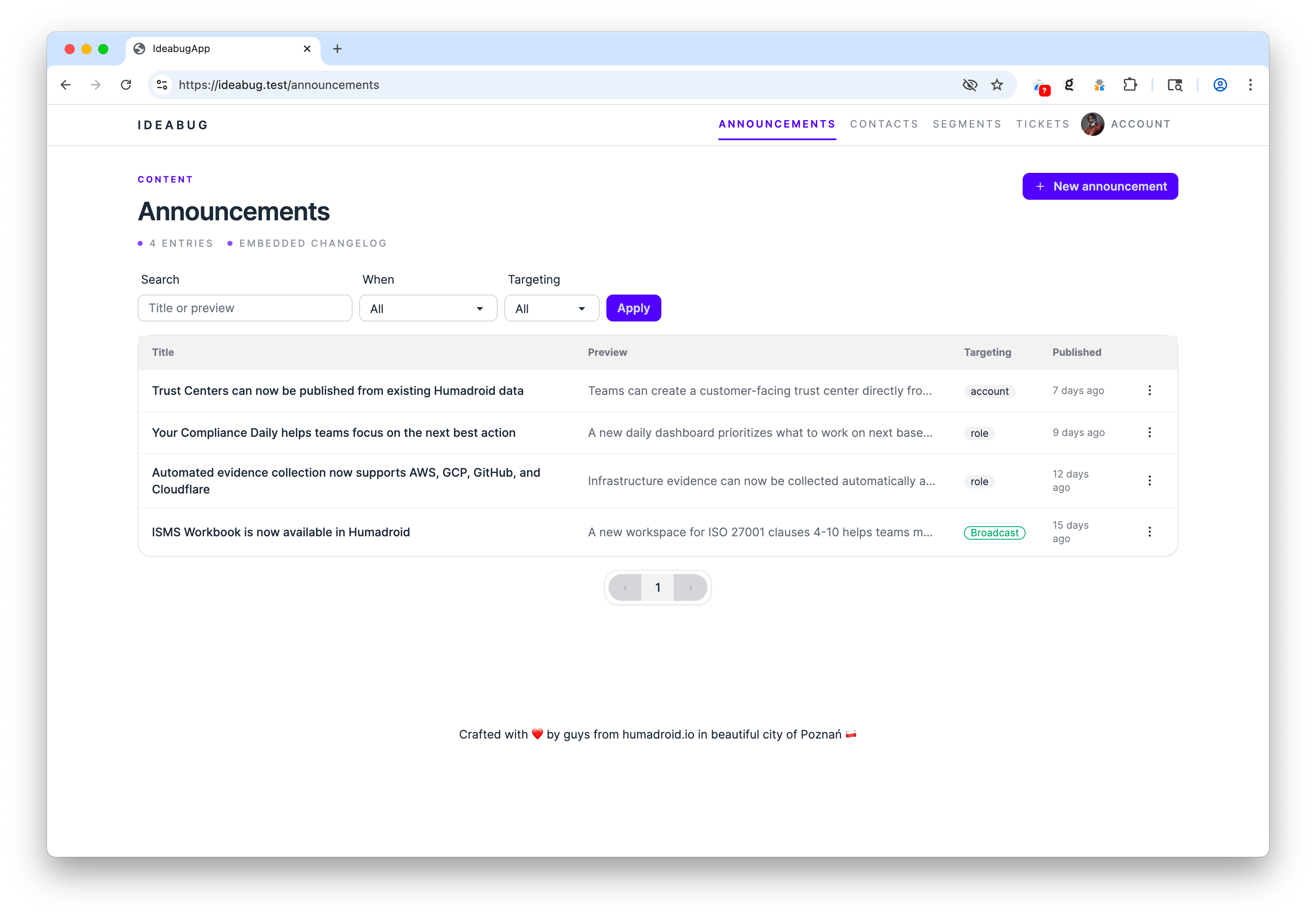
Announcements list |
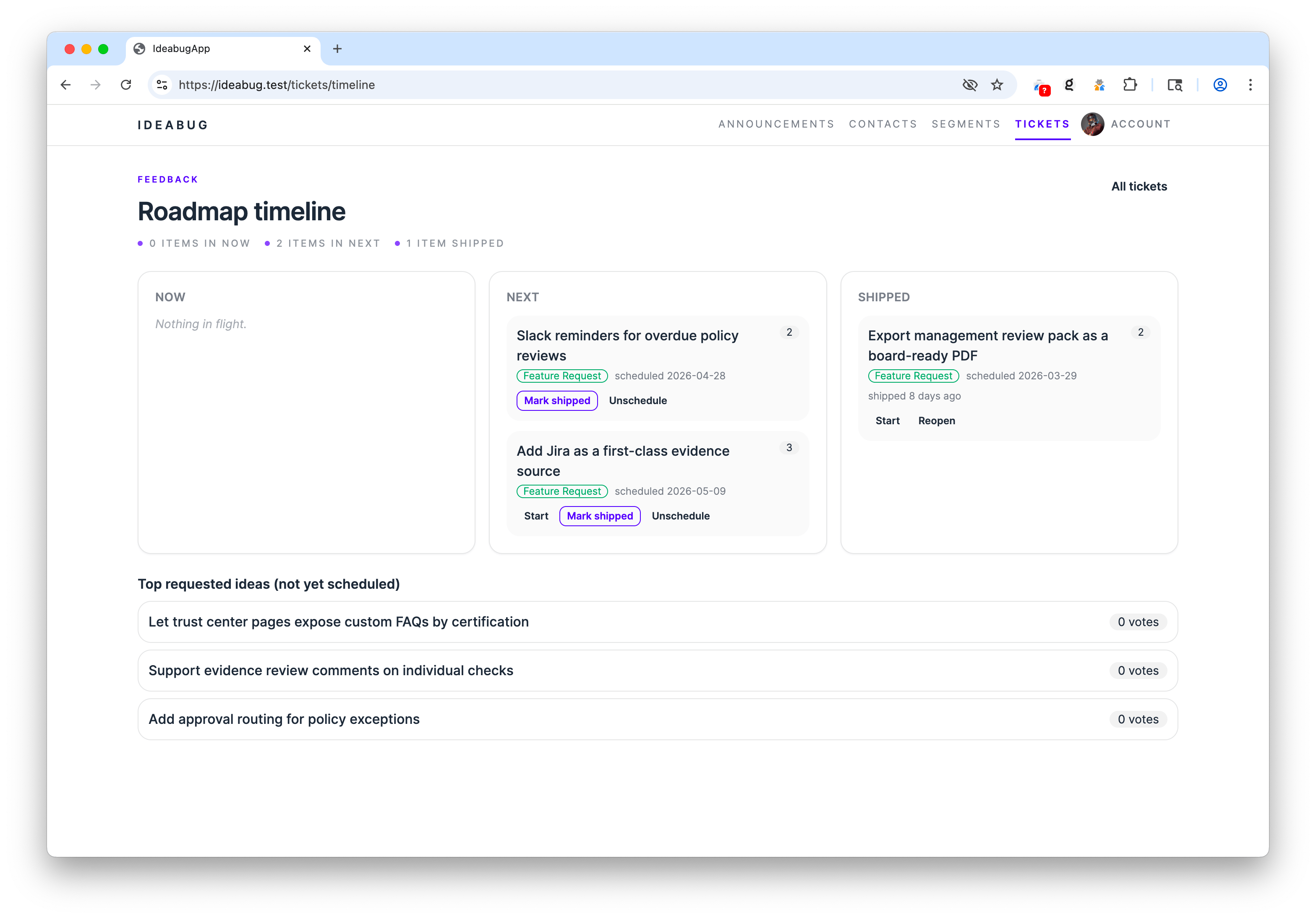
Roadmap |
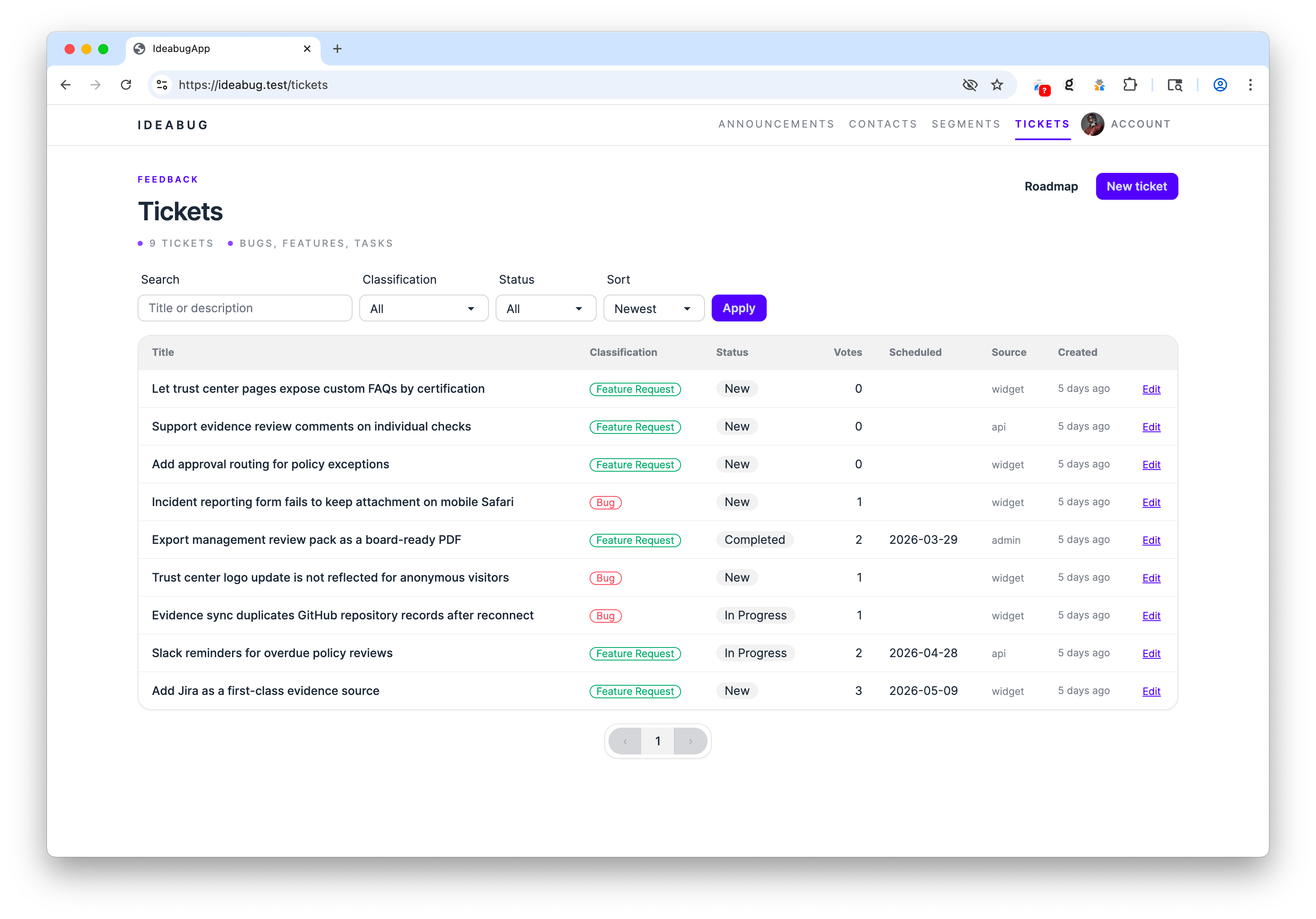
Tickets |
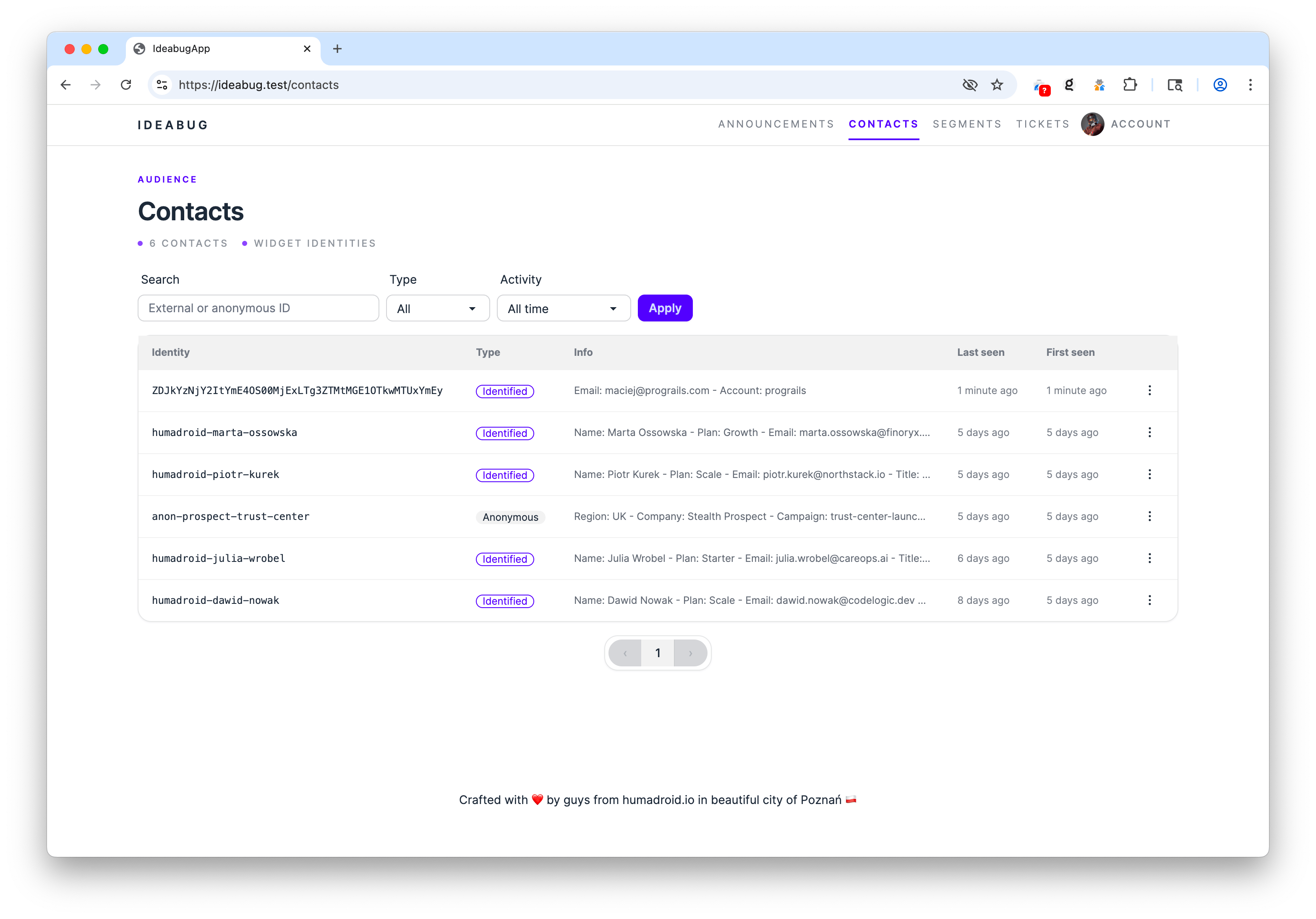
Contacts list |
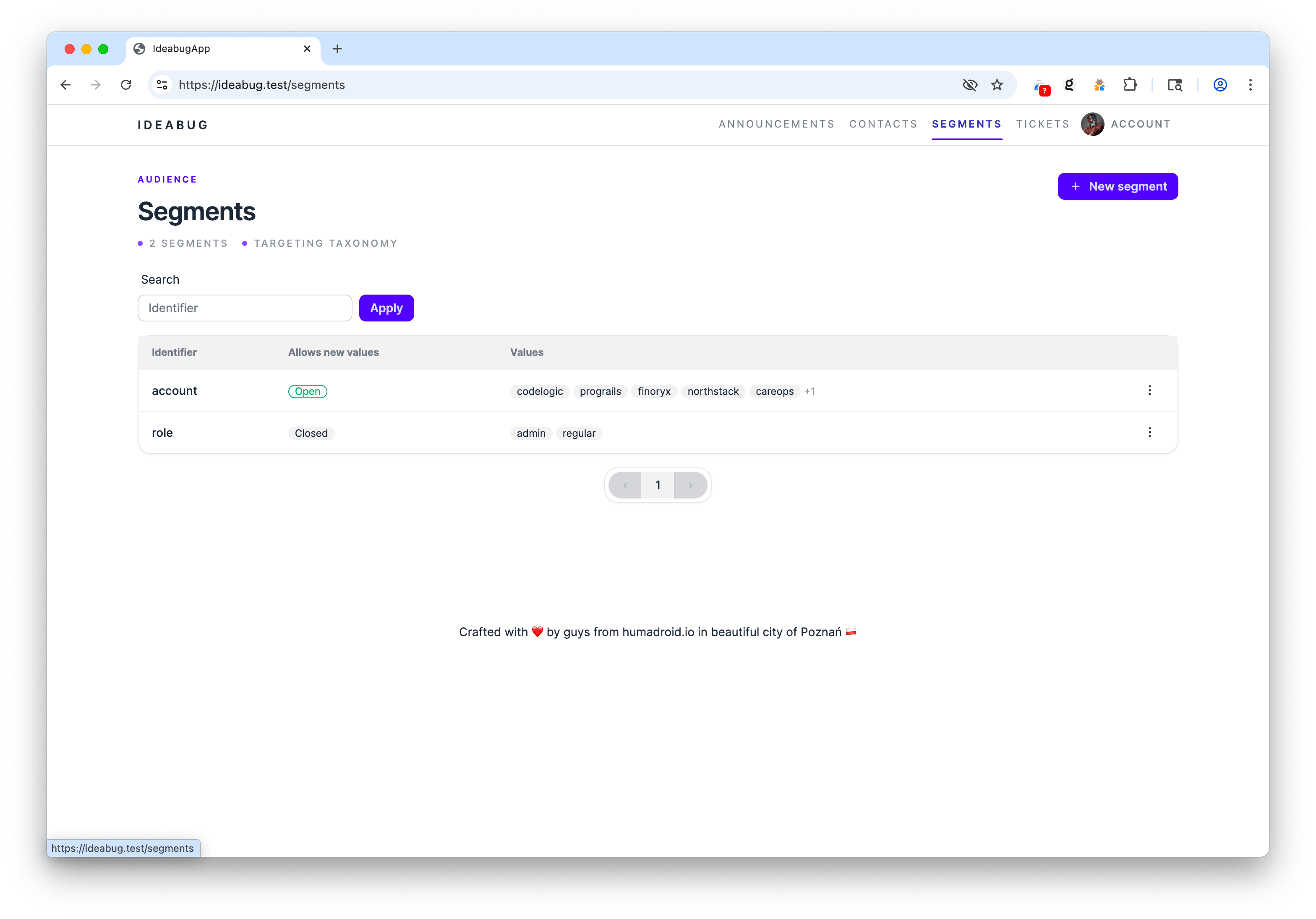
Segments |
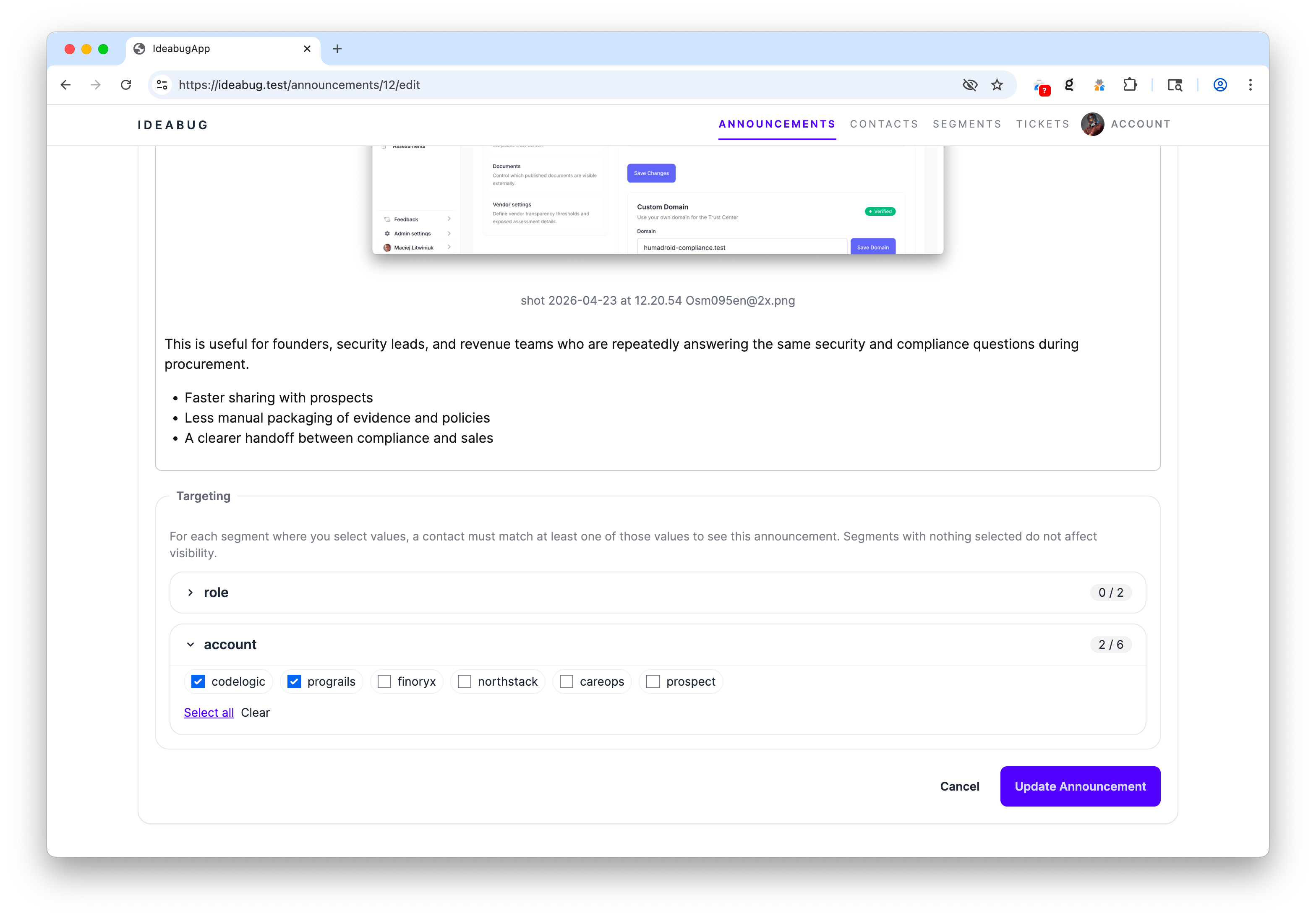
Announcement segment targeting |
- Embedding the widget — for host-app developers
- Public pages (changelog + roadmap)
- Self-hosting the server — for operators
- API reference
- Admin usage
- Customization
- Development
Add this to any page in your app where you want the bell to appear (typically your top navbar):
<div id="ideabug-feedback"></div>

<script
  src="https://YOUR-IDEABUG-HOST/script.js"
  data-ideabug-host="https://YOUR-IDEABUG-HOST"
  data-ideabug-target="#ideabug-feedback"
  defer
></script>
That's it. The widget will:
- Call
POST /api/v1/identityon first load and persist the returnedanonymous_idinlocalStorageunderideabug:state. - Render a bell with a badge for unread updates.
- Open a 360×520 panel with three tabs: Updates, Suggest, Roadmap.
- Poll the announcements endpoint every 60s (5min when the tab is hidden).
This is the exact flow the widget uses today:
- The browser loads
script.js, then the widget immediately callsPOST /api/v1/identity. - If
localStorage["ideabug:state"]already contains ananonymous_id, the widget sends it asX-Ideabug-Anon-Id. If not, the server creates a new anonymousContactwith a generated ID likeib_<22 random chars>. - The server returns that identity in both the JSON body and the
X-Ideabug-Anonymous-Idresponse header. The widget copies it intolocalStorage. - All later widget API requests send that stored value back as
X-Ideabug-Anon-Id, so reads, votes, opt-out state, and submitted tickets stay attached to the same anonymous contact. - If your host app later starts returning a JWT, the widget sends both the stored anonymous header and
Authorization: Bearer .... The server finds or creates the identified contact, merges the anonymous contact into it, and returns an emptyX-Ideabug-Anonymous-Idheader so the widget clears the stale anonymous ID fromlocalStorage.
Notes:
- Anonymous IDs are opaque contact keys, not host-app user IDs.
- The accepted header format is
[A-Za-z0-9_]{8,64}. Server-minted IDs use theib_prefix, but a valid client-supplied ID is also accepted and will create a contact if it does not exist yet. - After an anonymous contact is merged into an identified one, that browser no longer keeps the old anonymous ID around. If the user later becomes anonymous again, the next
/api/v1/identitycall will mint a fresh anonymous contact.
| Attribute | Required | Description |
|---|---|---|
data-ideabug-host |
yes | Origin of your ideabug server, e.g. https://feedback.acme.com |
data-ideabug-target |
yes¹ | CSS selector for the element that should host the default bell |
data-ideabug-trigger |
yes¹ | CSS selector for a pre-existing element to use as a custom trigger; the widget binds click + emits unread events but renders no bell of its own. Mutually exclusive with data-ideabug-target. |
¹ Provide either data-ideabug-target (default bell) or data-ideabug-trigger (your own button).
IdeabugWidget.configure() accepts these (all optional):
| Key | Default | Description |
|---|---|---|
jwt |
— | Function (sync or async) returning the current user's JWT, or null for anonymous. See JWT setup. |
pollInterval |
60000 |
Poll cadence (ms) when the page is visible. Min 5000. |
pollIntervalHidden |
300000 |
Poll cadence (ms) when the tab is hidden. Will be clamped to at least pollInterval. |
window.IdeabugWidget.configure({ pollInterval: 30000 });If your app already has authenticated users, you can promote anonymous contacts to identified ones. The widget keeps the original localStorage anon ID and sends it alongside a JWT — the server merges the two contacts on the next request, preserving read-state and votes, then clears the stale anonymous ID from browser storage so it cannot silently recreate the old anonymous contact later.
On the ideabug server:
openssl genpkey -algorithm RSA -out config/jwt/private.pem -pkeyopt rsa_keygen_bits:2048
openssl rsa -pubout -in config/jwt/private.pem -out config/jwt/public.pem
Distribute private.pem to your host application and keep it there — it is the signing key and must never leave your backend. ideabug only needs the public key: it verifies tokens, it never mints them.
You can also pass the public key via env vars (recommended in containerized deployments):
| Variable | Purpose |
|---|---|
JWT_PUBLIC_KEY |
PEM-encoded public key (verbatim contents). Takes precedence over JWT_PUBLIC_KEY_FILE. |
JWT_PUBLIC_KEY_FILE |
Filename inside config/jwt/. Defaults to public.pem. |
JWT_PRIVATE_KEY/JWT_PRIVATE_KEY_FILEare never read in production. They exist only so the test suite and the_test/widget_hostdev harness (test/support/jwt_test_issuer.rb) can mint fixtures locally. A production ideabug deployment should ship the public key only.
Identity in ideabug is established by the JWT's id claim, so token forgery would mean impersonation. Every incoming token is verified by JwtCredentialService (app/services/jwt_credential_service.rb) with these guarantees:
- Signature is actually checked.
JWT.decodeis called with verification on; an unverified decode path does not exist. - Algorithm is pinned to
RS256server-side. This blocks the two classic JWT attacks:alg: none(unsigned tokens) and algorithm confusion (an HS256 token signed with the public key as an HMAC secret). Both are rejected asJWT::IncorrectAlgorithm. expandiatare enforced. Expired tokens and tokens with a malformed/future issued-at are rejected before any contact lookup.- Only the public key is loaded. There is no code path that uses a private key to verify, so a leaked verifier process cannot be turned into a signer.
The practical consequence: without the RSA private key (which lives on your host app, never on ideabug), an attacker cannot mint a token that authenticates as any external_id, nor tamper with the payload of a captured token without invalidating its signature. These properties are pinned by the test suite — see test/controllers/api/v1/base_controller_test.rb for the four forgery vectors (attacker-signed RS256, alg-confusion HS256, alg: none, payload tampering).
Operator checklist:
- Keep
private.pemon the host app only. The ideabug deployment should havepublic.pem(orJWT_PUBLIC_KEY) and nothing else. - Always issue tokens with
expset; the verifier enforces it but does not invent one. - Rotate the key pair by deploying the new
public.pemto ideabug first, then cutting the host app over to the newprivate.pem. There is no key-id (kid) header support yet, so rotation is a single-key swap.
The token must be RS256 with these claims:
| Claim | Required | Notes |
|---|---|---|
id |
yes | Stable external identifier for the user (becomes Contact.external_id). String. |
exp |
yes | Standard JWT expiration. ideabug's helper signs 1-hour tokens. |
iat |
yes | Standard JWT issued-at. |
jti |
recommended | Unique token ID for replay protection. |
info |
optional | Hash of arbitrary user metadata stored on Contact.info_payload (e.g. { email: "x@y.com", name: "Ada" }). |
segments |
optional | Hash of { "segment_identifier" => "value" }. ideabug auto-creates contact ↔ segment_value links so you can target announcements (e.g. { "plan" => "pro", "region" => "eu" }). |
Example (Rails — but use any RS256 JWT library in any language):
# config/initializers/jwt_config.rb
require "openssl"
require "jwt"

module IdeabugJwt
  PRIVATE_KEY = OpenSSL::PKey::RSA.new(
    ENV["IDEABUG_JWT_PRIVATE_KEY"] || File.read(Rails.root.join("config/ideabug_private.pem"))
  )

  def self.token_for(user)
    payload = {
      id:       user.id.to_s,
      exp:      1.hour.from_now.to_i,
      iat:      Time.current.to_i,
      jti:      SecureRandom.uuid,
      info:     { email: user.email, name: user.name },
      segments: { plan: user.plan, region: user.region }
    }
    JWT.encode(payload, PRIVATE_KEY, "RS256")
  end
endThe token is signed by your backend (step 2b runs server-side because the private key must never reach the browser). You then need to make it available to your frontend JavaScript. Pick whichever style fits your app:
In your layout, write the freshly-signed token into a <meta> tag:
<%# app/views/layouts/application.html.erb %>
<% if user_signed_in? %>
  <meta name="ideabug-jwt" content="<%= IdeabugJwt.token_for(current_user) %>">
<% end %>Add a GET /internal/ideabug_jwt action to your existing app that returns a fresh token to logged-in users:
# config/routes.rb
get "internal/ideabug_jwt", to: "internal#ideabug_jwt"

# app/controllers/internal_controller.rb
class InternalController < ApplicationController
  before_action :authenticate_user!  # your existing auth

  def ideabug_jwt
    render json: { token: IdeabugJwt.token_for(current_user) }
  end
end
Never expose your
private.pemto the browser. The browser only ever sees the signed token, never the key.
The widget calls config.jwt() on every API request and uses whatever string you return as the Authorization: Bearer … header. Return null (or omit the configure call) when the user is logged out — the widget will fall back to anonymous mode.
<div id="ideabug-feedback"></div>

<script
  src="https://feedback.acme.com/script.js"
  data-ideabug-host="https://feedback.acme.com"
  data-ideabug-target="#ideabug-feedback"
  defer
></script>

<script>
  document.addEventListener("ideabug:ready", () => {
    const meta = document.querySelector('meta[name="ideabug-jwt"]');
    if (!meta) return; // anonymous user — widget keeps using the anon ID
    window.IdeabugWidget.configure({
      jwt: () => meta.content
    });
  });
</script>The widget awaits whatever your callable returns, so you can return a Promise that resolves to the token. A small in-memory cache avoids hitting your backend on every API call:
<script>
  document.addEventListener("ideabug:ready", () => {
    let cached = null;
    let expiresAt = 0;

    async function getIdeabugJwt() {
      if (cached && Date.now() < expiresAt) return cached;
      const res = await fetch("/internal/ideabug_jwt", { credentials: "same-origin" });
      if (!res.ok) { cached = null; return null; }
      const { token } = await res.json();
      cached = token;
      expiresAt = Date.now() + 50 * 60 * 1000; // refresh ~10min before the 1h JWT expiry
      return token;
    }

    window.IdeabugWidget.configure({ jwt: getIdeabugJwt });
  });
</script>
The callable is invoked on every API request, so token rotation is whatever logic you put in the callable — the widget always uses the latest value you return.
The widget loads two assets from your ideabug origin and makes XHR calls back to it:
script-src  https://YOUR-IDEABUG-HOST
style-src   https://YOUR-IDEABUG-HOST
connect-src https://YOUR-IDEABUG-HOST
The widget does not inject inline <style> tags — it loads an external stylesheet. So you do not need style-src 'unsafe-inline'.
Don't want the default bell? Point the widget at any element you already have in your nav and the widget will use it as the click trigger and the panel anchor:
<button id="my-feedback-btn" type="button" class="my-styles">
  Feedback
  <span data-ideabug-unread-count hidden aria-hidden="true"></span>
</button>

<script
  src="https://feedback.acme.com/script.js"
  data-ideabug-host="https://feedback.acme.com"
  data-ideabug-trigger="#my-feedback-btn"
  defer
></script>
What you get:
-
The widget binds click to
#my-feedback-btn(no extra DOM injection). -
Any descendant element with the
data-ideabug-unread-countattribute receives the unread count astextContent— and bothhiddenplusaria-hiddenare toggled when the count is not positive or the user is opted out. -
The trigger element gets
class="ideabug-has-unread"toggled, anddata-ideabug-unread="N"mirrored, so you can hand-roll your own indicator. Easiest: drop a<span class="ideabug-pulse-dot"></span>inside your trigger — it stays hidden when there's nothing unread, and pulses with--ib-notificationcolor when there is:<button id="my-feedback-btn" type="button"> Feedback <span class="ideabug-pulse-dot"></span> </button>
Or write your own from scratch:
#my-feedback-btn.ideabug-has-unread::after {
  content: ""; width: 8px; height: 8px; border-radius: 50%;
  background: tomato; position: absolute; top: 4px; right: 4px;
}
-
A
CustomEvent("ideabug:unread", { detail: { count, optedOut } })fires on the trigger element on every poll cycle — useful for analytics or driving framework-specific reactivity.
For multiple triggers (e.g. a button in the navbar AND a "Send feedback" link in the footer), use programmatic control:
document.addEventListener("ideabug:ready", () => {
  document.querySelectorAll(".feedback-link").forEach((el) =>
    el.addEventListener("click", (e) => { e.preventDefault(); IdeabugWidget.toggle(); })
  );
});
Public methods (available after ideabug:ready):
| Method | Purpose |
|---|---|
IdeabugWidget.open() |
Open the panel |
IdeabugWidget.close() |
Close the panel |
IdeabugWidget.toggle() |
Toggle |
IdeabugWidget.getUnreadCount() |
Current unread count |
IdeabugWidget.isOptedOut() |
True if user has muted updates |
The widget exposes a handful of CSS custom properties. Defaults are declared with :where() so they have zero specificity — your override wins from anywhere on the page, in any load order, with any selector:
<style>
  :root {
    --ib-accent:       #ff6b00;   /* brand color: links, active tab, vote button */
    --ib-notification: #ef4444;   /* the bell's unread dot (defaults to --ib-accent) */
    --ib-unread:       #fff7ed;   /* light tint behind unread items */
  }
</style>
Full token list: --ib-accent, --ib-bg, --ib-fg, --ib-muted, --ib-border, --ib-hover, --ib-unread, --ib-notification, --ib-danger.
If you already integrated the legacy new IdeabugNotifications({...}) constructor, it continues to work — the bootstrap shim maps it to the new IdeabugWidget.configure().
Each ideabug instance exposes two no-auth pages suitable for linking from your marketing site, footer, or release emails:
-
/changelog— a clean, minimal changelog of all published broadcast announcements (anything with no segment targeting andpublished_at <= now). Each entry has a permalink at/changelog/:idwith OpenGraph tags for sharing. Pagination is deep-linkable. SetANNOUNCEMENTS_PUBLICLY_ACCESSIBLE=trueto enable; otherwise both routes return 404.When public access is enabled, anonymous visitors hitting
/are redirected to/changeloginstead of seeing the marketing home. -
/roadmap— Now / Next / Shipped Kanban + most-requested ideas, no auth required. Anchored ticket IDs (/roadmap#ticket-123) for deep links.
Both pages are read-only. Voting and marking-as-read require the embedded widget's anonymous identity (stored in localStorage and sent as X-Ideabug-Anon-Id).
- Ruby 3.4 (see
.ruby-version) - PostgreSQL 14+
- Redis 6+ (Action Cable + cache)
- Node.js 20+ and Yarn (only for asset compilation in dev)
gem install dip                    # one-time
git clone https://github.com/humadroid-io/ideabug.git
cd ideabug
dip provision                       # boots postgres+redis, runs bin/setup
dip rails s # http://localhost:3000git clone https://github.com/humadroid-io/ideabug.git
cd ideabug
bundle install
yarn install
bin/rails db:prepare
bin/dev # puma + tailwind watch on :3001Then visit http://localhost:3001 and create your first admin user via the Rails console:
bin/rails console
> User.create!(email_address: "you@example.com", password: "...", password_confirmation: "...")| Variable | Default | Purpose |
|---|---|---|
DATABASE_URL |
local postgres | Postgres connection string |
REDIS_URL |
redis://localhost:6379/1 |
Redis URL |
RAILS_MASTER_KEY |
config/master.key |
Decrypts config/credentials.yml.enc |
JWT_PUBLIC_KEY / JWT_PUBLIC_KEY_FILE |
config/jwt/public.pem |
Public key for verifying host-app JWTs (only required if you use JWT identity) |
ANNOUNCEMENTS_PUBLICLY_ACCESSIBLE |
false |
Enables the public /changelog page (and redirects unauthenticated / visitors to it). When false, those routes return 404. |
HCAPTCHA_SECRET |
unset | Enables hCaptcha verification on POST /api/v1/tickets (widget passes hcaptcha_token in the body) |
CORS_ALLOWED_ORIGINS |
unset (= *) |
Comma-separated list of origins allowed to call /api/v1/*. Supports exact origins (https://app.acme.com), bare hosts (app.acme.com), and wildcard subdomains (*.humadroid.io). Wildcards match any subdomain over http/https with optional port; they do not match the apex. Leave unset or set to * to allow any origin. /script.js stays open regardless. |
The repo ships with a pinned Kamal 2.11.0 setup in config/deploy.example.yml plus bin/kamal. The real config/deploy.yml is gitignored so each environment keeps its own host/image/SSH details out of source control.
Single-host deploy:
cp config/deploy.example.yml config/deploy.ymland replace the placeholder server IP (203.0.113.10), hostname (feedback.example.com), registry, and any SSH/builder settings for your environment.- Set
KAMAL_REGISTRY_PASSWORDandIDEABUG_APP_DATABASE_PASSWORDin your shell or secret manager.RAILS_MASTER_KEYis already sourced fromconfig/master.keyby.kamal/secrets-common.
Then run:
bin/kamal setup    # first deploy, installs Docker + boots kamal-proxy
bin/kamal deploy   # subsequent deploys
The example config boots managed Kamal accessories for Postgres and Redis on the same host as the app. The app connects to those containers using the static DB_HOST, DB_NAME, DB_USER, DB_PORT, and REDIS_URL values declared in config/deploy.yml.
The checked-in .kamal/secrets-common maps KAMAL_REGISTRY_PASSWORD, IDEABUG_APP_DATABASE_PASSWORD, and RAILS_MASTER_KEY into Kamal. Persistent uploads are mounted at /rails/storage, and fingerprinted assets are bridged through /rails/public/assets to avoid 404s during rolling deploys.
If you later move to multiple app hosts, replace this single-host template with a multi-host topology and move Postgres/Redis out of local accessories. Docker service discovery does not span hosts, so external DB/Redis is the correct pattern in that setup.
After bumping versions, no Sprockets manifest config is needed — the widget bundle (vendor/javascript/ideabug_widget.js + app/assets/stylesheets/ideabug_widget.css) is auto-precompiled per config/initializers/assets.rb.
rack-attack is enabled out of the box with these throttles (per anonymous ID and per IP):
| Endpoint | Limit |
|---|---|
POST /api/v1/tickets |
5 / 10min per anon, 20 / hour per IP |
POST /api/v1/tickets/:id/vote |
60 / hour per anon |
POST /api/v1/announcements/read_all |
10 / hour per anon |
Tune in config/initializers/rack_attack.rb.
All /api/v1/* endpoints accept either or both of:
X-Ideabug-Anon-Id: <opaque id>— anonymous contact identity. Server-minted values look likeib_<22-char>, but any valid[A-Za-z0-9_]{8,64}value is accepted.Authorization: Bearer <RS256 JWT>— your host-app-signed JWT (see JWT setup)
If both are present the anonymous contact is merged into the identified one.
CORS defaults to * for /api/v1/* and /script.js. Restrict the API to specific origins with CORS_ALLOWED_ORIGINS (supports *.subdomain wildcards — see environment variables). Response headers exposed to JavaScript: X-Ideabug-Unread, X-Ideabug-Opted-Out, X-Ideabug-Contact-Id, X-Ideabug-Anonymous-Id.
| Method | Path | Purpose |
|---|---|---|
POST |
/api/v1/identity |
Mint, echo, or merge a contact. Returns { anonymous_id, external_id, identified, opted_out, unread_count, contact_id }. |
GET |
/api/v1/announcements |
List up to 10 most recent (segment-filtered) announcements. Sets X-Ideabug-Unread header. |
GET |
/api/v1/announcements/:id |
Single announcement. |
POST |
/api/v1/announcements/:id/read |
Mark one as read. Idempotent. |
POST |
/api/v1/announcements/read_all |
Bulk mark unread (within last month). Returns { marked: N }. |
POST |
/api/v1/announcements/opt_out / opt_in |
Toggle the contact's announcements_opted_out flag. |
GET |
/api/v1/tickets?type=feature&sort=top|new |
Public roadmap items. Annotates voted_by_me. |
POST |
/api/v1/tickets |
Submit a ticket. Body: { ticket: { title, description, classification, context } }. |
GET |
/api/v1/tickets/:id |
Ticket detail (404 unless on roadmap or authored by caller). |
POST / DELETE |
/api/v1/tickets/:id/vote |
Toggle a vote (features only). |
GET |
/api/v1/roadmap |
Now / Next / Shipped / Ideas buckets for the widget tab. |
Sign in at /session/new to access:
/dashboard— contact / announcement / read / vote stats with weekly sparkline; top-requested features and recent bugs/announcements— CRUD for changelog entries; segment targeting via collapsible per-segment pickers (filter, select-all, clear); rich-text body via Lexxy/tickets— table view with classification / status / search / sort / pagination/tickets/timeline— Now / Next / Shipped lanes; click any card to setscheduled_fororshipped_at/segments— define targeting taxonomy (plan,region, etc.) and allowed values/contacts— read-only list of identified + anonymous contacts; can delete
Segments let you slice announcements by user attribute — release a "Pro plan beta" note only to paying users, or a region-specific update only to EU contacts. The model is two-level:
- A segment is a category (e.g.
plan,region,role). - A segment value is one option inside a segment (e.g.
pro,eu,admin).
A contact gets linked to one or more segment values, and an announcement gets linked to one or more segment values. The visibility rule is then:
Show the announcement to a contact iff the announcement has no segment values or the contact and the announcement share at least one segment value.
So an announcement with no segment values is a broadcast to everyone, and an announcement with plan:pro reaches only contacts whose plan:pro link is set.
In the admin, go to /segments, click New segment, and create a segment per dimension you want to slice by:
| Field | What it does |
|---|---|
| Identifier | Lowercased slug (plan, region, role). This is the key your host app sends in the JWT. Must be unique. |
| Allow new values | If checked, the API will auto-create new segment values when it sees a value it hasn't seen before. Leave off for closed enums (e.g. plan ∈ {free, pro, enterprise}); turn on for open ones (e.g. team_id where there's a long tail). |
| Values | A list of allowed SegmentValues. Add the ones you want pre-defined (e.g. free, pro). With Allow new values off, only these can be assigned. |
Typical setups:
plan:    allow_new_values=false   values: free, pro, enterprise
region:  allow_new_values=false   values: eu, us, apac
team_id: allow_new_values=true    values: (auto-created)
You almost never enter this manually — the host app sends it via JWT. In your IdeabugJwt.token_for(user) helper (see JWT setup), include a segments claim:
JWT.encode({
  id:       user.id.to_s,
  exp:      1.hour.from_now.to_i,
  iat:      Time.current.to_i,
  jti:      SecureRandom.uuid,
  info:     { email: user.email },
  segments: { plan: user.plan, region: user.region, team_id: user.team_id.to_s }
}, PRIVATE_KEY, "RS256")
On every API call ideabug will:
- Look up each segment by its identifier (
plan,region,team_id). - Find or create the matching
SegmentValue(creation only ifallow_new_valuesis on). - Sync the contact ↔ segment_value links so they exactly reflect the JWT payload.
The full payload is also stored on the contact's segments_payload column for debugging.
If you don't use JWT auth, anonymous contacts have no segment links — they only see broadcast announcements.
In the announcement form, the Targeting section lists every segment you defined as a collapsible block. Inside each:
- Tick the values you want this announcement to reach.
- Leave a segment untouched (no values selected) and it doesn't constrain visibility — the announcement still reaches everyone matching the other selected segments.
The visibility logic is OR-within-segment, AND-across-segments only when you select values in multiple segments. Concretely:
| Announcement targets | Visible to a contact with… | Visible? |
|---|---|---|
| (nothing) | anything | ✓ |
plan: pro |
plan: pro |
✓ |
plan: pro |
plan: free |
✗ |
plan: pro, plan: enterprise |
plan: pro |
✓ |
plan: pro AND region: eu |
plan: pro, region: eu |
✓ |
plan: pro AND region: eu |
plan: pro, region: us |
✓ (rule is "share at least one value", not "match all") |
Note on AND semantics: the current rule is "contact shares ≥1 segment value with the announcement." If you need strict AND-across-segments ("must be Pro and in EU"), file a feature request — it's a query-level change in
Api::V1::AnnouncementsController#announcement_scope.
- Broadcast to everyone: create the announcement, leave Targeting empty.
- Beta cohort: create a
cohortsegment withallow_new_values=true, sendcohort: "beta"in the JWT for opted-in users, target announcements atcohort:beta. - Plan-gated changelog:
plansegment with closed values; target Pro-only releases atplan:pro,plan:enterprise. - Region-specific compliance notice:
regionsegment; target atregion:euonly.
- Accent color — set
.ideabug-root { --ib-accent: <color>; }on the host page. - Bell icon target — provide your own button as
data-ideabug-target; the widget appends to it. - Polling cadence — currently fixed at 60s active / 5min hidden. To change, edit
vendor/javascript/ideabug_widget.js(POLL_VISIBLE_MS,POLL_HIDDEN_MS). - Announcement window — "unread" decay is 1 month; tune
READ_WINDOWinApi::V1::AnnouncementsController. - Rate limits — see
config/initializers/rack_attack.rb. - hCaptcha — set
HCAPTCHA_SECRETand passhcaptcha_tokenfrom the widget's Suggest form.
bin/dev                      # puma + tailwind watch
bin/rails test               # full Minitest suite (run after every change)
bin/rails test test/models   # subset
bundle exec rubocop          # Standard preset, line length 100
The test suite uses Minitest (not RSpec, despite the project's history). Factories are in test/factories/. There is no separate JS test runner; the embedded widget is covered at the HTTP layer (test/integration/widget_script_test.rb) and via the API tests it consumes.
- Models follow the
## SCOPES / CONCERNS / CONSTANTS / ATTRIBUTES & RELATED / ASSOCIATIONS / VALIDATIONS / CALLBACKS / OTHERskeleton — preserve it when editing. - Schema annotations are auto-generated by a custom
mlitwiniuk/annotate_modelsfork; the# == Schema Informationblocks are regenerated ondb:migrate— leave them alone. - Serializers use Blueprinter (
app/blueprints/). - The embedded widget is plain IIFE JS (not Stimulus). The admin SPA-ish bits use Stimulus + Turbo via importmap.
app/
├── assets/stylesheets/ideabug_widget.css   # widget styles, scoped under .ideabug-root
├── blueprints/                              # Blueprinter serializers
├── controllers/
│   ├── api/v1/                              # public + widget API
│   ├── concerns/
│   │   ├── authentication.rb                # cookie sessions for admin
│   │   └── widget_authenticatable.rb        # anon-id + JWT for widget
│   ├── public_roadmap_controller.rb         # /roadmap (no auth)
│   └── …                                    # admin CRUD
├── javascript/controllers/                  # Stimulus (admin only)
├── models/                                  # Contact, Ticket, TicketVote, Announcement, …
├── services/
│   ├── contact_merge_service.rb             # anon → identified merge
│   ├── jwt_credential_service.rb
│   └── roadmap_presenter.rb                 # shared by API + public page
└── views/
    ├── public_roadmap/                      # /roadmap page
    └── welcome/script.js.erb                # thin bootstrap shell
vendor/javascript/ideabug_widget.js          # main widget (~430 LOC IIFE)
MIT. See LICENSE if present, otherwise consider this MIT-licensed.
Issues and PRs welcome at GitHub.
