
ArrowUtilities is a kitchen-sink style Unity class library aimed at adding game development tools to solve common issues faced during the architectural stages of game projects. Born out of my frustrations with Unity's Vector struct in C#, the project expanded to include many more tools once that issue was taken care of. Everything from syntactically-sugary RNG methods, to helper functions for runtime tilemap editing.
📖 Read the highly-detailed documentation on the wiki! 📖
Here's a brief rundown on the major features included in Arrow Utilities. All classes and methods are fully documented both via XML for the library itself, and extensively in the wiki linked above. Skip to the bottom for a final word and how to contribute yourself!
JSON Serialization of Unity's built-in Vector Structs has been a long-time pain to deal with, given it's self-referential members. Even employing robust serialization tools like Newtonsoft's JSON.NET. As a fix for this, Arrow Utilities employs a series of 1-to-1 structs intended soley for the serialization of every single type of Unity Engine Vector.
// To convert...
var myVec = new Vector2(0, 0)
var serializableForm = myVec.ToSerializable();
// To get original...
myVec = serializableForm.ToVector2();
Read more about this system, and the reason it was implemented HERE!
Pseudo-Random mechanics are by no-means difficult to program. However, you may find yourself making lots of helper
functions to cut down on how often you're typing if (Random.Value > 0.5f) etc.. ArrowUtilities aims to make these
mechanics both quicker to code, and with clearly baked-intent. Here's a quick list of the available methods:
//Note: All 'RNG' methods are static. No need to declare a 'new' RNG.
RNG.Chance(0.3f); //The float parameter can be treated as a percentage chance. 0.3f is 30% chance, etc.. Returns a boolean.
RNG.FiftyFifty(); //Simple 50/50 chance. Returns a boolean.
RNG.DiceRoll(5) //Takes in a number of 'sides' for the die. Returns an int from 1 to the number of sides.
RNG.D6(); //Preset version of DiceRoll() with 6 sides. Standard D4, D6, D10, D12, and D20 are all implemented.
RNG.GetReferenceToRandom(); //Returns a static instance of System.Random, instantiated the first time you call it.
//For Enumerables. All methods are generic extensions that may be called directly using the dot operator.
myList.Randomize(); //Short-hand for "myList.OrderBy(_ => RNG.GetReferenceToRandom.Next());"
myList.GetRandomEntry(); //Short-hand for "myList.OrderBy(_ => RNG.GetReferenceToRandom().Next()).First()"
You can read more about these methods here!
Whether you're making a rogue-like with fully procedural floors, or a game where the user draws, you probably know just how annoying it can be to place tiles at runtime. Single tiles are easy, but when you begin placing many at a time, the code probably got pretty long. You need a BoundsInt for the full area you're placing tiles in, a TileBase array filled with precisely the correct number of tiles to fill that area, and enough caffeine to stay awake throughout the process of trying to make it even semi-performant.
ArrowUtilities has you covered. As of now, you can draw large squares simply by using the following code:
myTilemap.SetSquareOfTiles(myVector3Int, 10, myTile);
//The Vector3Int determines the bottom left corner, and the 10 is the size-per-side.
The best part is, the TileBase array is cached, so if you only change the location you're drawing and keep the tile and size the same, you'll save on a likely very large iterator call! You can read more about it here!
Arrow Utilities has some other offerings worth taking a look at, specifically in the debugging and optimization departments. For example, check out this cool debug log block! These customizable blocks can be assembled as you gather data, or built and logged all at once. They're also utilized in the MethodSpeedTester class to give you clean results on the speed of your methods! You can read more about these block-debugs here!
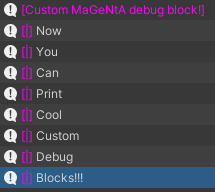
Also check out the optimizations page for more details on the MethodSpeedTester class!
Arrow Utilities will always be free to use, and you can even contribute yourself if you're willing. If any of this interests you, I highly suggest checking out the detailed wiki for information regarding everything in store.
